Add advanced password generator features#1841
Add advanced password generator features#1841droidmonkey merged 4 commits intokeepassxreboot:developfrom matsievskiysv:develop
Conversation


|
Oh i like this, although i think a label of "Advanced..." or "Extended ASCII..." would be more appropriate. The ... indicates the button opens/reveals some more features. |
|
Replaced FineTune button with Advanced button on the side. When clicked, it reveals advanced configurations. User can get back to simple configurations by clicking Simple button. Added ability to create hexadecimal passwords, proposed in #1248 by splitting characters is subgroups. Simple mode
Advanced mode
|


|
I really like this new UI, I will review in the next few days |


|
What if I only want some specific characters among |
|
If it is a frequent issue, groups should be adjusted. If it is just a couple of sites/programs, manual password edit is fine. I don't think adding more buttons would be a good idea. It would be too messy. |
|
But what if I generate a lot of passwords, and they need to be 500+ characters (ie. encryption keys or something like that)? Wouldn't a filter be more appropriate? Like a blacklist / whitelist pair or small input fields perhaps? |
|
There was discussion of including a textbox where a white/black list could be applied. |
|
Do you need this in GUI? Could this just be a CLI feature? |
|
Yes it absolutely must be in the GUI |
|
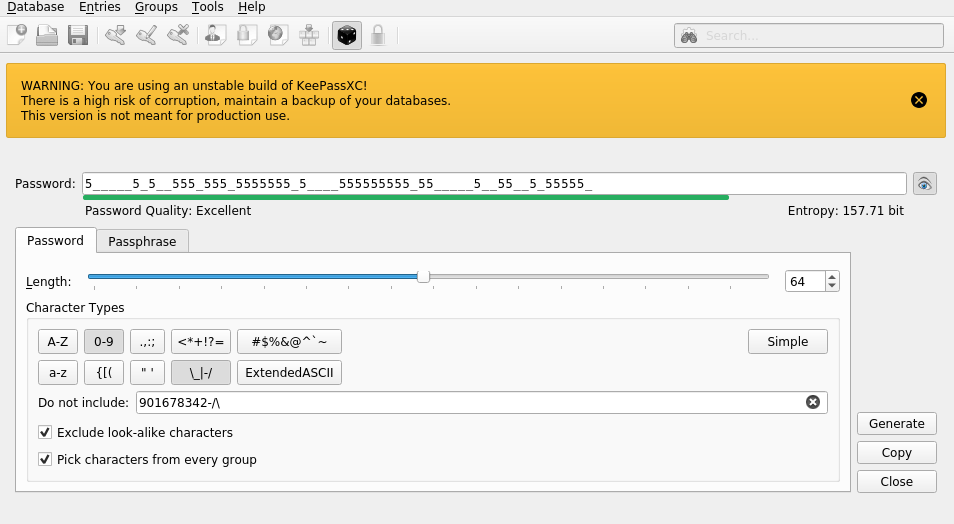
@droidmonkey @glubsy I've added "do not include" text input to gui and cli. |


|
@seregaxvm this is looking great in my opinion! Thank you! I'm still not sure about the purpose of A-F / G-Z filters though, sounds arbitrary and probably leads to less security in a sense. Perhaps it would be wise to replace those with something else... what about Unicode characters and non printable characters? That is, if it's at all possible without breaking things, since Unicode is multi-byte character encoding. |
|
@glubsy Those are for hex passwords. I don't understand the purpose of overriding the "do not include" entries if it covers the whole spectrum of a button. My opinion is if you put it in the do not include box, you mean it. I would add a clear button similar to what we have in the search box to quickly remove the do not include entries. If you hide the advanced fields, does it revert back to normal behavior? |
|
|

|
Well this is looking very good. Perhaps the only thing that might confuse the user is when clicking Also it might be a good opportunity to add examples in the |
|
Awesome update! |
|
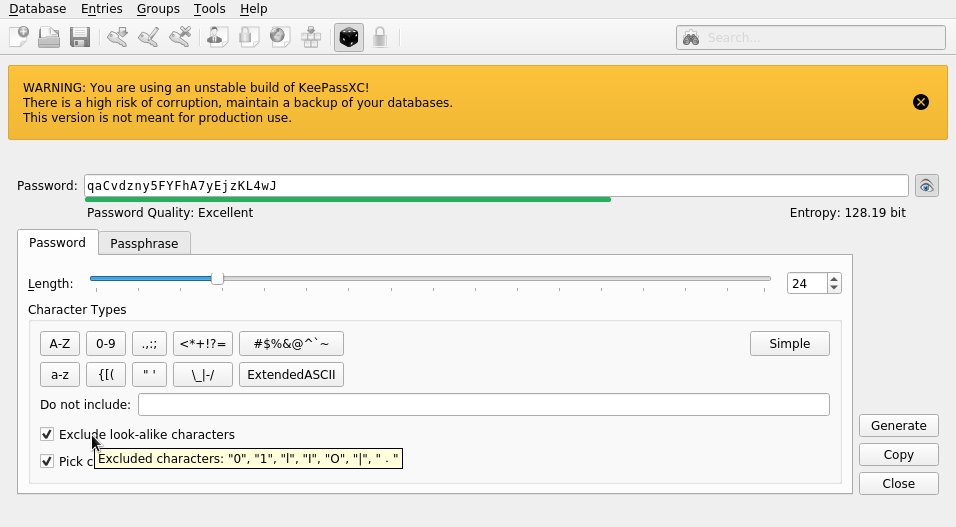
@glubsy added tool-tip description with list of excluded look-alike characters. |
|
Fantastic! Thank you very much! |
|
BTW, you are going to have to put all your commits into a branch. Recommend you do the following steps:
|
 droidmonkey
changed the title
droidmonkey
changed the title
|
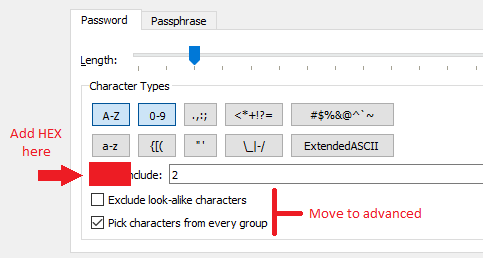
I tried this out and it worked perfectly. Recommend the following additions/changes:
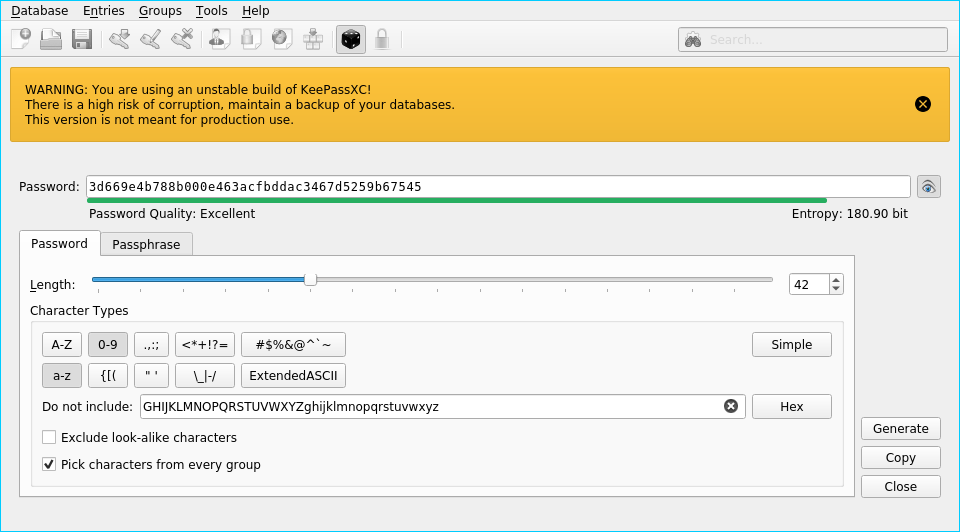
The HEX button (oft requested feature) would very simply set the "exclude characters" textbox to |

|
@droidmonkey, please create branch |
|
Checkboxes are hidden in simple mode. Added |

|
@seregaxvm you create the branch on your own fork. |
|
@droidmonkey I did but I'm not able to change the brunch to pull from. I only can change base brunch to commit into, but it should exist. |
|
Crap true, you cannot change the base branch. That is fine, I can merge it right now without much issue. In the future make sure you make PR using a branch off develop. |

tests/TestCryptoHash.cpp
Outdated
| QByteArray result3 = CryptoHash::hash(source2, CryptoHash::Sha512); | ||
| QCOMPARE(result3, QByteArray::fromHex("0d41b612584ed39ff72944c29494573e40f4bb95283455fae2e0be1e3565aa9f48057d59e6ff" | ||
| "d777970e282871c25a549a2763e5b724794f312c97021c42f91d")); | ||
| QCOMPARE(result3, |

There was a problem hiding this comment.
Revert these changes, your code formatter got a little happy.
tests/TestCsvExporter.cpp
Outdated
| QString expectedResult = | ||
| QString().append(ExpectedHeaderLine).append("\"Test Group Name\",\"Test Entry Title\",\"Test Username\",\"Test " | ||
| "Password\",\"http://test.url\",\"Test Notes\"\n"); | ||
| QString expectedResult = QString() |
There was a problem hiding this comment.
Revert these changes, your code formatter got a little happy.
tests/TestKdbx4.cpp
Outdated
| QTest::newRow("Upgrade (implicit): public-customdata") << QString("public-customdata") << KeePass2::FILE_VERSION_4; | ||
| QTest::newRow("Upgrade (implicit): rootgroup-customdata") << QString("rootgroup-customdata") | ||
| << KeePass2::FILE_VERSION_4; | ||
| QTest::newRow("Upgrade (implicit): rootgroup-customdata") |
There was a problem hiding this comment.
Revert these changes, your code formatter got a little happy.
tests/TestKdbx4.cpp
Outdated
| QTest::newRow("Upgrade (implicit): group-customdata") << QString("group-customdata") << KeePass2::FILE_VERSION_4; | ||
| QTest::newRow("Upgrade (implicit): rootentry-customdata") << QString("rootentry-customdata") | ||
| << KeePass2::FILE_VERSION_4; | ||
| QTest::newRow("Upgrade (implicit): rootentry-customdata") |
There was a problem hiding this comment.
Revert these changes, your code formatter got a little happy.
|
I can change the target branch (ie keepassxc/develop) but not the base, GitHub doesnt even give me the option to try. |
|
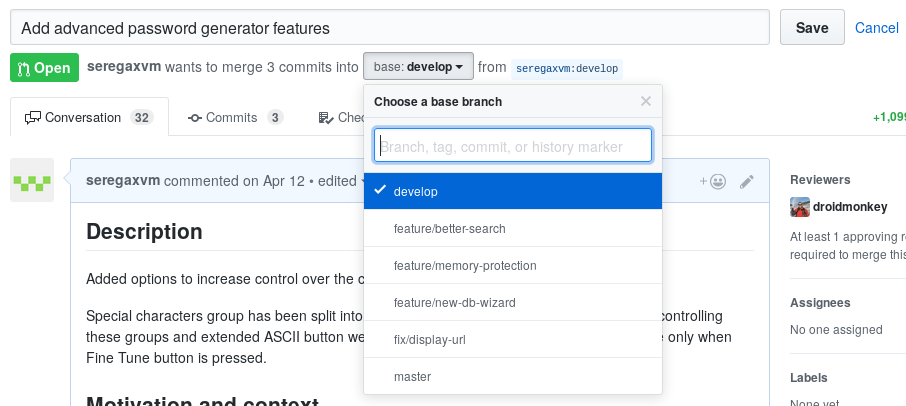
These are all my options. If it's possible I would prefer not to complicate things and to merge into |
|
@seregaxvm you want to merge INTO develop, so your current selection is accurate. The issue is the branch to the right cannot be changed (its locked with the PR). Its not that big of a deal, but sometimes rebasing and other actions get ugly when you don't have your PR in a new branch. IMO this is GitHubs fault for not enforcing that behavior. |
|
I really like this PR and the new UI (my 2 cent) |
|
This is ready for merge. Any more changes requested? I'm very happy with the results as well. |

src/core/PasswordGenerator.cpp
Outdated
| } | ||
|
|
||
| int i = 0; | ||
| while (1) { |

There was a problem hiding this comment.
It's not very clear at first look what this piece of code is suppose to do, insert a comment or move it into a function
There was a problem hiding this comment.
How about that :"Loop over character groups and remove excluded characters from them; remove empty groups"? Also break condition should be moved from if to while
There was a problem hiding this comment.
Also, you should use while(true) instead. You are implicitly converting 1 to bool in this case.
There was a problem hiding this comment.
@seregaxvm I think that can do it. 😉
|
I will do a formal review very soon |


Codecov Report
@@            Coverage Diff             @@
##             develop    #1841   +/-   ##
==========================================
  Coverage           ?   62.44%
==========================================
  Files              ?      269
  Lines              ?    17887
  Branches           ?        0
==========================================
  Hits               ?    11170
  Misses             ?     6717
  Partials           ?        0
Continue to review full report at Codecov.
|


|
It's great that these features are coming. Many, many sites happily accept the password during registration (containing the more unusual, non-allowed characters) but when it's time to log in, they will report "invalid password" with no further details. |

|
I would like to suggest adding a check box called "SQL safe" that would remove things like "--" and ";" from the password. I am not sure how developers handle them. I have had trouble logging into websites after using a password generated by Keepassxc. The password is accepted at change password time, but not during login :-( I had to tweak out certain sets of characters to get it working. This is completely the websites fault. But it would be ages before they fix it. I discovered at one site that the desktop site accepts longer passwords than the mobile version of the site. I had to use a shorter password :-( |
|
Omg, if you are running into websites that can't handle those characters that means they are ripe for SQL injection attacks. RUN! It is also a good indicator that the password is being stored as plain text in the database. RUN! |
|
I am inclined to think that different sections section of their sites are
handling SQL injections differently.
Perhaps the order of sanitization and hashing passwords are different(?)
…On Sat, Aug 11, 2018, 18:41 Jonathan White ***@***.***> wrote:
Omg, if you are running into websites that can't handle those characters
that means they are ripe for SQL injection attacks. RUN!
—
You are receiving this because you commented.
Reply to this email directly, view it on GitHub
<#1841 (comment)>,
or mute the thread
<https://github.com/notifications/unsubscribe-auth/ACUnaxgJIIGUZ3jb-c-XSCJLQtCzBQD8ks5uP2uRgaJpZM4TSWU3>
.
|
|
@lordloh You can just type |
The wink emoji of SQLi doom |

|
@seregaxvm @droidmonkey Sorry I couldn't find anywhere the reason so I'm asking here. Why are the character types in the group that they are in? Seems they are arbitrarily chosen or at least I couldn't spot any real pattern. Is there any rationale behind what characters are in what group? (apart from A-Z, a-z and 0-9 which makes sense to me) |
|
This is already merged. If you have a suggested grouping(s) please out them in a new issue. |
|
I don't have any particular grouping suggestions. I was just wondering if there was any reason they were grouped in the way there are. |
|
@sebast889 They are based on the personal experience with different sites password restrictions. The idea was to split |
9 participants


Description
Added options to increase control over the character groups used for password generation.
Special characters group has been split into 6 subgroups (see screenshot below). Buttons controlling these groups and extended ASCII button were moved to fineTuneBar widget and are visible only when Fine Tune button is pressed.
Motivation and context
A lot of sites have very particular set of characters allowed in password. This change allows to generate a password in compliance with character restrictions simply by selecting character groups.
fineTuneBar is initially hidden so additional information will not overload the UI.
Extended ASCII button was moved inside fineTuneBar because firstly, it makes sense, secondly, so UI would not change a lot.
How has this been tested?
-DWITH_ASAN=ONbefore and after alterations. No new memory leaks were introduced (BTW there are some memory leaks on development brunch).Screenshots (if appropriate):
Before changes
After changes
After changes with fine tune button pressed
Types of changes
Checklist:
-DWITH_ASAN=ON. [REQUIRED]