Reduce color fringes in FreeType subpixel rendering #229

Description

Report Classification
Issue Type: Bug
Component: JavaFX
Subcomponent: graphics: JavaFX Graphics
Operating System: Ubuntu
Java Release: 11
Regression: none
Frequency: Always
Report Details
Synopsis
Reduce color fringes in FreeType subpixel rendering
Description
The text rendered on Linux by JavaFX has severe color fringes because it fails to set the FreeType LCD filter.
The graphics module attempts to set the default LCD filter in FTFactory.java, shown below. Setting the filter is crucial. If the function returns an error, JavaFX disables subpixel rendering and reverts to grayscale anti-aliasing.
javafx.graphics/src/main/java/com/sun/javafx/font/freetype/FTFactory.java
/* This implementation only supports LCD if freetype has support. */
error = OSFreetype.FT_Library_SetLcdFilter(library, OSFreetype.FT_LCD_FILTER_DEFAULT);
LCD_SUPPORT = error == 0;
Yet its implementation in freetype.c, shown below, has a deceptive bug causing Linux users to see unfiltered subpixel rendering, while those working on the JavaFX FreeType support are unable to see the problem on their development workstations. On Linux systems with a default installation, the function fails silently and returns success (0) because the FreeType library is not found.
javafx.graphics/src/main/native-font/freetype.c
#define LIB_FREETYPE "libfreetype.so"
JNIEXPORT jint JNICALL OS_NATIVE(FT_1Library_1SetLcdFilter)
    (JNIEnv *env, jclass that, jlong arg0, jint arg1)
{
//  return (jint)FT_Library_SetLcdFilter((FT_Library)arg0, (FT_LcdFilter)arg1);
    static void *fp = NULL;
    if (!fp) {
        void* handle = dlopen(LIB_FREETYPE, RTLD_LAZY);
        if (handle) fp = dlsym(handle, "FT_Library_SetLcdFilter");
    }
    jint rc = 0;
    if (fp) {
        rc = (jint)((jint (*)(jlong, jint))fp)(arg0, arg1);
    }
    return rc;
}
There are two problems, with two alternative solutions:
-
The runtime reference to the shared object is the versioned file name
libfreetype.so.6, installed fromlibfreetype6. The namelibfreetype.soused above is the compilation file name, also called the linker name, installed fromlibfreetype6-dev. This development package,libfreetype6-dev, contains the supplementary files needed to develop programs using the FreeType library and is not installed by default.One solution, therefore, is to add "
.6" to the end of theLIB_FREETYPEstring. -
The feature detection is no longer necessary. FreeType added the function in version 2.3.0, released on January 17, 2007. The initial support for FreeType was added to JavaFX on July 5, 2013, but we now have more than a decade of support in FreeType for setting the LCD filter.
So another solution is to call the function directly.
I propose the second solution, replacing the native function with:
JNIEXPORT jint JNICALL OS_NATIVE(FT_1Library_1SetLcdFilter)
    (JNIEnv *env, jclass that, jlong arg0, jint arg1)
{
    return (jint)FT_Library_SetLcdFilter((FT_Library)arg0, (FT_LcdFilter)arg1);
}
System / OS / Java Runtime Information
I produced the problem on a QEMU/KVM virtual machine guest with 4 GB of RAM running on a Dell Precision Tower 3420 workstation host with 16 GB of RAM and a 4-core 3.30 GHz Intel Xeon Processor E3-1225 v5. This is a 64-bit Intel guest machine running Ubuntu 18.04.1 LTS (Bionic Beaver) with:
$ uname -a
Linux bionic 4.15.0-34-generic #37-Ubuntu SMP
Mon Aug 27 15:21:48 UTC 2018 x86_64 x86_64 x86_64 GNU/Linux

$ ldd --version
ldd (Ubuntu GLIBC 2.27-3ubuntu1) 2.27

$ getconf GNU_LIBPTHREAD_VERSION
NPTL 2.27

$ $HOME/opt/jdk-11/bin/java -version
openjdk version "11" 2018-09-25
OpenJDK Runtime Environment 18.9 (build 11+28)
OpenJDK 64-Bit Server VM 18.9 (build 11+28, mixed mode)
The display is a 27-inch Dell UltraSharp U2717D monitor with a resolution of 2560 × 1440 pixels at 109 pixels per inch and a one-to-one ratio of device pixels to logical pixels.
Reproduce the Issue
Steps to Reproduce
The easiest way to reproduce the problem is to run the Ensemble JavaFX application available in the JDK 8 Demos and Samples download. The application is packaged as the file Ensemble8.jar. Make sure that you have not installed the libfreetype6-dev package, and remove it if it's installed. It is not installed by default, and you should not find the file libfreetype.so anywhere on the system.
I ran the application with the Bash script:
#!/bin/bash
# Run the Ensemble JavaFX application
$HOME/opt/jdk-11/bin/java \
    --module-path $HOME/lib \
    --add-modules javafx.controls \
    -jar $HOME/opt/jdk1.8.0_181/demo/javafx_samples/Ensemble8.jar
where $HOME\lib contains the OpenJFX modules built from the latest sources on September 28, 2018:
javafx.base-linux.jar
javafx.controls-linux.jar
javafx.fxml-linux.jar
javafx.graphics-linux.jar
javafx.media-linux.jar
javafx.swing-linux.jar
javafx.web-linux.jar
When the Ensemble application starts, click the menu icon (☰) in the tool bar to see a list of JavaFX samples.
Expected Results
The text in the list appears as subpixel-rendered glyphs with no visible rendering artifacts, as shown below.
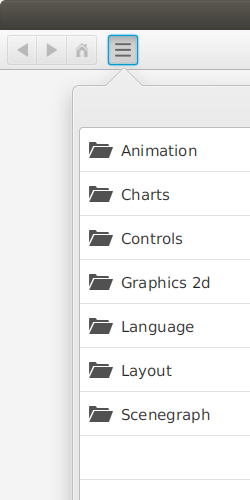
The following image shows a detail cropped from the image above and scaled by 800 percent.

Actual Result
The text in the list appears as glyphs with severe color fringes, as shown below. You should be able to see the color fringes in the image if you view it on a display with (1) a common pixel geometry of horizontal RGB or BGR stripes, and (2) a conventional resolution of 96 to 120 pixels per inch.

The following image shows a detail cropped from the image above and scaled by 800 percent.

Source code for an executable test case
I can provide a separate test case, if necessary, but the Ensemble application in the JDK 8 Demos and Samples download can produce the problem directly with no compiling required.
Workaround
The workaround is to install the package containing the FreeType development files as follows:
$ sudo apt-get install libfreetype6-devThis package is normally installed only by developers who compile and build software, like OpenJFX, that uses the FreeType library.