Conversation


|
@iissnan wiki page done; compatibility pass 😄 |


|
Cool. 👍 |
|
在站点配置文件里 |

|
5.0.0 添加了配置,但是并没有百度和google搜索 |
|
@timeng 新版去掉了搜索框,只保留了搜索弹窗。 |
|
@dog-2 之前测试过是可以的,有没有demo呢? |
|
@dog-2 我在本地试了下,是没有问题的。链接不存在问题,因为点击事件是js触发的。你试试www.xxx.yy/search.xml能不能访问。如果是本地测试,需要手动生成search.xml并且放到source的根目录下。 |

|
我建议备份好文章等配置,重新部署,十分钟的事。 |

|
上面你们讨论的内容我都看不懂,我只知道我用了这个功能可以正常搜索…… |

|
在Muse主题下面好像样式有问题,很多空白的地方。 |
|
@hustlibraco 不太明白你的问题,单个字符搜索一般是没有意义的,所以忽略掉了。 |

|
I'm having an issue with local search popup on mobile devices. It works fine on computer webpage, but when viewed on a mobile device the popup doesn't work. Thanks. I notice that it does work on mobile devices with the algolia example in the demo though. |
|
@flashlab Yes, it looks like the same issue. Sorry, I have to translate the text to understand it. It is an iPhone 6 with Safari that I am using. I did some searching and found that some other people are having trouble with similar popups on the current iOS. The local search works well otherwise. |
|
Also, I added |
|
okay. thanks. that fixed it. |

|
@flashlab 请问新版本只支持搜索弹窗,不支持搜索框可以修改吗?改成搜索框好看点!! |

|
@flashlab 点击搜索结果会出现重复域名 |

|
@ilofter 我这里是可以访问的 |

|
@jiangxiaoqiang 你好,我遇到和你一样的问题,请问你是怎么找到这个特殊字符的错误的?我的文章比较多不太好找? |

|
目前我和@silverlining21 遇到相同的问题。。。在本地运行时,点击search时无法输入关键词,debug的时候也没有出现错误信息。并不明白发生了什么。 |
|
@CalvinNeo 我这里访问没有问题:smile: @tonyfloatersu 检查 |
|
@flashlab 需要从本地手动添加search.xml到repository里面去吗?(的确search.xml文件未生成)(再附上repository地址供参考) |
|
OK,问题解决了,感谢 👍 |
|
@flashlab @jiangxiaoqiang 刚测试了下 |

|
我用的是local Search,能正常搜索,但是跳转的时候出现问题,比如说文章标题是“flask入门笔记(四)--数据库”,但是它好像自动转义成了“%2Fblog%2F2017%2F01%2F19%2Fflask%E5%85%A5%E9%97%A8%E7%AC%94%E8%AE%B0-%E5%9B%9B-%E6%95%B0%E6%8D%AE%E5%BA%93%2F”,所以每次跳转就会失败,这个怎么解决? |

|
@marsggbo 转义是否是在--debug下看到?你可以先删除search.xml然后重新hexo g 生成search.xml试试 |

|
一点一点删除post下的md文件,使用的排除法,最后找到有问题的那个md文件,先拷贝部分md进去,直到遇到问题(最后一次拷贝进去的文件肯定包含有问题的那个md),这样就找到了,我的文章有接近200篇
…On Tue, Jan 17, 2017 at 9:37 PM, Calvin Neo ***@***.***> wrote:
@jiangxiaoqiang <https://github.com/jiangxiaoqiang> 你好,我遇到和你一样的问题,
请问你是怎么找到这个特殊字符的错误的?我的文章比较多不太好找?
—
You are receiving this because you were mentioned.
Reply to this email directly, view it on GitHub
<#694 (comment)>,
or mute the thread
<https://github.com/notifications/unsubscribe-auth/AET9nyj4KaEEFjT54Py5CZ3DRoggxGrsks5rTMQngaJpZM4HmnV7>
.
--
jiangtingqiang
|
|
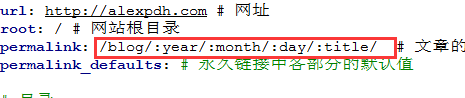
@amoyiki 我看了下那个文件,它的索引链接就是转义后的,重新hexo g后也是一样的,就像下面的图片一样(不知道可不可以上图片) |

|
@amoyiki 我找到问题的解决办法了,需要修改localsearch.swig文件。修改前后: |


|
@marsggbo 更新到最新版主题试试,不能跳转是因为没有解码 |

|
@flashlab |

|
chrome和edge可以使用local search,IE11点击没有反应。 SCRIPT438: 对象不支持“endsWith”属性或方法 endsWith 方法(字符串)(JavaScript)要求: 解决方案: Just add the polyfill above your existing code. |

|
thank for your advise @ivan-nginx. i am depoy the hexo blog using gitlab pages with CI, so i can only using local search in command line. after all, i fixed the problem by add the polyfill above in |

|
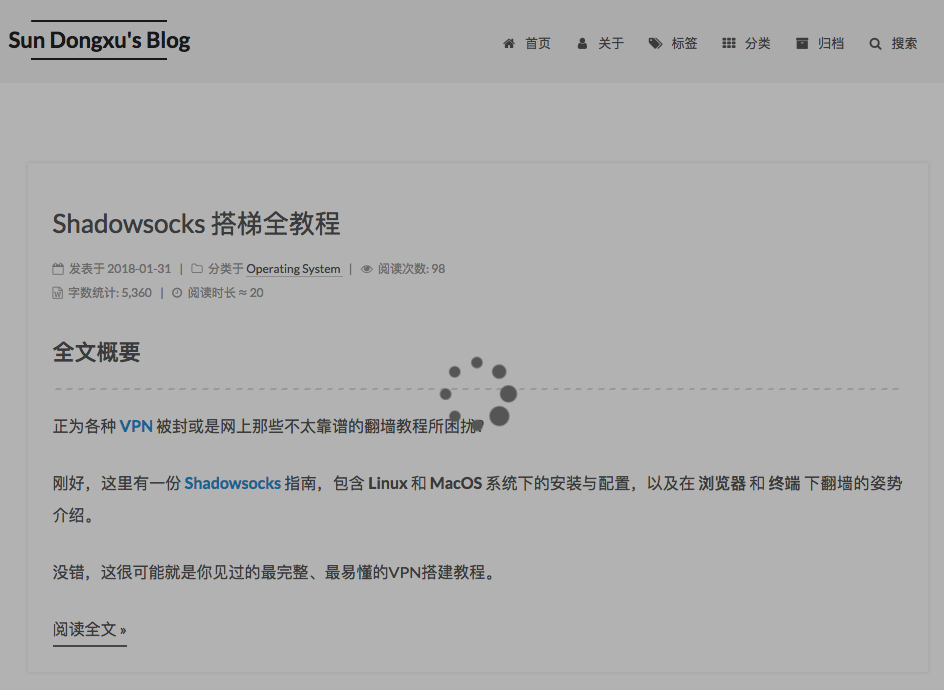
我点搜索后一直是圆圈在转,根目录下也没有search.xml啊 |

|
@XuCcc 我们的问题是一样的。点击搜索后一直转圈圈,搜索框出不来,虽然我执行,hexo g 时能生成.xml,但是没什么卵用 |


点击搜索后一直转圈的解决方案1.更新next到最新版本2.安装 hexo-generator-searchdb3.在主题配置文件中,第二行改为true即可。local_search:
enable: true
# if auto, trigger search by changing input
# if manual, trigger search by pressing enter key or search button
trigger: auto
# show top n results per article, show all results by setting to -1
top_n_per_article: 1 |

|
发现了一些BUG,但不知道怎么修复。 |


|
@mtrucc 不是bug 为了精简索引的体积同时也避免代码中某些字符会引起解析错误 |
|
@flashlab 好的,谢谢你的回复,我也觉得不太像bug,但别扭肯定是有的。如果主题作者或者插件作者能稍微针对这个优化一下就好了。 |

|
@flashlab 你好,我按照 NexT 官方文档 http://theme-next.iissnan.com/third-party-services.html#local-search,分别配置好了 站点配置文件和主题配置文件,之前还能够正常搜索,但是点击搜索按钮后会不停转菊花...就是在加载中的图案,然后一直无法正常弹窗,不知道之前有没有出现过类似的情况,这样应该怎么才能恢复正常呢?麻烦回答一下,谢谢~ |
|
NexT is rebased into organization repo. There is instructions on English or Chinese how to update from v5.1.x to v 6.0.x You also may read this for details. |

20 participants


!dea and core codes are from Joseph Pan.
see Wiki.