Repository navigation
Recommended way to use cabal freeze for an executable? #8047
Description

Having used Javascript's NPM in the past, I like it that cabal has freeze option, to create a freeze file, which from what I understand, is similar to package.lock.json in npm world.
Since I have a Haskell executable that has multiple team members working on it + gets built in the CI, I would like to use freeze file to make build reproducible -> meaning that when same git commit is executed on CI or on machine of developer A or machine of developer B, they are all guaranteed to get the same result. This is how package.lock.json is used also. So it doesn't really matter which dependency bounds are specified in myproject.cabal, nor does it matter if new patches were released for the packages we use in the project -> all that matters is the freeze file.
From what I understood, good workflow for this would be:
- When developing locally, when you want to in any way update dependencies used in the project, you should run
cabal freezeonce you are done. So for example, you will modify the version boundaries for some package in myproject.cabal, or you will add a new dependency, or remove an existing one, or docabal updateand want to get patches -> whatever you do, at the end you should docabal freeze, so that these changes are reflected in the freeze file.
One thing I wasn't sure about though is: does cabal actually use only cabal.project.freeze when cabal.project.freeze exists, does that happen by default? Testing it out locally, and googling about it, I developed a notion that it doesn't use exclusively freeze file, or maybe doesn't use it at all, at least not by default. But if that is so, what is the purpose of freeze file?
When I say testing locally, I mean that I generate freeze file with cabal freeze, run cabal build, it says it is up to date, but then if I update some dependency bound in myproject.cabal and run cabal build again, it will rebuild! While I would expect it to ignore the change, due to using freeze file.
Another question: is there a way to run cabal freeze automatically on any change in dependencies, the same way package.lock.json is generated automatically?
Also, https://cabal.readthedocs.io/en/3.6/cabal-package.html?highlight=freeze#freezing-dependency-versions
-> it says output is cabal.config, but that is not correct is it? Isn't output cabal.project.freeze ?
EDIT:
TODO (for the PR I would love to create at the end of this):
- Mention in docs that although
cabal buildwill do a bit of work if you modify .cabal, it will not produce a new build, it will still be the same old build (due to the freeze file). It just looks like it is doing smth new, because cabal file got touched. - Fix the mention of cabal.config being output of freeze -> it should say it returns
cabal.project.freeze. - Make it clear, somewhere in docs, that dependency versions from freeze file are combined with other files, which effectively results in dependency versions from freeze file are the ones that dictate what will be installed, resulting in reproducibility. Emphasize that this way freeze file becomes a part of project configuration and is by default used in all cabal operations -> there is nothing we need to do to use it, same as there is nothing we need to do to use
cabal.project. - Describe the standard workflow for dealing with freeze files, when developing an executable (when to run
cabal freeze, when to delete freeze file, should it be committed, ...). Consider discussing executable vs library use cases (how it is not that important for a library) -> not sure if that is too opinionated though, but I have seen that opinion reiterated on multiple blog posts.
Activity
[-]Recommended way to use `cabal freeze` for an executable[/-][+]Recommended way to use `cabal freeze` for an executable?[/+]Mikolaj commentedon Mar 14, 2022
Indeed, https://cabal.readthedocs.io/en/latest/cabal-package.html?highlight=freeze#freezing-dependency-versions says so, too.
philderbeast commentedon Mar 14, 2022
When moving from stack to cabal, I grabbed the constraints from stackage and stuffed those into
cabal.projectas constraints. Running freeze repeats the==constraints from thecabal.projectbut only for the packages actually used. It also shows the flags it chose.In this screenshot,
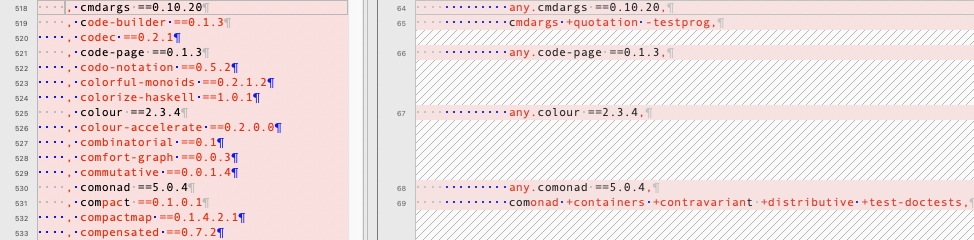
cabal.projectis on the left andcabal.project.freezeis on the right.The docs say that with freeze files "all users see a consistent set of dependencies". Does that imply a reproducible build if using the same compiler version? The
cabal v2-freezesection of the docs doesn't mention the interaction with other commands such ascabal outdatedorcabal build. Thecabal outdatedsection "Listing outdated dependency version bounds" mentions its interaction with freeze files while thecabal v2-buildsection doesn't.Martinsos commentedon Mar 15, 2022
Some information is also present in https://cabal.readthedocs.io/en/latest/cabal-project.html#cabal-project-reference -> it says that
cabal.project.freezeis applied aftercabal.project(therefore overriding it, at least the options that are not appendable), but beforecabal.project.local.So I would assume from this that
cabal.project.freezeis used everywhere wherecabal.projectis used, which should certainly also meancabal build.But maybe trick is in this "appendable" part? I don't know hm. But for some reason
cabal buildcares about changes in version bounds in .cabal even when freeze file is there. Maybe it just uses all of them? First takes boundaries from .cabal, then adds info from cabal.project.freeze to those, which means at the end it really matters what is written in freeze file?I just tried following: I had
in my .cabal file.
I run
cabal buildandcabal freeze.Running
cabal buildafter that just returnsUp to date.So then I modified .cabal to have more relaxed upper bound (latest version of template-haskell is 2.18):
When I ran
cabal buildafter this, I didn't getUp to date, which I expected, instead I gotWhich I guess is not so bad -> it did some work, but it didn't really install any new dependencies, or change any dependencies at all, it just recompiled the targets in the package. Probably it does that because it sees that cabal file changed but isn't aware what changed.
So then I modified .cabal file to contain:
and this resulted in failure
As seen in the error message, it says that freeze file demanded template haskell to be of version 2.16.0.0 exactly, and that is why the resolution failed. So this is great actually, it seems from this that freeze file is used!
From what I saw, it seems that freeze file gets combined with the .cabal file and other config files, and all the constraints are taken into account. However, as freeze file is the most specific one, it will effectively be the one to dictate the final version, and therefore the build is indeed reproducible.
It is also a nice thing that version bounds from .cabal are not ignored -> if we change them to not encompass the version specified in freeze file, cabal will fail. And that is good, because it warns us that we have some inconsistency between what we claim we want and what we pinned down as a working version.
So I guess I answered my own question, but I conclude that freeze file is automatically for all/most cabal commands, and effectively results in reproducible builds. And yes, the workflow I described sounds to be a reasonable workflow.
And no, there is no way to run
cabal freezeautomatically (but that doesn't sound like a bi problem, at least now for now? I will know better when we use it more).And yes, it seems the docs are wrong at that place where they mention
cabal.config, that is an old thing.Does this make sense all together?
Martinsos commentedon Mar 15, 2022
I can imagine one scenario that causes build to not be reproducible any more, and that is adding a new dependency to .cabal but forgetting to run
cabal freeze.In that case I guess that, since .cabal and freeze file are combined together, that new dependency will just retain the version bounds from .cabal and that is it, therefore leaving it un-pinned.
I am not sure what is a solution to this, if there is a way to ensure that people run
cabal freeze.There is one more thing I just realized: should I be deleting existing freeze file before running
cabal freezein attempt to update it? Doescabal freezeuse existing freeze file to determine the versions? I just tested this with example above, and it seems that it indeed does ->cabal freezeuses existing freeze file. If that is so, it makes sense to first delete the freeze file, and only then runcabal freeze. I wonder what is the purpose ofcabal freezereading freeze file, and if instead it would be better if it ignored it?fgaz commentedon Mar 15, 2022
The rebuild happens because modifying the cabal file invalidates the local/project cache, but due to the freeze file the same reproducible build plan will be constructed, and the previously built dependencies will be reused
Martinsos commentedon Mar 15, 2022
Thanks, that is what I also concluded at the end!
Martinsos commentedon Mar 16, 2022
Just to be clear, I still have questions outstanding:
cabal freezeagain?I am guessing for each of these what the answer might be, and I described those above, but it would be great to hear from somebody experienced what are the actual answers.
jneira commentedon Mar 16, 2022
There exists something similar in npm for example? dont you have to run some npm command (or a file watcher that run the command) to update its lock file? or you are thinking in make
cabal buildgenerates the freeze file on .cabal changes (npm does that afair)?Martinsos commentedon Mar 16, 2022
That is where I got the idea: in npm, package.lock.json is updated automatically.
More details here: https://docs.npmjs.com/cli/v8/configuring-npm/package-lock-json .
This means that if you do smth like
npm install somedep, package.lock.json is regenerated.However, even if you manually modify
package.jsonby adding new dependency (or smth else) and then runnpm install, this will also update package.lock.json, because it will modify node_modules. So detecting changes in node_modues is really what ensures that package.lock.json is updated every time that dependencies were changed.So yes, it would come down to cabal freeze file most likely being updated on
cabal build, it seems. Not sure if there is any other cabal command that "puts dependencies into action".jneira commentedon Mar 16, 2022
thanks, the npm example is really useful
yeah, there would be other involved cabal command, like install f.e.
however I think it would be hard make it the default, as quite cabal users don't use freeze files in local development by default
Martinsos commentedon Mar 16, 2022
It could be a flag that if turned on automatically regenerates freeze file. Library devs wouldn't use it probalby, while application devs would use it.
I don't yet know how important this automatic feature is though. It sounds nice, and I know in
npmI don't worry about it at all, I just do my stuff and commit package.lock.json when it changes, that is it. So that is nice. With cabal, I have to remember to runcabal freezeafter I do some changes to deps. If I don't do that, my project will be using stuff from the last freeze. That is not terrible. Actually, writing this, I think there is case where automatic freeze is valuable: what if I add new dependency to .cabal? Then old freeze + this new dependency will be used. And if I forget to runcabal freezeafter this, I will have that dependency not-frozen. It could stay not-frozen for quite some time if nobody remembers to runcabal freeze. And likely nobody would notice. While innpm, package.lock.json would get generated automatically for me and that couldn't happen.Martinsos commentedon Mar 16, 2022
Regarding ensuring that freeze file is up to date: what I just did in our project was add this check in the CI that checks if freeze file is up to date, so I will share it here in case it is interesting for the discussion.
If freeze file is not up to date, CI fails. So although there is no automatic updating of freeze file by cabal, this ensures that it is indeed up to date. It is a stronger/safer mechanism than automatic updating by cabal, but on the other hand most people probably won't think of doing it hm.
PR: https://github.com/wasp-lang/wasp/pull/508/files
Crucial code (Github Actions):
One thing I believe I learned from this, while thinking about regenerating freeze file, is that in most cases, the best thing to do is to first delete freeze file and then run
cabal freeze. This might result in multiple dependencies changing, but is also guaranteed to not cause any unneeccesary complications. While on the other hand, if you runcabal freezewithout deleting the freeze file first (for example in case you added a new dependency), there is a chance dependency resolution will fail due to all the versions that are pinned down by current freeze file.So if cabal was to implement automatic regeneration of freeze file, it would almost certainly have to consist of first deleting existing freeze file and only then generating a new one (or using some other way to generate a new one while ignoring the existing one). I believe npm uses the same approach when regenerating package.lock.json -> it ignores existing one while doing it, and doesn't just add to it, but regenerates it whole, as if it never existed.