Hi chat! I'm Ivie, and today I'm gonna be showing yall how to make a simple game in Love2d using Lua :3
Prize: $8 Itch.io grant + 1 snowflake
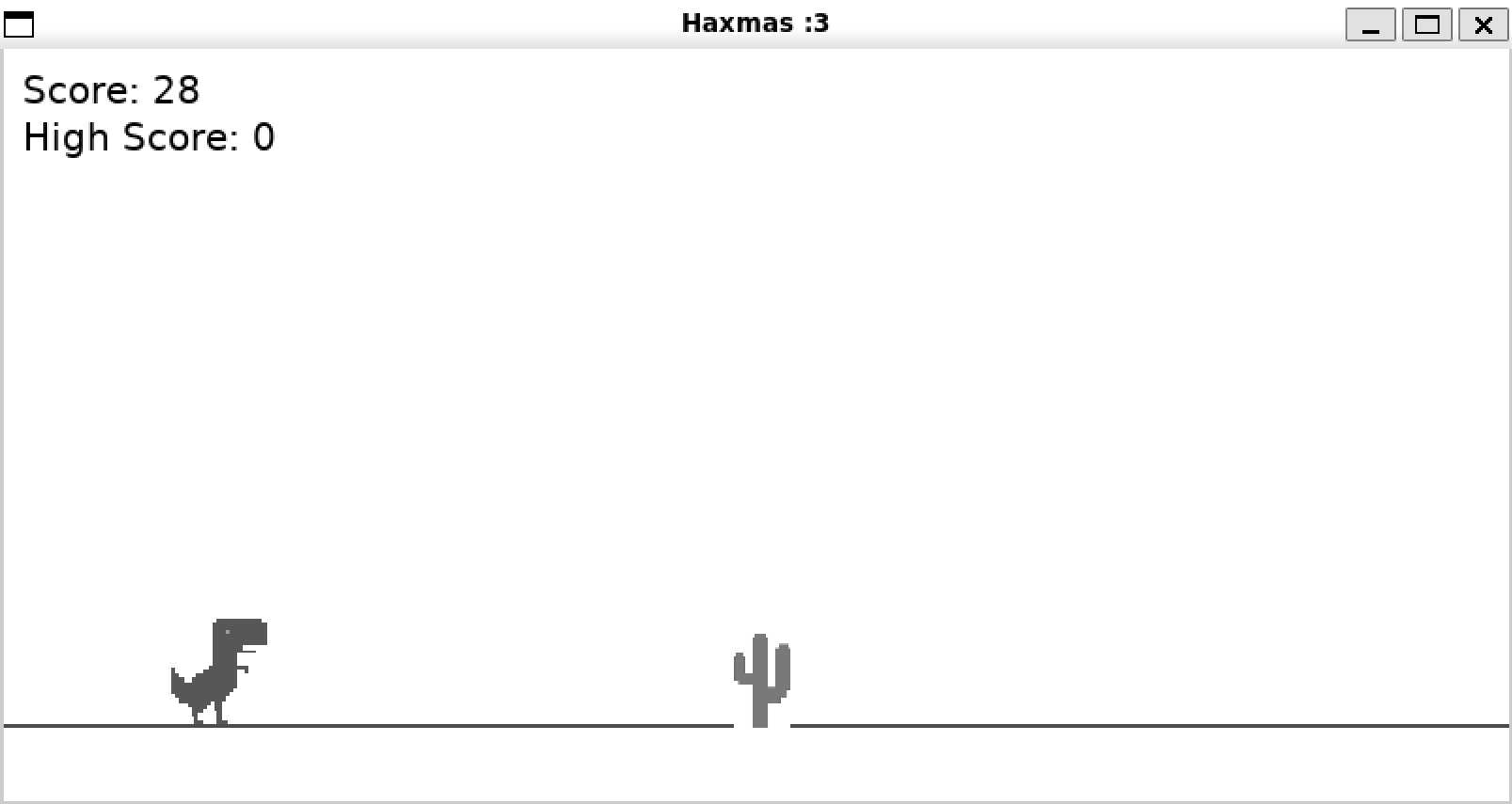
Your final project will look something like this :D
- Love2D installed
- Assets (download from https://github.com/hackclub/hackmas-day-10/tree/main/assets)
game/
├── assets/
│   ├── dino.png      -- Player sprite
│   └── cactus.png    -- Obstacle sprite
├── main.lua          -- Game logic
└── conf.lua          -- Love2D configuration
Love2D uses a special conf.lua file to configure the game window.
Create conf.lua:
function love.conf(t)
    t.title = "Haxmas game :3" -- change this to your game name
    t.version = "11.4"
    t.window.width = 800
    t.window.height = 400
    t.window.resizable = false
endCreate main.lua and set up the variables we need for the project
local player = {
    x = 80,
    y = 0,
    width = 1,
    height = 1,
    velocityY = 0,
    isJumping = false
}

local ground = { y = 0, height = 40 }
local obstacles = {}
local spawnTimer = 0
local spawnInterval = 1.5
local gameSpeed = 300
local score = 0
local highScore = 0
local gameOver = false
local gravity = 1200
local jumpForce = -500

local images = {}
local dinoScale = 1
What these variables are for:
| Variable | Purpose |
|---|---|
player.x/y |
Position on screen (x=80 keeps dino visible on the left) |
player.width/height |
Set to 1 initially, calculated from image size later |
player.velocityY |
Vertical speed for jump physics (negative = up) |
player.isJumping |
Prevents double-jumping |
ground.y/height |
Where the ground line is drawn |
obstacles |
Table storing all active cacti |
spawnTimer/Interval |
Controls when new obstacles appear |
gameSpeed |
How fast obstacles move (increases over time) |
gravity |
How quickly the player falls (pixels/second²) |
jumpForce |
Initial upward velocity when jumping (negative = up) |
images |
Table to store loaded sprite images |
dinoScale |
Multiplier to resize the dino sprite to fit the game |
love.load() runs once when the game starts. This is where we load images and calculate initial positions.
function love.load()
    love.window.setTitle("Haxmas :3") --change to your games name

    images.dino = love.graphics.newImage("assets/dino.png")
    images.cactus = love.graphics.newImage("assets/cactus.png")

    local targetHeight = 60
    dinoScale = targetHeight / images.dino:getHeight()
    player.width = images.dino:getWidth() * dinoScale
    player.height = targetHeight

    ground.y = love.graphics.getHeight() - ground.height
    player.y = ground.y - player.height + 1

    love.graphics.setFont(love.graphics.newFont(20))
end
What ts is doing:
-
Image Loading:
love.graphics.newImage()loads PNG files into memory. We store them in a table for easy access. -
Scaling: Instead of requiring exact image sizes, we calculate them
targetHeight = 60is our desired dino height in pixelsdinoScale = targetHeight / images.dino:getHeight()gives us the multiplier- This means any size image will work correctly
-
Ground Positioning:
ground.y = love.graphics.getHeight() - ground.heightputs the ground at the bottomplayer.y = ground.y - player.height + 1places the player just above the ground line (the +1 prevents a tiny gap)
love.update(dt) runs every frame (typically 60 times per second). The dt parameter is "delta time" which means the seconds elapsed since the last frame. Using dt makes movement smooth regardless of frame rate.
function love.update(dt)
    if gameOver then return end

    score = score + dt * 10
    gameSpeed = 300 + score * 0.5

    if player.isJumping then
        player.velocityY = player.velocityY + gravity * dt
        player.y = player.y + player.velocityY * dt

        if player.y >= ground.y - player.height then
            player.y = ground.y - player.height + 1
            player.isJumping = false
            player.velocityY = 0
        end
    end

    spawnTimer = spawnTimer + dt
    if spawnTimer >= spawnInterval then
        spawnTimer = 0
        spawnInterval = math.random(10, 20) / 10
        spawnObstacle()
    end

    for i = #obstacles, 1, -1 do
        local obs = obstacles[i]
        obs.x = obs.x - gameSpeed * dt

        if obs.x + obs.width < 0 then
            table.remove(obstacles, i)
        end

        if checkCollision(player, obs) then
            gameOver = true
            if score > highScore then
                highScore = score
            end
        end
    end
end
Info:
score = score + dt * 10
gameSpeed = 300 + score * 0.5- Score increases by 10 points per second
- Game speed starts at 300 and increases with score and speed as you go
if player.isJumping then
    player.velocityY = player.velocityY + gravity * dt
player.y = player.y + player.velocityY * dt- Gravity constantly adds to vertical velocity
- Position updates based on velocity
if player.y >= ground.y - player.height then
    player.y = ground.y - player.height + 1
    player.isJumping = false
    player.velocityY = 0
end- Detects landing and stuff
spawnTimer = spawnTimer + dt
if spawnTimer >= spawnInterval then
    spawnTimer = 0
    spawnInterval = math.random(10, 20) / 10
    spawnObstacle()
end- Timer counts up each frame
- Randomize the next interval (1.0 to 2.0 seconds) to keep gameplay unpredictable
obs.x = obs.x - gameSpeed * dt- Move obstacles left at the current game speed
if obs.x + obs.width < 0 then
    table.remove(obstacles, i)
end- Remove obstacles that have moved off-screen
love.draw() runs every frame after love.update(). This is where we display everything on screen.
function love.draw()
    love.graphics.clear(1, 1, 1)

    love.graphics.setColor(0, 0, 0)
    love.graphics.line(0, ground.y, love.graphics.getWidth(), ground.y)

    love.graphics.setColor(1, 1, 1)
    love.graphics.draw(images.dino, player.x, player.y, 0, dinoScale, dinoScale)

    for _, obs in ipairs(obstacles) do
        love.graphics.draw(images.cactus, obs.x, obs.y, 0,
            obs.width / images.cactus:getWidth(),
            obs.height / images.cactus:getHeight())
    end

    love.graphics.setColor(0, 0, 0)
    love.graphics.print("Score: " .. math.floor(score), 10, 10)
    love.graphics.print("High Score: " .. math.floor(highScore), 10, 35)

    if gameOver then
        love.graphics.setColor(0, 0, 0, 0.7)
        love.graphics.rectangle("fill", 0, 0, love.graphics.getWidth(), love.graphics.getHeight())

        love.graphics.setColor(1, 1, 1)
        love.graphics.print("GAME OVER", love.graphics.getWidth() / 2 - 60, love.graphics.getHeight() / 2 - 30)
        love.graphics.print("Press SPACE to restart", love.graphics.getWidth() / 2 - 100, love.graphics.getHeight() / 2 + 10)
    end
end
Details:
love.graphics.clear(1, 1, 1)
love.graphics.setColor(0, 0, 0)
love.graphics.line(0, ground.y, love.graphics.getWidth(), ground.y)
clear(1, 1, 1)fills the screen with white- Makes simple line for ground
love.graphics.draw(images.dino, player.x, player.y, 0, dinoScale, dinoScale)love.graphics.draw()parameters: image, x, y, rotation, scaleX, scaleY
love.graphics.setColor(0, 0, 0, 0.7)
love.graphics.rectangle("fill", 0, 0, love.graphics.getWidth(), love.graphics.getHeight())- Draw a semi-transparent black overlay for game overs
love.keypressed(key) is called once when a key is pressed down.
function love.keypressed(key)
    if key == "space" or key == "up" then
        if gameOver then
            restartGame()
        elseif not player.isJumping then
            player.isJumping = true
            player.velocityY = jumpForce
        end
    end

    if key == "escape" then
        love.event.quit()
    end
end
How ts works:
- Space or Up arrow pressed
- If game is over then restart
- If game is not over and is not already jumping then do a jump
- Escape key quits the game
function spawnObstacle()
    local obstacle = {
        x = love.graphics.getWidth(),
        width = 30,
        height = 50
    }
    obstacle.y = ground.y - obstacle.height + 1
    table.insert(obstacles, obstacle)
end
How ts works:
- Creates a new obstacle at the right edge
- Add it to the obstacles table for tracking
function checkCollision(a, b)
    return a.x < b.x + b.width and
           a.x + a.width > b.x and
           a.y < b.y + b.height and
           a.y + a.height > b.y
end
Yeah idk its pretty simple we js check if the two things are in each other and if so then they be colliding
function restartGame()
    gameOver = false
    score = 0
    obstacles = {}
    spawnTimer = 0
    gameSpeed = 300
    player.y = ground.y - player.height + 1
    player.isJumping = false
    player.velocityY = 0
end
Resets all variables and starts the game again
Personalize the game! Add your own logic, make your own images, turn the game upside-down, do whatever! Exact copies of the tutorial will not be accepted.
Once you finish the tutorial, your project should look something like this
function love.conf(t)
    t.title = "Dino Runner"
    t.version = "11.4"
    t.window.width = 800
    t.window.height = 400
    t.window.resizable = false
endlocal player = {
x = 80,
y = 0,
width = 1,
height = 1,
velocityY = 0,
isJumping = false
}
local ground = { y = 0, height = 40 }
local obstacles = {}
local spawnTimer = 0
local spawnInterval = 1.5
local gameSpeed = 300
local score = 0
local highScore = 0
local gameOver = false
local gravity = 1200
local jumpForce = -500
local images = {}
local dinoScale = 1
function love.load()
love.window.setTitle("Dino Runner")
images.dino = love.graphics.newImage("assets/dino.png")
images.cactus = love.graphics.newImage("assets/cactus.png")
local targetHeight = 60
dinoScale = targetHeight / images.dino:getHeight()
player.width = images.dino:getWidth() * dinoScale
player.height = targetHeight
ground.y = love.graphics.getHeight() - ground.height
player.y = ground.y - player.height + 1
love.graphics.setFont(love.graphics.newFont(20))
end
function love.update(dt)
if gameOver then return end
score = score + dt * 10
gameSpeed = 300 + score * 0.5
if player.isJumping then
player.velocityY = player.velocityY + gravity * dt
player.y = player.y + player.velocityY * dt
if player.y >= ground.y - player.height then
player.y = ground.y - player.height + 1
player.isJumping = false
player.velocityY = 0
end
end
spawnTimer = spawnTimer + dt
if spawnTimer >= spawnInterval then
spawnTimer = 0
spawnInterval = math.random(10, 20) / 10
spawnObstacle()
end
for i = #obstacles, 1, -1 do
local obs = obstacles[i]
obs.x = obs.x - gameSpeed * dt
if obs.x + obs.width < 0 then
table.remove(obstacles, i)
end
if checkCollision(player, obs) then
gameOver = true
if score > highScore then
highScore = score
end
end
end
end
function love.draw()
love.graphics.clear(1, 1, 1)
love.graphics.setColor(0, 0, 0)
love.graphics.line(0, ground.y, love.graphics.getWidth(), ground.y)
love.graphics.setColor(1, 1, 1)
love.graphics.draw(images.dino, player.x, player.y, 0, dinoScale, dinoScale)
for _, obs in ipairs(obstacles) do
love.graphics.draw(images.cactus, obs.x, obs.y, 0,
obs.width / images.cactus:getWidth(),
obs.height / images.cactus:getHeight())
end
love.graphics.setColor(0, 0, 0)
love.graphics.print("Score: " .. math.floor(score), 10, 10)
love.graphics.print("High Score: " .. math.floor(highScore), 10, 35)
if gameOver then
love.graphics.setColor(0, 0, 0, 0.7)
love.graphics.rectangle("fill", 0, 0, love.graphics.getWidth(), love.graphics.getHeight())
love.graphics.setColor(1, 1, 1)
love.graphics.print("GAME OVER", love.graphics.getWidth() / 2 - 60, love.graphics.getHeight() / 2 - 30)
love.graphics.print("Press SPACE to restart", love.graphics.getWidth() / 2 - 100, love.graphics.getHeight() / 2 + 10)
end
end
function love.keypressed(key)
if key == "space" or key == "up" then
if gameOver then
restartGame()
elseif not player.isJumping then
player.isJumping = true
player.velocityY = jumpForce
end
end
if key == "escape" then
love.event.quit()
end
end
function spawnObstacle()
local obstacle = {
x = love.graphics.getWidth(),
width = 30,
height = 50
}
obstacle.y = ground.y - obstacle.height + 1
table.insert(obstacles, obstacle)
end
function checkCollision(a, b)
return a.x < b.x + b.width and
a.x + a.width > b.x and
a.y < b.y + b.height and
a.y + a.height > b.y
end
function restartGame()
gameOver = false
score = 0
obstacles = {}
spawnTimer = 0
gameSpeed = 300
player.y = ground.y - player.height + 1
player.isJumping = false
player.velocityY = 0
end