Change log
Starting with version 1.0.0.2, the log will now be at the Releases page. This is the proper Github way to release versions. Thanks to mikhaelkh for the tip.
- Release date: 5 July 2014
- Fixed https://github.com/gorhill/httpswitchboard/issues/366: "Blocked sites no longer have an entry in the matrix".
- Bug was introduced on June 29 just by reformatting the code...
- Release date: 5 July 2014
-
New setting: "Copy all rules from global scope into newly created local scopes"
- Because of issue #349 and a handful of others I had closed as "won't fix".
- Disabled by default. When disabled, HTTPSB behaves just like before.
- It is mostly useful if you make heavy use of scopes, for instance, if you enabled the auto-creation of scopes.
- The copying occurs only at scope creation time, so if you add rules in the global scope after the local scope is created, these won't be copied.
- If you have a global scope with a lots of rules, this means all the these will be copied in newly created local scopes. Mind the potential rule bloat (Scoped rules manager will be handy here).
- Hence this feature is really only suited for those who work only with scopes, and in such case the global scope would be only used to create fine-grained rules which the user wishes to apply everywhere automatically.
- Frankly, it is not ideal. Best would be for the global rules to be seen by narrower scopes without having to copy them. Maybe in a future version. But for now, when I tried to implement this, the code each net request would be required to run through was heading toward being huge and thus inefficient. I prefer to take my time to do the right thing.
- The privacy-related settings have moved from the Settings tab into a new Privacy tab.
- Translation work by many contributors.
- Fixed https://github.com/gorhill/httpswitchboard/issues/364: "Sign in to Chrome" crashes the browser".
- A scope is automatically created for
chrome-schemeand itsallcell is whitelisted. If you already have an existing scope forchrome-scheme, it will replace the default one.
- A scope is automatically created for
- Fixed https://github.com/gorhill/httpswitchboard/issues/361: "EasyList Czech and Slovak moved".
- Fixed https://github.com/gorhill/httpswitchboard/issues/360: "Some ads are not blocked".
- I couldn't see the ads on my side, so hopefully this will be fixed, I will await feedback.
- Fixed https://github.com/gorhill/httpswitchboard/issues/353: "Improved message text for 'ubiquitousFormatHint' and 'ubiquitousAllowFormatHint'".
- Fixed https://github.com/gorhill/httpswitchboard/issues/352: "Show frame source over blocked frames".
- Fixed https://github.com/gorhill/httpswitchboard/issues/349: "When using (auto create) domain level scope, how do I create a rule that auto aplies to each scope when it is created?".
- Fixed https://github.com/gorhill/httpswitchboard/issues/194: "Move the Settings tab's Privacy section to its own tab".
- Release date: 21 June 2014
- Fixed https://github.com/gorhill/httpswitchboard/issues/344: "UA-spoofing disregards user-chosen UA strings for first cycle".
- Release date: 20 June 2014
-
New privacy setting: "Block all hyperlink auditing attempts"
- See "On-privacy: hyperlink auditing".
- Enabled by default: hyperlink-auditing is purely for tracking purpose, there is no benefit to the user.
- Translation work by various contributors.
- Fixed https://github.com/gorhill/httpswitchboard/issues/345: "Avoid using
chrome.runtime.sendMessage()wherever possible".- I suspect using
chrome.runtime.sendMessage()was causing a trickle of memory leaks which overtime pushed up the baseline memory footprint of HTTPSB.
- I suspect using
- Fixed https://github.com/gorhill/httpswitchboard/issues/343: "Please add datarating.com to blacklist.txt".
- Fixed https://github.com/gorhill/httpswitchboard/issues/342: "Address Hyperlink auditing".
- Fixed https://github.com/gorhill/httpswitchboard/issues/302: "Google Drive (spreadsheet) Issue" via fix to https://github.com/gorhill/httpswitchboard/issues/231.
- The workaround rule
@@||docs.google.com/stat|$xmlhttprequest[,...]will be removed for you by HTTPSB in order to ensure the formerly problematic block rule in EasyPrivacy is now properly enforced.
- The workaround rule
- Release date: 15 June 2014
- Revised extension shortcuts:
- Shortcut names can be internationalized.
- "Open dashboard..." (Alt-S) (will go to whatever tab is open in the dashboard, or the Settings tab)
-
"Temporarily whitelist all" (Alt-A).
- This is equivalent to whitelisting the
allmatrix cell. Because whitelisting theallcell is a drastic action, a domain-level scope is automatically created beforehand so as to avoid whitelisting the whole internet.
- This is equivalent to whitelisting the
-
"Temporarily whitelist page domain" (Alt-W).
- This is equivalent to whitelist the domain cell of the current web page.
-
"Remove all temporary changes" (Alt-Q).
- This will remove all temporary changes.
- Chrome API allows only a maximum of four shortcuts per extension, so I had to choose carefully what I think are the most useful shortcuts.
- External assets are now updated automatically.
- "External assets" are those you can see listed in the "About" tab in the dashboard.
- External assets are automatically updated when the extension launches; or every five days thereafter.
- You can still force an update in the "About" tab, or you can just forget about looking whether updates are available, it will be all taken care for you.
- In order to harden update feature so that a user does not end up with corrupted files, I worked on, and spun off a standalone MD5 hashing library (in case whoever is interested).
- Fixed https://github.com/gorhill/httpswitchboard/issues/338: "Quick heads-up: Update Punycode".
- Fixed https://github.com/gorhill/httpswitchboard/issues/334: "Automatic update of ubiquitious lists".
- Fixed https://github.com/gorhill/httpswitchboard/issues/263: "Handle properly error pages returned when fetching
assets/checksums.txt". - Fixed https://github.com/gorhill/httpswitchboard/issues/248: "Erasing (for single scope) resets to default global scope rule (the one that the extension uses in new install)".
- Now the generic rules from global scope will be used rather than the hard-coded factory rules.
- Release date: 10 June 2014
- Added more ABP-filter lists. Titles:
- "Adblock Plus Lithuania"
- "Adblock Polska"
- "Icelandic ABP List"
- "Greek AdBlock Filter"
- "Filtros Nauscopicos"
- Fixed https://github.com/gorhill/httpswitchboard/issues/333: "Necessary script for frame not shown in the matrix".
- Fixed https://github.com/gorhill/httpswitchboard/issues/330: "ABP rules blocking images can't be unblocked".
- 4 June 2014
- Updated reference benchmark with results for new blockers.
- Privacy Badger was properly primed this time.
- Can't help it: I keep wondering how to improve it.
- Priority: To not let feature creep turn this into a mess.
- Release date: 2 June 2014
- I consider this a new version because of how issue #303 was fixed ("Support
file://protocol"):- URI schemes other than
httporhttpsused to be reported in the behind-the-scene matrix. - Now these schemes will be reported on the page where they occurs, and
{schemename}-schemewill be used as the hostname for scope selection. Examples:- A
file:///...URI will be reported as afile-schemescope in the matrix. - A new tab in Chromium is reported as a
chrome-schemescope. - A new tab in Opera is reported as a
opera-schemescope. - A
data:...URI is reported as adata-schemescope. - A
chrome-extension://...URI is reported as achrome-extension-scheme. - Etc.
- A
- Inline javascript cannot be disabled for pages with scheme other than
httpandhttps.
- URI schemes other than
- Fixed https://github.com/gorhill/httpswitchboard/issues/325: "Google search ads not block in 'Adblock emulation mode'".
- Fixed https://github.com/gorhill/httpswitchboard/issues/321: "Improper handling of IP addresses in the matrix".
- Fixed https://github.com/gorhill/httpswitchboard/issues/303: "Support
file://protocol". - Fixed https://github.com/gorhill/httpswitchboard/issues/246: "Matrix: header row should always be present".
- Release date: 28 May 2014
-
Chinese (Simplified) translation by noblehng.
- So this fixes issue #71
- Release date: 28 May 2014
- As part of fix to #218, the built-in list of block lists can now be updated without waiting for a new release of the extension.
- Essentially this means I can add new (or remove obsolete) lists and users will be able to start to use these new lists after updating assests, rather than having to wait for a new release of the extension.
- Fixed https://github.com/gorhill/httpswitchboard/issues/316: "download attachment in gmail"
- Fixed https://github.com/gorhill/httpswitchboard/issues/218: "Friendly names for lists of ubiquitous blocked hosts"
- Release date: 27 May 2014
- Normally when assets are merely updated, no new revision is necessary, but in the current case a new list has been added (ABP Japnese filter), so the revision was necessary.
- Fixed https://github.com/gorhill/httpswitchboard/issues/312: "Add recipe for Twitch.tv"
- Fixed https://github.com/gorhill/httpswitchboard/issues/309: "Add inmuiads.info in HTTP Switchboard's self maintained blacklist"
- Fixed https://github.com/gorhill/httpswitchboard/issues/308: "ABP Japnese filter request"
- Release date: 26 May 2014
- More translation work by tlu1024 (German), r35p3ct (Russian), and tailHey (French)
- Fixed https://github.com/gorhill/httpswitchboard/issues/306: "Number of blocked script not counted properly for global stats"
- Release date: 25 May 2014
- Lot of translation work by tlu1024 (German)
- Fixed https://github.com/gorhill/httpswitchboard/issues/299: "Frame transparency doesn't work for the whole replacement frame"
- Your current choice of color/opacity will be reset to factory setting. Sorry.
- I had no choice but to change the internal representation of the color information, and trying to ensure backward compatibility would have required way too much complicated code, and in general the rule is more code = higher likelihood of new bugs. I went with the safer option.
- Since now opacity setting is separate from color setting, you don't have to enter a "CSS color", the built-in widget for color picking can now be used.
- Fixed https://github.com/gorhill/httpswitchboard/issues/52: "Make matrix colors work for color blind people"
- I can't tell whether it is good enough, so I will await feedback from color-blind people.
- I couldn't use patterns, as the cells and the permanent state indicators are too small for patterns. So I went with shades of grays.
- Release date: 25 May 2014
- Translation work by r35p3ct (Russian).
- Translation work by tlu1024 (German).
- Fixed https://github.com/gorhill/httpswitchboard/issues/300: "Built-in Chinalist needs update"
- Apparently the other China list in there is not updating anymore, so I will remove it at some point.
- Release date: 24 May 2014
- Translation work by tailHey.
- Fixed https://github.com/gorhill/httpswitchboard/issues/260: "Ad blocking differs from Adblock with the same rules" (this was not the same bug as the original issue).
- Release date: 23 May 2014
-
New feature: When installing the extension for first time, users will be presented with a list of "flavoured" configurations to help them get started
-
Breakage refers to the likeliness of web pages to not render and/or behave as expected
- Block all / allow exceptionally (default mode) => Security: very high, Breakage: high
- Allow all / block exceptionally => Security: medium, Breakage: medium low
- Ad blocker-like => Security: low, Breakage: low
- NoScript-like => Security: high, Breakage: high
- RequestPolicy-like => Security: medium high, Breakage: high
- Block nothing / report everything => Security: none, Breakage: none
- These are merely starting points, user can customize at will afterward
- For users who already have an existing implementation, this setup page can still be accessed from the About tab in the dashboard: click the Start from scratch... button.
-
Important: Keep in mind that loading a predefined configuration is similar to restoring all your settings and data, which means everything will be overwritten.
- So if you just want to just try these configurations, be sure you have a back up of your data.
-
Breakage refers to the likeliness of web pages to not render and/or behave as expected
- Fixed a bug in the parsing of cosmetic filters which prevented exception filters to work.
- Release date: 21 May 2014
- Coverage of cosmetic filters (ABP "element hide" filters) is now 100%.
- Fixed https://github.com/gorhill/httpswitchboard/issues/286: "Add pub2srv.com in HTTP Switchboard's self maintained blacklist"
- Fixed https://github.com/gorhill/httpswitchboard/issues/283: "Make the cosmetic filter rule injection more efficient for long running dynamic pages"
- Fixed https://github.com/gorhill/httpswitchboard/issues/276: "Improve coverage of ABP cosmetic filters"
- Fixed https://github.com/gorhill/httpswitchboard/issues/260: "Ad blocking differs from Adblock with the same rules"
And while I have your ear, I want users to be reassured that the new cosmetic filters feature is not a "broken implementation" as suggested by Wladimir Palant. It's pure fabrication.
Similarly, his "potentially significant hang when the page loads" "concern" is pure nonsense, given that ABP does magnitudes worst to inject its thousands of CSS rules. In worst case scenarios, HTTPSB does at most a couple hundreds iterations, which consist of tightly optimized look-up operations (fast) in order to narrow the number of CSS rules to inject to a handful.
Injecting the CSS rules IS the expensive operation, hence you want to minimize this as much as possible. ABP injects 20,000 of these CSS rules indiscriminately, so expressing "concerns" that HTTPSB may end up looping 500 times performing fast look-up operations is just plain intellectual dishonesty.
Everything is in the open on Github, with time stamps, etc. Any developer who can read javascript will be able to confirm everything I wrote in my original article. I wish this will happen.
My only mistake was to think the ABP developers would be happy I found and shared a solution to their problem of indiscriminately injecting 20,000 CSS rules on every page and frames on that page.
- Release date: 20 May 2014
- Translation work by r35p3ct
- Fixed https://github.com/gorhill/httpswitchboard/issues/283
- Release date: 19 May 2014
- Increased coverage of cosmetic filters (ABP element hiding filters) to 99%.
- Added support to make cosmetic filters friendly to pages which have dynamically loaded content.
- Fixed https://github.com/gorhill/httpswitchboard/issues/261
- Thanks to my-password-is-password for his precious help in tracking the bug.
- Contributions by Landpaddle:
- Contributions by deverton:
- Release date: 18 May 2014
- Fixed a couple of quirks (here and here) in the implementation of ABP cosmetic filters.
- It doesn't affect at all benchmark results shown there).
- Release date: 18 May 2014
-
New feature: Support for ABP cosmetic filters (aka ""element hiding" filters).
- The reason I changed my mind: Adblock Plus memory consumption.
- Disabled by default.
- Enable in the Ubiquitous rules tab.
- Coverage of ABP cosmetic filters is currently nearly 87%. I will add more as time permits.
- Currently I measured that over 20,885 cosmetic filters are parsed and enforced, while the total is 24,087 (as of writing).
- Just in case: the better performance has nothing to do with the fact that coverage is currently 87% instead of 100%.
- Test page: http://simple-adblock.com/faq/testing-your-adblocker/
- Release date: 17 May 2014
-
New feature: Due to popular demand, I added a new option in the Settings tab: "Blocked frames color (any valid CSS color):" along with a text input field to enter a valid CSS color value.
- Default is
rgba(204, 0, 0, 1), i.e. as it was before internally. - Example of valid CSS color values:
silver,#c00,rgba(192, 192, 192, 0.2)(note the opacity value), etc. - Reference for CSS color: http://www.w3.org/TR/css3-color/#html4
- Beware: I personally believe that hiding blocked frames from view is a bad idea (hence my resistance to implement the feature). So whether blocked frames are visible or not is now completely up to you.
- If you really want to completely render invisible blocked frames, the CSS color name is
transparent. - As of now there is no code to validate whether the CSS color you enter is valid. If is not valid, result will likely be invisible blocked frames, so be careful.
- To reset to factory color, just empty the input filed and press return: the field will be filled with factory color
rgba(204, 0, 0, 1). - I have to admit, it is a nice feature to have... I ended using it, my color:
rgba(204,204,204,0.8). - Note: After v0.9.3.0 was published, my-password-is-password found a fix for the slight visual glitch visible in the pattern. It's not worth to release a new revision just for this, but I will include the fix in the next release.
- Default is
- More work on performance and code review.
- Fixed https://github.com/gorhill/httpswitchboard/issues/135: "Change the colour of the blocked frame to grey".
- Release date: 16 May 2014
- This revision accommodates Opera web store.
- No issue fixed, but as the extension is heading toward version 1.0, I will spend more time code reviewing (and making changes if needed), benchmarking (memory, cpu), etc.
- For technically minded individual, changes can be seen in the commit history (I can't open an issue for every little code revision resulting from above-mentioned code review).
- Release date: 14 May 2014
- Big news for Russian users: Russian translation landed by r35p3ct (That's quite a lot of work in one swoop. Thanks!)
- Including further contributions by extesy
- With issue #231 now fully addressed, coverage of ABP complex filters is now 99.7%.
- Because of this, ABP filtering engine is now enabled by default for new installations.
- Fixed https://github.com/gorhill/httpswitchboard/issues/261: "Front page on www.tsn.ca goes blank when user agent spoofing is enabled".
- Fixed https://github.com/gorhill/httpswitchboard/issues/259: "Performance: single char hash for ubiquitous hostnames in matrix filtering".
- Fixed https://github.com/gorhill/httpswitchboard/issues/231: "More complete support of Adblock filters".
- Release date: 10 May 2014
- Fixed https://github.com/gorhill/httpswitchboard/issues/258: "Adblock+ complex filters not working".
- Given the size this project reached, I think I am at the point where I will have to ask for a couple of volunteers (5?) to test draft versions before I officially release a version or revision.
- Release date: 9 May 2014
- Fixed https://github.com/gorhill/httpswitchboard/issues/257: "cookies dropped randomly since yesterday".
- I screwed up, a reverse logic mistake caused session cookies to be systematically removed for users who had the "Delete non-blocked session cookies..." option disabled.
- Release date: 8 May 2014
- New feature: In order to enable users to help each other more easily, users can exchange matrix recipes with each other.
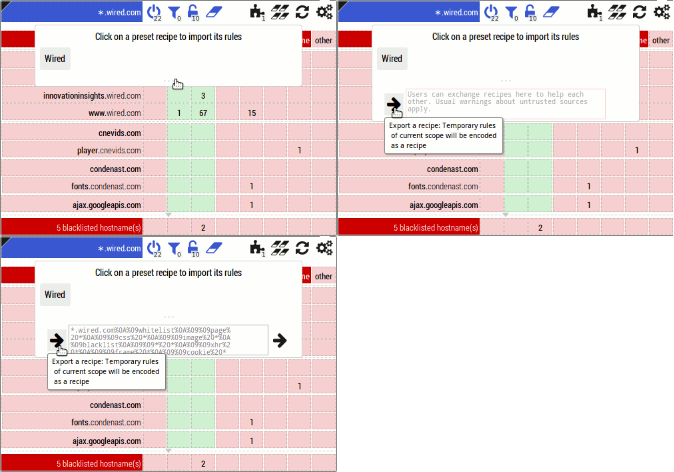
- The rationale is to decentralize support for the extension, I expect there will always be advanced users somewhere ready to help novice users, and this feature is to make helping easier.
- The new widget allows to export the current state of the matrix into a recipe, and allows to import a recipe into the current matrix. Example:
- Novice user asks help for set of rules to "unbreak" a web site.
- Advanced user figures the minimal set of rules.
- Advanced user exports the state of the matrix into a recipe.
- Advanced user post the resulting recipe somewhere where the novice user can copy it.
- Novice user, trusting advanced user, copy-paste the recipe into the recipe field and click on the import button.
- Novice user tries if it works, and if so, clicks on the padlock to lock down the new rules.
- Novice user express his gratitude to advanced user, advanced user answers "no problem".
- The import tries to be "smart", i.e. it won't allow the import of rules which are irrelevant to the current matrix.
- Fixed https://github.com/gorhill/httpswitchboard/issues/255: "A session cookie may be removed before it expires".
- Typical symptom: randomly being logged out of whatever web site you were logged in (not fun).
- Fixed https://github.com/gorhill/httpswitchboard/issues/252: Mismatch between user agent string from HTTP header and user agent string from
window.navigator.userAgent. - Progress on https://github.com/gorhill/httpswitchboard/issues/231: "More complete support of Adblock filters"
- Whitelist filters now supported.
- Coverage of ABP filter syntax is still not complete, but the support of whitelist filters bumps up the coverage from 84.5% to 87.9% in the case of EasyList + EasyPrivacy.
- Fixed https://github.com/gorhill/httpswitchboard/issues/81: "Figure a way to allow 'snapshot' of pop-up matrix into a recipe".
-
I care about backward compatibility, but apparently I failed this time. It has come to my attention that a user had its settings for auto-create scope disabled, despite me having put code in there to translate the old internal setting into the new one.
I still do not understand how this code can fail, but in any case,my apologies for this fumbling. (I could fix the problem, but I suppose it is too late at this point, so simplest workaround is to go to the Settings tab a re-select your choice of scope auto-creation --domainis now the preferred choice.) - Release date: 27 April 2014
- Changed feature: You can now choose to auto-create domain- or site-level scopes (before only site-level scope was available).
- I figure this was required as in general, a domain-level scope offers an optimal balance between usability and security.
- The security gain from using global scope to using a domain-level scope is huge.
- The security gain from using a domain-level scope to using a site-level scope is marginal in most cases.
- The convenience gain of using a domain-level scope rather than a site-level scope is significant.
- For instance, it is quite common for a web site which requires logging in to use HTTP redirect directives from one subdomain to another.
- Example: log in on
login.example.com, end up onmembers.example.com. - With a site-level scope set to
login.example.com, the login operation would fail because whatever whitelist rules were created in thelogin.example.comscope do not apply to themembers.example.comscope. - This is where domain-level scope is great, as whatever whitelist rules created in
*.example.comapply both tologin.example.comandmembers.example.com. - A real life example of this particular issue was raised recently: https://github.com/gorhill/httpswitchboard/issues/249 (French).
- Example: log in on
- Therefore aute-creation of domain-level scopes is now considered the preferred way of using HTTPSB. Defaults are left unchanged though, as I want to further evaluate whether auto-scoping should be enabled out of the box.
- Fixed https://github.com/gorhill/httpswitchboard/issues/250: "Let the user choose whether site- or domain-level scopes should be auto-created".
- Release date: 25 April 2014
- Fixed https://github.com/gorhill/httpswitchboard/issues/244: "'HTTP cookie headers foiled' repeated twice in the Statistics tab".
- The second entry was supposed to be "HTTP referer headers foiled"
- Release date: 25 April 2014
- Added RU AdList, a list of ABP filters for Russia (list copied from https://easylist-downloads.adblockplus.org/advblock.txt).
- Fixed https://github.com/gorhill/httpswitchboard/issues/242: "Requests showing up as blocked and allowed in Statistics Request log".
- Just to reassure users, the flaw was in the reporting of javascript files in the request log when blocked through ABP filtering: the files were properly blocked, they were just wrongly reported as "allowed".
- Fixed https://github.com/gorhill/httpswitchboard/issues/241: "Wrong display of 0% in Statistics tab (ABP complex filters)".
- Release date: 25 April 2014
- Workaround for https://github.com/gorhill/httpswitchboard/issues/240: "Privacy check box doesn't save [in Chrome 36 dev, Chrome 34 is ok]" (see chromium bug #366989)
- Traduction de la fonctionnalité User-Agent par tailHey
- Release date: 24 April 2014
- New privacy feature: User-Agent spoofing.
- Available in the Settings tab:
- Enable/disable (disabled by default)
- An input field to choose at which interval (minutes) to randomly pick a new user agent string
- A text area so you can enter your own list of user agent strings from which to randomly pick
- Enter nothing to blank the user agent string (not recommended)
- Enter a single user agent string to force a particular one
- Enter many to cycle randomly through them, as per your supplied interval
- I put in a couple of default user agent strings I found while browsing around, but I suggest you pick your own user agent strings going forward. There are various sources out there: you choose.
- Don't go overboard with the number of user agent strings, a handful of the top most common strings is just enough to accomplish the purpose.
- Prefixing a line with
#will cause the line to be ignored
- Of interest: EFF: "Browser Versions Carry 10.5 Bits of Identifying Information on Average"
- Available in the Settings tab:
- Version française maintenant complète après la révision finale de tailHey
- Fixed https://github.com/gorhill/httpswitchboard/issues/100: "Ability to neutralize User-Agent string for enhanced privacy" (as per above)
- Release date: 23 April 2014
- Fixed https://github.com/gorhill/httpswitchboard/issues/239: "ABP filters not working when there's an uppercase letter"
- ABP filters are now case insensitive.
- Internationalization infrastructure work
- I can say that finally HTTPSB is fully ready for translation, although I expect there might be small bits here and there that I missed. The translation work in whatever language itself is left to volunteers.
- Release date: 21 April 2014
- French translation work by tailHey.
- Removed obsolete portion of text in Settings tab regarding behind the scene filtering.
- Release date: 21 April 2014
- New option in the Settings tab: "Auto delete unused temporary scopes".
- Disabled by default.
- Especially useful for users who have enabled "Auto create temporary site-level scopes".
- A temporary scope (which has no permanent counterpart) won't be deleted immediately after the web page for which it applies is closed. It will linger a bit, and if it still unused after 20 minutes or so, it will then be removed from memory.
- Fixed https://github.com/gorhill/httpswitchboard/issues/229: "Auto-reload only current tab".
- The user has now the choice to smart reload: None, Current, or All (default).
- Just a reminder: smart reload ensures that only the pages which are affected by a change in the matrix will be reloaded. The feature here gives the user the choice of which set of pages are going to be candidates for smart reload.
- I changed the appearance of the filtering switches when in their off state: These switches are kind of important, so they need to stand out more if switched off.
- Release date: 18 April 2014
- Fixed https://github.com/gorhill/httpswitchboard/issues/237: "Do not auto-create site-level scope if matrix filtering for global scope is off".
- Release date: 18 April 2014
- The master switch is gone.
- A new "matrix filtering" switch is now available, and it is scope-based (see it as a master switch, but it applies only to the current scope).
- Since now matrix filtering can be turned off for a specific scope, the chromium-behind-the-scene scope will come out-of-the-box with matrix filtering turned off, in order to guarantee that, out-of-the-box, HTTPSB does not interfere with the browser or other extensions.
- There were cases of extensions being broken by HTTPSB despite the chromium-behind-the-scene scope defaulting to allow-all/block-exceptionally, because some of the hostnames the user was feeding another extension were ubiquitously blacklisted.
- For existing users, matrix filtering will be on by default for all scopes, including the chromium-behind-the-scene scope, to ensure there is no change in behavior with your existing installation.
- Adblock Plus filter syntax is now supported as user-supplied ubiquitous rules.
- You can mix and match plain hostname rules with Adblock Plus filter rules.
- "One hostname per line" becomes "One rule per line".
- Respect proper and sane ABP-filter syntax and all should be fine.
- Remember: garbage in, garbage out, so if you feed HTTPSB garbage rules, HTTPSB's behavior as a result is undefined.
- Be mindful that not all ABP filter syntax is supported.
- The HTTPSB entries in the browser's contextual menu (right-click) have been removed: I found out they were not working correctly due to the many changes which have happened since the contextual menu code was released. More thoughts are needed before I fix and put back these contextual menu entries. Probably not many users were relying on the contextual menu since nobody reported it wasn't working properly.
- New wiki page for an overview of HTTPSB's filtering engine
- Fixed https://github.com/gorhill/httpswitchboard/issues/234: "Per-scope switch to disable all ubiquitous blocked hosts".
- Fixed https://github.com/gorhill/httpswitchboard/issues/232: "Allow user to supply his own ADP-compatible filters".
- Release date: 15 April 2014
- No changes for existing users.
- Removed Fanboy lists from out-of-the-box default selected ubiquitous lists. Because this.
- I personally use the Fanboy lists, however these are causing a bit too much material to be blocked, especially annoying for a new user who chooses to use HTTPSB in allow-all/block-exceptionally approach.
- Fixed https://github.com/gorhill/httpswitchboard/issues/226: "Overzealous ABP filtering:
||needs to match beginning of domain name".- More accurately,
||needs to match the start of a label in a hostname. The bug blocked needed CSS files on http://lifehacker.com, http://gawker.com, etc. because there was a false positive for an ABP complex filter (URLs fromc.kinja-static.comwere erroneously reported as matching||a-static.com^filter).
- More accurately,
- Fixed https://github.com/gorhill/httpswitchboard/issues/225: "
slashdot.orgsite is blocked when usingfanboy-annoyance.txt".- HTTPSB now supports the parsing and enforcement of the ABP's
third-partyfilter option for ABP complex filters.
- HTTPSB now supports the parsing and enforcement of the ABP's
- Fixed https://github.com/gorhill/httpswitchboard/issues/224: "Restore from file doesn't always restore a user's custom ubiquitous rules".
- Fixed https://github.com/gorhill/httpswitchboard/issues/195: "Need an 'export all'/'import' feature".
- New buttons, in the About tab: Backup to file... and Restore from file...
- When restoring, ALL existing settings, rules, etc. will be overwritten, and the extension will be restarted.
- Be mindful that the backed up data is saved as a
text/jsonfile, hence it is directly human readable. Take appropriate measures (back up to an encrypted drive or folder, etc.) if you have privacy concerns. - Saving to cloud-based "Chrome Sync" storage is not implemented, due to the limits imposed on size.
- Fixed https://github.com/gorhill/httpswitchboard/issues/115: "Ability to make global rules".
- The ability to create ubiquitous whitelist rules, i.e. the whitelisting of hostnames in all scopes.
- A new section at the bottom of the Ubiquitous rules tab as been added, where the user can provide his own list of hostnames which are to be ubiquitously whitelisted, i.e. whitelisted in all scopes.
- Fixed https://github.com/gorhill/httpswitchboard/issues/215: "Necessary script in frame not shown in matrix".
- This bug would show up specifically if a user had the Chromium settings "Block third-party cookies and site data" enabled.
- This caused the user to lack the necessary information about the number of scripts attempting to execute within embedded frames (if and once these were unblocked).
- Fixed https://github.com/gorhill/httpswitchboard/issues/219: "Number of requests over-reported in matrix".
- Fixed https://github.com/gorhill/httpswitchboard/issues/217: "Add Wiltteri, the finnish supplement list for EasyList to HTTPSB".
- Fixed https://github.com/gorhill/httpswitchboard/issues/207: "Flush cached 3rd-party assets when a new version is installed".
- Before this fix, 3rd-party assets were still deemed out-of-date after an update even when a new version was shipped with the most up to date assets.
- Fixed https://github.com/gorhill/httpswitchboard/issues/207: "Youtube may not be whitelisted during first install for Opera".
- Fixed https://github.com/gorhill/httpswitchboard/issues/213: "HTTPSB's "power switch" not working anymore."
- Fixed https://github.com/gorhill/httpswitchboard/issues/32: "Build matrix incrementally."
- (I will be working more on bug fixes and language support framework for the time being.)
- Fixed https://github.com/gorhill/httpswitchboard/issues/211: "Hostnames with underscores not parsed properly."
- Fixed https://github.com/gorhill/httpswitchboard/issues/210: "Not all hostname-compatible rules from ABP files imported as HTTPSB blocked hostname".
- Fixed https://github.com/gorhill/httpswitchboard/issues/209: "Details in Statistics Page not working correctly".
- New button in the matrix pop-up which allows to turn on/off filtering using Adblock Plus ("ABP") complex filters for a specific scope.
- The state of this button is saved as part of a scope when you lock down your changes.
- The number in the badge represents to total number of requests blocked on the page using ADP filtering.
- The state of the padlock (to persist changes) and eraser (to revert changes) buttons now reflect the number of temporary changes (including the ABP button) which are not persisted in the current matrix.
- Net requests blocked through ABP filtering are now identifiable by a special icon in the request log in the Statistics tab in HTTPSB's Dashboard: by hovering the mouse over that icon you can see which ABP rule specifically is responsible for the blocking.
- Fixed https://github.com/gorhill/httpswitchboard/issues/208: "Adblock Plus filtering is still in effect even after turning off HTTPSB".
- Fixed https://github.com/gorhill/httpswitchboard/issues/205: "Need a way to easily exclude a whole page or domain from ABP-filtering".
- Fixed https://github.com/gorhill/httpswitchboard/issues/189: "Provide a badge for other toolbar icons in popup menus".

- Fixed newly added assets not being added: https://github.com/gorhill/httpswitchboard/issues/206.
- Code improvement: https://github.com/gorhill/httpswitchboard/issues/204.
- Fixed Hangouts extension not working: https://github.com/gorhill/httpswitchboard/issues/91#issuecomment-37180275.
- Sorry for the many spurious versions between 0.8.4.3 and 0.8.4.7 (Chrome store doesn't allow uploading a package without changing the version number):
- There was an issue I had a hard time to figure, which I narrowed to a file name in the 3rd-party assets with a reserved character as per Windows rules for filenames (I develop on Linux, so I had a bit of a hard time figuring the issue from the generic error message reported by the Chrome store.
- Support for ABP complex filters with wildcards.
- This adds more than 2,000 filters being in use when loading the default ABP lists.
- Added more lists of ABP filters in the Ubiquitous rules tab.
- These new lists are all disabled by default, as the usefulness of these lists depends on location/language.
- Fixed https://github.com/gorhill/httpswitchboard/issues/202.
- Fixed a bug which could potentially occur when loading the various ubiquitous lists, causing the extension to break:
- https://github.com/gorhill/httpswitchboard/issues/199.
- The bug would occurs depending on how fast the lists are loaded into memory: slower = bug more likely to occur.
- Workaround for those still using version 0.8.4.1 is to disable the "Parse and enforce Adblock+ complex filters" feature.
- Sorry :-(
- Further performance and memory footprint improvements to the code dealing with Adblock Plus complex filters.
- Reaching optimal performance is a requirement in order to support more complex filter syntax, i.e. wildcards, options, etc.
- Fixed potential false negatives (in rare circumstances) when evaluating against Adblock+ complex filters.
- Simplified Adblock+ complex filters-related code.
- First, an apology for having dismissed too quickly a good suggestion a while ago.
- Adblock Plus ("ABP") complex filters (those which parse into more than just "block a whole domain") can now be parsed and used to block web requests:
- Optional, disabled by default. Can be turned on from Ubiquitous rules tab in the Dashboard.
- Consider this a beta feature.
- Especially handy for users who prefer to work in allow-all/block exceptionally mode
- Not all ABP complex filters are parsed:
- Those with options are currently ignored (working on it, as time permit).
- Those with regular expressions are currently ignored (probably will support partially, i.e.
*only): these are rare instances and their use is discouraged anyway). - Filters used to hide elements are ignored (undecided whether I will ever implement since it requires modifying the DOM).
- Filters used to whitelist something -- like "acceptable ads" -- are ignored (will never implement).
- ABP complex filters are not reflected in the matrix (except obviously for those which apply on a whole domain). There is no user interface to enable/disable a single ABP complex filter.
- Rules from HTTPSB have precedence. If a request is evaluated as "allowed" by HTTPSB, it is then further evaluated using ABP filters.
- The only way to disable a single ABP complex filter is to disable the parsing of all complex filters, or to disable the whole list in which the filter appears. ABP complex filters are not affected by preset recipes.
- The number of requests effectively blocked by complex ABP filters is reported in the Statistics page in the Dashboard, so that you can get a sense of whether ABP filters are worth parsing and enforcing, given the extra memory use.
- The added overhead of evaluating an ABP complex filter is small, around 30 µs. (I did not revise this yet to reflect the new timings.)
- The main point of this feature is that you are still using ABP along HTTPSB, HTTPSB gets closer to be a complete replacement solution to ABP.
- Fixed https://github.com/gorhill/httpswitchboard/issues/198.
- Fixed https://github.com/gorhill/httpswitchboard/issues/197.
- Assets used by HTTPSB can now be updated without having to wait for a new release of the extension.
- From the About tab of the extension's Dashboard.
- "Assets" refers to:
- Preset ubiquitous blacklists.
- Preset recipes.
- Public Suffix List.
- Significantly reduced memory footprint.
- Not that there wasn't any memory leak, just that for this release, I chose to spend more time on code revision and refactoring instead of just features -- a necessary recurring task in order to ensure the code doesn't drift too far away from sanity. This allowed me to put to test and validate some ideas I was entertaining since a long time regarding memory footprint.
- Fixed https://github.com/gorhill/httpswitchboard/issues/179.
- Fixed https://github.com/gorhill/httpswitchboard/issues/191
- First two definitions:
- "Tabless HTTP requests" are requests which do not originate from any particular tab: these are known as behind-the-scene requests.
- "Orphan HTTP requests" are requests originating from a valid tab, but which tab display the content of a URL which is not handled by HTTPSB, i.e.
opera://startpage/, or whatever else similar which may come in the future.
- Orphan HTTP requests are now categorized as behind-the-scene requests.
- Before the fix, these requests were evaluated against the global scope, but unfortunately they could not be reported in any matrix.
- First two definitions:
- New option in Settings page to enable/disable smart auto-reload (as per issue #94). Enabled by default.
- Fixed https://github.com/gorhill/httpswitchboard/issues/193.
- Fixed https://github.com/gorhill/httpswitchboard/issues/192.
- Addressed https://github.com/gorhill/httpswitchboard/issues/191.
- Fixed https://github.com/gorhill/httpswitchboard/issues/94.
- Workaround for Yandex's improper rendering of float element in toolbar of extension pop-up.
- Fixed auto-whitelisting of Youtube at install time for Opera 19.
- Minor revision: The mini pop-up menu in the pop-up of the extension giving access to Rule manager, Settings, Documentation and On/off buttons has been removed and the buttons are now directly accessible in the extension pop-up toolbar as Dashboard, Documentation and On/off buttons on the far right.
-
New permission required: "unlimitedStorage".
- This permission gives an extension access to a virtual, sandboxed file system.
- Currently quota set at maximum of 24 MB, because the size of the content of assets directory (updated versions of files in this directory will eventually be stored in the sandboxed file system) is roughly 17 MB.
- This is needed in order to allow users to provide their own ubiquitous list of blacklisted hosts.
- This is also required for the upcoming feature which will allow users to update themselves the various data used by HTTPSB without having to wait a new version of HTTPSB:
- This permission gives an extension access to a virtual, sandboxed file system.
- Redesigned extension pages: All extension pages are now accessible through tabs on a single dashboard page (issue #129).
- The list of third-party lists of blocked hosts has moved to the Ubiquitous rules tab.
- "Ubiquitous" because these rules apply in all scopes.
- The former Rule manager page has been renamed Scoped rules.
- The list of third-party lists of blocked hosts has moved to the Ubiquitous rules tab.
- Users can now supply their own list of ubiquitous blacklisted hosts (go to Ubiquitous rules tab in the dashboard).
- This fixes one half of issue #152, the other half being "ubiquitous whitelisted hosts".
- The project's mini-blacklist
assets/httpsb/block-facebook.txtis gone. If you were using it, just enter the content of the file in your user list.
- Fixed https://github.com/gorhill/httpswitchboard/issues/181.
- Fixed https://github.com/gorhill/httpswitchboard/issues/129.
- Fixed https://github.com/gorhill/httpswitchboard/issues/39
- Replaced all preset recipes for Google various services with one single preset recipes which "unbreak" all Google various services.
- Turns out, it's just way too much time-consuming to try and create specific set of rules for each specific Google service.
- At least, it is scoped, so Google servers won't be pinged when not on a Google-owned web page.
- That's the point of domain-level scopes anyway, so I will just use one for Google.
-
New permission required: "downloads":
- Required to give the user the ability to backup their scoped rules to a file on their computer.
- Changes in Rule manager:
- Remove all is now Mark all for deletion, whereas you now need to click Commit all to confirm deleting all rules.
- New button: Reset to factory = reset to out-of-the box rules.
- New buttons: Backup to file and Restore from file, operate on the content of the Recipe text area (so you can backup a single recipe or all of them).
- Restore from file does not replace existing rules, it adds on top of existing rules.
- Backup to file requires a new permission for the extension ("Manage your downloads").
- Changes in extension popup:
- The "preset recipes" button now has a badge showing the number of matching preset recipes.
- A button has been added to take over the task of removing all temporary rules.
- The function of the existing button has changed to "revert temporary rules for current scope".
- More internal work on preset recipes (bringing the feature out of beta status is the goal).
- File format is YAML-compliant. Benefits: future-proofing, syntax highlighting.
- Internally, preset recipes can now be composite.
- For example, "Google Groups with account" is a composite of "Google Groups" (to "unbreak" Google groups) and "Google Account" (to "unbreak" logging into your Google account.)
- All 1st-party recipes are now scoped, and this will be the only accepted practice for 1st-party recipes.
- Updated all 3rd-party assets to their latest versions (preset blocked hosts, Public Suffix List).
- Fixed https://github.com/gorhill/httpswitchboard/issues/188
- Fixed https://github.com/gorhill/httpswitchboard/issues/186
- Fixed https://github.com/gorhill/httpswitchboard/issues/177:
- Thanks to my-password-is-password for his pull request.
- Fixed https://github.com/gorhill/httpswitchboard/issues/186.
- Fixed https://github.com/gorhill/httpswitchboard/issues/176.
- Fixed https://github.com/gorhill/httpswitchboard/issues/175.
- Fixed https://github.com/gorhill/httpswitchboard/issues/174.
- Fixed https://github.com/gorhill/httpswitchboard/issues/166.