Repository navigation
Fix the staging screenshot flaking on the commit message caret - #716
Merged
Merged
Conversation


goneng
force-pushed
the
keep-the-caret-out-of-the-staging-screenshot
branch
from
September 22, 2026 05:28
44b7596 to
5388f38
Compare

Take the keyboard focus out of the commit message field before the
staging view is captured, so the comparison stops reporting a caret
that no pull request drew.

* Click the diff pane, which reads "No file selected" at that point
  and so takes the focus without selecting or changing anything.
* Assert the diff pane is present first, so a view that never loaded
  fails with its own message rather than as a click into nothing.
Wait for the app to be the frontmost one before capturing a window, so
a screenshot cannot record the dimmed title bar of an inactive window.

* Ask for activation only when the app is not already in front, since
  an activation request would dismiss an open context menu.
* Fail with a clear message when the app cannot be brought forward,
  rather than attaching a picture that cannot be compared.
goneng
force-pushed
the
keep-the-caret-out-of-the-staging-screenshot
branch
from
September 22, 2026 20:21
5388f38 to
faaea0e
Compare
goneng
marked this pull request as ready for review
September 22, 2026 20:31

Contributor
|
Screenshot differs: emulatorApi=arm64 with 1 screenshot(s) |
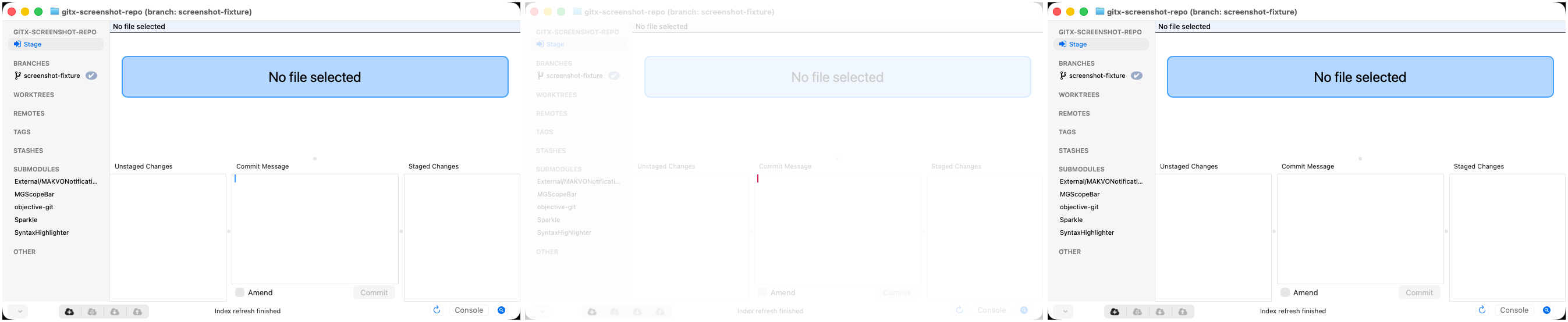

hannesa2
approved these changes
Sep 23, 2026

This file contains hidden or bidirectional Unicode text that may be interpreted or compiled differently than what appears below. To review, open the file in an editor that reveals hidden Unicode characters.
Learn more about bidirectional Unicode characters
Sign up for free
to join this conversation on GitHub.
Already have an account?
Sign in to comment


Add this suggestion to a batch that can be applied as a single commit.This suggestion is invalid because no changes were made to the code.Suggestions cannot be applied while the pull request is closed.Suggestions cannot be applied while viewing a subset of changes.Only one suggestion per line can be applied in a batch.Add this suggestion to a batch that can be applied as a single commit.Applying suggestions on deleted lines is not supported.You must change the existing code in this line in order to create a valid suggestion.Outdated suggestions cannot be applied.This suggestion has been applied or marked resolved.Suggestions cannot be applied from pending reviews.Suggestions cannot be applied on multi-line comments.Suggestions cannot be applied while the pull request is queued to merge.Suggestion cannot be applied right now. Please check back later.
Take the keyboard focus out of the commit message field before the
staging view is captured, so the comparison stops reporting a caret
that no pull request drew.
PBGitCommitController's first responder is the commit message field, soopening the staging view puts the keyboard focus there and its insertion
point blinks. Whether the caret lands in the capture then comes down to
when the screenshot is taken, and the comparison posts a difference
nobody made - most recently on #713.
so takes the focus without selecting or changing anything.
fails with its own message rather than as a click into nothing.
Tab is not a way out here: the text view's
doCommandBySelector:handsthe focus to a table, and
focusTable:no-ops on an empty one, which iswhat the fixture repo shows.
The second commit covers a different way a capture can differ from one
taken a moment later: a window whose app is not frontmost has its title
bar drawn dimmed. The tests assume the launch left the app in front
rather than checking, so the capture now waits for that, and asks for
activation only when the app is not already there - an activation
request would dismiss the open context menu the third test captures.
Test plan
testStagingTabScreenshotlocally six times before and after: thecaret is in 5 of 5 captures before the change and 0 of 7 after
(6 single runs plus a full-suite run), measured by scanning the commit
message area for the caret's colour.
GitXUITestssuite passes, all four tests.staging view once; comparisons after it should be quiet.
activation to Finder just before the history capture: the title bar
comes back dimmed and the traffic lights grey, and with the wait in
place it matches an undisturbed run (title glyph brightness 105.9
against 105.8).
the title identically.