Repository navigation
Various first-use issues encountered on Max OS X #2055

Description

Quick things
-
The default value ofAdrien didn't think this was wise, see below, so striking it outElement, OS/2, Metrics, X Heightis 0 but should be 500. -
Turn off CharView, View, Show, Control Points (Always) by defaultAdrien didn't think this was wise, see below, so striking it out -
Crash, SCTickValidationState() segfault while undoing actions #2056spurious so punting
Mac integration
- After installing FontForge on a Mac, the first time it is run, it runs
fc-cacheover all the/LIbrary/Fontswhich takes about 3 minutes on a Macbook Air. This is excruciating, and I wonder if this is really necessary, because I believe the reason this is run is to be able to register the fonts used to render the UI, and I believe those fonts are all in theFontForge.appbundle. So, can this scan be only scanning the bundle, and take just a second or two max..? - Weirdly the first time the program is run, the dock icon goes away after the
fc-cacheprocess completes, and XQuartz starts and the FF window appears. Quitting FontForge and launching it from the Finder again solves this. I don't think anything can be done about that, so checking this mark, but, it sucks :) Here's an image:

- The second time the program is run, the dock icon bounces forever. This really sucks and I hope something can be done! really distracting :( Here it is bouncing after the program is fully loaded:

- File, Open Font, now opens in
/instead of~which is very confusing. Change it to open in~:)

Metrics View weirdness
- In the metrics view left side bar, clicking the items should toggle them; currently clicking activates and shift clicking deactivates...
- In metrics view, after going View, Set Point Size, the hotkeys make no sense. Fortunately the fix will be to just redefine the hotkeys to something sensible.


More View options
- View, Show, Horizontal Metrics Lines is on by default, but only shows the
Element, Font Info, General, Ascent+Descentlines, and baseline, not theElement, OS/2, Metrics, X Height; this should become a submenu item, - with each line its own child item in the submenu,
- including X Height, and
- that X Height item should be on by default
- View, Show, Horizontal Metrics Lines, also toggles the advanceWidth line's visibility; that should become 2 new child items,
Origin Lineand -
Width Line
Fine points OS X integration
-
when you double click a glyph slot in FontView, the CharView window opens, but pretty small. Can CharView windows open 'maximized'?@frank-trampe suggested this would be unwelcome, so striking it out. Anyway, here is the window pretty small:

- After clicking the window maximize button (on mac, a green ball button) on the window title bar to make it maximized, the viewport doesn't run 'fit', and the glyph drawing area remains rather small. When I run fit it becomes better sized. Can this triggering of
fit()after maximizing be done automatically? Here is the fit view:

Better Fit
The View, Fit method could be smarter.
- For a blank glyph, the viewport could be fitted to the emsize + advanceWidth. Eg,

- For a glyph that exceeds the emsize in height, its bbox should be used rather than the emsize - which is what I think happens right now
- The zoom should be closer. For example this
Nacuteis shown at this size, which is too small as there is LOADS of room above and below:
From

To

- It should fit the origin to the left side of the window, so there is space to add a glyph to right in the multi glyph input box.
From

To

Kerning interaction
- After adding a lookup and kern subtable, then clicking an empty kern cell in the metrics window, the dialog to add a subtable appears (right in image below)

The lookup subtable drop down selection shows which subtable is currently in use, so there should not be a dialog window appearing here. Instead, the Kern by Classes window should open directly:
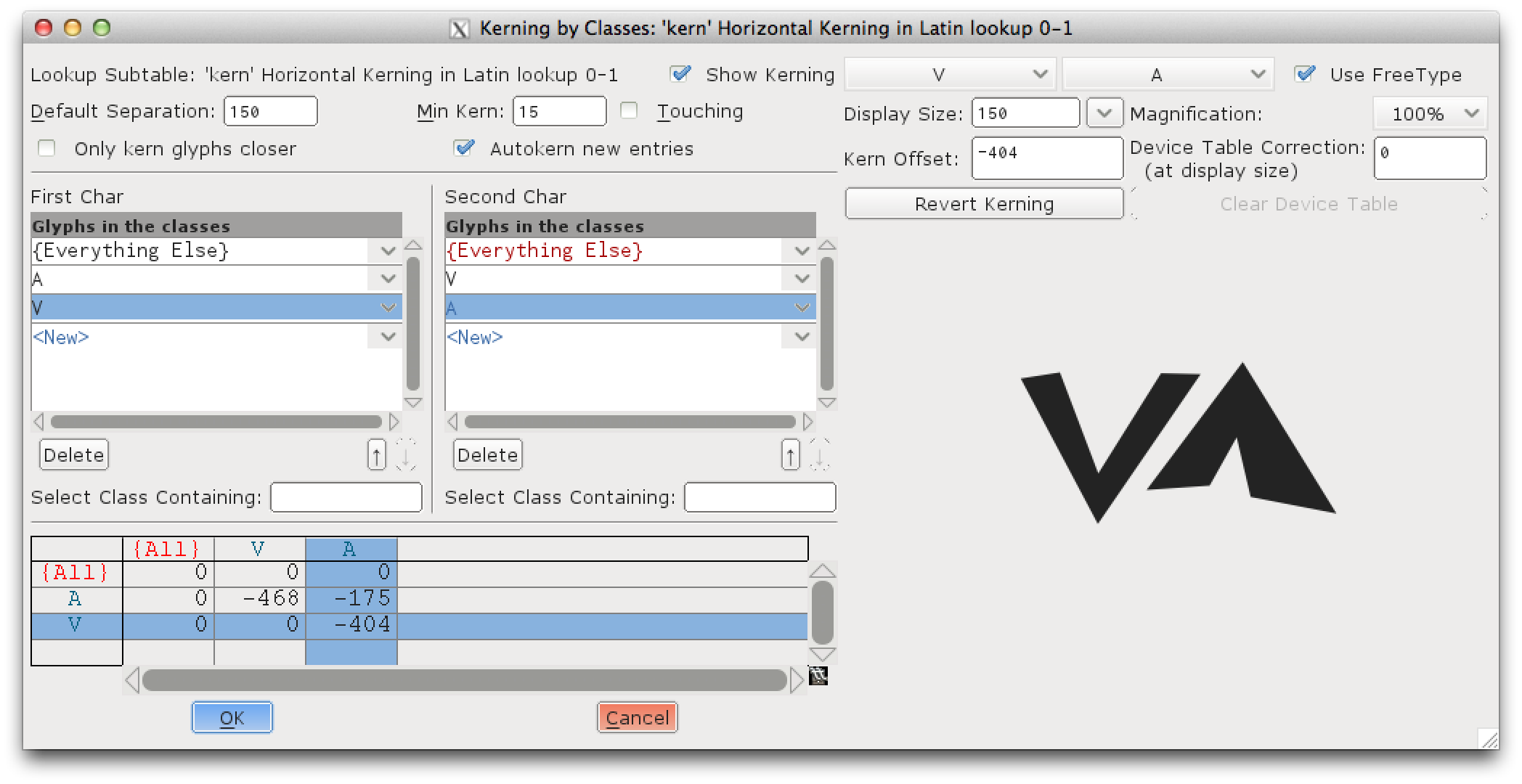
When I draw an A, a V, open a metrics window, type in AV, and then set the kerning value, the Create Lookup window appears correctly, I create a horizontal kerning lookup, and then I create a First Char class with A and a Second Char class with Z and...
- ...there is no way to cycle through the items in the Left Side or Right Side classes; there is a drop down but this is excruciating to click and click and click when there should be a button to click, and a hotkey to press, to cycle.

- ....when I clicked the left class and then the right class, a pop up appears that I had to click saying "Everything Else" blah blah. This message also appeared in the Messages window. So remove that dialog, it was super annoying.
- ....when I clicked the left class and then the right class, I got a crash. However, when I tried the same thing again, I could not reproduce... but in general this dialog needs more QA testing and crash fixing :)
- I also saw that the crash protection appeared to work then, but my lookup was not recovered, but there no Undo in the
Kerning by Classeswindow, so no actions to be autosaved, so I guess this is a major request; and its in another issue, thus checking this off here. - The Metrics View subtable dropdown's
New Lookup Subtable...action doesn't work, as subtables created on existing lookups don't appear in the Metrics, Kern by Classes, list, and attempting to 'Create a New Lookup' from this doesn't do anything.

Better drawing interaction
- Allow moving a point without touching its handles #2050 seems important to make FF really actually useful for drawing glyphs with.
- When you turn on CharView, View, Show, Control Points (Always) then you can not marquee select offcurve control points, only oncurve points; it would be good to be able to marquee select offcurve points when
Ctrlis pressed
Activity
lemzwerg commentedon Jan 23, 2015
Uh, oh, having so much different bug reports in a single issue is hard to maintain... Anyways, it's not my job to tell you this :-)
Regarding fc-cache: Instead of adding specialized code for scanning only a subset of the system's directory, I suggest that fc-cache is run at installation time, where users expect that it may take some time until everything is done. Doing so should shorten the start-up of the first call of the FontForge app considerably.
adrientetar commentedon Jan 23, 2015
That is #1621, fwiw.
davelab6 commentedon Jan 23, 2015
The way installation in Mac OS X goes is you drag the app bundle from the DMG disk image to the Applications folder ;) Its possible that we could set up a PKG installer, but I think its better to run fc-cache sanely.
davelab6 commentedon Jan 23, 2015
@frank-trampe I updated the main issue to prioritize all the things
lemzwerg commentedon Jan 23, 2015
Dave, I don't know how the installation process works on OS X – do you say that it is not possible to make the dragging operation trigger the start of a script?
davelab6 commentedon Jan 23, 2015
Yes
adrientetar commentedon Jan 26, 2015
I disagree with these changes esp. the first one.
davelab6 commentedon Jan 26, 2015
I believe other editors (robofont, glyphs) use 500 as a default x-height.
Always showing control points often clutters the screen and is off-putting in the first few hours of beginners use, and since turning it on is just a few clicks away (and is stored as a pref) I don't see the harm in changing this :)
I'll change those 2 to 'strike out' for now
adrientetar commentedon Jan 27, 2015
Clutters the screen? We're talking about designing, not using the fonts. The defaults need to be optimized defaults, not something you have to change everytime you install the program.
The first time I started FontForge, I had no experience with Casteljau (Bézier) curves whatsoever. But CPs are actually what you look for and look at when designing. It happens quite rarely but if I want to preview what I've drawn in the CharView I'll just use the preview keystroke.
davelab6 commentedon Jan 27, 2015
Clutters the screen so that selecting the control points you want can be hard, because other nearby control points are selected instead. The size of the points was increased because their target click area was said to be too small, and the 2 things combined degrades the user experience for people on laptops with smaller screens. There's another workshop coming up this weekend, I'll ask the participants about it. (You don't have to change it each time up install, because its a user pref, and your prefs are in your home dir?)
And the x height? :)
adrientetar commentedon Jan 27, 2015
I see. For me things work okay since SnapDistance was decreased, the size of the points are not problematic to me (and my particular computers I guess).
For the xheight I don't think it makes sense to define a default value. At least if it's not present in the font, programs or font editors who need it may calculate it from the height of the x glyph or at least they can assert that the value just wasn't set. I don't see the point of setting an arbitrary value if it's going to be wrong most of the time anyways, regardless of what other font editors may be doing.
Update osx/FontForge.app/Contents/MacOS/FontForge
davelab6 commentedon Mar 13, 2015
Still seems slow :(
frank-trampe commentedon Mar 13, 2015
@davelab6, can you check that your copy of fcprogress.pl has the new fc-cache call?
ctrlcctrlv commentedon Jun 7, 2020
I don't have a Mac so can't test some of these, while some of them I don't actually think are issues. (Auto-running fit on resize would definitely annoy me now that I'm used to how it works.)
Closed per G2A.