Repository navigation
With TextBaseline.ideographic text gets cut off below the baseline. #94680
Description

What is the difference between TextBaseline.alphabetic and TextBaseline.ideographic?
Overview
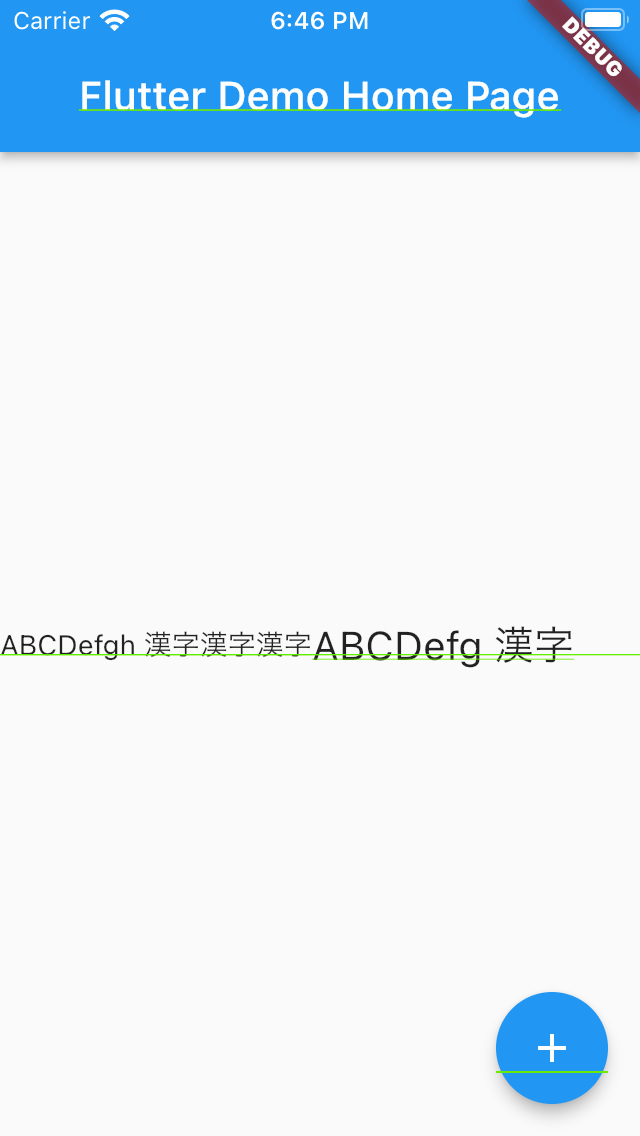
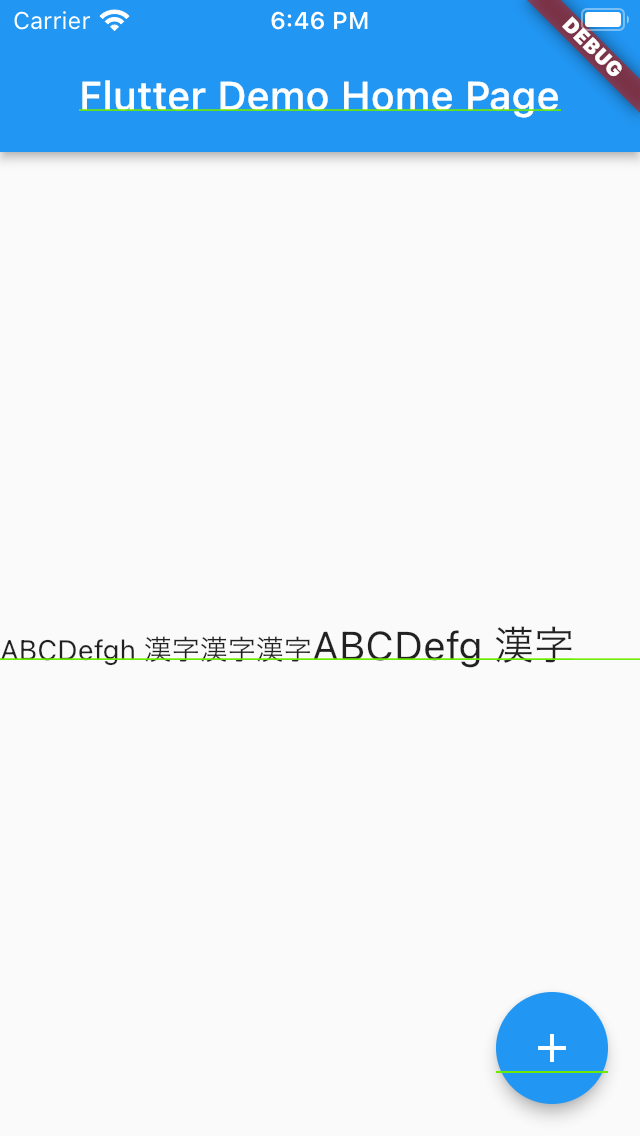
Just by reading the TextBaseline documentation, I could not understand the difference in appearance between TextBaseline.alphabetic and TextBaseline.ideographic. So, to check out the visual difference, I try the sample code below. Although the baseline of the characters aligned, there was no visual difference. What is the difference TextBaseline.alphabetic and TextBaseline.ideographic?
Reference
The same question in the Stack Over Flow was answered about the difference between the two properties. But the sample code did not show the difference.
flutter doctor -v
$ flutter doctor -v
[✓] Flutter (Channel stable, 2.5.1, on macOS 11.5.2 20G95 darwin-x64, locale ja)
    • Flutter version 2.5.1 at /Users/sshayashi/fvm/versions/2.5.1
    • Upstream repository https://github.com/flutter/flutter.git
    • Framework revision ffb2ecea52 (2 months ago), 2021-09-17 15:26:33 -0400
    • Engine revision b3af521a05
    • Dart version 2.14.2

[✓] Android toolchain - develop for Android devices (Android SDK version 30.0.3)
    • Android SDK at /Users/sshayashi/Library/Android/sdk
    • Platform android-30, build-tools 30.0.3
    • Java binary at: /Applications/Android Studio.app/Contents/jre/jdk/Contents/Home/bin/java
    • Java version OpenJDK Runtime Environment (build 1.8.0_242-release-1644-b3-6222593)
    • All Android licenses accepted.

[✓] Xcode - develop for iOS and macOS
    • Xcode at /Applications/Xcode13beta5.app/Contents/Developer
    • Xcode 13.0, Build version 13A5212g
    • CocoaPods version 1.10.1

[✓] Chrome - develop for the web
    • Chrome at /Applications/Google Chrome.app/Contents/MacOS/Google Chrome

[✓] Android Studio (version 4.0)
    • Android Studio at /Applications/Android Studio.app/Contents
    • Flutter plugin version 51.0.1
    • Dart plugin version 193.7547
    • Java version OpenJDK Runtime Environment (build 1.8.0_242-release-1644-b3-6222593)

[✓] VS Code (version 1.60.0)
    • VS Code at /Applications/Visual Studio Code.app/Contents
    • Flutter extension version 3.27.0

[✓] Connected device (2 available)
    • iPod touch (7th generation) (mobile) • C830390E-B470-4EC4-9F15-23477CACF678 • ios            • com.apple.CoreSimulator.SimRuntime.iOS-14-2 (simulator)
    • Chrome (web)                         • chrome                               • web-javascript • Google Chrome 96.0.4664.55

• No issues found!
sshayashi@MacBook-Pro:~/Programs/baseline_reprodution »
sample code
import 'package:flutter/material.dart';

void main() {
  runApp(const MyApp());
}

class MyApp extends StatelessWidget {
  const MyApp({Key? key}) : super(key: key);

  @override
  Widget build(BuildContext context) {
    return MaterialApp(
      title: 'Flutter Demo',
      theme: ThemeData(
        primarySwatch: Colors.blue,
      ),
      home: const MyHomePage(title: 'Flutter Demo Home Page'),
    );
  }
}

class MyHomePage extends StatefulWidget {
  const MyHomePage({Key? key, required this.title}) : super(key: key);
  final String title;
  @override
  State<MyHomePage> createState() => _MyHomePageState();
}

class _MyHomePageState extends State<MyHomePage> {
  int _counter = 0;

  void _incrementCounter() {
    setState(() {
      _counter++;
    });
  }

  @override
  Widget build(BuildContext context) {
    return Scaffold(
      appBar: AppBar(
        title: Text(widget.title),
      ),
      body: Center(
        child: Column(
          mainAxisAlignment: MainAxisAlignment.center,
          children: <Widget>[
            Row(
              crossAxisAlignment: CrossAxisAlignment.baseline,
              textBaseline: TextBaseline
                  .ideographic, // TextBaseline.alphabetic show the same result
              children: const [
                Text(
                  'ABCDefgh 漢字漢字漢字',
                ),
                Text(
                  'ABCDefg 漢字',
                  style: TextStyle(
                    fontSize: 20,
                  ),
                ),
              ],
            ),
          ],
        ),
      ),
      floatingActionButton: FloatingActionButton(
        onPressed: _incrementCounter,
        tooltip: 'Increment',
        child: const Icon(Icons.add),
      ),
    );
  }
}
sample code screenshots
| no baseline properties | TextBaseline.alphabetic | TextBaseline.ideographic |
|---|---|---|
 |
 |
|
Reacted by fzyzcjy, Sayed Mahmood Sayedi and Greg Price
Activity
[-]What is the difference between TextBaseline.alphabetic and TextBaseline.ideographic?[/-][+][Docs] Improve documentation for Textbaseline.alphabetic and TextBaseline.ideographic[/+]SShayashi commentedon Dec 15, 2021
@maheshmnj
Thanks for your triage and labeling. Is this just a documentation issue? If so, could you please provide some sample code that shows the difference between
TextBaseline.alphabeticandTextBaseline.ideographic?maheshj01 commentedon Dec 20, 2021
@SShayashi thanks for pointing out. This looks like a bug to me I see no difference in text baseline alignment when using either
TextBaseline.alphabeticorTexbaseline.ideographic.Ideally with
Textbaseline.alphabeticEnglish text should sit on the line but when using non-English characters, it would pass slightly below the baseline. To prevent thisTextbaseline.ideographicis available which should keep all characters (english or non-english) above the baseline.As per the below output
Textbaseline.alphabeticseems to be working as expected. The issue looks related toTextbaseline.ideographic.code sample
flutter doctor -v
[-][Docs] Improve documentation for Textbaseline.alphabetic and TextBaseline.ideographic[/-][+]With `TextBaseline.ideographic` Non-english characters get cut off below the baseline. [/+][-]With `TextBaseline.ideographic` Non-english characters get cut off below the baseline. [/-][+]With `TextBaseline.ideographic` text gets cut off below the baseline. [/+]maheshj01 commentedon Dec 20, 2021
code sample 2