Repository navigation
[Linux] Chinese characters is not rendered correctly on Ubuntu. #90951
Description

On Unbuntu 20.04, if system language is not English (eg. Chinese), flutter app will render some language (Chinese, Japanese, Korean) character to rectangle box.
But if you change system language to English, all language characters render correctly.
Steps to Reproduce
- change you system language to
Chinese. - Run
flutter create bug. - Update the
main.dartfile as follows: ...
import 'package:flutter/material.dart';

void main() {
  runApp(const MyApp());
}

class MyApp extends StatelessWidget {
  const MyApp({Key? key}) : super(key: key);

  @override
  Widget build(BuildContext context) {
    return MaterialApp(
      title: 'Flutter Demo',
      theme: ThemeData(
        primarySwatch: Colors.blue,
      ),
      home: Scaffold(
        body: Center(
          child: Column(
            mainAxisSize: MainAxisSize.min,
            children: const [
              Text("Hello World."),
              Text("你好,世界。"),
              Text("こんにちは。"),
              Text("안녕하세요."),
            ],
          ),
        ),
      ),
    );
  }
}
flutter run
Expected results:

Actual results:
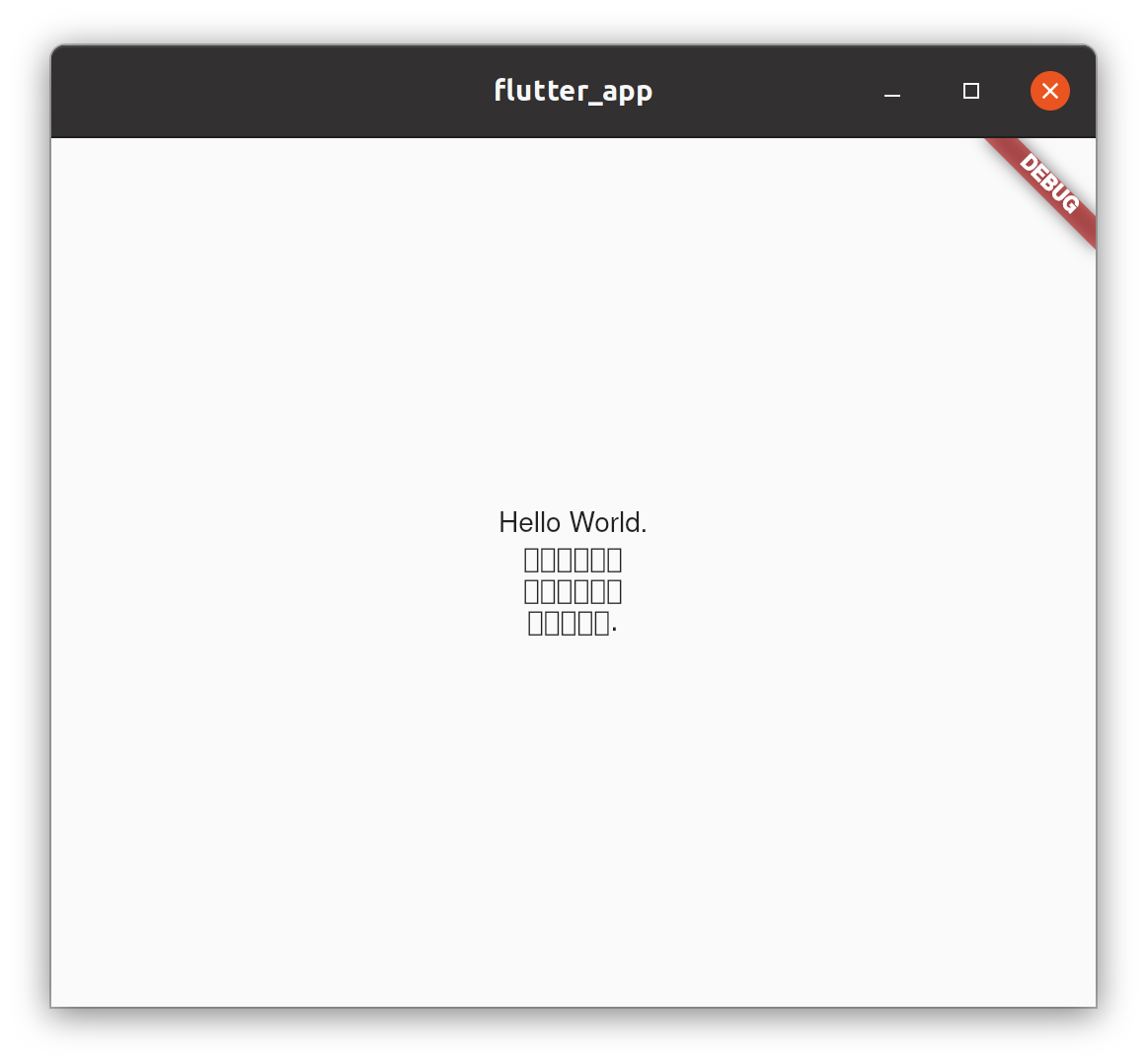
Logs
[✓] Flutter (Channel master, 2.6.0-12.0.pre.123, on Ubuntu 20.04.3 LTS 5.11.0-36-generic,
    locale en_GB.UTF-8)
    • Flutter version 2.6.0-12.0.pre.123 at /home/boyan/dev/flutter
    • Upstream repository https://github.com/flutter/flutter.git
    • Framework revision d508a247be (21 hours ago), 2021-09-28 10:28:05 -0400
    • Engine revision 520be30122
    • Dart version 2.15.0 (build 2.15.0-156.0.dev)

[✗] Android toolchain - develop for Android devices
    ✗ Unable to locate Android SDK.
      Install Android Studio from: https://developer.android.com/studio/index.html
      On first launch it will assist you in installing the Android SDK components.
      (or visit https://flutter.dev/docs/get-started/install/linux#android-setup for
      detailed instructions).
      If the Android SDK has been installed to a custom location, please use
      `flutter config --android-sdk` to update to that location.


[✗] Chrome - develop for the web (Cannot find Chrome executable at google-chrome)
    ! Cannot find Chrome. Try setting CHROME_EXECUTABLE to a Chrome executable.

[✓] Linux toolchain - develop for Linux desktop
    • clang version 10.0.0-4ubuntu1
    • cmake version 3.16.3
    • ninja version 1.10.0
    • pkg-config version 0.29.1

[!] Android Studio (not installed)
    • Android Studio not found; download from
      https://developer.android.com/studio/index.html
      (or visit https://flutter.dev/docs/get-started/install/linux#android-setup for
      detailed instructions).

[✓] IntelliJ IDEA Community Edition (version 2021.2)
    • IntelliJ at /home/boyan/dev/idea-IC-212.5284.40
    • Flutter plugin version 60.1.4
    • Dart plugin version 212.5486

[✓] Connected device (1 available)
    • Linux (desktop) • linux • linux-x64 • Ubuntu 20.04.3 LTS 5.11.0-36-generic

! Doctor found issues in 3 categories.
Reacted by eyouyou and wild-coffee
Activity
TahaTesser commentedon Sep 29, 2021
Hi @boyan01
Thanks for filing the issue, I have tried multiple languages, only the Chinese system language is causing the issue. In my case, the whole app doesn't render anything, becomes non-responsive after few seconds.
Reproducible code sample
complete minimal runnable code sample
Preview
Logs
logs
stablemasterCheck
flutter doctor -voutputs for each channel belowflutter doctor -v
✅: No Issue ❗️: Issue reproduced
Thanks for filing the issue
Can you please try the following code sample?
This code samples also comes blank for me
boyan01 commentedon Sep 29, 2021
I tested it,
this code samples comes blank for me too, regardless of whether the system language is Chinese or Englishboyan01 commentedon Sep 29, 2021
oh, I was wrong. It shows correctly on English. I'll going to check Chinese again.
update:
Because the text and background colors are too close, I made a mistake just now. I changed the background color to black to make it easier to distinguish.
After retesting, when the system language is changed to Chinese, the text are still rendering to the box, but if in English, the text rendering is normal.
English system lang
Chinese system lang
TahaTesser commentedon Sep 30, 2021
Hi @boyan01
Thanks for the details, for me, nothing renders when using Chinese text in the Chinese system language #90951 (comment)
I am using Zorin OS (based on Ubuntu 20.04 LTS)
13 remaining items
flutter-triage-bot commentedon Jun 6, 2024
The
triaged-desktoplabel is irrelevant if there is noteam-desktoplabel orfyi-desktoplabel.LFRon commentedon Jul 18, 2025
I tried on Debian Testing,which x86-64 architecture rendered correctly but ARM64 does not,could developer fix it?
qingzt commentedon Oct 18, 2025
Same problem. I got it on Arm64 Fedora.
HonestQiao commentedon Oct 20, 2025
Same problem. I got it on Arm64 Ubuntu25.04.
My board is Radxa Orion O6. The core is ArmV9.
LFRon commentedon Oct 21, 2025
It is because Flutter doesn't support rendering CJK Fonts on Linux ARM64 desktop,I recommend change system-wide font to SC Fonts like HarmonyOS Sans SC or Noto Sans SC
qingzt commentedon Oct 22, 2025
I tried Noto Sans SC and HarmonyOS Sans CS, it didn't take effect.
krystic commentedon Dec 19, 2025
TL;DR: The root cause of CJK characters displaying as squares (□□□) in Flutter apps on ARM64 Linux has been identified: the official ARM64
libflutter_linux_gtk.sodoes not havefontconfigenabled, preventing proper fallback to system fonts. We provide a universal solution by "replacing with fixed Engine SO", with "font mapping" as a temporary backup.Project repository: 👉 https://github.com/krystic/flutter-arm-cjk-fix
Root Cause & Solutions
fontconfig(especially when running in Snap sandbox), causing CJK fallback failure.libflutter_linux_gtk.sowithfontconfigenabled.mount --bindto map system Noto Sans CJK fonts to the app's font directory.Available Versions (Linux ARM64)
3.24.3,3.32.7,3.35.3,3.38.1(all withfontconfigenabled)3.38.5(Actions will trigger build and release upon detecting new tags)Quick Start
One-command installation (recommended, auto-detects ARM64 architecture and completes setup):
curl -fsSL https://raw.githubusercontent.com/krystic/flutter-arm-cjk-fix/main/install.sh | sudo bashFix an app (tries "SO root fix" first, auto-fallback to font mapping):
View fix method and status (will show SO / font / unknown):
Or manually clone repository for installation:
Compatibility & Security
Conclusion
This is not a font-missing issue for individual apps, but a systemic problem where Flutter Engine (official build) on ARM64 platform does not have
fontconfigenabled. By replacing with an Engine SO that hasfontconfigenabled, we can fix all affected Flutter desktop apps at the root cause level; when SO is temporarily unavailable, font mapping provides a reliable temporary alternative.Testing and feedback are welcome. We will continue to track and maintain the latest versions.
AsciiWolf commentedon Feb 14, 2026
Any progress?
qjebbs commentedon May 21, 2026
#90951 (comment)
Thank you! It really solved the problem. It's truly regrettable that the official team hasn't responded for so many years.
Separate ARM64 Linux Desktop and Embedded engine builds to fix CJK an…
fix: bundle and fallback to Noto Sans CJK for missing Chinese glyphs (#…
fix: bundle and fallback to Noto Sans CJK for missing Chinese glyphs