You signed in with another tab or window. Reload to refresh your session.You signed out in another tab or window. Reload to refresh your session.You switched accounts on another tab or window. Reload to refresh your session.Dismiss alert
{{ message }}
Repository navigation
[Windows] CPU single core usage spike to 100% #79195
CPU The utilization rate of single core is almost 100%. What I create is an initial flutter app. Almost all my flutter apps running on windows have this problem
But the flutter app doesn't show any performance problems. I mean its FPS is above 60
[√] Flutter (Channel dev, 2.1.0-12.1.pre, on Microsoft Windows [Version 10.0.17763.1817], locale zh-CN)
• Flutter version 2.1.0-12.1.pre at D:\flutter
• Framework revision 8264cb3e8a (2 weeks ago), 2021-03-10 12:37:57 -0800
• Engine revision 711ab3fda0
• Dart version 2.13.0 (build 2.13.0-116.0.dev)
• Pub download mirror https://pub.flutter-io.cn
• Flutter download mirror https://storage.flutter-io.cn
[√] Android toolchain - develop for Android devices (Android SDK version 30.0.2)
• Android SDK at C:\Users\autopMateBook\AppData\Local\Android\sdk
• Platform android-30, build-tools 30.0.2
• Java binary at: D:\androidstudio\jre\bin\java
• Java version OpenJDK Runtime Environment (build 1.8.0_242-release-1644-b01)
• All Android licenses accepted.
[√] Chrome - develop for the web
• Chrome at C:\Program Files\Google\Chrome\Application\chrome.exe
[√] Visual Studio - develop for Windows (Visual Studio Enterprise 2019 16.9.0)
• Visual Studio at C:\Program Files (x86)\Microsoft Visual Studio\2019\Enterprise
• Visual Studio Enterprise 2019 version 16.9.31025.194
• Windows 10 SDK version 10.0.18362.0
[√] Android Studio (version 4.1.0)
• Android Studio at D:\androidstudio
• Flutter plugin can be installed from:
https://plugins.jetbrains.com/plugin/9212-flutter
• Dart plugin can be installed from:
https://plugins.jetbrains.com/plugin/6351-dart
• Java version OpenJDK Runtime Environment (build 1.8.0_242-release-1644-b01)
[√] IntelliJ IDEA Community Edition (version 2020.3)
• IntelliJ at D:\IntelliJ IDEA Community Edition 2020.3.2
• Flutter plugin can be installed from:
https://plugins.jetbrains.com/plugin/9212-flutter
• Dart plugin can be installed from:
https://plugins.jetbrains.com/plugin/6351-dart
[√] VS Code
• VS Code at C:\Users\autopMateBook\AppData\Local\Programs\Microsoft VS Code
• Flutter extension version 3.20.0
[√] VS Code, 64-bit edition (version 1.53.0)
• VS Code at C:\Program Files\Microsoft VS Code
• Flutter extension version 3.20.0
[√] Connected device (2 available)
• Windows (desktop) • windows • windows-x64 • Microsoft Windows [Version 10.0.17763.1817]
• Chrome (web) • chrome • web-javascript • Google Chrome 89.0.4389.90
• No issues found!
i can confirm cpu usage with the sample flutter app goes quite wild
it increases to 12% on average (i have 2-3 in idle with 10 tabs of chrome, steam and a bunch of other stuff) and has large spikes on a few threads for me
screenshots
with flutter app opened
without flutter app
flutter doctor -v
[✓] Flutter (Channel master, 2.1.0-13.0.pre.288, on Microsoft Windows [Version 10.0.19041.867], locale ru-RU)
• Flutter version 2.1.0-13.0.pre.288 at c:\dev\src\flutter
• Framework revision e384ca7979 (34 hours ago), 2021-03-26 17:34:03 +0100
• Engine revision b5e15d055d
• Dart version 2.13.0 (build 2.13.0-162.0.dev)
[✓] Android toolchain - develop for Android devices (Android SDK version 30.0.2)
• Android SDK at C:\Users\danya\AppData\Local\Android\sdk
• Platform android-30, build-tools 30.0.2
• Java binary at: C:\Program Files\Android\Android Studio\jre\bin\java
• Java version OpenJDK Runtime Environment (build 1.8.0_242-release-1644-b01)
• All Android licenses accepted.
[✓] Chrome - develop for the web
• Chrome at C:\Program Files\Google\Chrome\Application\chrome.exe
[✓] Visual Studio - develop for Windows (Visual Studio Community 2019 16.7.7)
• Visual Studio at C:\Program Files (x86)\Microsoft Visual Studio\2019\Community
• Visual Studio Community 2019 version 16.7.30621.155
• Windows 10 SDK version 10.0.18362.0
[✓] Android Studio (version 4.0)
• Android Studio at C:\Program Files\Android\Android Studio
• Flutter plugin version 50.0.1
• Dart plugin version 193.7547
• Java version OpenJDK Runtime Environment (build 1.8.0_242-release-1644-b01)
[✓] VS Code (version 1.54.3)
• VS Code at C:\Users\danya\AppData\Local\Programs\Microsoft VS Code
• Flutter extension version 3.20.0
[✓] Connected device (3 available)
• Windows (desktop) • windows • windows-x64 • Microsoft Windows [Version 10.0.19041.867]
• Chrome (web) • chrome • web-javascript • Google Chrome 89.0.4389.90
• Edge (web) • edge • web-javascript • Microsoft Edge 89.0.774.63
• No issues found!
[√] Flutter (Channel master, 2.1.0-13.0.pre.293, on Microsoft Windows [Version 10.0.17763.1817], locale zh-CN)
• Flutter version 2.1.0-13.0.pre.293 at D:\flutter
• Framework revision 304f155ac2 (9 hours ago), 2021-03-27 14:22:36 -0700
• Engine revision b5e15d055d
• Dart version 2.13.0 (build 2.13.0-162.0.dev)
• Pub download mirror https://pub.flutter-io.cn
• Flutter download mirror https://storage.flutter-io.cn
[√] Android toolchain - develop for Android devices (Android SDK version 30.0.2)
• Android SDK at C:\Users\autopMateBook\AppData\Local\Android\sdk
• Platform android-30, build-tools 30.0.2
• Java binary at: D:\androidstudio\jre\bin\java
• Java version OpenJDK Runtime Environment (build 1.8.0_242-release-1644-b01)
• All Android licenses accepted.
[√] Chrome - develop for the web
• Chrome at C:\Program Files\Google\Chrome\Application\chrome.exe
[√] Visual Studio - develop for Windows (Visual Studio Enterprise 2019 16.9.0)
• Visual Studio at C:\Program Files (x86)\Microsoft Visual Studio\2019\Enterprise
• Visual Studio Enterprise 2019 version 16.9.31025.194
• Windows 10 SDK version 10.0.18362.0
[√] Android Studio (version 4.1.0)
• Android Studio at D:\androidstudio
• Flutter plugin can be installed from:
https://plugins.jetbrains.com/plugin/9212-flutter
• Dart plugin can be installed from:
https://plugins.jetbrains.com/plugin/6351-dart
• Java version OpenJDK Runtime Environment (build 1.8.0_242-release-1644-b01)
[√] IntelliJ IDEA Community Edition (version 2020.3)
• IntelliJ at D:\IntelliJ IDEA Community Edition 2020.3.2
• Flutter plugin can be installed from:
https://plugins.jetbrains.com/plugin/9212-flutter
• Dart plugin can be installed from:
https://plugins.jetbrains.com/plugin/6351-dart
[√] VS Code
• VS Code at C:\Users\autopMateBook\AppData\Local\Programs\Microsoft VS Code
• Flutter extension version 3.20.0
[√] VS Code, 64-bit edition (version 1.53.0)
• VS Code at C:\Program Files\Microsoft VS Code
• Flutter extension version 3.20.0
[√] Connected device (2 available)
• Windows (desktop) • windows • windows-x64 • Microsoft Windows [Version 10.0.17763.1817]
• Chrome (web) • chrome • web-javascript • Google Chrome 89.0.4389.90
• No issues found!
It's the default application and it's static without a setState
I noticed that when I drag and drop the window to adjust its size, its occupancy will decrease,
Maybe it's the refresh of the screen?
I've just noticed that my app is having the same issue... It is having a high CPU usage and it's a regression 'cause the same app built with an old version of Flutter does not use this much of CPU...
You can see in the above image by the app icon that it is the same app, but the 1st was built with the latest dev and the last was built with the last Flutter dev before Flutter 2... Both are doing the same thing (nothing, they are only open)...
Hi @au-top
Thanks for filing the issue, I can confirm the CPU spike as well and it drops right after killing the app. However, on stable, I can't see any CPU spike
flutter doctor -v
[✓] Flutter (Channel master, 2.1.0-13.0.pre.294, on Microsoft Windows [Version 10.0.19042.870], locale en-US)
• Flutter version 2.1.0-13.0.pre.294 at C:\Users\Taha\Code\flutter_master
• Framework revision a603714610 (28 hours ago), 2021-03-28 03:54:02 -0700
• Engine revision b5e15d055d
• Dart version 2.13.0 (build 2.13.0-162.0.dev)
[✓] Android toolchain - develop for Android devices (Android SDK version 30.0.3)
• Android SDK at C:\Users\Taha\Code\SDK
• Platform android-30, build-tools 30.0.3
• ANDROID_HOME = C:\Users\Taha\Code\SDK
• Java binary at: C:\Users\Taha\Code\android-studio\jre\bin\java
• Java version OpenJDK Runtime Environment (build 1.8.0_242-release-1644-b01)
• All Android licenses accepted.
[✓] Chrome - develop for the web
• Chrome at C:\Program Files\Google\Chrome\Application\chrome.exe
[✓] Visual Studio - develop for Windows (Visual Studio Community 2019 16.9.2)
• Visual Studio at C:\Program Files (x86)\Microsoft Visual Studio\2019\Community
• Visual Studio Community 2019 version 16.9.31112.23
• Windows 10 SDK version 10.0.19041.0
[✓] Android Studio (version 4.1.0)
• Android Studio at C:\Users\Taha\Code\android-studio
• Flutter plugin can be installed from:
:hammer: https://plugins.jetbrains.com/plugin/9212-flutter
• Dart plugin can be installed from:
:hammer: https://plugins.jetbrains.com/plugin/6351-dart
• Java version OpenJDK Runtime Environment (build 1.8.0_242-release-1644-b01)
[✓] VS Code (version 1.54.3)
• VS Code at C:\Users\Taha\AppData\Local\Programs\Microsoft VS Code
• Flutter extension version 3.20.0
[✓] Connected device (3 available)
• Windows (desktop) • windows • windows-x64 • Microsoft Windows [Version 10.0.19042.870]
• Chrome (web) • chrome • web-javascript • Google Chrome 89.0.4389.90
• Edge (web) • edge • web-javascript • Microsoft Edge 89.0.774.63
@au-top the link to the issue is of course: #78517
Taha wrote the "please" right after it so it does not open when you click on it, that is rather obvious of course.
The issue is the same on channels, beta, dev and was on master too, but when I now build on master I get totally unresponsive Windows apps, see #7949. (might be related to #78517 )
So @TahaTesser while on Windows desktop build issue, can you try #79498 as well? @darshankawar could not repeat it with his setup, can you please give it a shot as well?
@au-top If you have chance to triage it too, I would love to hear your findings as well. Moving this discussion over to it as I have something new regarding it I'm going to try.
I was able to reproduce this. In my case, the platform thread is spinning constantly. The problem is in the windows event loop code:
next_flutter_event_time gets initialized to TimePoint::clock::now() and then always updated to next_flutter_event_time = std::min(next_flutter_event_time, ProcessFlutterMessages()); so it's not really increasing.
which in my case resolves the CPU load. Updating the Windows template should be relatively straightforward. I'm not sure what to do about migrating existing projects.
If you're getting high CPU load with master, try replacing RunLoop::Run() in your windows app with the code above to see if it resolves the problem.
I was able to reproduce this. In my case, the platform thread is spinning constantly. The problem is in the windows event loop code:
next_flutter_event_time gets initialized to TimePoint::clock::now() and then always updated to next_flutter_event_time = std::min(next_flutter_event_time, ProcessFlutterMessages()); so it's not really increasing.
However since flutter/engine#24232 landed the whole void RunLoop::Run() can be replaced with
which in my case resolves the CPU load. Updating the Windows template should be relatively straightforward. I'm not sure what to do about migrating existing projects.
If you're getting high CPU load with master, try replacing RunLoop::Run() in your windows app with the code above to see if it resolves the problem.
This solution perfectly solved my problem
But why isn't this solution incorporated into flutter
Is there such a PR?
This thread has been automatically locked since there has not been any recent activity after it was closed. If you are still experiencing a similar issue, please open a new bug, including the output of flutter doctor -v and a minimal reproduction of the issue.
Activity
au-top commentedon Mar 27, 2021
flutter doctor -v
nt4f04uNd commentedon Mar 28, 2021
i can confirm cpu usage with the sample flutter app goes quite wild
it increases to 12% on average (i have 2-3 in idle with 10 tabs of chrome, steam and a bunch of other stuff) and has large spikes on a few threads for me
screenshots
with flutter app opened
without flutter app
flutter doctor -v
au-top commentedon Mar 28, 2021
Maybe I should upgrade my flutter to pre-13 Or windows?
au-top commentedon Mar 28, 2021
I use the pre13 problem obviously still exists
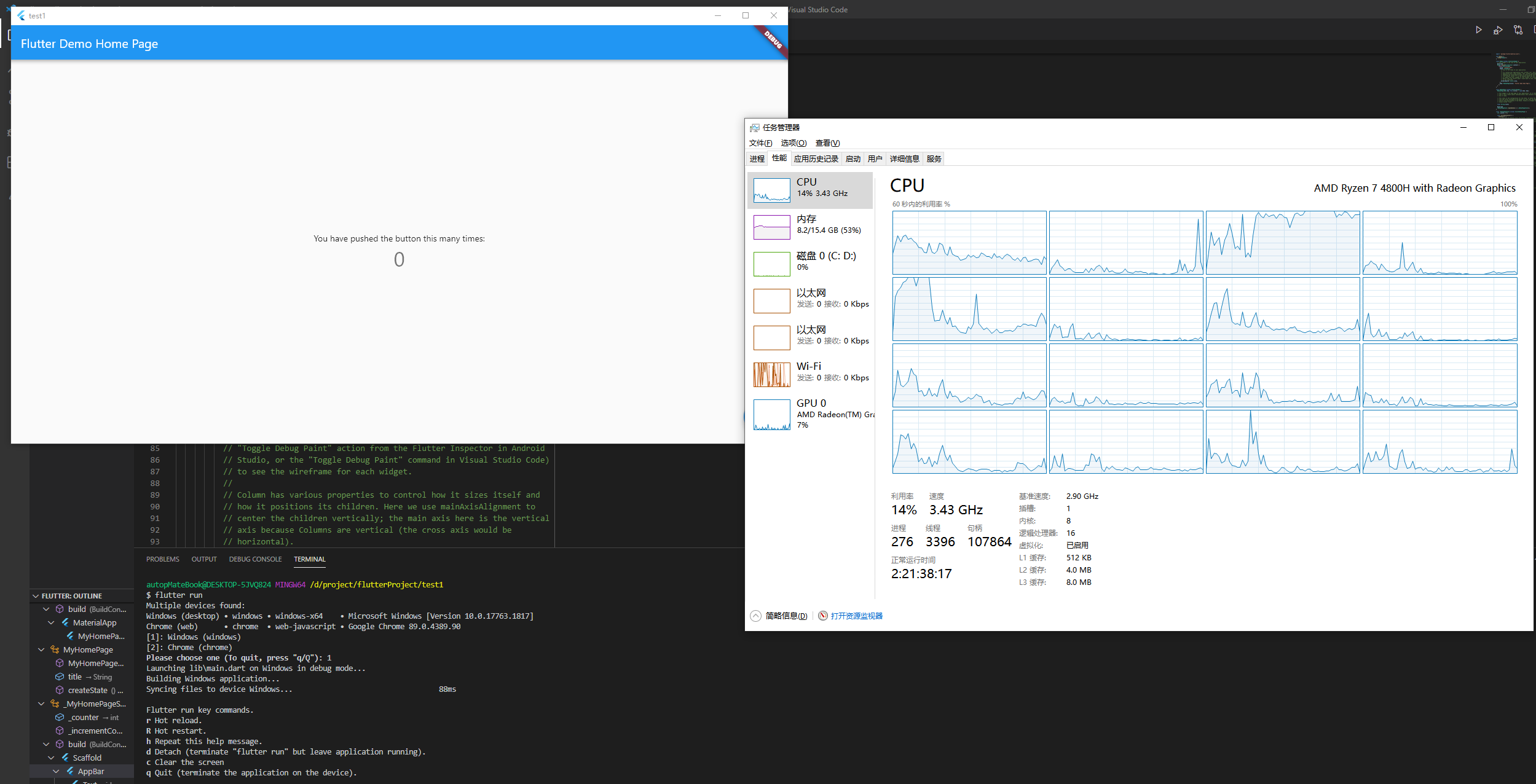
kill flutter app
flutter doctor -v
au-top commentedon Mar 28, 2021
It's the default application and it's static without a setState
I noticed that when I drag and drop the window to adjust its size, its occupancy will decrease,
Maybe it's the refresh of the screen?
inceptusp commentedon Mar 28, 2021
I've just noticed that my app is having the same issue... It is having a high CPU usage and it's a regression 'cause the same app built with an old version of Flutter does not use this much of CPU...
You can see in the above image by the app icon that it is the same app, but the 1st was built with the latest dev and the last was built with the last Flutter dev before Flutter 2... Both are doing the same thing (nothing, they are only open)...
TahaTesser commentedon Mar 29, 2021
Hi @au-top
Thanks for filing the issue, I can confirm the CPU spike as well and it drops right after killing the app. However, on
stable, I can't see any CPU spikeflutter doctor -v
[✓] Flutter (Channel master, 2.1.0-13.0.pre.294, on Microsoft Windows [Version 10.0.19042.870], locale en-US) • Flutter version 2.1.0-13.0.pre.294 at C:\Users\Taha\Code\flutter_master • Framework revision a603714610 (28 hours ago), 2021-03-28 03:54:02 -0700 • Engine revision b5e15d055d • Dart version 2.13.0 (build 2.13.0-162.0.dev) [✓] Android toolchain - develop for Android devices (Android SDK version 30.0.3) • Android SDK at C:\Users\Taha\Code\SDK • Platform android-30, build-tools 30.0.3 • ANDROID_HOME = C:\Users\Taha\Code\SDK • Java binary at: C:\Users\Taha\Code\android-studio\jre\bin\java • Java version OpenJDK Runtime Environment (build 1.8.0_242-release-1644-b01) • All Android licenses accepted. [✓] Chrome - develop for the web • Chrome at C:\Program Files\Google\Chrome\Application\chrome.exe [✓] Visual Studio - develop for Windows (Visual Studio Community 2019 16.9.2) • Visual Studio at C:\Program Files (x86)\Microsoft Visual Studio\2019\Community • Visual Studio Community 2019 version 16.9.31112.23 • Windows 10 SDK version 10.0.19041.0 [✓] Android Studio (version 4.1.0) • Android Studio at C:\Users\Taha\Code\android-studio • Flutter plugin can be installed from: :hammer: https://plugins.jetbrains.com/plugin/9212-flutter • Dart plugin can be installed from: :hammer: https://plugins.jetbrains.com/plugin/6351-dart • Java version OpenJDK Runtime Environment (build 1.8.0_242-release-1644-b01) [✓] VS Code (version 1.54.3) • VS Code at C:\Users\Taha\AppData\Local\Programs\Microsoft VS Code • Flutter extension version 3.20.0 [✓] Connected device (3 available) • Windows (desktop) • windows • windows-x64 • Microsoft Windows [Version 10.0.19042.870] • Chrome (web) • chrome • web-javascript • Google Chrome 89.0.4389.90 • Edge (web) • edge • web-javascript • Microsoft Edge 89.0.774.63[-]Windows CPU single core100% performance issues[/-][+][Windows] CPU single core usage spike to 100% [/+]9 remaining items
rydmike commentedon Apr 1, 2021
@au-top the link to the issue is of course: #78517
Taha wrote the "please" right after it so it does not open when you click on it, that is rather obvious of course.
The issue is the same on channels, beta, dev and was on master too, but when I now build on master I get totally unresponsive Windows apps, see #7949. (might be related to #78517 )
So @TahaTesser while on Windows desktop build issue, can you try #79498 as well? @darshankawar could not repeat it with his setup, can you please give it a shot as well?
@au-top If you have chance to triage it too, I would love to hear your findings as well. Moving this discussion over to it as I have something new regarding it I'm going to try.
knopp commentedon Apr 7, 2021
I was able to reproduce this. In my case, the platform thread is spinning constantly. The problem is in the windows event loop code:
next_flutter_event_timegets initialized toTimePoint::clock::now()and then always updated tonext_flutter_event_time = std::min(next_flutter_event_time, ProcessFlutterMessages());so it's not really increasing.However since flutter-team-archive/engine#24232 landed the whole
void RunLoop::Run()can be replaced withwhich in my case resolves the CPU load. Updating the Windows template should be relatively straightforward. I'm not sure what to do about migrating existing projects.
If you're getting high CPU load with master, try replacing
RunLoop::Run()in your windows app with the code above to see if it resolves the problem.The new Window embedder runloop, may require master channel!
The new Window embedder runloop, may require master channel!
au-top commentedon Apr 28, 2021
This solution perfectly solved my problem
But why isn't this solution incorporated into flutter
Is there such a PR?
knopp commentedon Apr 28, 2021
The PR to update window template landed yesterday. There is issue open for adding migration for existing projects.
The new Window embedder runloop, may require master channel!
github-actions commentedon Aug 2, 2021
This thread has been automatically locked since there has not been any recent activity after it was closed. If you are still experiencing a similar issue, please open a new bug, including the output of
flutter doctor -vand a minimal reproduction of the issue.