Repository navigation
[pointer_interceptor] Widget flickers when page rebuilt under pointer_interceptor #77369

Description

I am still having the same problems when using flutter widgets on top of HtmlElementView. I read the comments on issue #54027 and it looks like it is still a bug and the temporary fix is to use Pointer Interceptor. Is this still the case? It has been a while since the last comment and the bug report has been closed.
Metadata
Metadata
Assignees
Labels
issue is assigned to a domain expert for further triageFound to occur in 2.0The issue has been confirmed reproducible and is ready to work onA widget to prevent clicks from being swallowed by underlying HtmlElementViews on the webflutter/packages repository. See also p: labels.Web applications specifically
Activity
TahaTesser commentedon Mar 5, 2021
Hi @jeannelim
This has been turned into a package, check out #54027 (comment), not a temporary fix, hence the issue is closed
Closing, as this isn't an issue with Flutter itself. If you disagree, please write in the comments and I will reopen it.
Thank you
jeannelim commentedon Mar 5, 2021
Thanks for the clarification. I'm using the Pointer Interceptor package and it works on some cases and not in others. I tried to replicate it in a sample app. When MyHomePage is rebuilt, with the Pointer Interceptor the page flickers when the comment button appears and without the Pointer Interceptor the comment button just appears without any flickering. What would you suggest?
code snippet
TahaTesser commentedon Mar 9, 2021
Hi @jeannelim
Can you please provide your
flutter doctor -vand a complete reproducible minimal code sample including sample asset such as pdf hereThank you
jeannelim commentedon Mar 9, 2021
flutter doctor -v
[✓] Flutter (Channel stable, 2.0.1, on macOS 11.2.2 20D80 darwin-x64, locale
    en-CA)
    • Flutter version 2.0.1 at /Users/jeanne.lim/development/flutter
    • Framework revision c5a4b4029c (5 days ago), 2021-03-04 09:47:48 -0800
    • Engine revision 40441def69
    • Dart version 2.12.0

[✓] Android toolchain - develop for Android devices (Android SDK version 30.0.2)
    • Android SDK at /Users/jeanne.lim/Library/Android/sdk
    • Platform android-30, build-tools 30.0.2
    • Java binary at: /Applications/Android
      Studio.app/Contents/jre/jdk/Contents/Home/bin/java
    • Java version OpenJDK Runtime Environment (build
      1.8.0_242-release-1644-b3-6915495)
    • All Android licenses accepted.

[✓] Xcode - develop for iOS and macOS
    • Xcode at /Applications/Xcode.app/Contents/Developer
    • Xcode 12.4, Build version 12D4e
    • CocoaPods version 1.10.1

[✓] Chrome - develop for the web
    • Chrome at /Applications/Google Chrome.app/Contents/MacOS/Google Chrome

[✓] Android Studio (version 4.1)
    • Android Studio at /Applications/Android Studio.app/Contents
    • Flutter plugin can be installed from:
      🔨 https://plugins.jetbrains.com/plugin/9212-flutter
    • Dart plugin can be installed from:
      🔨 https://plugins.jetbrains.com/plugin/6351-dart
    • Java version OpenJDK Runtime Environment (build
      1.8.0_242-release-1644-b3-6915495)

[✓] Connected device (2 available)
    • iPad (8th generation) (mobile) • 526D8BD4-02C3-4B6E-8A78-78C44C883EB8 •
      ios            • com.apple.CoreSimulator.SimRuntime.iOS-14-4 (simulator)
    • Chrome (web)                   • chrome                               •
      web-javascript • Google Chrome 89.0.4389.82

• No issues found!
sample.pdf
jeannelim commentedon Mar 9, 2021
And the exact code in my main.dart:
code sample
TahaTesser commentedon Mar 10, 2021
Hi @jeannelim
Thanks for the complete code sample, I can reproduce
flickeringFAB withpointer_interceptor: ^0.9.0code sample
sample.pdf
flutter doctor -v
[✓] Flutter (Channel stable, 2.0.1, on macOS 11.2.3 20D91 darwin-x64, locale
    en-GB)
    • Flutter version 2.0.1 at /Users/tahatesser/Code/flutter_stable
    • Framework revision c5a4b4029c (6 days ago), 2021-03-04 09:47:48 -0800
    • Engine revision 40441def69
    • Dart version 2.12.0

[✓] Android toolchain - develop for Android devices (Android SDK version 30.0.3)
    • Android SDK at /Volumes/Extreme/SDK
    • Platform android-30, build-tools 30.0.3
    • ANDROID_HOME = /Volumes/Extreme/SDK
    • Java binary at: /Applications/Android
      Studio.app/Contents/jre/jdk/Contents/Home/bin/java
    • Java version OpenJDK Runtime Environment (build
      1.8.0_242-release-1644-b3-6915495)
    • All Android licenses accepted.

[✓] Xcode - develop for iOS and macOS
    • Xcode at /Volumes/Extreme/Xcode.app/Contents/Developer
    • Xcode 12.4, Build version 12D4e
    • CocoaPods version 1.10.1

[✓] Chrome - develop for the web
    • Chrome at /Applications/Google Chrome.app/Contents/MacOS/Google Chrome

[✓] Android Studio (version 4.1)
    • Android Studio at /Applications/Android Studio.app/Contents
    • Flutter plugin can be installed from:
      🔨 https://plugins.jetbrains.com/plugin/9212-flutter
    • Dart plugin can be installed from:
      🔨 https://plugins.jetbrains.com/plugin/6351-dart
    • Java version OpenJDK Runtime Environment (build
      1.8.0_242-release-1644-b3-6915495)

[✓] VS Code (version 1.54.1)
    • VS Code at /Applications/Visual Studio Code.app/Contents
    • Flutter extension version 3.20.0

[✓] Connected device (3 available)
    • Taha’s iPad (mobile) • 00008020-000255113EE8402E • ios            • iOS
      14.4.1
    • macOS (desktop)      • macos                     • darwin-x64     • macOS
      11.2.3 20D91 darwin-x64
    • Chrome (web)         • chrome                    • web-javascript • Google
      Chrome 89.0.4389.82
    ! Error: Taha’s iPad is busy: Copying cache files from device. Xcode will
      continue when Taha’s iPad is finished. (code -10)

• No issues found!
Thanks for filing the issue!
9 remaining items
ditman commentedon Mar 11, 2021
This is most likely related to #71888; @jeannelim can you take a look at 71888 and see if it seems familiar?
jeannelim commentedon Mar 12, 2021
No, I don't think it's the same issue.
My problem is using Pointer Interceptor when the state changes. Originally in my sample code I have this
so when _counter == 2 the page would flicker because of the Pointer Interceptor. But if I move the condition to the child it doesn't flicker anymore.
So it's like the Pointer Interceptor has to be built on the first build. Does that make sense?
gib40f commentedon Apr 7, 2021
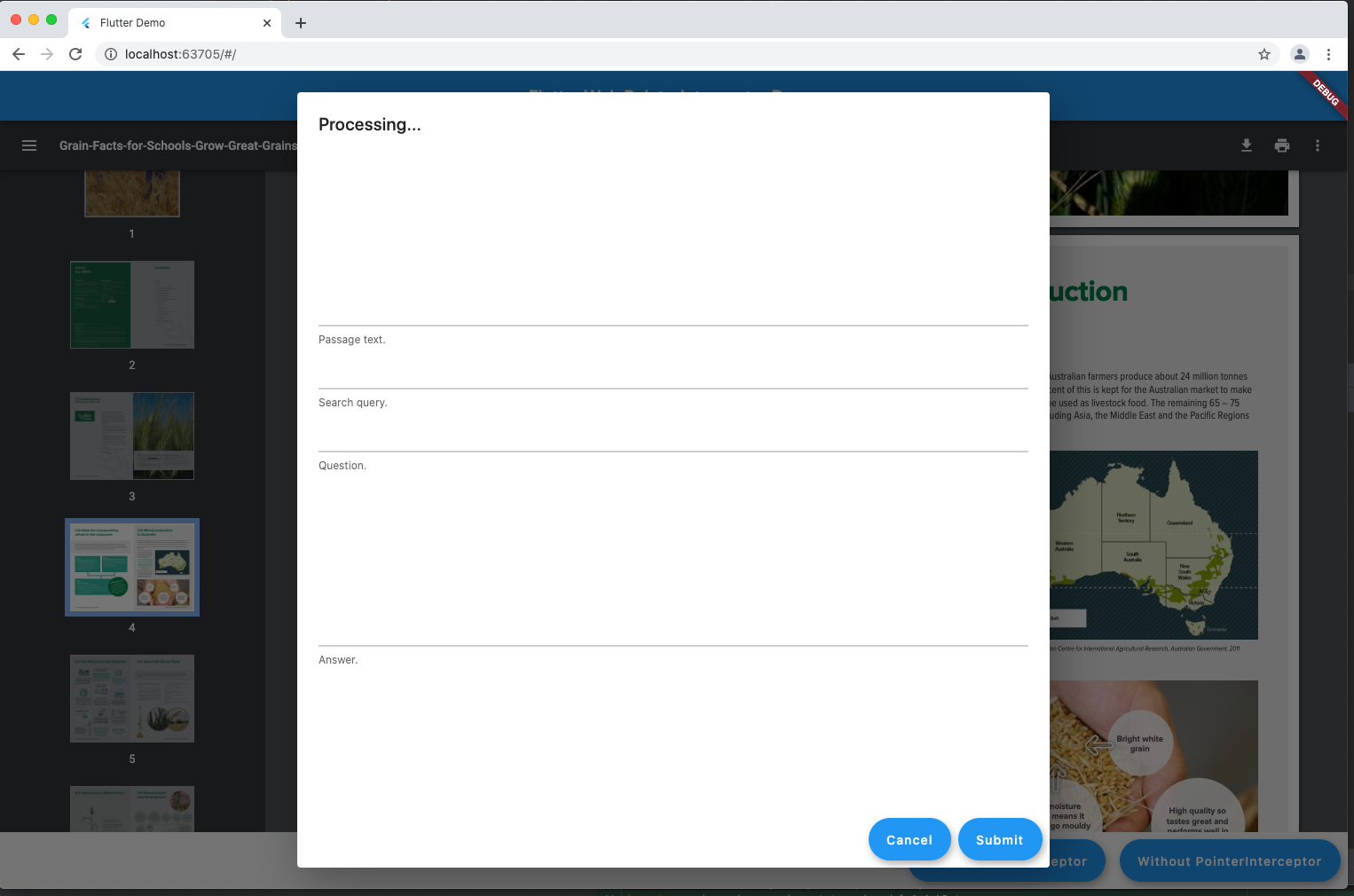
I am seeing a similar issue. I have a PDF being rendered and I am showing an AlertDialog. If I wrap the AlertDialog with PointerInterceptor I can click on fields and buttons but when the AlertDialog is shown it does a "load" on the PDF viewer inside the HtmlElementView and re-renders it at the beginning of the PDF document.
If I don't wrap with PointerInterceptor it doesn't do a load again and remains at same position but I can't click on buttons and fields in the AlertDialog.
ditman commentedon Apr 7, 2021
@gib40f can you minimally reproduce the issue (in a new flutter issue?). I'm currently working in rendering HtmlElementViews in a way that shouldn't reload, and the more test cases, the better!
gib40f commentedon Apr 7, 2021
ditman commentedon Apr 15, 2021
I've started working on this, please track progress here: #80524
ditman commentedon Apr 19, 2021
@gib40f it seems that your platform view is not being rendered underneath the bottom bar.
In the example that you produced there's no need for the pointer interceptor. It is only required when the buttons are OVERLAID on top of the HtmlElementView (think of a Stacked widget, is the most extreme case of this)
This is what your app looks like, in
htmlrender mode, in the chrome devtools:(Note how the iframe is not being rendered underneath the bottom bar, you can also see that the scrollbars from the iframe are correctly positioned at the bottom, and not being occluded by the bottom bar)
ditman commentedon Apr 19, 2021
@jeannelim I'm sorry, I remember writing a response to your question, but I must have forgotten to hit Comment.
I've checked your app again, and I've confirmed that what's reloading is the PDF preview. It also happens if you resize the browser window.
This is directly related to #71888 (I've verified it working with the fix from #80524). The only change I had to made was to ensure that the
PointerInterceptoronly wrapped theFloatingActionButton, and not the wholeCenterwidget, like so:Otherwise, the PointerInterceptor would cover the whole screen (and stop the interaction with the PDF preview, for example).
(I've also changed the src of
MyHtmlViewto beassets/assets/sample.pdfbefore deployment so I don't have to mess with asset URL resolution)Complete main.dart here
I've uploaded a built version of the app here:
https://dit-flickering-fab.web.app
If you can give it a shot, and let me know if it works as expected to you, that'd be awesome so this ticket can stay closed :)
Again, apologies for the late reply!
gib40f commentedon Apr 19, 2021
In relation to the simple demo app I might need to clarify. When you click the buttons an alert dialog is shown and that is when the PDF was being re-rendered. One button wraps it with pointer_interceptor and the other doesn't, showing different behaviour.
ditman commentedon Apr 19, 2021
@gib40f ahhh, I misunderstood, I thought it was the two buttons in the first page. My apologies. Let me verify again with the experimental engine I'm building!
ditman commentedon Apr 19, 2021
@gib40f here's the deployed version of your demo app with the experimental engine applied, the PDF is not reloading anymore:
https://dit-grain-pdf-reload.web.app
(Note that "Without PointerInterceptor" is letting mouse events go through the modal and into the PDF (mouse scroll wheel, will move the position of the PDF, and clicks will go through), so I'd say in this case, the preferred way of showing this modal is always With PointerInterceptor.)
The only modification I had to do to your code is just to ensure the iframe has a 100% height/width so it fills the allocated space by the framework:
github-actions commentedon Aug 2, 2021
This thread has been automatically locked since there has not been any recent activity after it was closed. If you are still experiencing a similar issue, please open a new bug, including the output of
flutter doctor -vand a minimal reproduction of the issue.