Skip to content

Strange behavior in showTimePicker dialog in keyboard input mode #74018

Closed
flutter/packages
#13033

Description

@jongkb

A user of my app who has a Samsung Galaxy S20 FE (Android 11) is reporting that the showTimePicker input dialog is behaving strangely. The locale is English (United Kingdom). In keyboard entry mode, the input dialog is not accepting what should be a valid 24-hour time. A validation error message "Enter a valid time" is shown when pressing OK button for hours 13 to 23 (pm time). For am hours though, the input was accepted. Dial time picker entry mode seems to be working correctly.
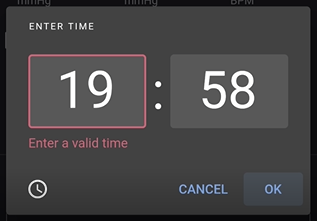
timepicker

I have asked the user to download the Flutter Gallery app and try out the demo time picker. The results were the same i.e. validation failed for hours 13 to 23 in keyboard mode.

The issue is not reproducible on the Android 11 emulator and on my Android 10 Mi A2 phone. I wonder if this issue only affects certain Android 11 devices (e.g. Samsung Galaxy S20 FE), or if there is a conflicting setting on the device.

Steps to Reproduce

  1. Language on device is set to English (United Kingdom).
  2. Launch Flutter Gallery app.
  3. Navigate to Material > Pickers > Time Picker.
  4. Open the time picker.
  5. Dial the time to a pm time e.g. 20:00. Tap the keyboard icon to switch to keyboard input mode.
  6. The keyboard entry dialog appears, showing 20:00; Tap OK without touching the time boxes.

Expected results:
Time accepted on pressing OK. Dialog is closed.

Actual results:
Enter a valid time validation error message in red appears (even though 20:00 is a valid 24-hour time). Dialog remains opened. Tapping on the input text box to edit causes the app to crash/close.

Note: In the case of my app, the time picker did not crash the app (probably due to different Flutter SDK version?). My app in production is running on Flutter 1.22.3 stable.

Activity

  1. darshankawar commented on Jan 15, 2021

    @darshankawar
    Member

    @jongkb
    Is there a way to confirm if this is only happening in Flutter Gallery app and on S20 ?
    Although I don't have the said device and on Emulator 11 didn't see the issue:

    Screenshot 2021-01-15 at 4 58 43 PM

    Is it possible to reach out to the user with below sample code (demo app) and ask them to try it to see if issue persists ?

    code sample
    @override
      Widget build(BuildContext context) {
        return Scaffold(
          appBar: AppBar(
            title: Text(widget.title),
          ),
          body: Center(
            child: GestureDetector(
                onTap: () async {
                  TimeOfDay picked = await showTimePicker(
                    context: context,
                    initialTime: TimeOfDay.now(),
                    builder: (BuildContext context, Widget child) {
                      return MediaQuery(
                        data: MediaQuery.of(context)
                            .copyWith(alwaysUse24HourFormat: true),
                        child: child,
                      );
                    },);
                },
                child: Text("SetTime",textAlign: TextAlign.center,))
          ),
        );
      }


  2. added
    in triagePresently being triaged by the triage team
    waiting for responseThe Flutter team cannot make further progress on this issue until the original reporter responds
    on Jan 15, 2021
  3. jongkb commented on Jan 16, 2021

    @jongkb
    Author

    @darshankawar
    I'm finally able to reproduce the odd behavior in the time picker on the Android 11 emulator and my own phone. This doesn't look like a Galaxy S20 FE specific issue after all.

    The issue can be reproduced under the following conditions:

    1. Language settings set to a locale which inherently uses 24-hour time format (e.g. English (United Kingdom) - en_GB)
    2. Set the Use locale default and Use 24-hour format options to off in the Date & time settings of the device.
      timeformat
      This essentially sets the alwaysUse24HourFormat property of Flutter's MediaQuery to false.

    The sample code workaround fixes the validation issue. Hopefully this can be addressed at the framework level but with that said, there seems to be a more fundamental issue. With the 24-hour format turned off in Settings, the Flutter time picker UI still presents itself as 24-hour clock instead of a 12-hour clock (with AM/PM).

    To confirm what should be the "standard" UI behavior, I noticed that when setting alarm in the native Clock app, the clock indeed switches to 12-hour format when 24-hour format is turned off in Settings.

  4. removed
    waiting for responseThe Flutter team cannot make further progress on this issue until the original reporter responds
    on Jan 16, 2021
  5. changed the title [-]Strange behavior in showTimePicker dialog in keyboard input mode on Samsung Galaxy S20 FE[/-] [+]Strange behavior in showTimePicker dialog in keyboard input mode[/+] on Jan 16, 2021
  6. darshankawar commented on Jan 18, 2021

    @darshankawar
    Member

    @jongkb
    Thanks for digging deep into this issue. I tried the suggested settings in emulator and sample code.

    Screenshot 2021-01-18 at 12 03 33 PM

    Screenshot 2021-01-18 at 12 03 47 PM

    Although I am unable to replicate the issue, keeping this issue open for further analysis.

    stable flutter doctor -v
    [✓] Flutter (Channel stable, 1.22.5, on Mac OS X 10.15.4 19E2269 darwin-x64,
        locale en-IN)
        • Flutter version 1.22.5 at /Users/dhs/documents/Fluttersdk/flutter
        • Framework revision 7891006299 (5 weeks ago), 2020-12-10 11:54:40 -0800
        • Engine revision ae90085a84
        • Dart version 2.10.4
    
     
    [✓] Android toolchain - develop for Android devices (Android SDK version 30.0.0)
        • Android SDK at /Users/dhs/Library/Android/sdk
        • Platform android-30, build-tools 30.0.0
        • Java binary at: /Applications/Android
          Studio.app/Contents/jre/jdk/Contents/Home/bin/java
        • Java version OpenJDK Runtime Environment (build
          1.8.0_242-release-1644-b3-6915495)
        • All Android licenses accepted.
    
    [✓] Xcode - develop for iOS and macOS (Xcode 12.3)
        • Xcode at /Applications/Xcode.app/Contents/Developer
        • Xcode 12.3, Build version 12C33
        • CocoaPods version 1.9.3
    
    [!] Android Studio (version 4.1)
        • Android Studio at /Applications/Android Studio.app/Contents
        ✗ Flutter plugin not installed; this adds Flutter specific functionality.
        ✗ Dart plugin not installed; this adds Dart specific functionality.
        • Java version OpenJDK Runtime Environment (build
          1.8.0_242-release-1644-b3-6915495)
    
    [✓] VS Code (version 1.52.1)
        • VS Code at /Applications/Visual Studio Code.app/Contents
        • Flutter extension version 3.16.0
    
    [✓] Connected device (1 available)
        • sdk gphone x86 64 arm64 (mobile) • emulator-5554 • android-x64 • Android
          11 (API 30) (emulator)
    
    ! Doctor found issues in 1 category.
    
    
  7. added
    p: material_uimaterial_ui package in flutter/packages
    frameworkflutter/packages/flutter repository. See also f: labels.
    platform-androidAndroid applications specifically
    and removed
    in triagePresently being triaged by the triage team
    on Jan 18, 2021
  8. Ham3D commented on Apr 28, 2021

    @Ham3D

    I have the same bug, I'm on the latest flutter version.
    do I need to provide more data?

  9. kindaniel commented on May 26, 2021

    @kindaniel

    This bug still continues. Apparently Flutter should get the time format information to use in the time picker using the OS configuration and not the app's location. Because we can have people who are in a location that the default is 24hrs, however, they set it as the default to be used as 12hrs.

  10. 4 remaining items

  11. added
    fyi-frameworkFor the attention of Framework team
    and removed
    team-androidOwned by Android platform team
    p: material_uimaterial_ui package in flutter/packages
    on Aug 3, 2023
  12. added
    team-designOwned by Design Languages team
    and removed
    fyi-frameworkFor the attention of Framework team
    on Aug 8, 2023
  13. added
    a: internationalizationSupporting other languages or locales. (aka i18n)
    P2Important issues not at the top of the work list
    triaged-designTriaged by Design Languages team
    on Aug 9, 2023
  14. github-actions commented on Oct 20, 2026

    @github-actions

    This thread has been automatically locked since there has not been any recent activity after it was closed. If you are still experiencing a similar issue, please open a new bug, including the output of flutter doctor -v and a minimal reproduction of the issue.

  15. locked as resolved and limited conversation to collaborators on Oct 20, 2026
Sign up for free to join this conversation on GitHub. Already have an account? Sign in to comment

Metadata

Metadata

Assignees

No one assigned

    Labels

    P2Important issues not at the top of the work lista: internationalizationSupporting other languages or locales. (aka i18n)f: date/time pickerDate or time picker widgetsframeworkflutter/packages/flutter repository. See also f: labels.platform-androidAndroid applications specificallyteam-designOwned by Design Languages teamtriaged-designTriaged by Design Languages team

    Type

    No type

    Projects

    No projects

      Milestone

      No milestone

      Relationships

      None yet

      Development

      No branches or pull requests

      Issue actions