Repository navigation
ubuntu desktop app leaks memory #73402
Description

Details
**Target Platform: linux
**Target OS version/browser: ubuntu18.04
**Devices:
flutter doctor:
Doctor summary (to see all details, run flutter doctor -v):
[✓] Flutter (Channel master, 1.26.0-2.0.pre.179, on Linux, locale en_US.UTF-8)
[✗] Android toolchain - develop for Android devices
    ✗ Unable to locate Android SDK.
      Install Android Studio from: https://developer.android.com/studio/index.html
      On first launch it will assist you in installing the Android SDK components.
      (or visit https://flutter.dev/docs/get-started/install/linux#android-setup for detailed instructions).
      If the Android SDK has been installed to a custom location, please use
      `flutter config --android-sdk` to update to that location.

[✓] Chrome - develop for the web
[✓] Linux toolchain - develop for Linux desktop
[!] Android Studio (not installed)
[✓] VS Code (version 1.51.1)
[✓] Proxy Configuration
[✓] Connected device (2 available)

! Doctor found issues in 2 categories.
flutter ubuntu desktop app comsumes too much memory, and may leaks memory.
build a profile app, and run it.
flutter create app1
cd app1
flutter build linux --profile
./build/linux/profile/bundle/app1
use top to watch this app.
top -p pid

RES: ~80M
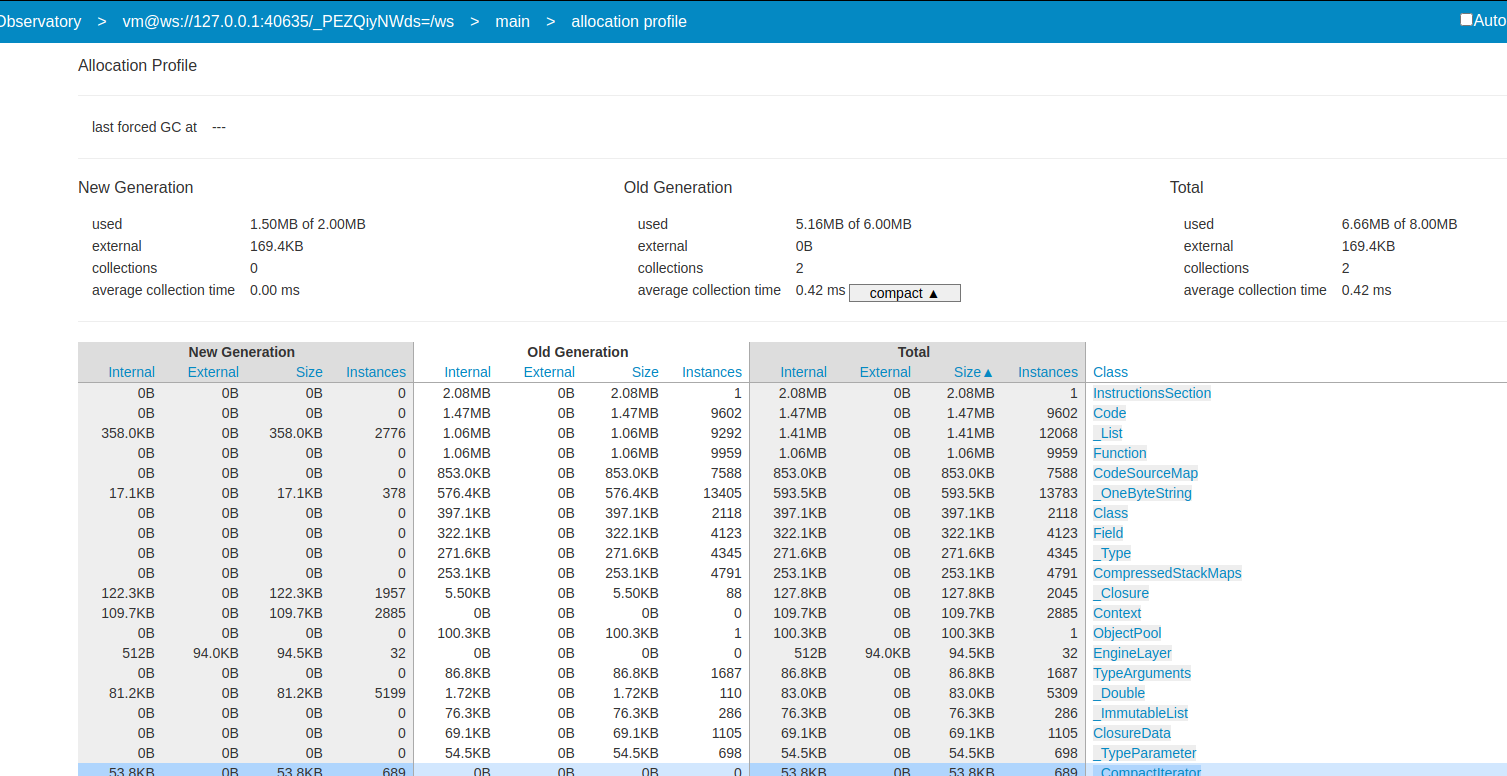
open the Observatory's allocation-profiler:
click the btn in flutter app:
the top shows:

RES: ~100M
the Observatory's allocation-profiler:
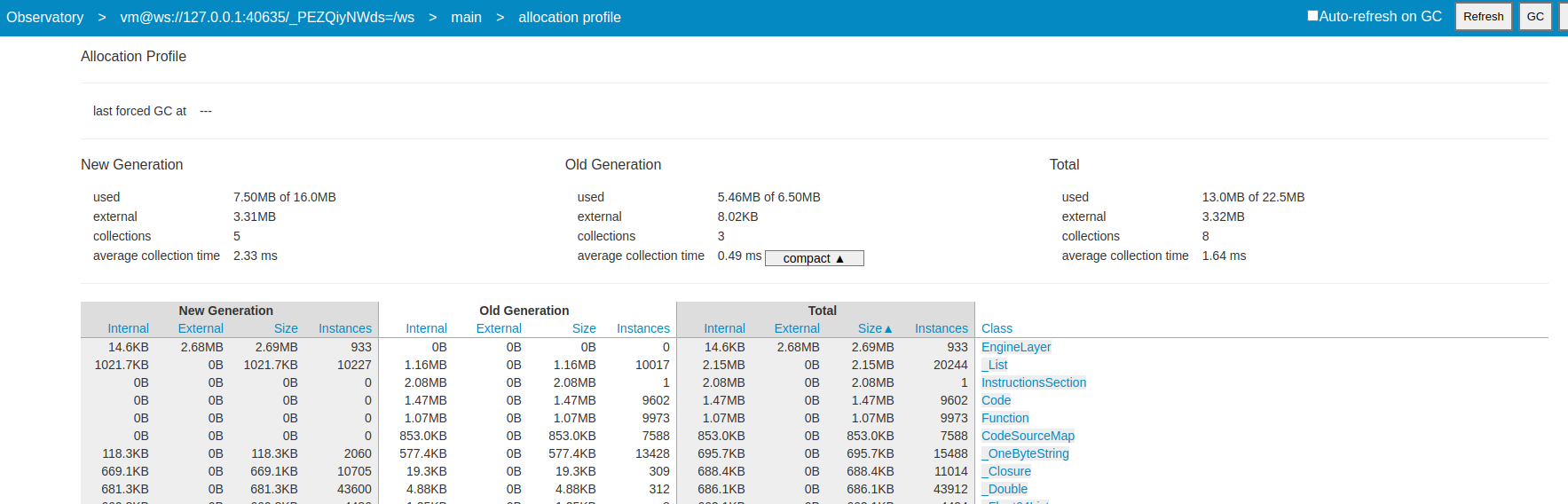
trigger gc in Observatory's allocation-profiler:

the top shows:

RES: ~100M
The above demonstrates that flutter app's RES grows and never decrease.
Logs
Logs
Reacted by Pablo Jiménez Pascual, Hillel Coren and Jean-Claude Viau
Activity
TahaTesser commentedon Jan 6, 2021
Hi @caijw
Thanks for filing the issue
Tasks:   1 total,   0 running,   1 sleeping,   0 stopped,   0 zombie
%Cpu(s):  4.1 us,  1.6 sy,  0.0 ni, 94.3 id,  0.0 wa,  0.0 hi,  0.0 si,  0.0 st
MiB Mem :  15927.4 total,   6787.0 free,   2452.9 used,   6687.6 buff/cache
MiB Swap:   4095.5 total,   4095.5 free,      0.0 used.  13018.9 avail Mem

    PID USER      PR  NI    VIRT    RES    SHR S  %CPU  %MEM     TIME+ COMMAND
   8364 taha      20   0 1122844 176376  85752 S   0.0   1.1   0:03.64 triage
flutter doctor -v
[✓] Flutter (Channel master, 1.26.0-2.0.pre.200, on Linux, locale en_US.UTF-8)
    • Flutter version 1.26.0-2.0.pre.200 at /home/taha/Code/flutter_master
    • Framework revision d0e9959a46 (10 hours ago), 2021-01-05 22:14:03 -0500
    • Engine revision e115066dcd
    • Dart version 2.12.0 (build 2.12.0-179.0.dev)

[✗] Android toolchain - develop for Android devices
    ✗ ANDROID_HOME = /home/taha/Code/sdk
      but Android SDK not found at this location.

[✓] Chrome - develop for the web
    • Chrome at google-chrome

[✓] Linux toolchain - develop for Linux desktop
    • Ubuntu clang version 11.0.0-2
    • cmake version 3.16.3
    • ninja version 1.10.0
    • pkg-config version 0.29.2

[!] Android Studio (not installed)
    • Android Studio not found; download from https://developer.android.com/studio/index.html
      (or visit https://flutter.dev/docs/get-started/install/linux#android-setup for detailed instructions).

[✓] VS Code (version 1.52.0)
    • VS Code at /usr/share/code
    • Flutter extension version 3.17.0

[✓] Connected device (2 available)
    • Linux (desktop) • linux  • linux-x64      • Linux
    • Chrome (web)    • chrome • web-javascript • Google Chrome 87.0.4280.88

! Doctor found issues in 2 categories.
Thank you
caijw commentedon Jan 6, 2021
I use valgrind to detect the memory leak.
The result shows:
full valgrind outputs:
valgrind.log
The result shows that there is definitely memory leaking.
It seems that There are up to 3M memory leak. But why the process's RES grows so quickly?
jonahwilliams commentedon Jan 6, 2021
I don't think the observatory gc button is functional. You're also running a profile mode which still has a debugger attached
caijw commentedon Jan 7, 2021
@jonahwilliams the new generation's memory is freed,so i think the observatory gc button is functional.
By the way, i test a release app, the process's RES grows too.
launch:
click btn:
Is flutter app trying to consume as much memory as possible?
stuartmorgan-g commentedon Feb 20, 2022
huycozy commentedon Apr 19, 2024
The issue persists on the latest Flutter stable/master channels.
flutter doctor -v (stable & master)
[✓] Flutter (Channel stable, 3.19.6, on Ubuntu 22.04.3 LTS 6.5.0-26-generic, locale en_US.UTF-8) • Flutter version 3.19.6 on channel stable at /home/huynq/Documents/Working/flutter • Upstream repository https://github.com/flutter/flutter.git • Framework revision 54e66469a9 (2 days ago), 2024-04-17 13:08:03 -0700 • Engine revision c4cd48e186 • Dart version 3.3.4 • DevTools version 2.31.1 [✓] Android toolchain - develop for Android devices (Android SDK version 34.0.0-rc3) • Android SDK at /home/huynq/Android/Sdk/ • Platform android-33, build-tools 34.0.0-rc3 • Java binary at: /snap/android-studio/current/jbr/bin/java • Java version OpenJDK Runtime Environment (build 17.0.9+0-17.0.9b1087.7-11185874) • All Android licenses accepted. [✓] Chrome - develop for the web • Chrome at google-chrome [✓] Linux toolchain - develop for Linux desktop • Ubuntu clang version 14.0.0-1ubuntu1.1 • cmake version 3.22.1 • ninja version 1.10.1 • pkg-config version 0.29.2 [✓] Android Studio (version 2021.1) • Android Studio at /home/huynq/Documents/android-studio • Flutter plugin version 67.0.1 • Dart plugin version 211.7817 • Java version OpenJDK Runtime Environment (build 11.0.11+0-b60-7590822) [!] Android Studio (version unknown) • Android Studio at /snap/android-studio/current • Flutter plugin can be installed from: 🔨 https://plugins.jetbrains.com/plugin/9212-flutter • Dart plugin can be installed from: 🔨 https://plugins.jetbrains.com/plugin/6351-dart ✗ Unable to determine Android Studio version. • android-studio-dir = /snap/android-studio/current • Java version OpenJDK Runtime Environment (build 17.0.9+0-17.0.9b1087.7-11185874) [✓] VS Code (version 1.84.2) • VS Code at /usr/share/code • Flutter extension version 3.86.0 [✓] VS Code (version 1.88.1) • VS Code at /snap/code/current/usr/share/code • Flutter extension version 3.86.0 [✓] Connected device (2 available) • Linux (desktop) • linux • linux-x64 • Ubuntu 22.04.3 LTS 6.5.0-26-generic • Chrome (web) • chrome • web-javascript • Google Chrome 120.0.6099.199 [✓] Network resources • All expected network resources are available. ! Doctor found issues in 1 category.flutter-triage-bot commentedon Jun 6, 2024
The
triaged-desktoplabel is irrelevant if there is noteam-desktoplabel orfyi-desktoplabel.shbae-musma commentedon Aug 31, 2026
I am seeing what appears to be the same class of issue in a production Flutter Linux HMI: the process RSS and native anonymous memory grow continuously while the Dart heap remains stable.
Summary
The application receives real-time some data and updates its UI approximately once per second. The growth is primarily in
Anonymous/Private_Dirty, not the Dart heap. Explicit GC in DevTools can reduce memory substantially, but there is no supported way to request GC in a release application.The issue is much more pronounced on Raspberry Pi 5 / Linux ARM64 than on Ubuntu x86_64.
Long-running comparison
We built the same application source in Flutter Linux release mode and recorded
/proc/<pid>/smaps_rolluponce per minute.The first 10 minutes were excluded from the linear regressions.
The last 12-hour slopes were also still positive:
Anonymous +4.97 MB/hAnonymous +0.43 MB/hOn the Raspberry Pi, average anonymous memory increased from approximately
114.8 MBduring the first measured 30 minutes to427.1 MBduring the final 30 minutes. On x86_64 it increased from approximately78.8 MBto114.3 MB.At the end of both tests:
015on ARM64,14on x86_64)61)This suggests that the growth is not caused by accumulating threads, file descriptors, socket connections, or an unbounded Flutter image cache.
Isolation tests already performed
We have spent several weeks reducing the application and testing individual paths:
Anonymousapproximately+0.01 MB/hin the final hour).notifyListeners()once per second: growth reproduced on Raspberry Pi (approximately+2.1 MB/hin that reduced test).The strongest split test was:
Current interpretation
This looks like native memory accumulation associated with repeated Flutter Linux rendering/rebuild work. It may involve the Flutter engine, GTK/Linux embedder, graphics stack, or the native allocator. The effect exists on x86_64 but is amplified by roughly 10x on Raspberry Pi 5 ARM64.
This resembles the behavior reported in this issue: RSS/native memory grows while Dart GC and heap analysis do not account for the retained process memory. It may also be related in symptoms to #189756, although that report is for Android ARM64 and a high-frequency
CustomPainter/ paragraph repaint workload.