Default tooltip style is no longer legible on Windows in web and desktop builds #71052

Description

Steps to Reproduce
Flutter version 1.24.x and later break past default tooltip style for Web and Desktop builds.
Expected results
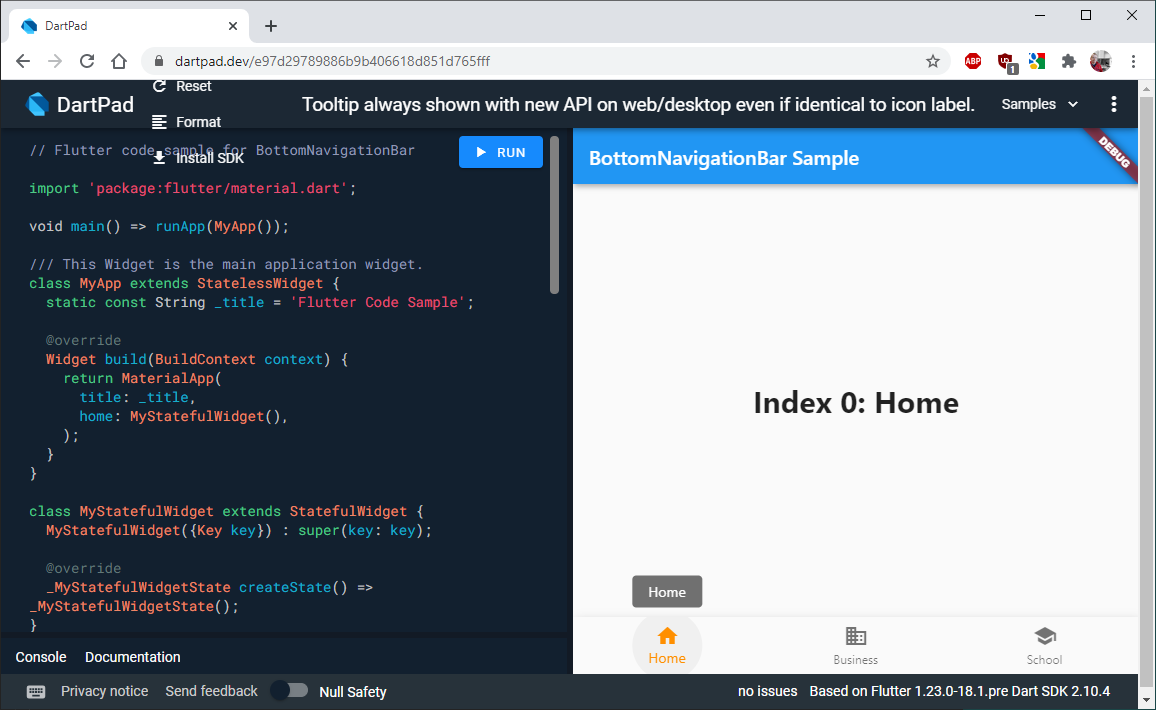
In earlier Flutter versions, tooltips had a default style that looked different from more recent Flutter releases.
For example in Web DartPad based on version '1.23.0-18.1.pre Dart SDK 2.10.4' default tooltips looked like this (still did when this was posted, if DartPad version is upgraded later, it might be broken too when the live link is tried further below):
Actual results
In newer versions, e.g. Channel beta, 1.24.0-10.2.pre or higher the default tooltips style now look like this on Web (and Desktop):
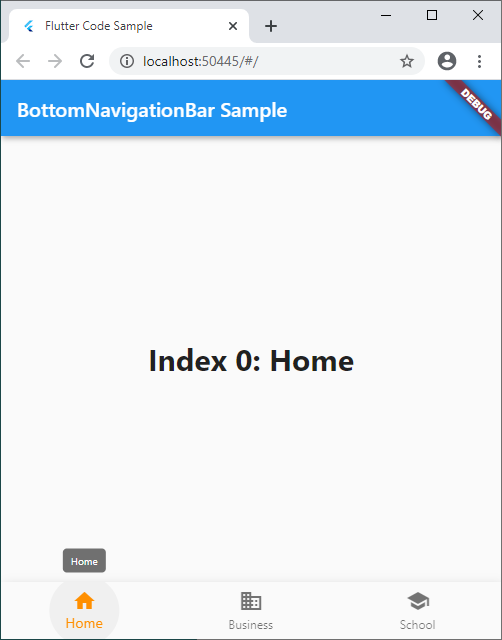
The same breaking default tooltip style change also applies to Web and Desktop builds on channels dev and master.
To illustrate the difference more clearly, here is the older default style on web/desktop and the new default style on web/desktop, side by side:

The broken new style on Web and Desktop uses a default font size that is barely legible. It is a bit difficult to see the rationale of why this new style is preferred over the old one. Perhaps it is a bug?
Sample code: https://gist.github.com/rydmike/e97d29789886b9b406618d851d765fff
Try in DartPad here: https://dartpad.dev/e97d29789886b9b406618d851d765fff
Summary
The default style for tooltips on Web and Desktop has been broken.
Flutter doctor
``` flutter doctor -v [√] Flutter (Channel beta, 1.24.0-10.2.pre, on Microsoft Windows [Version 10.0.18363.1139], locale en-US) • Flutter version 1.24.0-10.2.pre at C:\Users\mryds\fvm\versions\beta • Framework revision 022b333 (4 days ago), 2020-11-18 11:35:09 -0800 • Engine revision 07c1eed46b • Dart version 2.12.0 (build 2.12.0-29.10.beta)[√] Android toolchain - develop for Android devices (Android SDK version 29.0.1)
• Android SDK at C:\Users\mryds\AppData\Local\Android\sdk
• Platform android-30, build-tools 29.0.1
• Java binary at: C:\Program Files\Android\Android Studio\jre\bin\java
• Java version OpenJDK Runtime Environment (build 1.8.0_242-release-1644-b01)
• All Android licenses accepted.
[√] Chrome - develop for the web
• Chrome at C:\Program Files (x86)\Google\Chrome\Application\chrome.exe
[√] Android Studio (version 4.1.0)
• Android Studio at C:\Program Files\Android\Android Studio
• Flutter plugin can be installed from:
https://plugins.jetbrains.com/plugin/9212-flutter
• Dart plugin can be installed from:
https://plugins.jetbrains.com/plugin/6351-dart
• Java version OpenJDK Runtime Environment (build 1.8.0_242-release-1644-b01)
[√] IntelliJ IDEA Community Edition (version 2020.2)
• IntelliJ at C:\Program Files\JetBrains\IntelliJ IDEA Community Edition 2018.3.1
• Flutter plugin version 51.0.3
• Dart plugin version 202.8070
[√] VS Code (version 1.51.1)
• VS Code at C:\Users\mryds\AppData\Local\Programs\Microsoft VS Code
• Flutter extension version 3.16.0
[√] Connected device (5 available)
• Nexus 7 (mobile) • 0a99f5e8 • android-arm • Android 6.0.1 (API 23)
• sdk gphone x86 64 arm64 (mobile) • emulator-5554 • android-x64 • Android 11 (API 30) (emulator)
• Web Server (web) • web-server • web-javascript • Flutter Tools
• Chrome (web) • chrome • web-javascript • Google Chrome 86.0.4240.198
• Edge (web) • edge • web-javascript • Microsoft Edge 87.0.664.41
• No issues found!
</details>