Repository navigation
[macos] Crash when requesting speech permission when running from VS Code #70374
Description

I had a crash issue when run on mac app. This issue happended 100% on debug & release mode
This is the minimal test project
I just create a project with flutter create speech_test and setup platform channel.
The issue happens in mac os platform channel when I asking speech permission on this line:
SFSpeechRecognizer.requestAuthorization()
Logs
flutter run --v
{"CFBundleName":"speech_test","DTXcode":"1210","DTSDKName":"macosx10.15","NSHumanReadableCopyright":"Copyright © 2020
com.example. All rights
reserved.","DTSDKBuild":"19G68","CFBundleDevelopmentRegion":"en","CFBundleVersion":"1","BuildMachineOSBuild":"19H2","NS
PrincipalClass":"NSApplication","CFBundleIconName":"AppIcon","CFBundlePackageType":"APPL","CFBundleIconFile":"AppIcon",
"CFBundleSupportedPlatforms":["MacOSX"],"DTPlatformName":"macosx","CFBundleShortVersionString":"1.0.0","NSMainNibFile":
"MainMenu","CFBundleInfoDictionaryVersion":"6.0","CFBundleExecutable":"speech_test","DTCompiler":"com.apple.compilers.l
lvm.clang.1_0","CFBundleIdentifier":"com.example.speechTest","DTPlatformVersion":"10.15.6","DTXcodeBuild":"12A7403","LS
MinimumSystemVersion":"10.15","DTPlatformBuild":"12A7403","NSSpeechRecognitionUsageDescription":"App needs to access
speech"}
[+3280 ms] Observatory URL on device: http://127.0.0.1:52507/akuZ6vCfY4w=/
[   +9 ms] Caching compiled dill
[ +155 ms] Connecting to service protocol: http://127.0.0.1:52507/akuZ6vCfY4w=/
[   +2 ms] Launching a Dart Developer Service (DDS) instance at http://127.0.0.1:0, connecting to VM service at
http://127.0.0.1:52507/akuZ6vCfY4w=/.
[ +300 ms] DDS is listening at http://127.0.0.1:52509/29R3AcOpmrs=/.
[ +110 ms] Successfully connected to service protocol: http://127.0.0.1:52507/akuZ6vCfY4w=/
[        ] Waiting for macOS to report its views...
[   +8 ms] Waiting for macOS to report its views... (completed in 7ms)
[  +14 ms] DevFS: Creating new filesystem on the device (null)
[  +21 ms] DevFS: Created new filesystem on the device
(file:///var/folders/11/wq1vn8yd2739xsmmzbq3m06w0000gn/T/com.example.speechTest/speech_testyBCWdV/speech_test/)
[   +2 ms] Updating assets
[ +115 ms] Syncing files to device macOS...
[   +2 ms] <- reset
[        ] Compiling dart to kernel with 0 updated files
[   +3 ms] <- recompile package:speech_test/main.dart 74867277-0531-4bf0-9ce9-1b8ac3ec4b54
[        ] <- 74867277-0531-4bf0-9ce9-1b8ac3ec4b54
[ +137 ms] Updating files.
[        ] DevFS: Sync finished
[        ] Syncing files to device macOS... (completed in 144ms)
[        ] Synced 0.0MB.
[   +1 ms] <- accept
[   +7 ms] Connected to _flutterView/0x7f9ec107d820.
[   +2 ms] Flutter run key commands.
[   +2 ms] r Hot reload. 🔥🔥🔥
[   +1 ms] R Hot restart.
[        ] h Repeat this help message.
[        ] d Detach (terminate "flutter run" but leave application running).
[        ] c Clear the screen
[        ] q Quit (terminate the application on the device).
[        ] An Observatory debugger and profiler on macOS is available at: http://127.0.0.1:52509/29R3AcOpmrs=/
[+8221 ms] Service protocol connection closed.
[        ] Lost connection to device.
[   +3 ms] DevFS: Deleting filesystem on the device
(file:///var/folders/11/wq1vn8yd2739xsmmzbq3m06w0000gn/T/com.example.speechTest/speech_testyBCWdV/speech_test/)
[ +259 ms] Ignored error while cleaning up DevFS: TimeoutException after 0:00:00.250000: Future not completed
[   +3 ms] "flutter run" took 50,296ms.
[ +236 ms] ensureAnalyticsSent: 226ms
[   +1 ms] Running shutdown hooks
[        ] Shutdown hook priority 4
[   +6 ms] Shutdown hooks complete
[        ] exiting with code 0
flutter doctor -v
[✓] Flutter (Channel master, 1.24.0-8.0.pre.194, on Mac OS X 10.15.7 19H2 darwin-x64, locale en-US)
    • Flutter version 1.24.0-8.0.pre.194 at /Users/ductran/Documents/Soft/flutter
    • Framework revision 018467cdb1 (24 hours ago), 2020-11-11 02:04:03 -0500
    • Engine revision 81f219c59c
    • Dart version 2.12.0 (build 2.12.0-31.0.dev)

[✓] Android toolchain - develop for Android devices (Android SDK version 30.0.2)
    • Android SDK at /Users/ductran/Library/Android/sdk
    • Platform android-30, build-tools 30.0.2
    • ANDROID_HOME = /Users/ductran/Library/Android/sdk
    • ANDROID_SDK_ROOT = /Users/ductran/Library/Android/sdk
    • Java binary at: /Applications/Android Studio 3.5 Preview.app/Contents/jre/jdk/Contents/Home/bin/java
    • Java version OpenJDK Runtime Environment (build 1.8.0_242-release-1644-b3-6222593)
    • All Android licenses accepted.

[✓] Xcode - develop for iOS and macOS (Xcode 12.1)
    • Xcode at /Applications/Xcode.app/Contents/Developer
    • Xcode 12.1, Build version 12A7403
    • CocoaPods version 1.9.3

[✓] Chrome - develop for the web
    • Chrome at /Applications/Google Chrome.app/Contents/MacOS/Google Chrome

[✓] Android Studio (version 4.1)
    • Android Studio at /Applications/Android Studio 3.5 Preview.app/Contents
    • Flutter plugin can be installed from:
      🔨 https://plugins.jetbrains.com/plugin/9212-flutter
    • Dart plugin can be installed from:
      🔨 https://plugins.jetbrains.com/plugin/6351-dart
    • Java version OpenJDK Runtime Environment (build 1.8.0_242-release-1644-b3-6222593)

[✓] VS Code (version 1.51.1)
    • VS Code at /Applications/Visual Studio Code.app/Contents
    • Flutter extension version 3.16.0

[✓] Connected device (3 available)
    • macOS (desktop)  • macos      • darwin-x64     • Mac OS X 10.15.7 19H2 darwin-x64
    • Web Server (web) • web-server • web-javascript • Flutter Tools
    • Chrome (web)     • chrome     • web-javascript • Google Chrome 86.0.4240.193

• No issues found!
Reacted by Joseph Zhang, Yu Ohama, 王书倌, Ke, Tom Gilder, Ulrich Diedrichsen, Arto Bendiken and Simon
Activity
darshankawar commentedon Nov 12, 2020
@ductranit
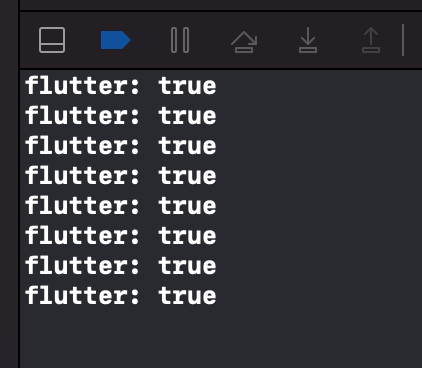
Tried your sample project on latest Master in debug and release mode and didn't see the crash. The app ran properly without any issues. Tapped on FAB which asks for permission. Granted it and was able to tap on FAB that results in
flutter:trueprinted in console as below:flutter doctor -v
Can you provide more details around the issue like a video ? What happens after you grant permission ?
ductranit commentedon Nov 12, 2020
@darshankawar weird that it doesn't happen on yours. My friend can preproduce it.
It doesn't show any permission modal, just crash. I'm on the latest master now
Here is the video
darshankawar commentedon Nov 12, 2020
@ductranit
I got the permission for the first time when I installed the app and didn't see the issue. Can you check if there are any settings disabled in your machine ?
ductranit commentedon Nov 12, 2020
@darshankawar well, if I know what it is, I already fixed it. Do you have any clues about this issue?
The weird thing is that I can run the project
Runner.xcworkspacein xcode without any issue (it can show the permission & I can accept it)So I think it's something relate to flutter build tool (had the same issue with
flutter run)adriandewitts commentedon Nov 13, 2020
Hi @darshankawar. I get the crash on my system.
flutter doctor -v
TahaTesser commentedon Nov 17, 2020
Hi @adriandewitts @ductranit
I can reproduce this issue the crash on the latest
masterwhen running from Flutter on VS Code onlyVS Code
Android Studio
#70374 (comment)
Xcode
Meanwhile, when running from Xcode, it asks for permission, and the app runs after granting it

Terminal works fine too
Code Sample
#70374 (comment)
flutter doctor -v
[✓] Flutter (Channel master, 1.24.0-8.0.pre.268, on macOS 11.0.1 20B29 darwin-x64, locale en-GB) • Flutter version 1.24.0-8.0.pre.268 at /Users/tahatesser/Code/flutter_master • Framework revision e803b13f01 (6 hours ago), 2020-11-16 22:55:59 -0800 • Engine revision f0e80100f7 • Dart version 2.12.0 (build 2.12.0-49.0.dev) [✓] Android toolchain - develop for Android devices (Android SDK version 30.0.2) • Android SDK at /Users/tahatesser/Code/sdk • Platform android-30, build-tools 30.0.2 • ANDROID_HOME = /Users/tahatesser/Code/sdk • Java binary at: /Applications/Android Studio.app/Contents/jre/jdk/Contents/Home/bin/java • Java version OpenJDK Runtime Environment (build 1.8.0_242-release-1644-b3-6915495) • All Android licenses accepted. [✓] Xcode - develop for iOS and macOS (Xcode 12.2) • Xcode at /Volumes/Extreme/Xcode.app/Contents/Developer • Xcode 12.2, Build version 12B45b • CocoaPods version 1.10.0 [✓] Chrome - develop for the web • Chrome at /Applications/Google Chrome.app/Contents/MacOS/Google Chrome [✓] Android Studio (version 4.1) • Android Studio at /Applications/Android Studio.app/Contents • Flutter plugin can be installed from: 🔨 https://plugins.jetbrains.com/plugin/9212-flutter • Dart plugin can be installed from: 🔨 https://plugins.jetbrains.com/plugin/6351-dart • Java version OpenJDK Runtime Environment (build 1.8.0_242-release-1644-b3-6915495) [✓] VS Code (version 1.51.1) • VS Code at /Applications/Visual Studio Code.app/Contents • Flutter extension version 3.16.0 [✓] Connected device (4 available) • RMX2001 (mobile) • EUYTFEUSQSRGDA6D • android-arm64 • Android 10 (API 29) • macOS (desktop) • macos • darwin-x64 • macOS 11.0.1 20B29 darwin-x64 • Web Server (web) • web-server • web-javascript • Flutter Tools • Chrome (web) • chrome • web-javascript • Google Chrome 86.0.4240.198 • No issues found!33 remaining items
gspencergoog commentedon Jul 13, 2023
@DanTup Could this be an issue for the VSCode plugin? (Note that this issue is really old, so we're not sure if it still occurs.)
DanTup commentedon Jul 21, 2023
I can reproduce this with the repo above. I don't think there's anything in the Dart-Code plugin itself that would contribute to this, but I have have weird issues with MacOS permissions in the past (for example VS Code randomly popping up asking for permission to something, I say no, and then months later something tried to use it).
In this instance, I don't have any apps shown in the Speech Recognition permissions section though. VS Code was listed (as blocked) in Microphone access, but that also made no difference.
There's nothing in the Flutter output when this happens, except the VM Service closing. I presume the native app is crashing - though I don't know if there's a way to tell why?
natsuk4ze commentedon Jan 21, 2024
Hello everyone. A while ago I submitted an #134191 that may be relevant to this. That one has the smallest reproducible code sample, a crash log, and a screen record video. Please check it out if you are looking for additional information regarding this issue.
de1mat commentedon Apr 11, 2024
I think a big clue is in this related issue / comment:
#134191 (comment)
matanlurey commentedon Jul 10, 2025
@bkonyi This is a weird one that could use your 👁️
NullPointerException-25 commentedon Mar 11, 2026
I had the same issue when I requested that permission and runned on android studio. I checked the Macos report event and it throws the following
of course if have that permission declared in my info.plist extrated from the app content folder /build/macos/Build/Products/Debug_app/Runner.app/Contents
This app only runs normally on xcode
mitevdev commentedon Apr 25, 2026
The same problem here. The app crashes without asking for permissions when run from vs code. Running the app from Xcode leads to no problems.
wanoghoco commentedon May 8, 2026
same problem here
BZ1234567890 commentedon Jun 16, 2026
Same problem here, too. Any roadmap when this is going to get fixed?
bkonyi commentedon Sep 8, 2026
I spent some time digging into this and tried fixing it in #191357 by launching the app bundle with
openinstead of running the binary directly, but unfortunately that's a dead end forflutter run.Why it crashes
When
flutter runstarts a macOS app, it executes the binary inside<app>.app/Contents/MacOS/<executable>directly as a child process. Because it's spawned directly from the IDE (VS Code or Android Studio), macOS TCC attributes permission requests (speech, mic, camera, photos) to the parent IDE process instead of the app bundle. Since the IDE'sInfo.plistdoesn't have the usage description strings for your app, macOS terminates the process.Running from Xcode works because Xcode uses
debugserverwith private entitlements to manage process responsibility. Runningopen <app>.appfrom Terminal works because LaunchServices treats the app bundle as its own responsible process.Why
opendoesn't work in flutter_toolsI tried using
open -a <bundle> --args ...in #191357, butopenbreaksflutter rundebugging:FlutterEngine.mm) only reads switches from theFLUTTER_ENGINE_SWITCHESenvironment variable, notargv. LaunchServices strips caller environment variables when launching viaopen.opendetaches stdout and stderr, so all logs and print statements are lost.--write-service-infoisn't parsed fromargvby the engine or VM, so the connection file is never written andflutter runtimes out waiting for the VM Service.openexits immediately, so the tool loses signal handling (Ctrl+C) and process exit tracking.Making
openwork would require significant engine changes to pass switches and stream stdio over custom IPC or pipes.Because of this, I'm going to close #191357.
Workarounds
For now, the cleanest workarounds when developing features that need permissions are:
open macos/Runner.xcworkspace) when testing permissions..apponce from Terminal (open build/macos/Build/Products/Debug/<app>.app) to trigger and accept the permission prompt. Once granted, macOS remembers the permission for the bundle ID, and subsequentflutter runsessions from the IDE will work.[flutter_tools] Query macOS unified logs on SIGABRT to detect TCC cra…
[flutter_tools] Detect macOS TCC permission crashes and provide diagn…