Skip to content

Asset Image not loading while using Cupertino Picker in bottom sheet #61228

Closed

Description

@sherrychhabra51

Hi Everyone

I am trying to show country flag and names using Cupertino Picker which is used inside a bottom sheet.When the bottom sheet opens up for the first time, Cupertino Picker is throwing an error saying "The method 'toDouble' was called on null."

**I would like to point out two things here:-

  1. This issue is coming when I am displaying images by fetching it from assets in cupertino picker. If I use Inbuilt flutter icons then the same code works fine.
  2. Also note that if you comment this line Image.asset('images/image_2.jpg', height: 200), , the same code will work**

Below is the stack trace.

════════ Exception caught by image resource service ════════════════════════════════════════════════
The following NoSuchMethodError was thrown while resolving an image:
The method 'toDouble' was called on null.
Receiver: null
Tried calling: toDouble()

When the exception was thrown, this was the stack: 
#0      Object.noSuchMethod (dart:core-patch/object_patch.dart:51:5)
#1      double.> (dart:core-patch/double.dart:94:31)
#2      max (dart:math-patch/math_patch.dart:43:9)
#3      _clipOffsetToScrollableRange (package:flutter/src/widgets/list_wheel_scroll_view.dart:362:19)
#4      _getItemFromOffset (package:flutter/src/widgets/list_wheel_scroll_view.dart:354:11)
...
Image provider: ScrollAwareImageProvider<dynamic>()
Image configuration: ImageConfiguration(bundle: PlatformAssetBundle#b5efd(), devicePixelRatio: 3.0, locale: en_US, textDirection: TextDirection.ltr, size: Size(30.0, 30.0), platform: android)
Image key: AssetBundleImageKey(bundle: PlatformAssetBundle#b5efd(), name: "images/flags/in.png", scale: 1.0)

Also check the code that I have used to show the flag and name of country:-

code sample
import 'package:flutter/cupertino.dart';
import 'package:flutter/material.dart';

void main() => runApp(MyApp());

List<Map<String, String>> flagData = [
  {"name": "India", "flag": "images/flags/in.png"},
  {"name": "France", "flag": "images/flags/fr.png"},
  {"name": "Italy", "flag": "images/flags/it.png"},
  {"name": "Germany", "flag": "images/flags/de.png"},
  {"name": "Belgium", "flag": "images/flags/be.png"},
];

class MyApp extends StatelessWidget {
  @override
  Widget build(BuildContext context) {
    return MaterialApp(
      title: 'Flutter Demo',
      theme: ThemeData(
        primarySwatch: Colors.blue,
      ),
      home: MyHomePage(),
    );
  }
}

class MyHomePage extends StatefulWidget {
  @override
  _MyHomePageState createState() => _MyHomePageState();
}

class _MyHomePageState extends State<MyHomePage> {
  double hgt;
  double wdth;

  @override
  Widget build(BuildContext context) {
    var size = MediaQuery.of(context).size;
    hgt = size.height;
    wdth = size.width;

    return Scaffold(
        appBar: AppBar(
          title: Text("ScrollWheel in bottom sheet"),
        ),
        body: SingleChildScrollView(
          child: Column(children: [
          Image.asset('images/image_2.jpg', height: 200),
           SizedBox(height: 10),
            RaisedButton(
                child: Text("Tap To Open"),
                onPressed: () async {
                  _showBottomSheetModal();
                })
          ]),
        ));
  }

  _showBottomSheetModal() {
    showModalBottomSheet(
        backgroundColor: Colors.white,
        context: context,
        builder: (context) {
          return Column(
            mainAxisSize: MainAxisSize.min,
            children: <Widget>[
              SizedBox(
                height: 250,
                child: CupertinoPicker(
                  onSelectedItemChanged: (int item) {
                    print("item - $item");
                  },
                  itemExtent: 80,
                  diameterRatio: 2,
                  children: flagData.map((e) {
                    print(e['flag']);
                    return Row(
                      children: <Widget>[
                        Image.asset(
                          e['flag'],
                          width: 30,
                          height: 30,
                        ),
                        Text(e['name'])
                      ],
                    );
                  }).toList(),
                ),
              ),
            ],
          );
        });
  }
}

here is the flutter doctor stacktrace:-

Doctor summary (to see all details, run flutter doctor -v):
[√] Flutter (Channel beta, 1.19.0-4.3.pre, on Microsoft Windows [Version 10.0.17763.168], locale en-IN)

[√] Android toolchain - develop for Android devices (Android SDK version 30.0.0)
[√] Android Studio (version 4.0)
[√] VS Code (version 1.46.1)
[√] Connected device (1 available)

• No issues found!
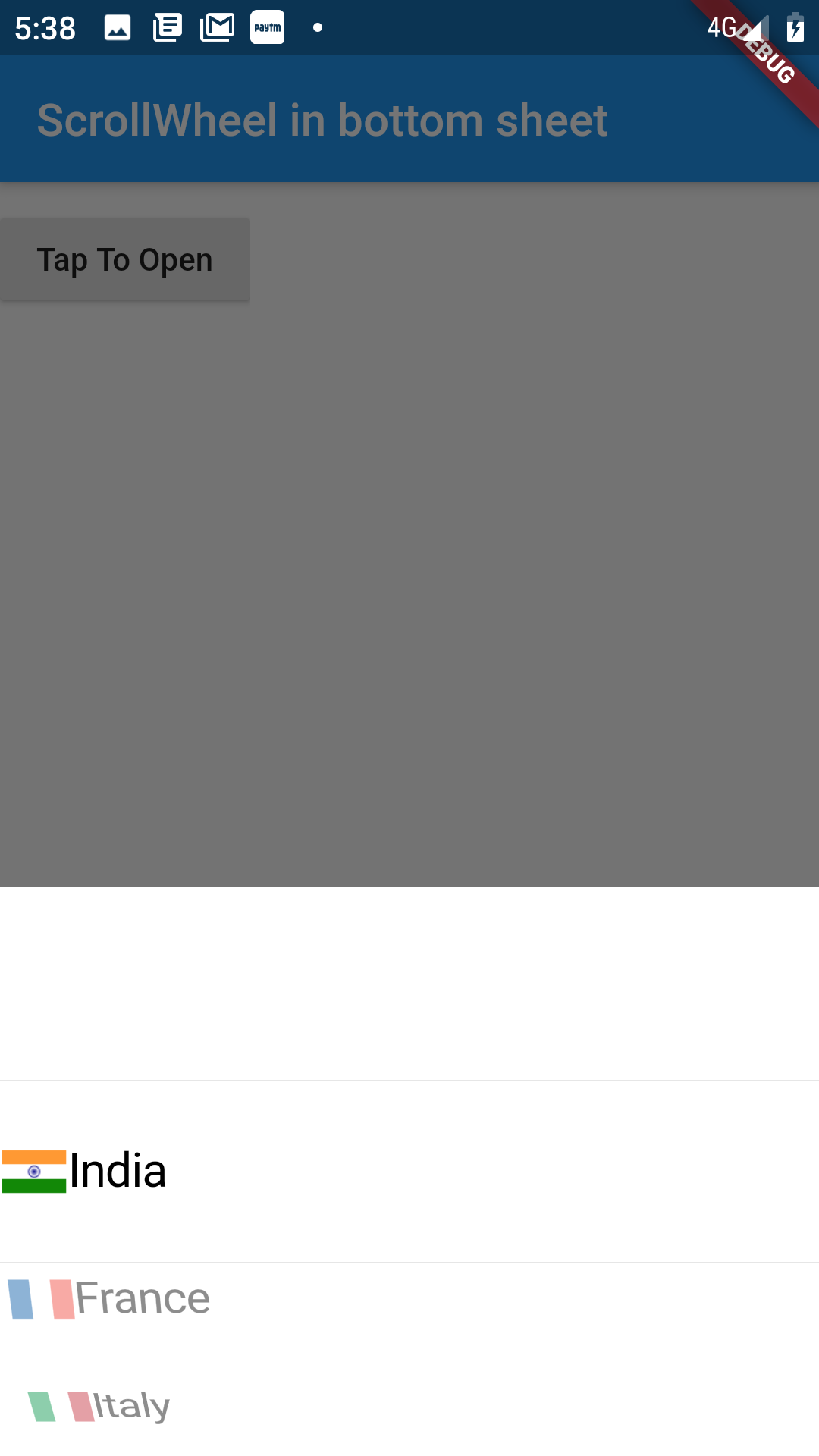
Also check screenshots for actual output (having no flag) and expected output (having flag with country name).

Activity

  1. VladyslavBondarenko commented on Jul 10, 2020

    @VladyslavBondarenko

    @sherrychhabra51
    could you attach minimal reproducible project?
    What device are you using? do you have another device/emulator to check if it persists?
    I tried to run it on my Redmi Note 7 Android 9 (API 28) with master 1.20.0-8.0.pre.40 and beta 1.19.0-4.3.pre (as you used) with this image instead of image_2.jpg and flags. But it is working as intended

  2. added
    in triagePresently being triaged by the triage team
    waiting for responseThe Flutter team cannot make further progress on this issue until the original reporter responds
    on Jul 10, 2020
  3. sherrychhabra51 commented on Jul 10, 2020

    @sherrychhabra51
    Author

    @VladyslavBondarenko
    Can you please clone repo from below mentioned URL:-
    https://github.com/sherrychhabra51/flutter-wheel-view.git

    I have tested this in Google Pixel 2 and MI A-1 device and able to reproduce this in both of these devices .
    Here are some steps which might help you :-

    1. Run the app and tap on Tap To Open Button.
    2. Bottom sheet pops up and in this bottom sheet, only last items which are not visible on screen will have flag and country name both loaded properly but the items that are visible on screen will have only country name and while loading image it will throw an exception.
    3. Do scroll up and down, all images will be loaded.

    I am facing this issue with CupertinoPicker only, if i use List view instead of Cupertino Picker , it seems to be working fine without any issue.
    Let me know if more details are required.

  4. removed
    waiting for responseThe Flutter team cannot make further progress on this issue until the original reporter responds
    on Jul 10, 2020
  5. VladyslavBondarenko commented on Jul 13, 2020

    @VladyslavBondarenko

    @sherrychhabra51
    thank you, with this repo I can reproduce it, with current master 1.20.0-8.0.pre.57 as well.

    I also noticed that it doesn't happen when I use Image.network('https://i.imgur.com/uBlK6gV.jpg', height: 200), instead of Image.asset('images/image_2.jpg', height: 200),, although it's the same image

  6. added
    a: assetsPackaging, accessing, or using assets
    a: imagesLoading, displaying, rendering images
    p: cupertino_uicupertino_ui package in flutter/packages
    frameworkflutter/packages/flutter repository. See also f: labels.
    has reproducible stepsThe issue has been confirmed reproducible and is ready to work on
    and removed
    in triagePresently being triaged by the triage team
    on Jul 13, 2020
  7. sherrychhabra51 commented on Jul 13, 2020

    @sherrychhabra51
    Author

    Yes. That's correct. The issue only occurs when we use Image.asset and the same code works fine if used with Icon class or Image.network class.

  8. aylanexame commented on Jul 14, 2020

    @aylanexame

    I am facing the same issue.

  9. 4 remaining items

  10. Adavo commented on Sep 27, 2020

    @Adavo

    Hi @yaaqovadam ,
    I have tried on my side but it's not working even by loading picture on the main screen.
    See : https://youtu.be/d8Q8SlcwJ7Y

    I really hope that Flutter team will fix this issue ASAP because I have no idea how to find a proper workaround...

  11. 0xPixelfrost commented on Sep 30, 2020

    @0xPixelfrost

    Duplicate of #60578

    Check my comment

  12. yaaqovadam commented on Sep 30, 2020

    @yaaqovadam

    @Adavo

    hrmmm.. wellll.........:) i dunno.. i actually preload mine on the sign in screen, the top most widget in the widget tree, before i navigate to the screen with the picker. try doing that.

    "I really hope that Flutter team will fix this issue ASAP"

    me too :)

  13. jonbhanson commented on Dec 11, 2020

    @jonbhanson

    I am experiencing this same issue. Used @yaaqovadam's workaround, which worked. It would be nice to have this work out of the box, though.

    Edit: a cleaner way to preload the image file is using precacheImage:

          Image myImage = Image.asset(imagePath);
          await precacheImage(myImage.image, context);
    
  14. maciejberka commented on Dec 22, 2020

    @maciejberka

    Try (for each image):

    Image someImage;
    
    void initState() {
       super.initState();
       someImage = Image.asset('assets/my_image.png');
    }
    
    @override
    void didChangeDependencies() {
       super.didChangeDependencies();
       precacheImage(someImage.image, context);
    }
    

    Source

  15. bounty1342 commented on Feb 4, 2021

    @bounty1342

    Please look at @XxLuckyMxX comment.

    Pre-caching with a builder is counterproductive...

    also linked to #60578

    @darshankawar

  16. bounty1342 commented on Apr 10, 2021

    @bounty1342

    @darshankawar So any updates on this ?

  17. hyungtaecf commented on May 4, 2021

    @hyungtaecf

    I was trying to fix the issue for my app for hours! I tried a lot of stuff, and I decided to try one last stupid thing before giving up, but it ended up working in my case!!

    I'm using FancyShimmerImage inside ListWheelScrollView, which is basically the CachedNetworkImage with a shimmer. I noticed the problem was only happening to me for the visible widgets in the ListWheelScrollView, but when scrolling to the parts where it starts hidden, those images were loading well. So I realized it happens just in the first rendering. Then I had what I thought was a stupid idea, that I set the errorWidget to be displayed in the CachedNetworkImage as the FancyShimmerImage itself, and it ended up that when it tries to load the image again it works.

  18. quango2304 commented on Sep 9, 2021

    @quango2304

    thanh @hyungtaecf

    this is how it work for me

    Image.asset(
                    widget.country.flagUri!,
                    package: 'country_pick_screen',
                    width: 40,
                    errorBuilder: (_,__, ___) {
                      return Image.asset(
                        widget.country.flagUri!,
                        package: 'country_pick_screen',
                        width: 40,
                        errorBuilder: (_,__, ___) {
                          return SizedBox();
                        },
                      );
                    },
                  )
    
  19. GotJimmy commented on Oct 25, 2021

    @GotJimmy

    I was trying to fix the issue for my app for hours! I tried a lot of stuff, and I decided to try one last stupid thing before giving up, but it ended up working in my case!!

    I'm using FancyShimmerImage inside ListWheelScrollView, which is basically the CachedNetworkImage with a shimmer. I noticed the problem was only happening to me for the visible widgets in the ListWheelScrollView, but when scrolling to the parts where it starts hidden, those images were loading well. So I realized it happens just in the first rendering. Then I had what I thought was a stupid idea, that I set the errorWidget to be displayed in the CachedNetworkImage as the FancyShimmerImage itself, and it ended up that when it tries to load the image again it works.

    Works perfectly that way! Thanks!

  20. maheshj01 commented on Dec 21, 2022

    @maheshj01
    Member

    @sherrychhabra51 I tried running your code sample and it seems to work as expected, I believe the bug is fixed.

    flutter doctor -v (mac)
    [✓] Flutter (Channel master, 3.7.0-3.0.pre.33, on macOS 12.6 21G115 darwin-arm64, locale en-IN)
        • Flutter version 3.7.0-3.0.pre.33 on channel master 
        • Upstream repository https://github.com/flutter/flutter.git
        • Framework revision 5201856805 (38 minutes ago), 2022-12-05 18:27:21 -0800
        • Engine revision a309d239c4
        • Dart version 2.19.0 (build 2.19.0-463.0.dev)
        • DevTools version 2.20.0
        • If those were intentional, you can disregard the above warnings; however it is recommended to use "git" directly
          to perform update checks and upgrades.
    
    [✓] Android toolchain - develop for Android devices (Android SDK version 33.0.0-rc4)
        • Android SDK at /Users/mahesh/Library/Android/sdk
        • Platform android-33, build-tools 33.0.0-rc4
        • ANDROID_HOME = /Users/mahesh/Library/Android/sdk
        • Java binary at: /Applications/Android Studio.app/Contents/jre/Contents/Home/bin/java
        • Java version OpenJDK Runtime Environment (build 11.0.12+0-b1504.28-7817840)
        • All Android licenses accepted.
    
    [✓] Xcode - develop for iOS and macOS (Xcode 14.0.1)
        • Xcode at /Applications/Xcode.app/Contents/Developer
        • Build 14A400
        • CocoaPods version 1.11.3
    
    [✓] Chrome - develop for the web
        • Chrome at /Applications/Google Chrome.app/Contents/MacOS/Google Chrome
    
    [✓] Android Studio (version 2021.2)
        • Android Studio at /Applications/Android Studio.app/Contents
        • Flutter plugin can be installed from:
          🔨 https://plugins.jetbrains.com/plugin/9212-flutter
        • Dart plugin can be installed from:
          🔨 https://plugins.jetbrains.com/plugin/6351-dart
        • Java version OpenJDK Runtime Environment (build 11.0.12+0-b1504.28-7817840)
    
    [✓] IntelliJ IDEA Community Edition (version 2021.2.1)
        • IntelliJ at /Applications/IntelliJ IDEA CE.app
        • Flutter plugin version 61.2.4
        • Dart plugin version 212.5080.8
    
    [✓] VS Code (version 1.70.2)
        • VS Code at /Applications/Visual Studio Code.app/Contents
        • Flutter extension version 3.55.20221129
    
    [✓] Connected device (3 available)
        • iPhone 12 Pro (mobile) • 026D5789-9E78-4AD5-B1B2-3F8D4E7F65E4 • ios            •
          com.apple.CoreSimulator.SimRuntime.iOS-14-5 (simulator)
        • macOS (desktop)        • macos                                • darwin-arm64   • macOS 12.6 21G115 darwin-arm64
        • Chrome (web)           • chrome                               • web-javascript • Google Chrome 108.0.5359.94
    
    [✓] HTTP Host Availability
        • All required HTTP hosts are available
    
    • No issues found!
    
    [✓] Flutter (Channel stable, 3.3.9, on macOS 12.6 21G115 darwin-arm, locale en-IN)
        • Flutter version 3.3.9 on channel stable at /Users/mahesh/Development/flutter
        • Upstream repository https://github.com/flutter/flutter.git
        • Framework revision b8f7f1f986 (24 hours ago), 2022-11-23 06:43:51 +0900
        • Engine revision 8f2221fbef
        • Dart version 2.18.5
        • DevTools version 2.15.0
    
    [✓] Android toolchain - develop for Android devices (Android SDK version 33.0.0-rc4)
        • Android SDK at /Users/mahesh/Library/Android/sdk
        • Platform android-33, build-tools 33.0.0-rc4
        • ANDROID_HOME = /Users/mahesh/Library/Android/sdk
        • Java binary at: /Applications/Android Studio.app/Contents/jre/Contents/Home/bin/java
        • Java version OpenJDK Runtime Environment (build 11.0.12+0-b1504.28-7817840)
        • All Android licenses accepted.
    
    [✓] Xcode - develop for iOS and macOS (Xcode 14.0.1)
        • Xcode at /Applications/Xcode.app/Contents/Developer
        • Build 14A400
        • CocoaPods version 1.11.3
    
    [✓] Chrome - develop for the web
        • Chrome at /Applications/Google Chrome.app/Contents/MacOS/Google Chrome
    
    [✓] Android Studio (version 2021.2)
        • Android Studio at /Applications/Android Studio.app/Contents
        • Flutter plugin can be installed from:
          🔨 https://plugins.jetbrains.com/plugin/9212-flutter
        • Dart plugin can be installed from:
          🔨 https://plugins.jetbrains.com/plugin/6351-dart
        • Java version OpenJDK Runtime Environment (build 11.0.12+0-b1504.28-7817840)
    
    [✓] IntelliJ IDEA Community Edition (version 2021.2.1)
        • IntelliJ at /Applications/IntelliJ IDEA CE.app
        • Flutter plugin version 61.2.4
        • Dart plugin version 212.5080.8
    
    [✓] VS Code (version 1.70.2)
        • VS Code at /Applications/Visual Studio Code.app/Contents
        • Flutter extension version 3.53.20221101
    
    [✓] Connected device (3 available)
        • iPhone 12 Pro (mobile) • 026D5789-9E78-4AD5-B1B2-3F8D4E7F65E4 • ios            •
          com.apple.CoreSimulator.SimRuntime.iOS-14-5 (simulator)
        • macOS (desktop)        • macos                                • darwin-arm64   • macOS 12.6 21G115 darwin-arm
        • Chrome (web)           • chrome                               • web-javascript • Google Chrome 107.0.5304.110
    
    [✓] HTTP Host Availability
        • All required HTTP hosts are available
    
    • No issues found!
    

    Closing for now. Incase you still encounter the issue please feel free to write in the comments and we will reopen it.

    Thank you.

  21. added
    r: fixedIssue is closed as already fixed in a newer version
    on Dec 21, 2022
  22. github-actions commented on Mar 4, 2023

    @github-actions

    This thread has been automatically locked since there has not been any recent activity after it was closed. If you are still experiencing a similar issue, please open a new bug, including the output of flutter doctor -v and a minimal reproduction of the issue.

  23. locked as resolved and limited conversation to collaborators on Mar 4, 2023
Sign up for free to join this conversation on GitHub. Already have an account? Sign in to comment

Metadata

Metadata

Assignees

No one assigned

    Labels

    a: assetsPackaging, accessing, or using assetsa: imagesLoading, displaying, rendering imagesfound in release: 1.20Found to occur in 1.20frameworkflutter/packages/flutter repository. See also f: labels.has reproducible stepsThe issue has been confirmed reproducible and is ready to work onp: cupertino_uicupertino_ui package in flutter/packagesr: fixedIssue is closed as already fixed in a newer version

    Type

    No type

    Projects

    No projects

      Milestone

      No milestone

      Relationships

      None yet

      Development

      No branches or pull requests

      Issue actions