Repository navigation
Flutter video_player widget doesn't fit into the parent widget. #51250
Description

Hello,
Greetings!.
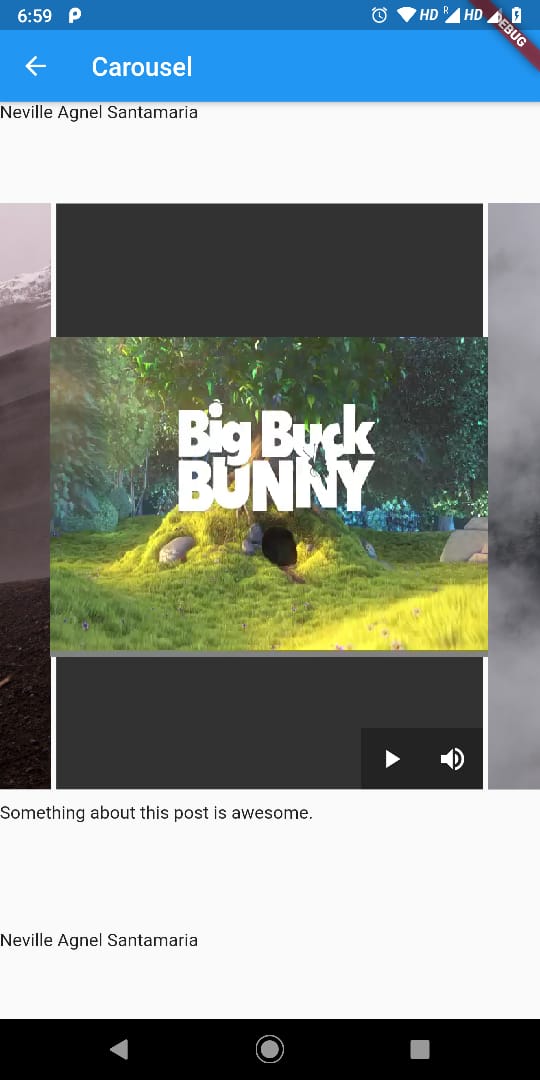
I'm using a carouselslider widget under which I've added aspectratio widget followed by video_player widget. But, for some videos, video_player flows outside the carousel widget.
P.S.: Reference to issue no. #48854
Please refer the screenshot for reference:-
Flutter doctor:-
[✓] Flutter (Channel dev, v1.13.0, on Linux, locale en_GB.UTF-8)
    • Flutter version 1.13.0 at /home/neville/Projects/flutter
    • Framework revision 09126abb22 (3 months ago), 2019-12-03 17:43:00 -0800
    • Engine revision 6179380243
    • Dart version 2.7.0 (build 2.7.0-dev.2.1 a4d799c402)


[✓] Android toolchain - develop for Android devices (Android SDK version 29.0.2)
    • Android SDK at /home/neville/Android/Sdk
    • Android NDK location not configured (optional; useful for native profiling support)
    • Platform android-29, build-tools 29.0.2
    • Java binary at: /home/neville/Projects/android-studio/jre/bin/java
    • Java version OpenJDK Runtime Environment (build 1.8.0_202-release-1483-b49-5587405)
    • All Android licenses accepted.

[✓] Android Studio (version 3.5)
    • Android Studio at /home/neville/Projects/android-studio
    • Flutter plugin version 42.0.1
    • Dart plugin version 191.8593
    • Java version OpenJDK Runtime Environment (build 1.8.0_202-release-1483-b49-5587405)

[✓] VS Code (version 1.41.1)
    • VS Code at /usr/share/code
    • Flutter extension version 3.8.1

[✓] Connected device (1 available)
    • Mi A2 • f04cdaad • android-arm64 • Android 9 (API 28)

• No issues found!
Following is the code:-
sample code
import 'dart:async';
import 'package:flutter/material.dart';
import 'package:flutter_widgets/flutter_widgets.dart';
import 'package:video_player/video_player.dart';

class VideoPlayerScreen extends StatefulWidget {
  final String videoUrl;

  VideoPlayerScreen({@required this.videoUrl, Key key}) : super(key: key);

  @override
  _VideoPlayerScreenState createState() => _VideoPlayerScreenState();
}

class _VideoPlayerScreenState extends State {
  VideoPlayerController _controller;
  Future _initializeVideoPlayerFuture;
  bool _volumeUp = true;
  var _scaffoldKey = new GlobalKey();
  var a;

  @override
  void initState() {
// Create and store the VideoPlayerController. The VideoPlayerController
// offers several different constructors to play videos from assets, files,
// or the internet.
    _controller = VideoPlayerController.network(widget.videoUrl);

// Initialize the controller and store the Future for later use.
    _initializeVideoPlayerFuture = _controller.initialize();

    _controller.addListener(checkIfVideoFinished);

    super.initState();
  }

  void checkIfVideoFinished() {
    if (_controller.value.position == _controller.value.duration) {
      _controller.removeListener(checkIfVideoFinished);
      setState(() {
        _controller.pause();
      });
    }
  }

  @override
  void dispose() {
// Ensure disposing of the VideoPlayerController to free up resources.
    _controller.removeListener(checkIfVideoFinished);
    _controller.dispose();

    super.dispose();
  }

  @override
  Widget build(BuildContext context) {
    return VisibilityDetector(
      key: _scaffoldKey,
      onVisibilityChanged: (VisibilityInfo info) {
        if (info.visibleFraction < 1.0) {
          if (_controller.value.isPlaying) {
            if (this.mounted) {
              setState(() {
                _controller.pause();
              });
            }
          }
        }
// debugPrint( widget.videoUrl + "\n ${info.visibleFraction} of my widget is visible");
      },
      child: Stack(
        children: [
          FutureBuilder(
            future: _initializeVideoPlayerFuture,
            builder: (context, snapshot) {
              if (snapshot.connectionState == ConnectionState.done) {
// If the VideoPlayerController has finished initialization, use
// the data it provides to limit the aspect ratio of the video.
                return Align(
                  alignment: Alignment.center,
                  child: AspectRatio(
                    aspectRatio: 4 / 3,
                    child: VideoPlayer(_controller),
                  ),
                );
              } else {
// If the VideoPlayerController is still initializing, show a
// loading spinner.
                return Center(child: CircularProgressIndicator());
              }
            },
          ),
          Align(
            alignment: Alignment.bottomRight,
            child: Container(
              color: Colors.black87.withOpacity(0.3),
              child: Row(
                mainAxisSize: MainAxisSize.min,
                children: [
                  IconButton(
                    icon: Icon(
                      _controller.value.isPlaying
                          ? Icons.pause
                          : Icons.play_arrow,
                    ),
                    color: Colors.white,
                    onPressed: () {
                      if (_controller.value.isPlaying) {
                        setState(() {
                          _controller.pause();
                        });
                        _controller.removeListener(checkIfVideoFinished);
                      } else {
                        setState(() {
                          _controller.play();
                        });
                        _controller.addListener(checkIfVideoFinished);
                      }
                    },
                  ),
                  IconButton(
                    icon: Icon(
                      _volumeUp ? Icons.volume_up : Icons.volume_off,
                    ),
                    color: Colors.white,
                    onPressed: () {
                      setState(() {
                        if (_volumeUp) {
                          _controller.setVolume(0.0);
                          _volumeUp = false;
                        } else {
                          _controller.setVolume(1.0);
                          _volumeUp = true;
                        }
                      });
                    },
                  ),
                ],
              ),
            ),
          ),
        ],
      ),
    );
  }
}
Reacted by Nguyen Quang Huy and wz003
Activity
oyeolamilekan commentedon Feb 23, 2020
try wrapping it with container widget and set the padding to whichever value you like
n-santamaria commentedon Feb 23, 2020
Hello @oyeolamilekan,
Yes, the solution u shared, I already tried it earlier.
Additional to my previous comment, not all videos move out of it's parent widget, some videos fits perfectly fine without any padding.
What I am trying to achieve, that there's should be 0 padding. I want to fit the video player to the maximum width without any padding.
It works perfectly fine for images and some of the videos which I am testing.
Like Instagram, how the videos are displayed, I'm trying to achieve the same here.
VladyslavBondarenko commentedon Feb 24, 2020
Hi @n-santamaria
Could you provide code where it will be visible that video doesn't fit to the parent widget (together with link to the example video)? I can't see from you code sample your problem
n-santamaria commentedon Feb 24, 2020
I've already added attached the code above along with the screenshot from my android phone.
If you see, the screenshot, in the background there's a carousel widget, on each slide there's either a video or image file.
As in the screenshot, I'm playing "Big Buck Bunny", the width of the video_player overflows it's parent widget (the edges, if you are able to notice).
I will attached the video example in sometime.
n-santamaria commentedon Feb 24, 2020
@VladyslavBondarenko, apologize for the delay.
Below is the link for the video example you've requested:-
https://drive.google.com/file/d/11uWpmCA8CvSKZ4-UC3RDycB1J1_9f6_d/view?usp=drivesdk
n-santamaria commentedon Feb 24, 2020
Below is the updated code zip file :-
videoplayer.zip
Note: DisplayVideoImgGif component calls in VideoPlayerScreen component for displaying videos.
kurobon-jp commentedon Mar 29, 2020
Hello.
I'm facing the same problem.
Obviously, the drawing area of the video exceeds the size of the widget.
And the size of the drawing area seems to vary depending on the video resolution.
https://github.com/kurobon-jp/flutter_video_player_test
This seems to be happening on Android devices with some snapdragon processors.
This phenomenon has been confirmed with the following devices.
I hope this information helps.
workaround flutter/flutter#51250
braysonjohn148 commentedon Dec 14, 2020
any solution to this. I want all aspect ration video to fit the parent height: 100, width: 100. To fit but not stretch the video.
maheshj01 commentedon Jun 25, 2021
@braysonjohn148 probably this might be related to your issue #42945
maheshj01 commentedon Jun 25, 2021
Hi @n-santamaria,
Thanks for filing the issue, This issue is replicable on latest stable version of flutter with
video_player: ^2.1.6. The video goes out of its parent Container on Android while it works as expected on IOS and stays within the bounds.code sample
flutter doctor -v
@kurobon-jp Thanks for the details and the complete example
9 remaining items
TahaTesser commentedon Mar 17, 2022
Adding
customer:solarisas per #64233 (comment)rahulvyas commentedon Jul 8, 2022
Did anyone manage to show video with controls properly on iOS and Android? I'm getting a bottom overflow error and my video has some weird padding at the top. Attached screenshot for reference. Also, the android simulator is not able to play videos however real device can play videos. Flutter web is also not able to play AWS CloudFront master playlist format videos.
ds84182 commentedon Aug 5, 2022
This should be fixed by flutter-team-archive/engine#24888. Flutter Engine was not handling the transformation matrix correctly previously, but it is handled correctly now. This sometimes manifested as the video bounds being painted incorrectly if the surface needed to be rotated and cropped.
liumcse commentedon Aug 11, 2022
If you're still having the problem of fuzzy / fluctuating edges, try wrapping your
VideoPlayerwith aClipRect:Note that the fluctuating pixels are actually rendered outside the VideoPlayer widget. The cause is that the texture sent by ExoPlayer has a different size than the intrinsic size of the video.
stuartmorgan-g commentedon Jan 8, 2026
Closing as fixed per this comment. Please file a new issue if a similar issue is reproducible in current versions of Flutter.
github-actions commentedon Jan 22, 2026
This thread has been automatically locked since there has not been any recent activity after it was closed. If you are still experiencing a similar issue, please open a new bug, including the output of
flutter doctor -vand a minimal reproduction of the issue.