Skip to content

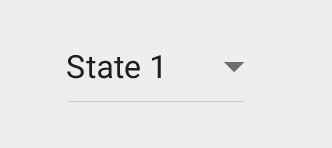
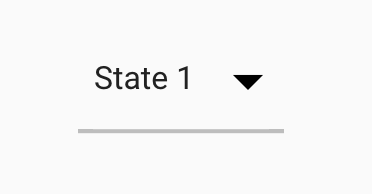
DropDownButton underline is a long way away from the text it underlines. #4664

Closed

Description

@DaveShuckerow

Is there a way to make it be closer in space-limited contexts such as a configuration toolbar?

Activity

  1. abarth commented on Jun 21, 2016

    @abarth
    Contributor
  2. eseidelGoogle commented on Jun 21, 2016

    @eseidelGoogle
    Contributor
  3. eseidelGoogle commented on Jun 22, 2016

    @eseidelGoogle
    Contributor

    Our sizes are just wrong.

    Spec:
    screen shot 2016-06-22 at 2 55 35 pm
    Flutter:
    screen shot 2016-06-22 at 2 59 29 pm

    @HansMuller could you take this?

  4. Hixie commented on Jun 22, 2016

    @Hixie
    Contributor

    The size of the arrow might be something I broke with the icon changes.

    The underline is because _kBottomBorderHeight is set to 2.0. That looks intentional. I don't know where we got that from. The spec seems to use a hairline (0.0). Fixing the underline width might be as simple as replacing that 2.0 with 0.0.

  5. self-assigned this
    on Jun 22, 2016
  6. HansMuller commented on Jun 22, 2016

    @HansMuller
    Contributor

    I agree that the underline's size and position and the arrow's size don't match the spec. Will fix.

  7. eseidelGoogle commented on Jun 23, 2016

    @eseidelGoogle
    Contributor

    I wrote a half-patch yesterday. In case it's useful:

    diff --git a/packages/flutter/lib/src/material/drop_down.dart b/packages/flutter/lib/src/material/drop_down.dart
    index 6ea5a91..185570a 100644
    --- a/packages/flutter/lib/src/material/drop_down.dart
    +++ b/packages/flutter/lib/src/material/drop_down.dart
    @@ -21,7 +21,7 @@ const double _kMenuItemHeight = 48.0;
     const EdgeInsets _kMenuVerticalPadding = const EdgeInsets.symmetric(vertical: 8.0);
     const EdgeInsets _kMenuHorizontalPadding = const EdgeInsets.symmetric(horizontal: 4.0);
     const double _kBaselineOffsetFromBottom = 20.0;
    -const double _kBottomBorderHeight = 2.0;
    +const double _kBottomBorderHeight = 1.0;
     const Border _kDropDownUnderline = const Border(bottom: const BorderSide(color: const Color(0xFFBDBDBD), width: _kBottomBorderHeight));
    
     class _DropDownMenuPainter extends CustomPainter {
    @@ -324,7 +324,6 @@ class DropDownMenuItem<T> extends StatelessWidget {
       Widget build(BuildContext context) {
         return new Container(
           height: _kMenuItemHeight,
    -      padding: const EdgeInsets.symmetric(horizontal: 8.0),
           child: new Baseline(
             baselineType: TextBaseline.alphabetic,
             baseline: _kMenuItemHeight - _kBaselineOffsetFromBottom,
    
  8. Hixie commented on Jun 23, 2016

    @Hixie
    Contributor

    Pretty sure that should 0.0, not 1.0.

  9. a7me63azzab commented on Jan 4, 2019

    @a7me63azzab

    How to remove the underline from DropDownButton ?

  10. impratik commented on Jan 19, 2019

    @impratik

    How to remove the underline from DropDownButton ?
    Hi , Wrap your DropDownButton widget with DropdownButtonHideUnderline Widget to remove underline from DropDownButton .

  11. a7me63azzab commented on Jan 20, 2019

    @a7me63azzab

    @impratik thanks

  12. temirfe commented on Mar 29, 2019

    @temirfe

    DropdownButtonHideUnderline

    через ж*пу

  13. victornett commented on May 29, 2019

    @victornett

    How to remove the underline from DropDownButton ?
    Hi , Wrap your DropDownButton widget with DropdownButtonHideUnderline Widget to remove underline from DropDownButton .

    ty 🗡

  14. added
    frameworkflutter/packages/flutter repository. See also f: labels.
    on May 31, 2019
  15. chirmac commented on Jun 14, 2019

    @chirmac

    How to remove the underline from DropDownButton ?
    Hi , Wrap your DropDownButton widget with DropdownButtonHideUnderline Widget to remove underline from DropDownButton .

    Thank you so much

  16. ivantanakaa commented on Jun 19, 2019

    @ivantanakaa

    How to change the underline width from DropDownButton?

  17. ikicodedev commented on Aug 21, 2019

    @ikicodedev

    How to remove the underline from DropDownButton ?

    You could also modify theunderline 'property of DropdownButton by passing it an empty container.

    underline: Container (),

  18. github-actions commented on Aug 28, 2021

    @github-actions

    This thread has been automatically locked since there has not been any recent activity after it was closed. If you are still experiencing a similar issue, please open a new bug, including the output of flutter doctor -v and a minimal reproduction of the issue.

  19. locked as resolved and limited conversation to collaborators on Aug 28, 2021
Sign up for free to join this conversation on GitHub. Already have an account? Sign in to comment

Metadata

Metadata

Assignees

Labels

frameworkflutter/packages/flutter repository. See also f: labels.p: material_uimaterial_ui package in flutter/packages

Type

No type

Projects

No projects

    Milestone

    No milestone

    Relationships

    None yet

    Development

    No branches or pull requests

    Issue actions