Repository navigation
[Widget] Unexpected drag behaviour on Switch #46046
Description

When a Switch widgets value is determined via a function of type Future*, the drag behaviour overrides the value of the Switch(visually).
*: This will be referred as _toggleSwitch()
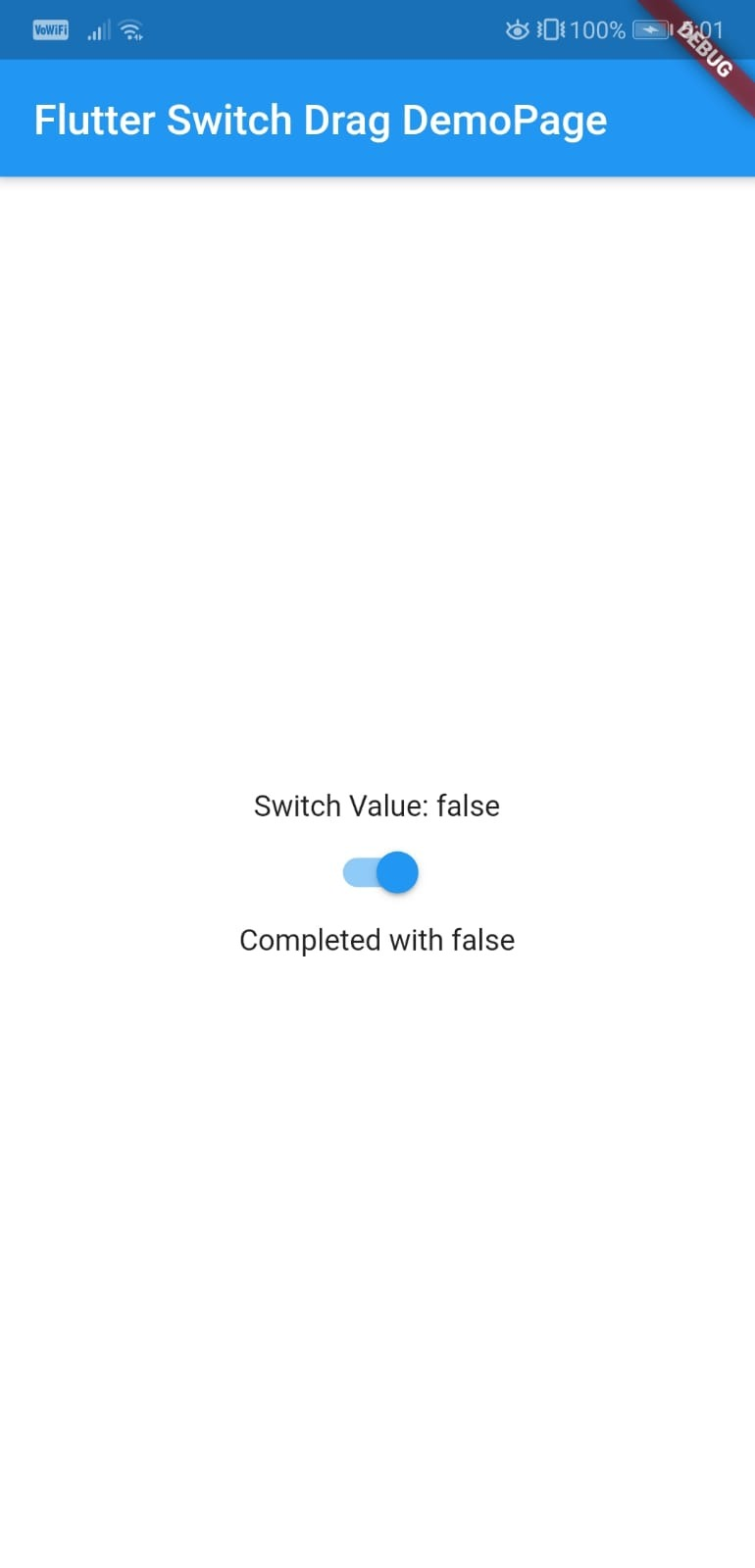
If _toggleSwitch() completes with false but the onChanged was called after the switch was toggled on by dragging, the switch's value will be displayed as true. This is only a visual bug, hot reload won't fix the issue.
You would expect the switch's value to visually reset after _toggleSwitch() completes with false in this case.
I'm not sure of the expected behaviour because of this description:
/// The switch itself does not maintain any state. Instead, when the state of
/// the switch changes, the widget calls the [onChanged] callback. Most widgets
/// that use a switch will listen for the [onChanged] callback and rebuild the
/// switch with a new [value] to update the visual appearance of the switch.
Steps to Reproduce
Application
In this application there's a Switch with a non-null onChanged property. A function of type Future called _toggleSwitch() is called when this Switch is toggled on. _toggleSwitch() sets the Switch to a random bool value after 100ms. This function is only called when the user toggles the switch on, the switch resets to false when toggled off.
- Test tap gestures behaviour to verify the Switch's value and visual indicator is in-line.
- Restart the app
- Toggle switch by dragging till _toggleSwitch() completes with false.
- Reset either by dragging or tapping if _toggleSwitch() completes with true.
- If _toggleSwitch() completes with false, tapping / hot reload won't fix this visual bug. You would need to toggle off by dragging before continuing, so the value and visual indicator is in-line.
I think this can also be replicated the other way around; where the switch is toggled of by dragging and _toggleSwitch() completes with true.
**Target Platform: Android
**Target OS version/browser: Android 9
**Devices: Device(Haven't tested with Emulator)
Logs
flutter analyze
Analyzing switch_drag_test...
No issues found! (ran in 1.9s)
flutter doctor -v
[√] Flutter (Channel beta, v1.11.0, on Microsoft Windows [Version 10.0.18362.476], locale en-GB)
    • Flutter version 1.11.0 at C:\Development\sdk\flutter
    • Framework revision 856a90e67c (4 weeks ago), 2019-11-08 18:00:01 -0800
    • Engine revision af04338413
    • Dart version 2.7.0

[√] Android toolchain - develop for Android devices (Android SDK version 29.0.2)
    • Android SDK at C:\Development\sdk\Android
    • Android NDK location not configured (optional; useful for native profiling support)
    • Platform android-29, build-tools 29.0.2
    • ANDROID_HOME = C:\Development\sdk\Android
    • Java binary at: C:\Program Files\Android\Android Studio\jre\bin\java
    • Java version OpenJDK Runtime Environment (build 1.8.0_202-release-1483-b03)
    • All Android licenses accepted.

[√] Android Studio (version 3.5)
    • Android Studio at C:\Program Files\Android\Android Studio
    • Flutter plugin version 41.1.2
    • Dart plugin version 191.8593
    • Java version OpenJDK Runtime Environment (build 1.8.0_202-release-1483-b03)

[√] VS Code (version 1.38.1)
    • VS Code at C:\Users\erdem\AppData\Local\Programs\Microsoft VS Code
    • Flutter extension version 2.22.2

[√] Connected device (1 available)
    • EML L09 • BPN7N18419008822 • android-arm64 • Android 9 (API 28)

• No issues found!
(It was 5:30 am when I wrote this. I'm happy to rephrase parts that are incomprehensible.)
Activity
[-]Switch, unexpected drag behaviour[/-][+][Widget] Unexpected drag behaviour on Switch[/+]erdemyerebasmaz commentedon Dec 4, 2019
For our use case, we forced render by changing the key after each call completes as a workaround.
Before this, we disabled drag behaviour as shown here.
lock commentedon Apr 4, 2020
This thread has been automatically locked since there has not been any recent activity after it was closed. If you are still experiencing a similar issue, please open a new bug, including the output of
flutter doctor -vand a minimal reproduction of the issue.