Skip to content

Text position is not centered in PopupMenuItem #25782

Closed

Description

@xia-weiyang

It's a bug.

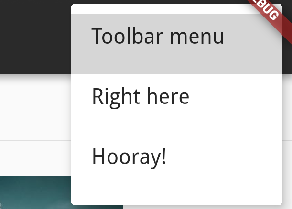
2018-12-26 22-11-35

Text position is not cented in PopupMenuItem When I set the language to Chinese.

  @override
  Widget build(BuildContext context) {
    return MaterialApp(
      title: 'Demo',
      localizationsDelegates: [
        GlobalMaterialLocalizations.delegate,
        GlobalWidgetsLocalizations.delegate,
      ],
      supportedLocales: [
        const Locale('zh', 'CN'),
      ],
      locale: const Locale('zh', 'CN'),
      home: LaunchPage(),
    );
  }

I am sure this is the reason, because it wokes fine when I commented out this code. It's like gallery.

It has no effect when I am try to use padding or center warp this text widget. I don't know why, but I hope
to resove this problem.

Logs

[✓] Flutter (Channel beta, v1.0.0, on Linux, locale zh_CN.UTF-8)
    • Flutter version 1.0.0 at /home/xia/develop/flutter/flutter
    • Framework revision 5391447fae (4 周前), 2018-11-29 19:41:26 -0800
    • Engine revision 7375a0f414
    • Dart version 2.1.0 (build 2.1.0-dev.9.4 f9ebf21297)

[✓] Android toolchain - develop for Android devices (Android SDK 28.0.3)
    • Android SDK at /home/xia/Android/Sdk
    • Android NDK location not configured (optional; useful for native profiling
      support)
    • Platform android-28, build-tools 28.0.3
    • Java binary at:
      /home/xia/develop/tool/android-studio-ide-181.5014246-linux/android-studio
      /jre/bin/java
    • Java version OpenJDK Runtime Environment (build
      1.8.0_152-release-1136-b06)
    • All Android licenses accepted.

[✓] Android Studio (version 3.2)
    • Android Studio at
      /home/xia/develop/tool/android-studio-ide-181.5014246-linux/android-studio
    • Flutter plugin version 31.1.1
    • Dart plugin version 181.5656
    • Java version OpenJDK Runtime Environment (build
      1.8.0_152-release-1136-b06)

[!] IntelliJ IDEA Ultimate Edition (version 2018.2)
    • IntelliJ at /home/xia/develop/tool/ideaIU-2018.2.4/idea-IU-182.4505.22
    ✗ Flutter plugin not installed; this adds Flutter specific functionality.
    ✗ Dart plugin not installed; this adds Dart specific functionality.
    • For information about installing plugins, see
      https://flutter.io/intellij-setup/#installing-the-plugins

[✓] Connected device (1 available)
    • Android SDK built for x86 • emulator-5554 • android-x86 • Android 9 (API
      28) (emulator)

Activity

  1. added
    frameworkflutter/packages/flutter repository. See also f: labels.
    p: material_uimaterial_ui package in flutter/packages
    a: fidelityMatching the OEM platforms better
    on Dec 27, 2018
  2. added this to the milestone on Dec 27, 2018
  3. HansMuller commented on Jan 3, 2019

    @HansMuller
    Contributor
  4. ozexpert commented on Jan 4, 2019

    @ozexpert

    seeing this problem too.

  5. justinmc commented on Jan 4, 2019

    @justinmc
    Contributor

    I was able to reproduce this with the following code:

    import 'package:flutter_localizations/flutter_localizations.dart';
    import 'package:flutter/material.dart';
    
    void main() => runApp(MyApp());
    
    enum WhyFarther { harder, smarter, selfStarter, tradingCharter }
    
    class MyApp extends StatelessWidget {
      @override
      Widget build(BuildContext context) {
        return MaterialApp(
          title: 'Flutter Demo',
          localizationsDelegates: [
            GlobalMaterialLocalizations.delegate,
            GlobalWidgetsLocalizations.delegate,
          ],
          supportedLocales: [
            const Locale('zh', 'CN'),
          ],
          locale: const Locale('zh', 'CN'),
          theme: ThemeData(
            primarySwatch: Colors.blue,
          ),
          home: HomePage(),
        );
      }
    }
    
    class HomePage extends StatelessWidget {
      HomePage({Key key}) : super(key: key);
    
      @override
      Widget build(BuildContext context) {
        return Scaffold(
          appBar: AppBar(
            title: Text('Text position is not cented in PopupMenuItem'),
          ),
          body: Center(
            child: Column(
              mainAxisAlignment: MainAxisAlignment.center,
              children: <Widget>[
                PopupMenuButton<WhyFarther>(
                  itemBuilder: (BuildContext context) => <PopupMenuEntry<WhyFarther>>[
                    const PopupMenuItem<WhyFarther>(
                      value: WhyFarther.harder,
                      child: Text('Working a lot harder'),
                    ),
                    const PopupMenuItem<WhyFarther>(
                      value: WhyFarther.smarter,
                      child: Text('Being a lot smarter'),
                    ),
                    const PopupMenuItem<WhyFarther>(
                      value: WhyFarther.selfStarter,
                      child: Text('Being a self-starter'),
                    ),
                    const PopupMenuItem<WhyFarther>(
                      value: WhyFarther.tradingCharter,
                      child: Text('Placed in charge of trading charter'),
                    ),
                    const PopupMenuItem<WhyFarther>(
                      value: WhyFarther.tradingCharter,
                      child: Text('你好'),
                    ),
                  ],
                ),
              ],
            ),
          ),
        );
      }
    }

    Don't forget to include localizations in pubspec.yaml:

      flutter_localizations:
        sdk: flutter
    
  6. changed the title [-]Text position is not cented in PopupMenuItem[/-] [+]Text position is not centered in PopupMenuItem[/+] on Jan 4, 2019
  7. reply-1988 commented on Jan 15, 2019

    @reply-1988

    I also met this problem with the following code:

    onLongPress: () async {
              if (Platform.isAndroid) {
                final result = await showMenu(
                    context: context,
                    items: [
                      PopupMenuItem(
                        height: ScreenUtil().setHeight(70),
                        child: Text(
                          "删除",
                          style: TextStyle(
                            fontSize: ScreenUtil().setSp(32),
                          ),
                        ),
                        value: ItemType.delete,
                      )
                    ],
                    position: RelativeRect.fromLTRB(
                        x, y - 50, MediaQuery.of(context).size.width - x, 0),
                );
                if (result == ItemType.delete) {
                  deleteShift(model);
                }
              }
            },
  8. voiddog commented on Jan 18, 2019

    @voiddog

    In flutter 1.0 PopupMenuItem's default height is 48

    You can solve the problem by setting PopupMenuItem's height

  9. reply-1988 commented on Jan 18, 2019

    @reply-1988

    In flutter 1.0 PopupMenuItem's default height is 48

    You can solve the problem by setting PopupMenuItem's height

    i try it, but the text in PopupMenuItem is not center.

  10. voiddog commented on Jan 18, 2019

    @voiddog

    Yes, there may be deviations here.PopupMenuItem force the baseline to start at the bottom 20. you can see the code in PopupMenuItem:

    @override
      Widget build(BuildContext context) {
        final ThemeData theme = Theme.of(context);
        TextStyle style = theme.textTheme.subhead;
        if (!widget.enabled)
          style = style.copyWith(color: theme.disabledColor);
    
        Widget item = AnimatedDefaultTextStyle(
          style: style,
          duration: kThemeChangeDuration,
          child: Baseline(
            /// the _kBaselineOffsetFormBottom is 20
            baseline: widget.height - _kBaselineOffsetFromBottom,
            baselineType: style.textBaseline,
            child: buildChild(),
          )
        );
        /// ... ignore other code
    }

    So the problem is the baseline, you can see the picture blew:
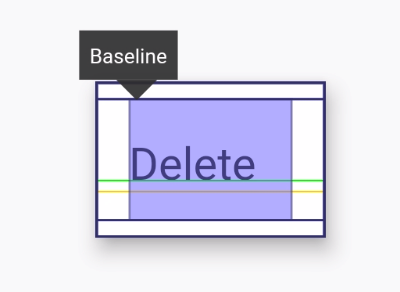
    the green line is the baseline

    _kBaselineOffsetFromBottom is pravite and final, so we can't modify it, but we can center the text by setting the height of PopupMenuItem.

    PopupMenuItem's height is about 40 + fontSize. But the results may have deviations, beacause the height of text may not equal to font size.

  11. nagoya0 commented on Feb 4, 2019

    @nagoya0

    any updates on this?
    seeing this issue in Japanese locale too.

  12. shingohu commented on Mar 28, 2019

    @shingohu

    try this code or just copy the PopupMenuItem source and remove the wrap of Baseline

    _showAddMenu(BuildContext context) {
        return Theme(
          data: Theme.of(context).copyWith(
            cardColor: Color(0xb8000000),
            textTheme: TextTheme(
                subhead: TextStyle(textBaseline: TextBaseline.alphabetic)),
          ),
          child: PopupMenuButton<int>(
            tooltip: "",
            offset: Offset(0, 60),
            onSelected: (index) {
              if (index == 1) {
                //Navigator.of(context).pushNamed(RouterName.videoConferenceList);
              }
            },
            itemBuilder: (context) {
              return [
                PopupMenuItem(
                  value: 1,
                  
                  child: Text(
                    "视频会议",
                    style: TextStyle(color: Colors.white),
                  ),
                ),
                PopupMenuItem(
                  value: 2,
                  child: Text(
                    "发起群聊",
                    style: TextStyle(color: Colors.white),
                  ),
                ),
                PopupMenuItem(
                  value: 3,
                  child: Text(
                    "通讯录",
                    style: TextStyle(color: Colors.white),
                  ),
                ),
              ];
            },
            icon: Icon(
              Icons.add,
              color: Colors.white,
              size: 30,
            ),
          ),
        );
      }
    
  13. xia-weiyang commented on May 20, 2019

    @xia-weiyang
    Author

    I hope to provide the settings for this _kBaselineOffsetFromBottom field instead of changing the source code.

  14. tmulin commented on Jun 21, 2019

    @tmulin

    I got the same problem too when using whti locale "zh" .

  15. GaryQian commented on Jun 29, 2019

    @GaryQian
    Contributor

    I am indeed seeing completely different heights of the laid out text for the different locales.

    Just a guess for now, but it could be that the alphabetic letters are being rendered using the chinese font's alphabet instead the true alphabetic font. This may have caused skewed text meant to line up with Chinese.

  16. GaryQian commented on Jul 2, 2019

    @GaryQian
    Contributor

    The problem is that when locale is set to chinese, we begin to use the ideographic baseline (instead of alphabetic baseline) for laying out the vertical alignment.

    However, it is currently known that our metric for ideographic baseline is inaccurate. The solution for now may be to just use the alphabetic baseline regardless of the locale, which should produce comparable results between different locales.

  17. GaryQian commented on Jul 2, 2019

    @GaryQian
    Contributor

    #35493 Is a fix for this until our ideographic baseline implementation is improved, after which it can be reverted.

  18. GaryQian commented on Jul 16, 2019

    @GaryQian
    Contributor

    I will close this for now. There is a TODO to undo this change in the future.

  19. github-actions commented on Aug 14, 2021

    @github-actions

    This thread has been automatically locked since there has not been any recent activity after it was closed. If you are still experiencing a similar issue, please open a new bug, including the output of flutter doctor -v and a minimal reproduction of the issue.

  20. locked as resolved and limited conversation to collaborators on Aug 14, 2021
Sign up for free to join this conversation on GitHub. Already have an account? Sign in to comment

Metadata

Metadata

Assignees

No one assigned

    Labels

    a: fidelityMatching the OEM platforms betterframeworkflutter/packages/flutter repository. See also f: labels.p: material_uimaterial_ui package in flutter/packages

    Type

    No type

    Projects

    No projects

      Milestone

      No milestone

      Relationships

      None yet

      Development

      No branches or pull requests

      Issue actions