DatePicker widget is with bug when displayed on small mobile phone screens #19744


Description

flutter doctor
Doctor summary (to see all details, run flutter doctor -v):
[✓] Flutter (Channel beta, v0.5.1, on Mac OS X 10.13.6 17G65, locale pt-BR)
[✓] Android toolchain - develop for Android devices (Android SDK 27.0.3)
[✓] iOS toolchain - develop for iOS devices (Xcode 9.4.1)
[✓] Android Studio (version 3.1)
[✓] Connected devices (1 available)
The DatePicker widget is with bug when displayed on small mobile phone screens.
(LG K130) mobile phone screen is is height: 521 and width: 320
Below is the evidence and the code used
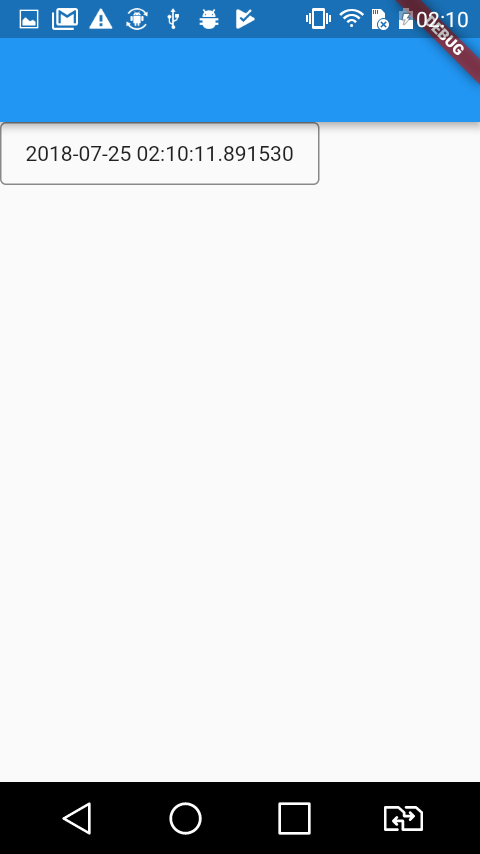
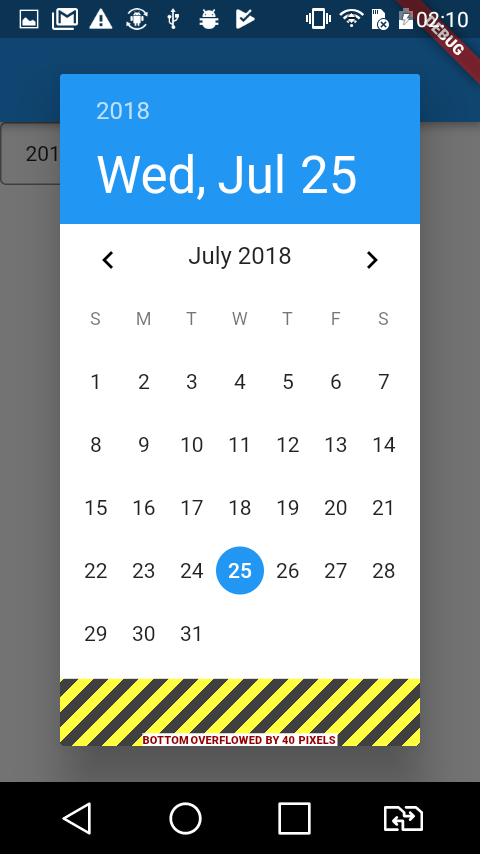
import 'dart:async';
import 'package:flutter/material.dart';
import 'dart:ui' as ui;

void main() => runApp(new MyApp());

class MyApp extends StatelessWidget {
  @override
  Widget build(BuildContext context) {
    return new MaterialApp(
      home: new MyHomePage(),
    );
  }
}

class MyHomePage extends StatefulWidget {
  @override
  _MyHomePageState createState() => new _MyHomePageState();
}

class _MyHomePageState extends State<MyHomePage> {

  DateTime _fromDateTime = new DateTime.now();

  Future<Null> _selectDate(BuildContext context) async {
    final DateTime picked = await showDatePicker(
      context: context,
      initialDate: _fromDateTime,
      firstDate: new DateTime(2018),
      lastDate: new DateTime(2020)
    );

    if(picked != null && picked != _fromDateTime) {
      setState(() {
        _fromDateTime = picked;
      });
    }
  }

  @override
  Widget build(BuildContext context) {
    final ui.Size logicalSize = MediaQuery.of(context).size;
    final double _width = logicalSize.width;
    final double _height = logicalSize.height;

    // [height: , 521.3333333333334,   _width: , 320.0]
    print(['height: ', _height, '  _width: ', _width]);

    return new Scaffold(
      appBar: new AppBar(),
      body: new InkWell(
        onTap: () {
          _selectDate(context);
        },
        child: new Container(
          padding: EdgeInsets.only(top: 12.0, bottom: 12.0, left: 16.0, right: 16.0),
          decoration: new BoxDecoration(
            borderRadius: new BorderRadius.all(new Radius.circular(4.0)),
            border: new Border.all(
              color: Colors.black45,
              width: 1.0,
            ),
          ),
          child: new Text('${_fromDateTime.toString()}'),
        ),
      )
    );
  }
}
I/flutter ( 3470): ══╡ EXCEPTION CAUGHT BY RENDERING LIBRARY ╞═════════════════════════════════════════════════════════
I/flutter ( 3470): The following message was thrown during layout:
I/flutter ( 3470): A RenderFlex overflowed by 40 pixels on the bottom.
I/flutter ( 3470): The overflowing RenderFlex has an orientation of Axis.vertical.
I/flutter ( 3470): The edge of the RenderFlex that is overflowing has been marked in the rendering with a yellow and
I/flutter ( 3470): black striped pattern. This is usually caused by the contents being too big for the RenderFlex.
I/flutter ( 3470): Consider applying a flex factor (e.g. using an Expanded widget) to force the children of the
I/flutter ( 3470): RenderFlex to fit within the available space instead of being sized to their natural size.
I/flutter ( 3470): This is considered an error condition because it indicates that there is content that cannot be
I/flutter ( 3470): seen. If the content is legitimately bigger than the available space, consider clippingit with a
I/flutter ( 3470): ClipRect widget before putting it in the flex, or using a scrollable container rather than a Flex,
I/flutter ( 3470): like a ListView.
I/flutter ( 3470): The specific RenderFlex in question is:
I/flutter ( 3470): RenderFlex#ecf38 relayoutBoundary=up7 OVERFLOWING
I/flutter ( 3470): creator: Column ← SizedBox ← LayoutBuilder ← OrientationBuilder ← DefaultTextStyle ←
I/flutter ( 3470): AnimatedDefaultTextStyle ← _InkFeatures-[GlobalKey#7e953 ink renderer] ←
I/flutter ( 3470): NotificationListener<LayoutChangedNotification> ← CustomPaint ← _ShapeBorderPaint ← PhysicalShape
I/flutter ( 3470): ← _MaterialInterior ← ⋯
I/flutter ( 3470): parentData: <none> (can use size)
I/flutter ( 3470): constraints: BoxConstraints(w=240.0, 0.0<=h<=448.0)
I/flutter ( 3470): size: Size(240.0, 448.0)
I/flutter ( 3470): direction: vertical
I/flutter ( 3470): mainAxisAlignment: start
I/flutter ( 3470): mainAxisSize: min
I/flutter ( 3470): crossAxisAlignment: stretch
I/flutter ( 3470): verticalDirection: down
I/flutter ( 3470): ◢◤◢◤◢◤◢◤◢◤◢◤◢◤◢◤◢◤◢◤◢◤◢◤◢◤◢◤◢◤◢◤◢◤◢◤◢◤◢◤◢◤◢◤◢◤◢◤◢◤◢◤◢◤◢◤◢◤◢◤◢◤◢◤◢◤◢◤◢◤◢◤◢◤◢◤◢◤◢◤◢◤◢◤◢◤◢◤◢◤◢◤◢◤◢◤◢◤◢◤
I/flutter ( 3470): ════════════════════════════════════════════════════════════════════════════════════════════════════
`
``