Font weight is too light in light mode and too heavy in dark mode #120857

Description

Steps to Reproduce
- Execute
flutter runon the code sample. - Take a screenshot of the Flutter app.
- Compose a new message in iOS Mail with the same text.
- Take screenshots of iOS Mail in light mode and dark mode.
- Compare the text in the screenshots to the screenshot of the Flutter app.
Expected results:
The font weights look the same.
Actual results:
The font weight in Flutter is too light in light mode and too heavy in dark mode. This makes the app look quite different in one mode compared to the other.
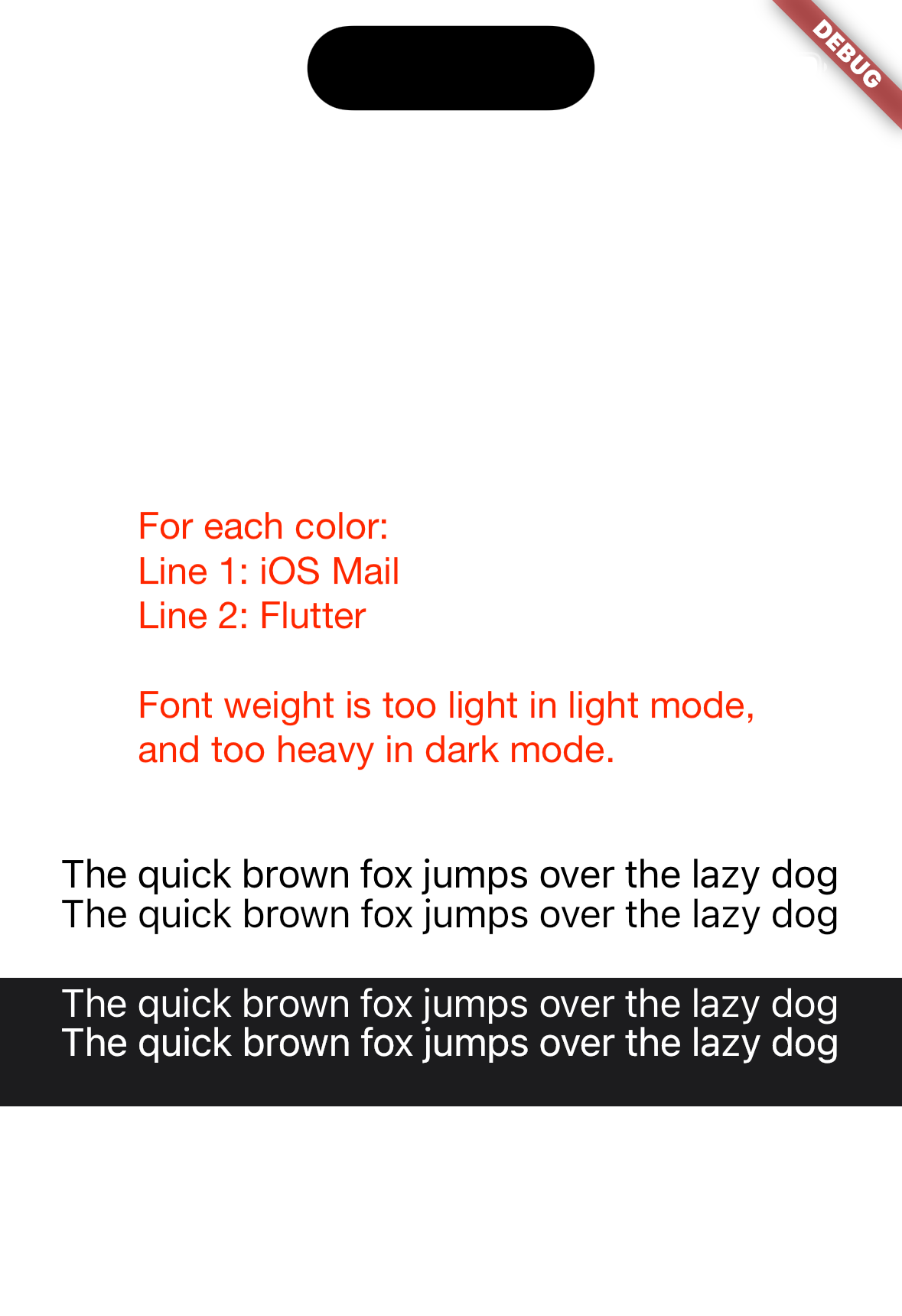
Code sample
import 'package:flutter/material.dart';

void main() {
  runApp(const MainApp());
}

class MainApp extends StatelessWidget {
  const MainApp({super.key});

  @override
  Widget build(BuildContext context) {
    return MaterialApp(
      home: Scaffold(
        body: Column(
          mainAxisAlignment: MainAxisAlignment.center,
          children: [
            Container(
              alignment: Alignment.center,
              height: 56.0,
              child: const Text(
                'The quick brown fox jumps over the lazy dog',
                style: TextStyle(
                  color: Colors.black,
                  fontSize: 17.0,
                  letterSpacing: -0.43,
                ),
              ),
            ),
            Container(
              alignment: Alignment.center,
              color: const Color.fromRGBO(28, 28, 30, 1),
              height: 56.0,
              child: const Text(
                'The quick brown fox jumps over the lazy dog',
                style: TextStyle(
                  color: Colors.white,
                  fontSize: 17.0,
                  letterSpacing: -0.43,
                ),
              ),
            ),
          ],
        ),
        backgroundColor: Colors.white,
      ),
    );
  }
}
Details
[flutter] flutter doctor -v
[✓] Flutter (Channel stable, 3.7.3, on macOS 13.2.1 22D68 darwin-x64, locale en-US)
    • Flutter version 3.7.3 on channel stable at /Users/anthonymoretti/Development/flutter
    • Upstream repository https://github.com/flutter/flutter.git
    • Framework revision 9944297138 (7 days ago), 2023-02-08 15:46:04 -0800
    • Engine revision 248290d6d5
    • Dart version 2.19.2
    • DevTools version 2.20.1

[✗] Android toolchain - develop for Android devices
    ✗ Unable to locate Android SDK.
      Install Android Studio from: https://developer.android.com/studio/index.html
      On first launch it will assist you in installing the Android SDK components.
      (or visit https://flutter.dev/docs/get-started/install/macos#android-setup for detailed instructions).
      If the Android SDK has been installed to a custom location, please use
      `flutter config --android-sdk` to update to that location.


[✓] Xcode - develop for iOS and macOS (Xcode 14.2)
    • Xcode at /Applications/Xcode.app/Contents/Developer
    • Build 14C18
    • CocoaPods version 1.11.3

[✓] Chrome - develop for the web
    • Chrome at /Applications/Google Chrome.app/Contents/MacOS/Google Chrome

[!] Android Studio (not installed)
    • Android Studio not found; download from https://developer.android.com/studio/index.html
      (or visit https://flutter.dev/docs/get-started/install/macos#android-setup for detailed instructions).

[✓] VS Code (version 1.75.1)
    • VS Code at /Applications/Visual Studio Code.app/Contents
    • Flutter extension version 3.58.0

[✓] Connected device (3 available)
    • iPhone 14 Pro (mobile) • ED506CAA-EB76-47D8-BBDC-751CB0EE7EC8 • ios            • com.apple.CoreSimulator.SimRuntime.iOS-16-2 (simulator)
    • macOS (desktop)        • macos                                • darwin-x64     • macOS 13.2.1 22D68 darwin-x64
    • Chrome (web)           • chrome                               • web-javascript • Google Chrome 110.0.5481.100

[✓] HTTP Host Availability
    • All required HTTP hosts are available

! Doctor found issues in 2 categories.
exit code 0