Skip to content

NestedScrollView + TabBarView + Scrollbar = attached to more than one ScrollPosition. #118713

Closed

Description

@tenhobi

I am facing issues with NestedScrollView with multiple scrollable areas, specifically in TabBarView, while enabled Scrollbar either by explicitly wrapping in Scrollbar() widget or overriding ScrollBehavior.buildScrollbar.

This issue is present even in NestedScrollView's demo, which also works like a repro for my case https://api.flutter-io.cn/flutter/widgets/NestedScrollView-class.html#widgets.NestedScrollView.1 and is present on all platforms I tested, specifically on web, iOS, Android, ...

How to reproduce

Scroll in one tab and move (fast) to other one and try to scroll there. Sooner or later an exception will throw, which does no side effect other than being printed, so the app works just fine.

On mobile, wrap NestedScrollView in ScrollConfiguration and use custom behavior

class CustomScrollBehavior extends MaterialScrollBehavior {
  @override
  Widget buildScrollbar(BuildContext context, Widget child, ScrollableDetails details) {
    return Scrollbar(
      controller: details.controller,
      child: child,
    );
  }
}

Logs

Mobile logs
======== Exception caught by animation library =====================================================
The following assertion was thrown while notifying status listeners for AnimationController:
The provided ScrollController is currently attached to more than one ScrollPosition.

The Scrollbar requires a single ScrollPosition in order to be painted.

When the scrollbar is interactive, the associated ScrollController must only have one ScrollPosition attached.The provided ScrollController must be unique to one ScrollView widget.

When the exception was thrown, this was the stack: 
#0      RawScrollbarState._debugCheckHasValidScrollPosition.<anonymous closure> (package:flutter/src/widgets/scrollbar.dart:1536:9)
#1      RawScrollbarState._debugCheckHasValidScrollPosition (package:flutter/src/widgets/scrollbar.dart:1561:6)
#2      RawScrollbarState._validateInteractions (package:flutter/src/widgets/scrollbar.dart:1470:14)
#3      AnimationLocalStatusListenersMixin.notifyStatusListeners (package:flutter/src/animation/listener_helpers.dart:240:19)
#4      AnimationController._checkStatusChanged (package:flutter/src/animation/animation_controller.dart:822:7)
#5      AnimationController._tick (package:flutter/src/animation/animation_controller.dart:838:5)
#6      Ticker._tick (package:flutter/src/scheduler/ticker.dart:249:12)
#7      SchedulerBinding._invokeFrameCallback (package:flutter/src/scheduler/binding.dart:1175:15)
#8      SchedulerBinding.handleBeginFrame.<anonymous closure> (package:flutter/src/scheduler/binding.dart:1079:11)
#9      _LinkedHashMapMixin.forEach (dart:collection-patch/compact_hash.dart:617:13)
#10     SchedulerBinding.handleBeginFrame (package:flutter/src/scheduler/binding.dart:1077:17)
#11     SchedulerBinding._handleBeginFrame (package:flutter/src/scheduler/binding.dart:994:5)
#12     _invoke1 (dart:ui/hooks.dart:167:13)
#13     PlatformDispatcher._beginFrame (dart:ui/platform_dispatcher.dart:296:5)
#14     _beginFrame (dart:ui/hooks.dart:104:31)
The AnimationController notifying status listeners was: AnimationController#39240(⏭ 1.000; paused)
====================================================================================================
Web logs
======== Exception caught by animation library =====================================================
The following assertion was thrown while notifying status listeners for AnimationController:
The provided ScrollController is currently attached to more than one ScrollPosition.

The Scrollbar requires a single ScrollPosition in order to be painted.

When the scrollbar is interactive, the associated ScrollController must only have one ScrollPosition attached.The provided ScrollController must be unique to one ScrollView widget.

When the exception was thrown, this was the stack: 
dart-sdk/lib/_internal/js_dev_runtime/private/ddc_runtime/errors.dart 266:49      throw_
packages/flutter/src/widgets/scrollbar.dart 1536:9                                <fn>
packages/flutter/src/widgets/scrollbar.dart 1560:14                               [_debugCheckHasValidScrollPosition]
packages/flutter/src/widgets/scrollbar.dart 1470:14                               [_validateInteractions]
packages/flutter/src/animation/listener_helpers.dart 240:19                       notifyStatusListeners
packages/flutter/src/animation/animation_controller.dart 822:7                    [_checkStatusChanged]
packages/flutter/src/animation/animation_controller.dart 756:5                    [_startSimulation]
packages/flutter/src/animation/animation_controller.dart 619:12                   [_animateToInternal]
packages/flutter/src/animation/animation_controller.dart 467:12                   forward
packages/flutter/src/widgets/scrollbar.dart 1863:37                               [_handleScrollNotification]
packages/flutter/src/widgets/notification_listener.dart 130:22                    onNotification
packages/flutter/src/widgets/framework.dart 3094:18                               dispatchNotification
packages/flutter/src/widgets/framework.dart 3097:13                               dispatchNotification
packages/flutter/src/widgets/framework.dart 4441:24                               dispatchNotification
packages/flutter/src/widgets/notification_listener.dart 60:13                     dispatch
packages/flutter/src/widgets/scroll_activity.dart 92:90                           dispatchScrollUpdateNotification
packages/flutter/src/widgets/scroll_position.dart 914:5                           didUpdateScrollPositionBy
packages/flutter/src/widgets/nested_scroll_view.dart 1319:5                       applyClampedPointerSignalUpdate
packages/flutter/src/widgets/nested_scroll_view.dart 964:45                       pointerScroll
packages/flutter/src/widgets/nested_scroll_view.dart 1417:24                      pointerScroll
packages/flutter/src/widgets/scrollable.dart 742:16                               [_handlePointerScroll]
packages/flutter/src/gestures/pointer_signal_resolver.dart 90:7                   resolve
packages/flutter/src/gestures/binding.dart 466:29                                 handleEvent
packages/flutter/src/gestures/binding.dart 440:14                                 dispatchEvent
packages/flutter/src/rendering/binding.dart 337:11                                dispatchEvent
packages/flutter/src/gestures/binding.dart 395:7                                  [_handlePointerEventImmediately]
packages/flutter/src/gestures/binding.dart 357:5                                  handlePointerEvent
packages/flutter/src/gestures/binding.dart 314:7                                  [_flushPointerEventQueue]
packages/flutter/src/gestures/binding.dart 295:7                                  [_handlePointerDataPacket]
lib/_engine/engine/platform_dispatcher.dart 1183:13                               invoke1
lib/_engine/engine/platform_dispatcher.dart 244:5                                 invokeOnPointerDataPacket
lib/_engine/engine/pointer_binding.dart 147:39                                    [_onPointerData]
lib/_engine/engine/pointer_binding.dart 372:14                                    [_handleWheelEvent]
lib/_engine/engine/pointer_binding.dart 672:7                                     <fn>
lib/_engine/engine/pointer_binding.dart 362:43                                    <fn>
lib/_engine/engine/pointer_binding.dart 203:80                                    <fn>
dart-sdk/lib/_internal/js_dev_runtime/private/ddc_runtime/operations.dart 334:14  _checkAndCall
dart-sdk/lib/_internal/js_dev_runtime/private/ddc_runtime/operations.dart 339:39  dcall
The AnimationController notifying status listeners was: AnimationController#3369f(▶ 0.000)
====================================================================================================

Thoughts

The exceptions tells the reason. Both CustomScrollView, ListView or whatever are using default (primary) ScrollController.

Simple fix might be to add a ScrollController to each scrollable in TabBarView, yet that stops NestedScrollView's headerSliverBuilder, which stops expanding and shrinking itself. The question/report here is a question how to solve/fix this issue? I am not sure that any idea of syncing would work out great with all the slivers capabilities. Or is there some "super magic trick" about using scrollbars in NestedScrollView I am not aware of?

I have seen that there were bunch of issues that were slightly different, mainly because there were not dependent on the NestedScrollView and sliver fancy needs like #88428. Some stuff have been said here, but that is rather about preserving tab states #101320. Or #89864 which is also not about NestedScrollView. Neither of those issues helped my case, unfortunately.

Summary:

  • scrolling works just fine, scrollbars seems to work too, but exceptions been raising
  • we need to preserve NestedScrollView so we can work with slivers based on the unified scroll area
  • we need scrollbars (for individual tabs)
  • this issue is present in linked demo
  • NestedScrollView even advises not to use controllers on nested scrollable
/// The [body] is built in a context that provides a [PrimaryScrollController]
/// that interacts with the [NestedScrollView]'s scroll controller. Any
/// [ListView] or other [Scrollable]-based widget inside the [body] that is
/// intended to scroll with the [NestedScrollView] should therefore not be
/// given an explicit [ScrollController], instead allowing it to default to
/// the [PrimaryScrollController] provided by the [NestedScrollView].

Activity

  1. darshankawar commented on Jan 19, 2023

    @darshankawar
    Member

    Thanks for the report @tenhobi
    Your case looks very similar to #101320 as you already mentioned, but have you already tried this and see if it helps in your case ?

    Summary:

    I think all these bullet points you can share in this umbrella issue related to NestedScrollView so that there will be a proper tracking for all the thoughts you shared and the team member will be aware of it.
    Let us know if this sounds ok and can be clubbed together with above linked issue, because per your summary, it seems they are multiple use cases / issues which probably need to be tracked separately as well.

  2. added
    waiting for responseThe Flutter team cannot make further progress on this issue until the original reporter responds
    on Jan 19, 2023
  3. tenhobi commented on Jan 19, 2023

    @tenhobi
    Author

    Thanks for a reply @darshankawar.

    Yes, I tried that with the linked demo, aka
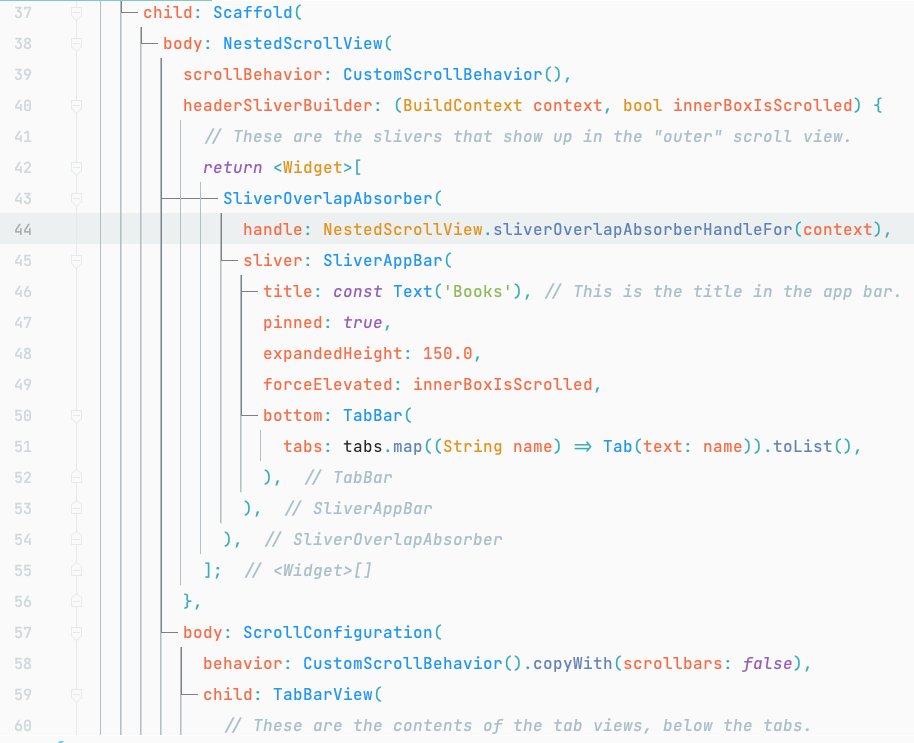
    image

    As you can see from the recording, the scrollbar then applies only to outer scrollable, not including the inner ones. Same behaviour is on the web.

    Screen.Recording.2023-01-19.at.8.23.54.AM.mov
  4. removed
    waiting for responseThe Flutter team cannot make further progress on this issue until the original reporter responds
    on Jan 19, 2023
  5. darshankawar commented on Jan 20, 2023

    @darshankawar
    Member

    Thanks for the feedback. I am going to keep this issue open to team's insights on what's the best way to tackle such issues. There have been similar issues reported as we discussed above #101320, but per OP, the mentioned solution in it doesn't apply for their case.

    The main issue could be related to #102003, but will let the team take a call on it whether to club this issue together or keep it separate.

    code sample
    import 'package:flutter/material.dart';
    
    void main() => runApp(const MyApp());
    
    class MyApp extends StatelessWidget {
      const MyApp({super.key});
    
      static const String _title = 'Flutter Code Sample';
    
      @override
      Widget build(BuildContext context) {
        return const MaterialApp(
          title: _title,
          home: MyStatelessWidget(),
        );
      }
    }
    
    class MyStatelessWidget extends StatelessWidget {
      const MyStatelessWidget({super.key});
    
      @override
      Widget build(BuildContext context) {
        final List<String> tabs = <String>['Tab 1', 'Tab 2'];
        return DefaultTabController(
          length: 2, // This is the number of tabs.
          child: Scaffold(
            body: NestedScrollView(
                scrollBehavior: CustomScrollBehavior(),
                headerSliverBuilder:
                    (BuildContext context, bool innerBoxIsScrolled) {
                  // These are the slivers that show up in the "outer" scroll view.
                  return <Widget>[
                    SliverOverlapAbsorber(
                      // This widget takes the overlapping behavior of the SliverAppBar,
                      // and redirects it to the SliverOverlapInjector below. If it is
                      // missing, then it is possible for the nested "inner" scroll view
                      // below to end up under the SliverAppBar even when the inner
                      // scroll view thinks it has not been scrolled.
                      // This is not necessary if the "headerSliverBuilder" only builds
                      // widgets that do not overlap the next sliver.
                      handle:
                          NestedScrollView.sliverOverlapAbsorberHandleFor(context),
                      sliver: SliverAppBar(
                        title: const Text('Books'),
                        // This is the title in the app bar.
                        pinned: true,
                        expandedHeight: 150.0,
                        // The "forceElevated" property causes the SliverAppBar to show
                        // a shadow. The "innerBoxIsScrolled" parameter is true when the
                        // inner scroll view is scrolled beyond its "zero" point, i.e.
                        // when it appears to be scrolled below the SliverAppBar.
                        // Without this, there are cases where the shadow would appear
                        // or not appear inappropriately, because the SliverAppBar is
                        // not actually aware of the precise position of the inner
                        // scroll views.
                        forceElevated: innerBoxIsScrolled,
                        bottom: TabBar(
                          // These are the widgets to put in each tab in the tab bar.
                          tabs: tabs.map((String name) => Tab(text: name)).toList(),
                        ),
                      ),
                    ),
                  ];
                },
                body: TabBarView(
                    // These are the contents of the tab views, below the tabs.
                    children: [
                      ScrollConfiguration(
                        behavior: ScrollConfiguration.of(context)
                            .copyWith(scrollbars: false),
                        child: Builder(
                          // This Builder is needed to provide a BuildContext that is
                          // "inside" the NestedScrollView, so that
                          // sliverOverlapAbsorberHandleFor() can find the
                          // NestedScrollView.
                          builder: (BuildContext context) {
                            return CustomScrollView(
                              // The "controller" and "primary" members should be left
                              // unset, so that the NestedScrollView can control this
                              // inner scroll view.
                              // If the "controller" property is set, then this scroll
                              // view will not be associated with the NestedScrollView.
                              // The PageStorageKey should be unique to this ScrollView;
                              // it allows the list to remember its scroll position when
                              // the tab view is not on the screen.
                            //  key: PageStorageKey(),
                              slivers: <Widget>[
                                SliverOverlapInjector(
                                  // This is the flip side of the SliverOverlapAbsorber
                                  // above.
                                  handle: NestedScrollView
                                      .sliverOverlapAbsorberHandleFor(context),
                                ),
                                SliverPadding(
                                  padding: const EdgeInsets.all(8.0),
                                  // In this example, the inner scroll view has
                                  // fixed-height list items, hence the use of
                                  // SliverFixedExtentList. However, one could use any
                                  // sliver widget here, e.g. SliverList or SliverGrid.
                                  sliver: SliverFixedExtentList(
                                    // The items in this example are fixed to 48 pixels
                                    // high. This matches the Material Design spec for
                                    // ListTile widgets.
                                    itemExtent: 48.0,
                                    delegate: SliverChildBuilderDelegate(
                                      (BuildContext context, int index) {
                                        // This builder is called for each child.
                                        // In this example, we just number each list item.
                                        return ListTile(
                                          title: Text('Item $index'),
                                        );
                                      },
                                      // The childCount of the SliverChildBuilderDelegate
                                      // specifies how many children this inner list
                                      // has. In this example, each tab has a list of
                                      // exactly 30 items, but this is arbitrary.
                                      childCount: 30,
                                    ),
                                  ),
                                ),
                              ],
                            );
                          },
                        ),
                      )
                    ])),
          ),
          //  ),
          //  ),
        );
      }
    }
    
    class CustomScrollBehavior extends MaterialScrollBehavior {
      @override
      Widget buildScrollbar(
          BuildContext context, Widget child, ScrollableDetails details) {
        return Scrollbar(
          controller: details.controller,
          child: child,
        );
      }
    }
    
    
    stable, master flutter doctor -v
    [✓] Flutter (Channel stable, 3.3.10, on macOS 12.2.1 21D62 darwin-x64, locale
        en-GB)
        • Flutter version 3.3.10 on channel stable at
          /Users/dhs/documents/fluttersdk/flutter
        • Upstream repository https://github.com/flutter/flutter.git
        • Framework revision 135454af32 (15 hours ago), 2022-12-15 07:36:55 -0800
        • Engine revision 3316dd8728
        • Dart version 2.18.6
        • DevTools version 2.15.0
    
    [!] Xcode - develop for iOS and macOS (Xcode 12.3)
        • Xcode at /Applications/Xcode.app/Contents/Developer
        ! Flutter recommends a minimum Xcode version of 13.
          Download the latest version or update via the Mac App Store.
        • CocoaPods version 1.11.2
    
    [✓] Chrome - develop for the web
        • Chrome at /Applications/Google Chrome.app/Contents/MacOS/Google Chrome
    
    [✓] VS Code (version 1.62.0)
        • VS Code at /Applications/Visual Studio Code.app/Contents
        • Flutter extension version 3.21.0
    
    [✓] Connected device (5 available)
        • SM G975F (mobile)       • RZ8M802WY0X • android-arm64   • Android 11 (API 30)
        • Darshan's iphone (mobile)  • 21150b119064aecc249dfcfe05e259197461ce23 •
          ios            • iOS 14.4.1 18D61
        • iPhone 12 Pro Max (mobile) • A5473606-0213-4FD8-BA16-553433949729     •
          ios            • com.apple.CoreSimulator.SimRuntime.iOS-14-3 (simulator)
        • macOS (desktop)            • macos                                    •
          darwin-x64     • Mac OS X 10.15.4 19E2269 darwin-x64
        • Chrome (web)               • chrome                                   •
          web-javascript • Google Chrome 98.0.4758.80
    
    [✓] HTTP Host Availability
        • All required HTTP hosts are available
    
    ! Doctor found issues in 1 category.
    
    [!] Flutter (Channel master, 3.7.0-24.0.pre.21, on macOS 12.2.1 21D62
        darwin-x64, locale en-GB)
        • Flutter version 3.7.0-24.0.pre.21 on channel master at
          /Users/dhs/documents/fluttersdk/flutter
        ! Warning: `flutter` on your path resolves to
          /Users/dhs/Documents/Fluttersdk/flutter/bin/flutter, which is not inside
          your current Flutter SDK checkout at
          /Users/dhs/documents/fluttersdk/flutter. Consider adding
          /Users/dhs/documents/fluttersdk/flutter/bin to the front of your path.
        ! Warning: `dart` on your path resolves to
          /Users/dhs/Documents/Fluttersdk/flutter/bin/dart, which is not inside your
          current Flutter SDK checkout at /Users/dhs/documents/fluttersdk/flutter.
          Consider adding /Users/dhs/documents/fluttersdk/flutter/bin to the front
          of your path.
        • Upstream repository https://github.com/flutter/flutter.git
        • Framework revision 52d1205b88 (21 minutes ago), 2023-01-19 23:50:24 -0500
        • Engine revision 730e88fb67
        • Dart version 3.0.0 (build 3.0.0-136.0.dev)
        • DevTools version 2.20.0
        • If those were intentional, you can disregard the above warnings; however
          it is recommended to use "git" directly to perform update checks and
          upgrades.
    
    [!] Xcode - develop for iOS and macOS (Xcode 12.3)
        • Xcode at /Applications/Xcode.app/Contents/Developer
        ! Flutter recommends a minimum Xcode version of 13.
          Download the latest version or update via the Mac App Store.
        • CocoaPods version 1.11.2
    
    [✓] Chrome - develop for the web
        • Chrome at /Applications/Google Chrome.app/Contents/MacOS/Google Chrome
    
    [✓] VS Code (version 1.62.0)
        • VS Code at /Applications/Visual Studio Code.app/Contents
        • Flutter extension version 3.21.0
    
    [✓] Connected device (5 available)
        • SM G975F (mobile)       • RZ8M802WY0X • android-arm64   • Android 11 (API 30)
        • Darshan's iphone (mobile)  • 21150b119064aecc249dfcfe05e259197461ce23 •
          ios            • iOS 14.4.1 18D61
        • iPhone 12 Pro Max (mobile) • A5473606-0213-4FD8-BA16-553433949729     •
          ios            • com.apple.CoreSimulator.SimRuntime.iOS-14-3 (simulator)
        • macOS (desktop)            • macos                                    •
          darwin-x64     • Mac OS X 10.15.4 19E2269 darwin-x64
        • Chrome (web)               • chrome                                   •
          web-javascript • Google Chrome 98.0.4758.80
    
    [✓] HTTP Host Availability
        • All required HTTP hosts are available
    
    ! Doctor found issues in 1 category.


  6. added
    frameworkflutter/packages/flutter repository. See also f: labels.
    f: scrollingViewports, list views, slivers, etc.
    has reproducible stepsThe issue has been confirmed reproducible and is ready to work on
    a: qualityA truly polished experience
    and removed
    in triagePresently being triaged by the triage team
    on Jan 20, 2023
  7. darshankawar commented on Jan 20, 2023

    @darshankawar
    Member
  8. added
    P2Important issues not at the top of the work list
    on Jan 24, 2023
  9. AsturaPhoenix commented on Feb 3, 2023

    @AsturaPhoenix

    @tenhobi You might be able to get somewhere by wrapping the inner ScrollControllers in a ScrollController that effectively keeps track of its own dedicated ScrollPosition but also attaches it to the inner scroll controller provided by the NestedScrollView, to keep both the scrollbars and the NestedScrollView happy:

    https://dartpad.dev/8218ccd847e33d5dd29417b19866a63f

    It's not pretty though, and requires, in addition to the adaptor scroll controller, that you intercept the inner scroll controller to wrap it for each inner scrollable (examples in the DartPad).

    SubordinateScrollController
    /// A scroll controller subordinate to a parent controller, which
    /// [createScrollPosition]s via the parent and attaches/detaches its positions
    /// from the parent. This is useful for creating nested scroll controllers
    /// for widgets with scrollbars that can actuate a parent scroll controller.
    class SubordinateScrollController extends ScrollController {
      SubordinateScrollController(
        this.parent, {
        String subordinateDebugLabel = 'subordinate',
      }) : super(
              debugLabel: parent.debugLabel == null
                  ? null
                  : '${parent.debugLabel}/$subordinateDebugLabel',
              initialScrollOffset: parent.initialScrollOffset,
              keepScrollOffset: parent.keepScrollOffset,
            );
      final ScrollController parent;
      // Although some use cases might seem to be simplified if parent were made
      // settable, we can't really do this because scroll positions are owned by
      // Scrollables rather than the scroll controller, so the scroll view is
      // responsible for transferring positions from one controller to another. If
      // we were to try to do the transfer here, we would end up trying to dispose
      // of positions that Scrollables may still be holding on to.
    
      @override
      ScrollPosition createScrollPosition(
        ScrollPhysics physics,
        ScrollContext context,
        ScrollPosition? oldPosition,
      ) =>
          parent.createScrollPosition(physics, context, oldPosition);
    
      @override
      void attach(ScrollPosition position) {
        super.attach(position);
        parent.attach(position);
      }
    
      @override
      void detach(ScrollPosition position) {
        parent.detach(position);
        super.detach(position);
      }
    
      @override
      void dispose() {
        for (final position in positions) {
          parent.detach(position);
        }
    
        super.dispose();
      }
    }
    Wrapping the inner scroll controllers
              body: TabBarView(
                children: [
                  ...
                  Builder(
                        ...
                        builder: (BuildContext context) {
                          final parentController = PrimaryScrollController.of(context);
                          if (scrollControllers[i]?.parent != parentController) {
                            scrollControllers[i]?.dispose();
                            scrollControllers[i] = SubordinateScrollController(parentController);
                          }
                          
                          return CustomScrollView(
                            ...
                            controller: scrollControllers[i],

    This is more of a hack than a solution though.

    A cleaner way to wrap the inner scroll controller could be to make each tab view a StatefulWidget that keeps its own wrapped scroll controller and recreates it based on didUpdateWidget, but you'd still need to pull it out using PrimaryScrollController.of(context).

  10. Piinks commented on May 30, 2023

    @Piinks
    Contributor

    The issue here I think is #81152, the PrimaryScrollController is what the NestedScrollView relies on to attach to the inner scroll view of the body.
    Thank you for providing another test case for us as we work on trying to fix it. I am going to close this to refer to #81152. Thanks!

  11. github-actions commented on Jun 19, 2023

    @github-actions

    This thread has been automatically locked since there has not been any recent activity after it was closed. If you are still experiencing a similar issue, please open a new bug, including the output of flutter doctor -v and a minimal reproduction of the issue.

  12. locked as resolved and limited conversation to collaborators on Jun 19, 2023
Sign up for free to join this conversation on GitHub. Already have an account? Sign in to comment

Metadata

Metadata

Assignees

No one assigned

    Labels

    P2Important issues not at the top of the work lista: qualityA truly polished experiencef: scrollingViewports, list views, slivers, etc.found in release: 3.3Found to occur in 3.3found in release: 3.7Found to occur in 3.7frameworkflutter/packages/flutter repository. See also f: labels.has reproducible stepsThe issue has been confirmed reproducible and is ready to work onr: duplicateIssue is closed as a duplicate of an existing issue

    Type

    No type

    Projects

    No projects

      Milestone

      No milestone

      Relationships

      None yet

      Development

      No branches or pull requests

      Issue actions