[WEB]: using toByteData on Image fails #116721


Description

Hi,
Thanks for checking this!
My main target is to alter colors from an image for a web flutter application. I need to alter the gamma so I can't use a ColorFilter.
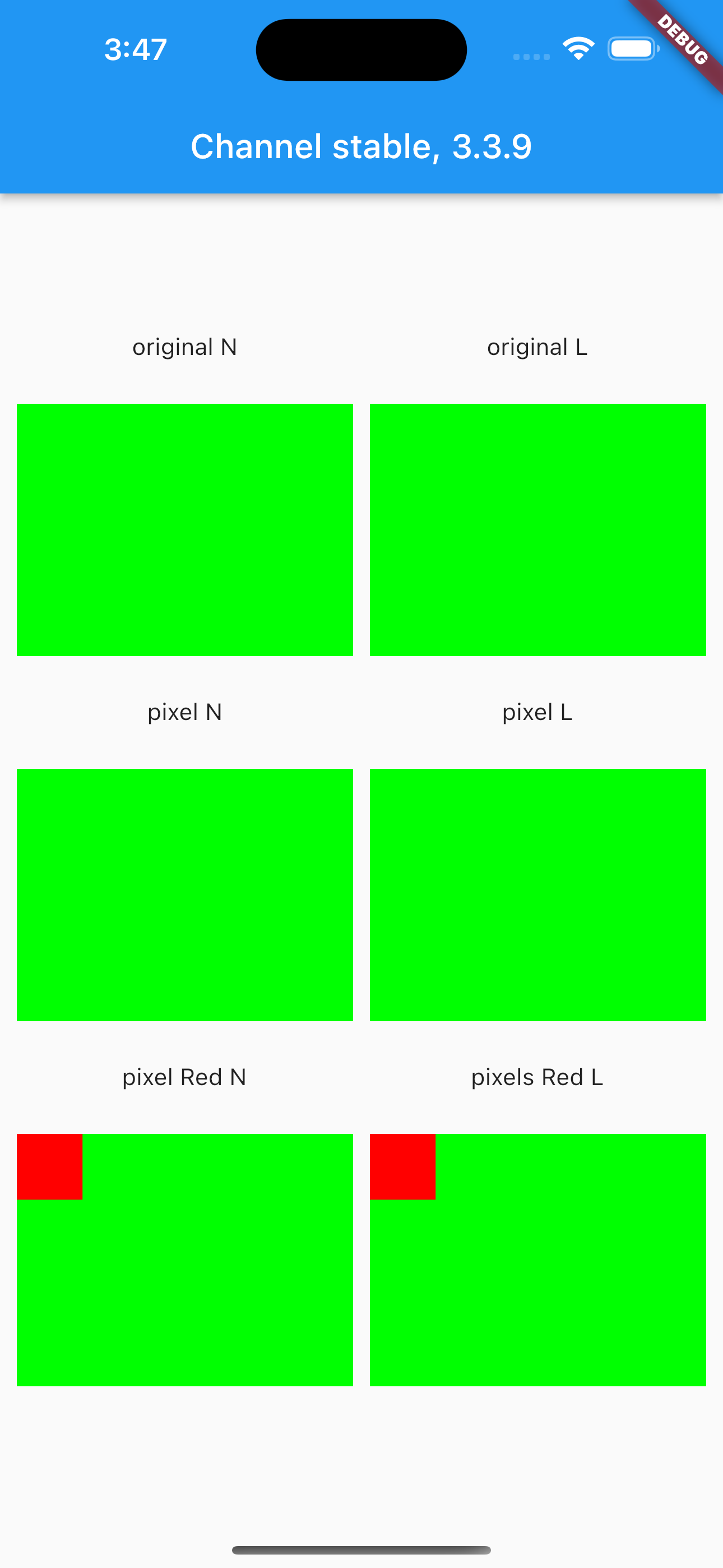
Here is what I see on web but not on mobile.
-
ui.Image._().toByteData()
When running on web it will return questionable information and it cannot be used. -
ui.decodeImageFromPixels
Fails on web but not on mobile (probably as the earlyer steptoByteData()returns faulty info).
Other failed attempts include:
- Uint8List.fromList(response.bodyBytes) where the response is from http.get along with ui.decodeImageFromList / Image.memory());
- adding a "dummy" header for the bitmap before decoding
- tried with all available ImageByteFormat and different image formats or sources;
- using a codec (ui.instantiateImageCodec);
Steps to Reproduce
Tested on the master 3.7.0-4.0.pre.32, beta 3.6.0-0.1.pre. On the stable channel toByteData throws an exception.
The problem only reproduces when running on web.
Steps
- Clone this repo.
- Run the project on chrome.
- Wait 5 seconds after launch finished. (I added a Future delayed instead of a callback completion).
Expected results:
-
6 images appear on screen appear (given sufficient resources were available to process and display the images).
-
Log prints correct information about the colors. In this case you should see "R:0 G:255 B:1 A:255" (all images used are green).
Actual results:
-
only 2 images appear. These were not built from the resulting toByteData. (on stable the failing reason is different).
-
The log prints faulty info "R:150 G:150 B:150 A:150".
Logs
Logs Web Master
Launching lib/main.dart on Chrome in debug mode...
This app is linked to the debug service: ws://127.0.0.1:65158/qLj-XU9PEVk=/ws
Debug service listening on ws://127.0.0.1:65158/qLj-XU9PEVk=/ws

💪 Running with sound null safety 💪
Connecting to VM Service at ws://127.0.0.1:65158/qLj-XU9PEVk=/ws
25
 R:150 G:150 B:150 A:150
2
Failed to create image from pixels.
25
 R:150 G:150 B:150 A:150
2
Failed to create image from pixels.
Logs Mobile Master
Launching lib/main.dart on iPhone 14 Pro Max in debug mode...
Xcode build done.                                           22.6s
Connecting to VM Service at ws://127.0.0.1:63552/iBGBIR2C1P0=/ws
50
flutter:  R:0 G:255 B:1 A:255
Logs Web Beta
Launching lib/main.dart on Chrome in debug mode...
This app is linked to the debug service: ws://127.0.0.1:56733/El40qGs1V78=/ws
Debug service listening on ws://127.0.0.1:56733/El40qGs1V78=/ws

💪 Running with sound null safety 💪
Connecting to VM Service at ws://127.0.0.1:56733/El40qGs1V78=/ws
25
 R:150 G:150 B:150 A:150
2
Failed to create image from pixels.
25
 R:150 G:150 B:150 A:150
2
Failed to create image from pixels.
Logs Mobile Beta
Launching lib/main.dart on iPhone 14 Pro Max in debug mode...
Xcode build done.                                           18.0s
Connecting to VM Service at ws://127.0.0.1:54816/NXjnyvdhN60=/ws
50
flutter:  R:0 G:255 B:1 A:255
Logs Web Stable
Launching lib/main.dart on Chrome in debug mode...
lib/main.dart:1
This app is linked to the debug service: ws://127.0.0.1:53110/vgsE0APDfZw=/ws
Debug service listening on ws://127.0.0.1:53110/vgsE0APDfZw=/ws
💪 Running with sound null safety 💪
Connecting to VM Service at ws://127.0.0.1:53110/vgsE0APDfZw=/ws
Flutter Web Bootstrap: Programmatic
Error: Expected a value of type 'Uint8List', but got one of type 'Null'
dart-sdk/lib/_internal/js_dev_runtime/private/ddc_runtime/errors.dart 266:49      throw_
dart-sdk/lib/_internal/js_dev_runtime/private/ddc_runtime/errors.dart 99:3        castError
dart-sdk/lib/_internal/js_dev_runtime/private/ddc_runtime/operations.dart 452:10  cast
dart-sdk/lib/_internal/js_dev_runtime/private/ddc_runtime/classes.dart 635:14     as_C
dart-sdk/lib/_internal/js_shared/lib/js_util_patch.dart 134:3                     _callMethodUnchecked3
lib/_engine/engine/canvaskit/canvaskit_api.dart 982:22                            SkImageExtension.readPixels
lib/_engine/engine/canvaskit/image.dart 321:23                                    _encodeImage
lib/_engine/engine/canvaskit/image.dart 290:28                                    [_readPixelsFromSkImage]
lib/_engine/engine/canvaskit/image.dart 284:14                                    toByteData
packages/flutter_image/main.dart 81:48                                            processImageAndLoadResult
dart-sdk/lib/_internal/js_dev_runtime/patch/async_patch.dart 84:54                runBody
dart-sdk/lib/_internal/js_dev_runtime/patch/async_patch.dart 123:5                _async
packages/flutter_image/main.dart 72:28                                            processImageAndLoadResult
packages/flutter_image/main.dart 59:17                                            <fn>
dart-sdk/lib/_internal/js_dev_runtime/patch/async_patch.dart 84:54                runBody
dart-sdk/lib/_internal/js_dev_runtime/patch/async_patch.dart 123:5                _async
packages/flutter_image/main.dart 58:37                                            <fn>
packages/flutter/src/painting/image_stream.dart 650:25                            setImage
packages/flutter/src/painting/image_stream.dart 993:5                             [_emitFrame]
packages/flutter/src/painting/image_stream.dart 972:7                             _decodeNextFrameAndSchedule
dart-sdk/lib/_internal/js_dev_runtime/patch/async_patch.dart 45:50                <fn>
dart-sdk/lib/async/zone.dart 1653:54                                              runUnary
dart-sdk/lib/async/future_impl.dart 147:18                                        handleValue
dart-sdk/lib/async/future_impl.dart 766:44                                        handleValueCallback
dart-sdk/lib/async/future_impl.dart 795:13                                        _propagateToListeners
dart-sdk/lib/async/future_impl.dart 566:5                                         [_completeWithValue]
dart-sdk/lib/async/future_impl.dart 639:7                                         callback
dart-sdk/lib/async/schedule_microtask.dart 40:11                                  _microtaskLoop
dart-sdk/lib/async/schedule_microtask.dart 49:5                                   _startMicrotaskLoop
dart-sdk/lib/_internal/js_dev_runtime/patch/async_patch.dart 166:15               <fn>
Error: Expected a value of type 'Uint8List', but got one of type 'Null'
dart-sdk/lib/_internal/js_dev_runtime/private/ddc_runtime/errors.dart 266:49      throw_
dart-sdk/lib/_internal/js_dev_runtime/private/ddc_runtime/errors.dart 99:3        castError
dart-sdk/lib/_internal/js_dev_runtime/private/ddc_runtime/operations.dart 452:10  cast
dart-sdk/lib/_internal/js_dev_runtime/private/ddc_runtime/classes.dart 635:14     as_C
dart-sdk/lib/_internal/js_shared/lib/js_util_patch.dart 134:3                     _callMethodUnchecked3
Logs Mobile Stable
Launching lib/main.dart on iPhone 14 Pro Max in debug mode...
lib/main.dart:1
Xcode build done.                                           28.7s
Connecting to VM Service at ws://127.0.0.1:52276/RS0uqfozBT0=/ws
50
flutter:  R:0 G:255 B:1 A:255
analyze
flutter analyze
info • Avoid `print` calls in production code • lib/main.dart:118:7 • avoid_print
warning • The '!' will have no effect because the receiver can't be null • lib/main.dart:125:30 • unnecessary_non_null_assertion
Flutter doctor
flutter doctor -v Master
$ flutter doctor -v
[✓] Flutter (Channel master, 3.7.0-4.0.pre.32, on macOS 12.6 21G115 darwin-x64,
    locale en-GB)
    • Flutter version 3.7.0-4.0.pre.32 on channel master at
      /Users/Durdu/Durdu/Home/development/flutter
    • Upstream repository https://github.com/flutter/flutter.git
    • Framework revision 68ce1aeaeb (14 hours ago), 2022-12-07 10:03:17 -0800
    • Engine revision 67254d6e4b
    • Dart version 2.19.0 (build 2.19.0-467.0.dev)
    • DevTools version 2.20.0

[✓] Android toolchain - develop for Android devices (Android SDK version 31.0.0)
    • Android SDK at /Users/Durdu/Library/Android/sdk
    • Platform android-31, build-tools 31.0.0
    • Java binary at:
      /Library/Java/JavaVirtualMachines/jdk1.8.0_25.jdk/Contents/Home/bin/java
    • Java version Java(TM) SE Runtime Environment (build 1.8.0_25-b17)
    • All Android licenses accepted.

[✓] Xcode - develop for iOS and macOS (Xcode 14.1)
    • Xcode at /Applications/Xcode.app/Contents/Developer
    • Build 14B47b
    • CocoaPods version 1.11.3

[✓] Chrome - develop for the web
    • Chrome at /Applications/Google Chrome.app/Contents/MacOS/Google Chrome

[!] Android Studio (not installed)
    • Android Studio not found; download from
      https://developer.android.com/studio/index.html
      (or visit https://flutter.dev/docs/get-started/install/macos#android-setup
      for detailed instructions).

[✓] VS Code (version 1.73.1)
    • VS Code at /Applications/Visual Studio Code.app/Contents
    • Flutter extension version 3.54.0

[✓] Connected device (2 available)
    • macOS (desktop) • macos  • darwin-x64     • macOS 12.6 21G115 darwin-x64
    • Chrome (web)    • chrome • web-javascript • Google Chrome 108.0.5359.98

[✓] HTTP Host Availability
    • All required HTTP hosts are available

! Doctor found issues in 1 category.
flutter doctor -v Beta
$ flutter doctor -v
[✓] Flutter (Channel beta, 3.6.0-0.1.pre, on macOS 12.6 21G115 darwin-x64, locale en-GB)
    • Flutter version 3.6.0-0.1.pre on channel beta at /Users/Durdu/Durdu/Home/development/flutter
    • Upstream repository https://github.com/flutter/flutter.git
    • Framework revision 75927305ff (3 weeks ago), 2022-11-17 05:52:50 +0530
    • Engine revision b754eabc98
    • Dart version 2.19.0 (build 2.19.0-374.1.beta)
    • DevTools version 2.19.0

[✓] Android toolchain - develop for Android devices (Android SDK version 31.0.0)
    • Android SDK at /Users/Durdu/Library/Android/sdk
    • Platform android-31, build-tools 31.0.0
    • Java binary at: /Library/Java/JavaVirtualMachines/jdk1.8.0_25.jdk/Contents/Home/bin/java
    • Java version Java(TM) SE Runtime Environment (build 1.8.0_25-b17)
    • All Android licenses accepted.

[✓] Xcode - develop for iOS and macOS (Xcode 14.1)
    • Xcode at /Applications/Xcode.app/Contents/Developer
    • Build 14B47b
    • CocoaPods version 1.11.3

[✓] Chrome - develop for the web
    • Chrome at /Applications/Google Chrome.app/Contents/MacOS/Google Chrome

[!] Android Studio (not installed)
    • Android Studio not found; download from https://developer.android.com/studio/index.html
      (or visit https://flutter.dev/docs/get-started/install/macos#android-setup for detailed instructions).

[✓] VS Code (version 1.74.0)
    • VS Code at /Applications/Visual Studio Code.app/Contents
    • Flutter extension version 3.54.0

[✓] Connected device (3 available)
    • iPhone 14 Pro Max (mobile) • 3A15A11D-CC44-4191-9529-AA6F3AD77D37 • ios            • com.apple.CoreSimulator.SimRuntime.iOS-16-1 (simulator)
    • macOS (desktop)            • macos                                • darwin-x64     • macOS 12.6 21G115 darwin-x64
    • Chrome (web)               • chrome                               • web-javascript • Google Chrome 108.0.5359.98

[✓] HTTP Host Availability
    • All required HTTP hosts are available

! Doctor found issues in 1 category.
flutter doctor -v Stable
$ flutter doctor -v
[✓] Flutter (Channel stable, 3.3.9, on macOS 12.6 21G115 darwin-x64, locale en-GB)
    • Flutter version 3.3.9 on channel stable at /Users/Durdu/Durdu/Home/development/flutter
    • Upstream repository https://github.com/flutter/flutter.git
    • Framework revision b8f7f1f986 (2 weeks ago), 2022-11-23 06:43:51 +0900
    • Engine revision 8f2221fbef
    • Dart version 2.18.5
    • DevTools version 2.15.0

[✓] Android toolchain - develop for Android devices (Android SDK version 31.0.0)
    • Android SDK at /Users/Durdu/Library/Android/sdk
    • Platform android-31, build-tools 31.0.0
    • Java binary at: /Library/Java/JavaVirtualMachines/jdk1.8.0_25.jdk/Contents/Home/bin/java
    • Java version Java(TM) SE Runtime Environment (build 1.8.0_25-b17)
    • All Android licenses accepted.

[✓] Xcode - develop for iOS and macOS (Xcode 14.1)
    • Xcode at /Applications/Xcode.app/Contents/Developer
    • Build 14B47b
    • CocoaPods version 1.11.3

[✓] Chrome - develop for the web
    • Chrome at /Applications/Google Chrome.app/Contents/MacOS/Google Chrome

[!] Android Studio (not installed)
    • Android Studio not found; download from https://developer.android.com/studio/index.html
      (or visit https://flutter.dev/docs/get-started/install/macos#android-setup for detailed instructions).

[✓] VS Code (version 1.73.1)
    • VS Code at /Applications/Visual Studio Code.app/Contents
    • Flutter extension version 3.54.0

[✓] Connected device (3 available)
    • iPhone 14 Pro Max (mobile) • 3A15A11D-CC44-4191-9529-AA6F3AD77D37 • ios            •
      com.apple.CoreSimulator.SimRuntime.iOS-16-1 (simulator)
    • macOS (desktop)            • macos                                • darwin-x64     • macOS 12.6 21G115 darwin-x64
    • Chrome (web)               • chrome                               • web-javascript • Google Chrome 108.0.5359.94
    ! Error: iPhone AD is busy: Waiting to connect and unlock the device. Xcode will continue when iPhone AD is finished.
      (code -10)

[✓] HTTP Host Availability
    • All required HTTP hosts are available

! Doctor found issues in 1 category.
Images
Images Master


Images Beta


Images Stable