Repository navigation
Output of print() calls (made by the app under test) always lands in the first test when running integration tests run with --reporter json #113885
Description

Synopsis
When running Flutter integration tests with the JSON reporter, print() calls that the app code is making have wrong testID.
This only occurs when running integration tests with flutter test integraton_test. Widget tests run with flutter test are not impacted.
Steps to Reproduce
- Clone the bartekpacia/flutter_test_json_reporter_bug repository. This is a default counter app slightly modified by me to demonstrate this problem.
cdto the cloned repository. $ flutter pub get$ flutter test integration_test/widget_test.dart --reporter json > reports/i_widget_test.jsonl
Actual results:
The events of type print, messageType print have wrong testID – the events with output of all print() calls that the app under test is making have testID of the first test.
Grep print()s made by the first test.
$ cat ./reports/i_widget_test.jsonl | grep "title increment"
{"testID":4,"messageType":"print","message":"build() called with title increment","type":"print","time":15889}
{"testID":4,"messageType":"print","message":"build() called with title increment","type":"print","time":16769}
Grep print()s made by the second test.
$ cat ./reports/i_widget_test.jsonl | grep "title decrement"
{"testID":4,"messageType":"print","message":"build() called with title decrement","type":"print","time":17059}
{"testID":4,"messageType":"print","message":"build() called with title decrement","type":"print","time":17177
Expected results:
I expect print()s to have correct testIDs. In the above example, that'd be:
$ cat ./reports/i_widget_test.jsonl | grep "title decrement"
{"testID":5,"messageType":"print","message":"build() called with title decrement","type":"print","time":17059}
{"testID":5,"messageType":"print","message":"build() called with title decrement","type":"print","time":17177
Ignore time in the above logs – it doesn't matter.
Code sample
The code is available in the repository I linked above.
See the integration_test/widget_test.dart file.
Logs
$ flutter doctor -v
[✓] Flutter (Channel stable, 3.3.5, on macOS 12.6 21G115 darwin-arm, locale en-PL)
    • Flutter version 3.3.5 on channel stable at /Users/bartek/fvm/versions/stable
    • Upstream repository https://github.com/flutter/flutter.git
    • Framework revision d9111f6402 (3 days ago), 2022-10-19 12:27:13 -0700
    • Engine revision 3ad69d7be3
    • Dart version 2.18.2
    • DevTools version 2.15.0

[✓] Android toolchain - develop for Android devices (Android SDK version 33.0.0)
    • Android SDK at /Users/bartek/androidsdk
    • Platform android-33, build-tools 33.0.0
    • ANDROID_HOME = /Users/bartek/androidsdk
    • Java binary at: /Users/bartek/Library/Application
      Support/JetBrains/Toolbox/apps/AndroidStudio/ch-0/213.7172.25.2113.9123335/Android
      Studio.app/Contents/jre/Contents/Home/bin/java
    • Java version OpenJDK Runtime Environment (build 11.0.13+0-b1751.21-8125866)
    • All Android licenses accepted.

[✓] Xcode - develop for iOS and macOS (Xcode 14.0.1)
    • Xcode at /Applications/Xcode.app/Contents/Developer
    • Build 14A400
    • CocoaPods version 1.11.3

[✓] Chrome - develop for the web
    • Chrome at /Applications/Google Chrome.app/Contents/MacOS/Google Chrome

[✓] Android Studio (version 2021.3)
    • Android Studio at /Users/bartek/Library/Application
      Support/JetBrains/Toolbox/apps/AndroidStudio/ch-0/213.7172.25.2113.9123335/Android Studio.app/Contents
    • Flutter plugin can be installed from:
      🔨 https://plugins.jetbrains.com/plugin/9212-flutter
    • Dart plugin can be installed from:
      🔨 https://plugins.jetbrains.com/plugin/6351-dart
    • Java version OpenJDK Runtime Environment (build 11.0.13+0-b1751.21-8125866)

[✓] IntelliJ IDEA Ultimate Edition (version 2022.2.3)
    • IntelliJ at /Users/bartek/Applications/JetBrains Toolbox/IntelliJ IDEA Ultimate.app
    • Flutter plugin version 70.2.5
    • Dart plugin version 222.4345.14

[✓] IntelliJ IDEA Ultimate Edition (version 2022.2.3)
    • IntelliJ at /Users/bartek/Library/Application Support/JetBrains/Toolbox/apps/IDEA-U/ch-0/222.4345.14/IntelliJ
      IDEA.app
    • Flutter plugin can be installed from:
      🔨 https://plugins.jetbrains.com/plugin/9212-flutter
    • Dart plugin can be installed from:
      🔨 https://plugins.jetbrains.com/plugin/6351-dart

[✓] VS Code (version 1.72.2)
    • VS Code at /Applications/Visual Studio Code.app/Contents
    • Flutter extension version 3.50.0

[✓] Connected device (3 available)
    • sdk gphone64 arm64 (mobile) • emulator-5554 • android-arm64  • Android 13 (API 33) (emulator)
    • macOS (desktop)             • macos         • darwin-arm64   • macOS 12.6 21G115 darwin-arm
    • Chrome (web)                • chrome        • web-javascript • Google Chrome 106.0.5249.119

[✓] HTTP Host Availability
    • All required HTTP hosts are available

• No issues found!
Better visualization of the JSON test results
To better visualize the test output, I suggest converting the test results from flutter test --reporter json's format to JUnit format using the junitreport package and then convert the JUnit .xml file to a simple HTML website using the Python junit2html package.
-
Install the
junitreportpackage:$ dart pub global activate junitreport -
(Assuming you have Python installed) Install the
junit2htmlpackage:$ pip install junit2html -
Run the integration tests with the JSON reporter
$ flutter test integration_test/widget_test.dart --reporter json > reports/i_widget_test.jsonl -
Convert
flutter testoutput to JUnit format$ dart pub global run junitreport:tojunit --input reports/i_widget_test.jsonl --output reports/i_widget_test.xml -
Generate nice HTML report of the test output from the JUnit format
$ junit2html reports/widget_test.xml reports/widget_test.html -
Open
reports/widget_test.htmlwith the browser of your choice. You should see this website. Here it can be very clearly seen that the stdout is messed up.
For comparison, see the output of
flutter test test/widget_test --reporter json(converted to JUnit and then converted to HTML report). This is the correct behavior.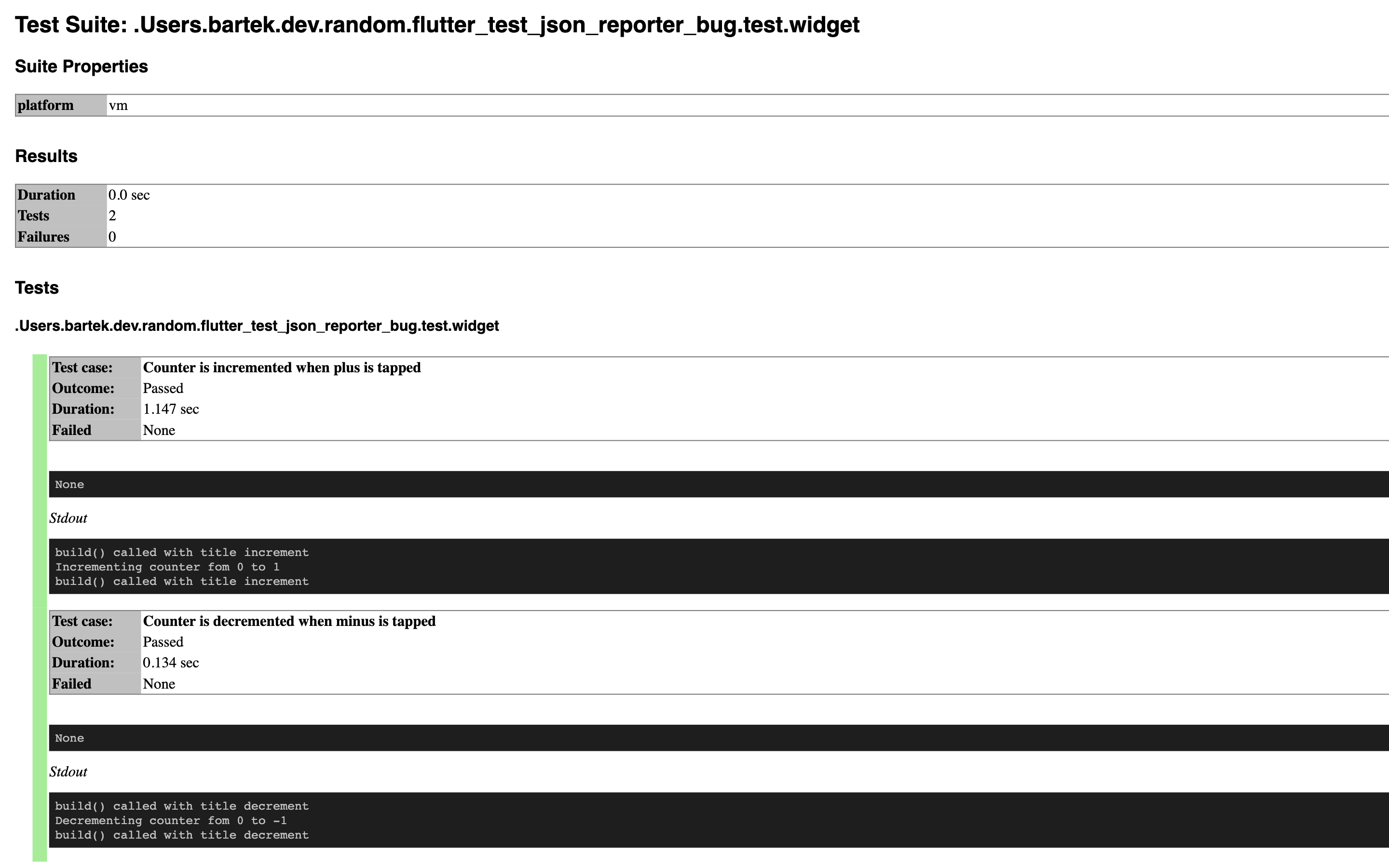
Activity
[-]Output of `print()` calls (made by the under test app) always lands in the first test when running integration tests run with `--reporter json` [/-][+]Output of `print()` calls (made by the app under test) always lands in the first test when running integration tests run with `--reporter json` [/+]exaby73 commentedon Oct 24, 2022
Hello @bartekpacia. I am getting different logs, possibly the expected ones, on master. Sorry for not understanding the issue very well. Could you please verify that these are the correct logs and also verify on the master channel yourself if that is the case?
{"testID":1,"result":"success","skipped":false,"hidden":true,"type":"testDone","time":21772} {"group":{"id":2,"suiteID":0,"parentID":null,"name":"","metadata":{"skip":false,"skipReason":null},"testCount":2,"line":null,"column":null,"url":null},"type":"group","time":21775} {"group":{"id":3,"suiteID":0,"parentID":2,"name":"Counter","metadata":{"skip":false,"skipReason":null},"testCount":2,"line":9,"column":3,"url":"c:/Users/Nabeel/dev/nevercode/issue_113885/integration_test/widget_test.dart"},"type":"group","time":21776} {"test":{"id":4,"name":"Counter is incremented when plus is tapped","suiteID":0,"groupIDs":[2,3],"metadata":{"skip":false,"skipReason":null},"line":154,"column":5,"url":"package:flutter_test/src/widget_tester.dart"},"type":"testStart","time":21776} {"testID":4,"messageType":"print","message":"build() called with title increment","type":"print","time":22568} {"testID":4,"messageType":"print","message":"Incrementing counter fom 0 to 1","type":"print","time":23032} {"testID":4,"messageType":"print","message":"build() called with title increment","type":"print","time":23058} {"testID":4,"result":"success","skipped":false,"hidden":false,"type":"testDone","time":23198} {"test":{"id":5,"name":"Counter is decremented when minus is tapped","suiteID":0,"groupIDs":[2,3],"metadata":{"skip":false,"skipReason":null},"line":154,"column":5,"url":"package:flutter_test/src/widget_tester.dart"},"type":"testStart","time":23199} {"testID":4,"messageType":"print","message":"build() called with title decrement","type":"print","time":23256} {"testID":5,"messageType":"print","message":"Decrementing counter fom 0 to -1","type":"print","time":23316} {"testID":4,"messageType":"print","message":"build() called with title decrement","type":"print","time":23324} {"testID":5,"result":"success","skipped":false,"hidden":false,"type":"testDone","time":23360} {"test":{"id":6,"name":"(tearDownAll)","suiteID":0,"groupIDs":[2],"metadata":{"skip":false,"skipReason":null},"line":42,"column":5,"url":"package:integration_test/integration_test.dart"},"type":"testStart","time":23361} {"testID":6,"result":"success","skipped":false,"hidden":true,"type":"testDone","time":23371} {"success":true,"type":"done","time":24038}bartekpacia commentedon Oct 24, 2022
Hi @exaby73, did you try to reproduce this issue on the latest Flutter stable (v3.3.5) or Flutter master channel? I reproduced this issue on Flutter stable (v3.3.5), not on Flutter master.
exaby73 commentedon Oct 24, 2022
Yes I can reproduce this on stable, but not on master. I tried with 3.3.5 and 3.5.0-10.0.pre.40
bartekpacia commentedon Oct 24, 2022
@exaby73 After taking a closer look at your logs, I think you're encountering this error, but your tests run in a different order, so at first glance it looks OK, but it's not.
I put the JSON output you posted into a
exaby_logs.jsonlfile and then I grepped it. As you can see below, output bothprint()s has the sametestID, even though they were made in different tests.I tried on
masterbut got the same logs as onstable. I think that the order in which tests are run is not always the same.flutter --version
exaby73 commentedon Oct 26, 2022
Alright thank you for the information. Labelling the issue for further insights from the team
jason-simmons commentedon Nov 15, 2022
This is caused by the use of zones in the Flutter testing libraries. See #96939 for a broader discussion of zones and tests.
The Dart test package overrides the
printfunction in the zone used to run the test. The zone'sprintwill send a message to the test framework that will be logged with the test's ID.However, the build callback may be run in a different zone that was created on behalf of a previous test. So if
printis called withinbuild, it will get that zone's instance of theprintfunction and will be logged with that test's ID.One potential workaround would be capturing
Zone.current.printwithin the test function and passing that print function to theMyAppconstructor. Callbacks likebuildwithinMyAppcould then use that function to log messages that will be associated with the expected ID.[flutter_test] Ensure LiveTestWidgetsFlutterBinding executes frame an…
github-actions commentedon Sep 11, 2026
This thread has been automatically locked since there has not been any recent activity after it was closed. If you are still experiencing a similar issue, please open a new bug, including the output of
flutter doctor -vand a minimal reproduction of the issue.