Repository navigation
(Loading Designer...) Form Designer Fails to Display #6492

Description

-
.NET Core Version: 6.0.101
-
Visual Studio 2022 Version 17.0.4
When opening a Form Designer it Displays the Message "Loading Designer..."(Image Attached) and completely doesn't display the Form Designer. What should one do to have the Form Designer Displayed? Form Designer sometimes shows after a few VS Restarts or sometimes lucky to have it displayed the first time VS starts. I didn't experience this using VS 2019 NET 5

Activity
dreddy-work commentedon Jan 11, 2022
@Shyam-Gupta, can you follow-up here?
Shyam-Gupta commentedon Jan 11, 2022
@Njoro007 Could you please provide following information:
devenv.exe,DesignToolsServer.exeor.NET runtime. Please share them with us.FYI: @merriemcgaw
Njoro007 commentedon Jan 12, 2022
The issue is very random. It happens in any Project (Old or New), NET 5 or NET 6. I sometimes get lucky to have the Windows Form Designer Display the Form. Sometimes even with numerous VS restarts doesn't work.
Yes All Projects Build Successfully, I'm able to debug as well
I'm finding a number of errors only on DesignerToolsServer.exe
[15:13:42.6740614] [Foresight Property]: Launching design tools server process...
[15:13:43.6684551] Creating VSCodeDomDesignerLoader
[15:13:52.7278373] [Foresight Property]: Timed out while connecting to named pipe: DesignToolsServer.340e7bf1-6d59-4c76-bbd8-318bea1b56bf
[15:13:52.9539640] Microsoft.DotNet.DesignTools.Client.ServerException: Timed out while connecting to named pipe.
at Microsoft.DotNet.DesignTools.Client.Host.ServerProcess.d__30.MoveNext()
--- End of stack trace from previous location where exception was thrown ---
at System.Runtime.ExceptionServices.ExceptionDispatchInfo.Throw()
at System.Runtime.CompilerServices.TaskAwaiter.HandleNonSuccessAndDebuggerNotification(Task task)
at Microsoft.DotNet.DesignTools.Client.Host.ServerProcess.d__25.MoveNext()
--- End of stack trace from previous location where exception was thrown ---
at System.Runtime.ExceptionServices.ExceptionDispatchInfo.Throw()
at System.Runtime.CompilerServices.TaskAwaiter.HandleNonSuccessAndDebuggerNotification(Task task)
at Microsoft.DotNet.DesignTools.Client.Host.ServerHostFactory.d__7.MoveNext()
--- End of stack trace from previous location where exception was thrown ---
at System.Runtime.ExceptionServices.ExceptionDispatchInfo.Throw()
at System.Runtime.CompilerServices.TaskAwaiter.HandleNonSuccessAndDebuggerNotification(Task task)
at Microsoft.DotNet.DesignTools.Client.DesignToolsClientLoader.d__35.MoveNext()
--- End of stack trace from previous location where exception was thrown ---
at System.Runtime.ExceptionServices.ExceptionDispatchInfo.Throw()
at Microsoft.VisualStudio.Telemetry.WindowsErrorReporting.WatsonReport.GetClrWatsonExceptionInfo(Exception exceptionObject)
[15:14:10.1764439] Creating VSCodeDomDesignerLoader
WinForms.mp4
kirsan31 commentedon Jan 12, 2022
I can add my 50 cents on this.
For me most of the time (if not all) this happens when you open solution with remembered (opened) forms designers (like we see in video above). And the more such forms there are, the higher the likelihood that they will not open.
As a result, I got used to always closing the form after using the designer.
Also when using designer VS frequently silently crashing (exit all processes).
As a result, I got used to always save my work before using designer and in the process of using it.
Shyam-Gupta commentedon Jan 12, 2022
@Njoro007 Thank you for sharing the information. From the logs, I can confirm that its happening because
DesignToolsServerprocess is exiting on launch. If you could share the EventVwr logs for this process, then it will help me identify the root cause.Also let me know the project
Target Frameworkand output of following command when executed in Visual Studio Developer Command prompt:"c:\Program Files\dotnet\dotnet.exe" --list-runtimes.Shyam-Gupta commentedon Jan 12, 2022
@kirsan31 Whenever the issue reproes for you, could you please share
WinForms output window logs, andEventVwrlogs fordevenv.exeandDesignToolsServer.exe. Thanks.Arcalise08 commentedon Jan 13, 2022
I am effected by the same bug. I leave windows forms designer on verbose mode. I have virtually the same error as the OP here. It does it randomly. There are no EventVwr logs pertaining to the event either. Frustratingly, It isnt enough to close the form and reopen it. After getting the named_pipe timeout you must restart visual studio for it to try again.
Shyam-Gupta commentedon Jan 13, 2022
@Arcalise08 What is the
Visual Studioversion you are using ? Did it work for you in earlier versions ?foller commentedon Jan 14, 2022
I had the same problem today.
By taking a good look at the errors and things I messed with before the error started happening. I verified that it is looking for the file from the temp folder. One of my projects has a reference to a project with a higher version and that caused an error when loading the logger. I tested it by deleting the contents of the Temp folder and creating a new project. That solved the problem. I went back in the project and removed the references to packages with a higher version. I deleted the data from the temp folder and ran it again. Worked perfectly.
Before that I had tried reinstalling windows, installed VS 2022, went back pc updates and nothing worked.
The solution was to upgrade the project's version from .net 5 to .net 6 or remove the reference project with the highest version and delete the contents of the temp folder.
Arcalise08 commentedon Jan 14, 2022
I confirmed this issue in 17.0.4, 17.0.5 and 17.1.0
The code base on question was recently upgraded from .net framework 4.6. It is a legacy codebase. And the designer was originally not happy because the project was stuck on x86 builds. And just about no forms would load no matter how many times I tried. I made some adjustments that allowed me to build in x64 bit and now the designer works sometimes.
@foller I'm not sure how you were able to reference a project with a higher .net version in the first place. But it sounds like not the same root cause as our case. Our entire solution is the same .net version
Shyam-Gupta commentedon Jan 14, 2022
@Arcalise08 Could you please check if appropriate runtime versions are installed with
Visual Studio. These options are available inVisual Studio Installer->Modify->Individual Componentstab. If they are not installed then try installing them and see if problem gets resolved.Shyam-Gupta commentedon Jan 14, 2022
@Arcalise08 We have made some fixes related to x86 projects in .NET (Core) designer and they should be available in an upcoming 17.1 Preview release.
foller commentedon Jan 14, 2022
@Arcalise08 let me explain better. The error is the same.
in my case it copies the App.designer.deps.json and App.designer.runtimeconfig.json files to the Local\temp folder. In my case, was a larger version of Microsoft.Extensions.Logging installed inside one of the packages with a version greater than my project version 5.0.

referring to how I was using a larger version than my project. I have created a nuget package to use dependency injection with entityFramework on all my projects.
https://www.nuget.org/packages/HyperCrud
in this package I made some references to preview versions, which works perfectly in windows forms and other types of projects, but causes the preview error.
by changing the project to the .net 6 version and using VS 2022 it copies the file with a updated version to the temp folder which is used to run the named pipe.
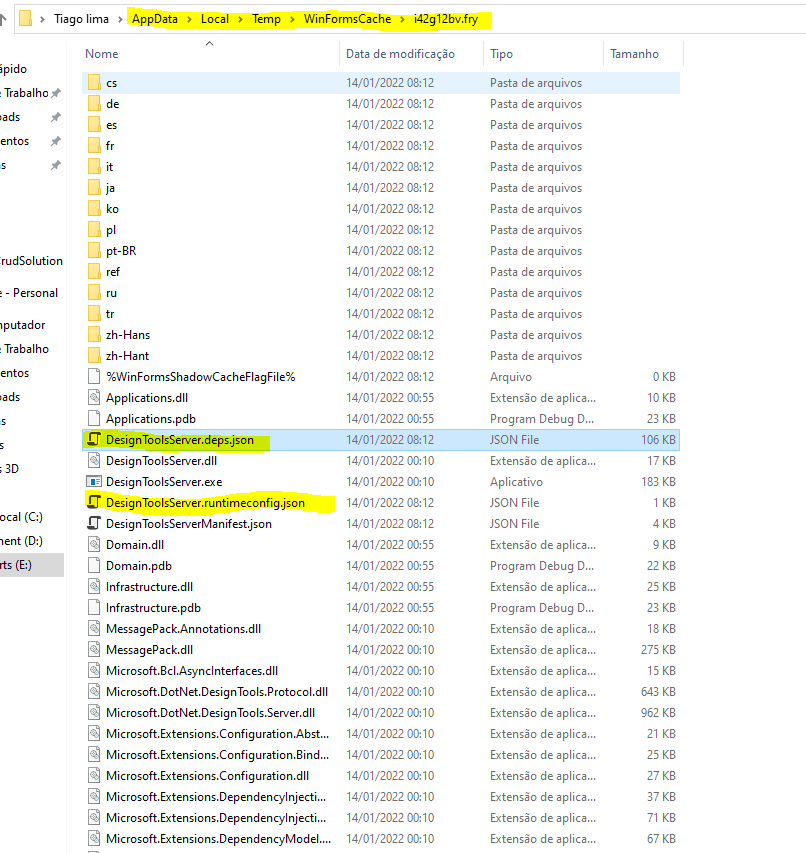
if you open the files you will see that inside it there are references to the packages used inside all the packages referenced by your project. including versions being replaced by major versions that are within a referenced package.

Arcalise08 commentedon Jan 14, 2022
@foller
Although the symptoms are the same (designer not loading) the root cause is different. We are seeing a
Timed out while connecting to named pipe: DesignToolsServer.340e7bf1-6d59-4c76-bbd8-318bea1b56bfwith no other errors and nothing pointing to a cause.@Shyam-Gupta I've yet to have this issue happen again after installing .net core 3.1 runtimes. However since the issue is intermittent im hesitant to say that fixed it. It also seems very odd to me that a missing runtime would cause an issue only sometimes. I would imagine that would cause an issue all the time would it not?
8 remaining items
Update designer-related docs, add designer troubleshooting guide
Update designer-related docs, add designer troubleshooting guide
Update designer-related docs, add designer troubleshooting guide
Update designer-related docs, add designer troubleshooting guide
Update designer-related docs, add designer troubleshooting guide