Repository navigation
Microsoft.Data.SqlClient DLL not being created #2024
Description

Describe the bug

Similar issues have been described in #1318 and #745. As usual, Microsoft seems to be ignoring it.
The DLL files are not being copied into the bin, and thus I am getting runtime errors from a missing DLL.
I am trying to run this an Azure Cloud. This is neither working on Azure Cloud nor locally on my local PC.
Exception message: System.DllNotFoundException: 'Unable to load DLL 'Microsoft.Data.SqlClient.SNI.x64.dll': The specified module could not be found. (Exception from HRESULT: 0x8007007E)'
To reproduce
Simply create an ASP.NET 4.8 project and add Microsoft.Data.SqlClient (currently 5.1.1) and Microsoft.Data.SqlClient.SNI (currently 5.1.0) using NuGet package manager.
SqlConnection sqlConnection = new SqlConnection("database_connection_string");
sqlConnection.Open();

return sqlConnection;
Expected behavior
The DLLs to be copied to their proper folders so there aren't runtime errors and I can connect to my database.
Further technical details
Microsoft.Data.SqlClient version: (found on the nuget or Microsoft.Data.SqlClient.dll)
.NET Framework 4.8.0
Operating system: Windows 11
csproj file
<?xml version="1.0" encoding="utf-8"?>
<Project ToolsVersion="15.0" xmlns="http://schemas.microsoft.com/developer/msbuild/2003">
  <Import Project="$(MSBuildExtensionsPath)\$(MSBuildToolsVersion)\Microsoft.Common.props" Condition="Exists('$(MSBuildExtensionsPath)\$(MSBuildToolsVersion)\Microsoft.Common.props')" />
  <PropertyGroup>
    <Configuration Condition=" '$(Configuration)' == '' ">Debug</Configuration>
    <Platform Condition=" '$(Platform)' == '' ">AnyCPU</Platform>
    <ProjectGuid>{7FE0E303-4F3A-40C5-A078-33FCA6A6DF2C}</ProjectGuid>
    <OutputType>Library</OutputType>
    <AppDesignerFolder>Properties</AppDesignerFolder>
    <RootNamespace>CentralDataAccessLayer</RootNamespace>
    <AssemblyName>Central.DataAccessLayer</AssemblyName>
    <TargetFrameworkVersion>v4.8</TargetFrameworkVersion>
    <FileAlignment>512</FileAlignment>
    <Deterministic>true</Deterministic>
    <TargetFrameworkProfile />
    <NuGetPackageImportStamp>
    </NuGetPackageImportStamp>
  </PropertyGroup>
  <PropertyGroup Condition=" '$(Configuration)|$(Platform)' == 'Debug|AnyCPU' ">
    <DebugSymbols>true</DebugSymbols>
    <DebugType>full</DebugType>
    <Optimize>false</Optimize>
    <OutputPath>bin\Debug\</OutputPath>
    <DefineConstants>DEBUG;TRACE</DefineConstants>
    <ErrorReport>prompt</ErrorReport>
    <WarningLevel>4</WarningLevel>
    <CodeAnalysisRuleSet>AllRules.ruleset</CodeAnalysisRuleSet>
  </PropertyGroup>
  <PropertyGroup Condition=" '$(Configuration)|$(Platform)' == 'Release|AnyCPU' ">
    <DebugType>pdbonly</DebugType>
    <Optimize>true</Optimize>
    <OutputPath>bin\Release\</OutputPath>
    <DefineConstants>TRACE</DefineConstants>
    <ErrorReport>prompt</ErrorReport>
    <WarningLevel>4</WarningLevel>
  </PropertyGroup>
  <ItemGroup>
    <Reference Include="Azure.Core, Version=1.31.0.0, Culture=neutral, PublicKeyToken=92742159e12e44c8, processorArchitecture=MSIL">
      <HintPath>..\packages\Azure.Core.1.31.0\lib\net461\Azure.Core.dll</HintPath>
    </Reference>
    <Reference Include="Azure.Identity, Version=1.8.2.0, Culture=neutral, PublicKeyToken=92742159e12e44c8, processorArchitecture=MSIL">
      <HintPath>..\packages\Azure.Identity.1.8.2\lib\netstandard2.0\Azure.Identity.dll</HintPath>
    </Reference>
    <Reference Include="JetBrains.Annotations, Version=4242.42.42.42, Culture=neutral, PublicKeyToken=1010a0d8d6380325, processorArchitecture=MSIL">
      <HintPath>..\packages\JetBrains.Annotations.2022.3.1\lib\net20\JetBrains.Annotations.dll</HintPath>
    </Reference>
    <Reference Include="Microsoft.Bcl.AsyncInterfaces, Version=7.0.0.0, Culture=neutral, PublicKeyToken=cc7b13ffcd2ddd51, processorArchitecture=MSIL">
      <HintPath>..\packages\Microsoft.Bcl.AsyncInterfaces.7.0.0\lib\net462\Microsoft.Bcl.AsyncInterfaces.dll</HintPath>
    </Reference>
    <Reference Include="Microsoft.Data.SqlClient, Version=5.0.0.0, Culture=neutral, PublicKeyToken=23ec7fc2d6eaa4a5, processorArchitecture=MSIL">
      <HintPath>..\packages\Microsoft.Data.SqlClient.5.1.1\lib\net462\Microsoft.Data.SqlClient.dll</HintPath>
    </Reference>
    <Reference Include="Microsoft.Identity.Client, Version=4.52.0.0, Culture=neutral, PublicKeyToken=0a613f4dd989e8ae, processorArchitecture=MSIL">
      <HintPath>..\packages\Microsoft.Identity.Client.4.52.0\lib\net461\Microsoft.Identity.Client.dll</HintPath>
    </Reference>
    <Reference Include="Microsoft.Identity.Client.Extensions.Msal, Version=2.28.0.0, Culture=neutral, PublicKeyToken=0a613f4dd989e8ae, processorArchitecture=MSIL">
      <HintPath>..\packages\Microsoft.Identity.Client.Extensions.Msal.2.28.0\lib\net45\Microsoft.Identity.Client.Extensions.Msal.dll</HintPath>
    </Reference>
    <Reference Include="Microsoft.IdentityModel.Abstractions, Version=6.28.1.0, Culture=neutral, PublicKeyToken=31bf3856ad364e35, processorArchitecture=MSIL">
      <HintPath>..\packages\Microsoft.IdentityModel.Abstractions.6.28.1\lib\net472\Microsoft.IdentityModel.Abstractions.dll</HintPath>
    </Reference>
    <Reference Include="Microsoft.IdentityModel.JsonWebTokens, Version=6.28.1.0, Culture=neutral, PublicKeyToken=31bf3856ad364e35, processorArchitecture=MSIL">
      <HintPath>..\packages\Microsoft.IdentityModel.JsonWebTokens.6.28.1\lib\net472\Microsoft.IdentityModel.JsonWebTokens.dll</HintPath>
    </Reference>
    <Reference Include="Microsoft.IdentityModel.Logging, Version=6.28.1.0, Culture=neutral, PublicKeyToken=31bf3856ad364e35, processorArchitecture=MSIL">
      <HintPath>..\packages\Microsoft.IdentityModel.Logging.6.28.1\lib\net472\Microsoft.IdentityModel.Logging.dll</HintPath>
    </Reference>
    <Reference Include="Microsoft.IdentityModel.Protocols, Version=6.28.1.0, Culture=neutral, PublicKeyToken=31bf3856ad364e35, processorArchitecture=MSIL">
      <HintPath>..\packages\Microsoft.IdentityModel.Protocols.6.28.1\lib\net472\Microsoft.IdentityModel.Protocols.dll</HintPath>
    </Reference>
    <Reference Include="Microsoft.IdentityModel.Protocols.OpenIdConnect, Version=6.28.1.0, Culture=neutral, PublicKeyToken=31bf3856ad364e35, processorArchitecture=MSIL">
      <HintPath>..\packages\Microsoft.IdentityModel.Protocols.OpenIdConnect.6.28.1\lib\net472\Microsoft.IdentityModel.Protocols.OpenIdConnect.dll</HintPath>
    </Reference>
    <Reference Include="Microsoft.IdentityModel.Tokens, Version=6.28.1.0, Culture=neutral, PublicKeyToken=31bf3856ad364e35, processorArchitecture=MSIL">
      <HintPath>..\packages\Microsoft.IdentityModel.Tokens.6.28.1\lib\net472\Microsoft.IdentityModel.Tokens.dll</HintPath>
    </Reference>
    <Reference Include="System" />
    <Reference Include="System.Buffers, Version=4.0.3.0, Culture=neutral, PublicKeyToken=cc7b13ffcd2ddd51, processorArchitecture=MSIL">
      <HintPath>..\packages\System.Buffers.4.5.1\lib\net461\System.Buffers.dll</HintPath>
    </Reference>
    <Reference Include="System.ComponentModel.Composition" />
    <Reference Include="System.Configuration" />
    <Reference Include="System.Configuration.ConfigurationManager, Version=7.0.0.0, Culture=neutral, PublicKeyToken=cc7b13ffcd2ddd51, processorArchitecture=MSIL">
      <HintPath>..\packages\System.Configuration.ConfigurationManager.7.0.0\lib\net462\System.Configuration.ConfigurationManager.dll</HintPath>
    </Reference>
    <Reference Include="System.Core" />
    <Reference Include="System.Data.OracleClient" />
    <Reference Include="System.Diagnostics.DiagnosticSource, Version=7.0.0.2, Culture=neutral, PublicKeyToken=cc7b13ffcd2ddd51, processorArchitecture=MSIL">
      <HintPath>..\packages\System.Diagnostics.DiagnosticSource.7.0.2\lib\net462\System.Diagnostics.DiagnosticSource.dll</HintPath>
    </Reference>
    <Reference Include="System.Drawing" />
    <Reference Include="System.IdentityModel" />
    <Reference Include="System.IdentityModel.Tokens.Jwt, Version=6.28.1.0, Culture=neutral, PublicKeyToken=31bf3856ad364e35, processorArchitecture=MSIL">
      <HintPath>..\packages\System.IdentityModel.Tokens.Jwt.6.28.1\lib\net472\System.IdentityModel.Tokens.Jwt.dll</HintPath>
    </Reference>
    <Reference Include="System.IO, Version=4.1.1.0, Culture=neutral, PublicKeyToken=b03f5f7f11d50a3a, processorArchitecture=MSIL">
      <HintPath>..\packages\System.IO.4.3.0\lib\net462\System.IO.dll</HintPath>
      <Private>True</Private>
      <Private>True</Private>
    </Reference>
    <Reference Include="System.Memory, Version=4.0.1.2, Culture=neutral, PublicKeyToken=cc7b13ffcd2ddd51, processorArchitecture=MSIL">
      <HintPath>..\packages\System.Memory.4.5.5\lib\net461\System.Memory.dll</HintPath>
    </Reference>
    <Reference Include="System.Memory.Data, Version=7.0.0.0, Culture=neutral, PublicKeyToken=cc7b13ffcd2ddd51, processorArchitecture=MSIL">
      <HintPath>..\packages\System.Memory.Data.7.0.0\lib\net462\System.Memory.Data.dll</HintPath>
    </Reference>
    <Reference Include="System.Net" />
    <Reference Include="System.Net.Http, Version=4.1.1.3, Culture=neutral, PublicKeyToken=b03f5f7f11d50a3a, processorArchitecture=MSIL">
      <HintPath>..\packages\System.Net.Http.4.3.4\lib\net46\System.Net.Http.dll</HintPath>
      <Private>True</Private>
      <Private>True</Private>
    </Reference>
    <Reference Include="System.Numerics" />
    <Reference Include="System.Numerics.Vectors, Version=4.1.4.0, Culture=neutral, PublicKeyToken=b03f5f7f11d50a3a, processorArchitecture=MSIL">
      <HintPath>..\packages\System.Numerics.Vectors.4.5.0\lib\net46\System.Numerics.Vectors.dll</HintPath>
    </Reference>
    <Reference Include="System.Runtime, Version=4.1.1.1, Culture=neutral, PublicKeyToken=b03f5f7f11d50a3a, processorArchitecture=MSIL">
      <HintPath>..\packages\System.Runtime.4.3.1\lib\net462\System.Runtime.dll</HintPath>
      <Private>True</Private>
      <Private>True</Private>
    </Reference>
    <Reference Include="System.Runtime.CompilerServices.Unsafe, Version=6.0.0.0, Culture=neutral, PublicKeyToken=b03f5f7f11d50a3a, processorArchitecture=MSIL">
      <HintPath>..\packages\System.Runtime.CompilerServices.Unsafe.6.0.0\lib\net461\System.Runtime.CompilerServices.Unsafe.dll</HintPath>
    </Reference>
    <Reference Include="System.Runtime.InteropServices.RuntimeInformation, Version=4.0.1.0, Culture=neutral, PublicKeyToken=b03f5f7f11d50a3a, processorArchitecture=MSIL">
      <HintPath>..\packages\System.Runtime.InteropServices.RuntimeInformation.4.3.0\lib\net45\System.Runtime.InteropServices.RuntimeInformation.dll</HintPath>
      <Private>True</Private>
      <Private>True</Private>
    </Reference>
    <Reference Include="System.Security" />
    <Reference Include="System.Security.AccessControl, Version=6.0.0.0, Culture=neutral, PublicKeyToken=b03f5f7f11d50a3a, processorArchitecture=MSIL">
      <HintPath>..\packages\System.Security.AccessControl.6.0.0\lib\net461\System.Security.AccessControl.dll</HintPath>
    </Reference>
    <Reference Include="System.Security.Cryptography.Algorithms, Version=4.2.1.0, Culture=neutral, PublicKeyToken=b03f5f7f11d50a3a, processorArchitecture=MSIL">
      <HintPath>..\packages\System.Security.Cryptography.Algorithms.4.3.1\lib\net463\System.Security.Cryptography.Algorithms.dll</HintPath>
      <Private>True</Private>
      <Private>True</Private>
    </Reference>
    <Reference Include="System.Security.Cryptography.Encoding, Version=4.0.1.0, Culture=neutral, PublicKeyToken=b03f5f7f11d50a3a, processorArchitecture=MSIL">
      <HintPath>..\packages\System.Security.Cryptography.Encoding.4.3.0\lib\net46\System.Security.Cryptography.Encoding.dll</HintPath>
      <Private>True</Private>
      <Private>True</Private>
    </Reference>
    <Reference Include="System.Security.Cryptography.Primitives, Version=4.0.1.0, Culture=neutral, PublicKeyToken=b03f5f7f11d50a3a, processorArchitecture=MSIL">
      <HintPath>..\packages\System.Security.Cryptography.Primitives.4.3.0\lib\net46\System.Security.Cryptography.Primitives.dll</HintPath>
      <Private>True</Private>
      <Private>True</Private>
    </Reference>
    <Reference Include="System.Security.Cryptography.ProtectedData, Version=7.0.0.1, Culture=neutral, PublicKeyToken=b03f5f7f11d50a3a, processorArchitecture=MSIL">
      <HintPath>..\packages\System.Security.Cryptography.ProtectedData.7.0.1\lib\net462\System.Security.Cryptography.ProtectedData.dll</HintPath>
    </Reference>
    <Reference Include="System.Security.Cryptography.X509Certificates, Version=4.1.1.2, Culture=neutral, PublicKeyToken=b03f5f7f11d50a3a, processorArchitecture=MSIL">
      <HintPath>..\packages\System.Security.Cryptography.X509Certificates.4.3.2\lib\net461\System.Security.Cryptography.X509Certificates.dll</HintPath>
      <Private>True</Private>
      <Private>True</Private>
    </Reference>
    <Reference Include="System.Security.Permissions, Version=7.0.0.0, Culture=neutral, PublicKeyToken=cc7b13ffcd2ddd51, processorArchitecture=MSIL">
      <HintPath>..\packages\System.Security.Permissions.7.0.0\lib\net462\System.Security.Permissions.dll</HintPath>
    </Reference>
    <Reference Include="System.Security.Principal.Windows, Version=5.0.0.0, Culture=neutral, PublicKeyToken=b03f5f7f11d50a3a, processorArchitecture=MSIL">
      <HintPath>..\packages\System.Security.Principal.Windows.5.0.0\lib\net461\System.Security.Principal.Windows.dll</HintPath>
    </Reference>
    <Reference Include="System.ServiceProcess" />
    <Reference Include="System.Text.Encodings.Web, Version=7.0.0.0, Culture=neutral, PublicKeyToken=cc7b13ffcd2ddd51, processorArchitecture=MSIL">
      <HintPath>..\packages\System.Text.Encodings.Web.7.0.0\lib\net462\System.Text.Encodings.Web.dll</HintPath>
    </Reference>
    <Reference Include="System.Text.Json, Version=7.0.0.2, Culture=neutral, PublicKeyToken=cc7b13ffcd2ddd51, processorArchitecture=MSIL">
      <HintPath>..\packages\System.Text.Json.7.0.2\lib\net462\System.Text.Json.dll</HintPath>
    </Reference>
    <Reference Include="System.Threading.Tasks.Extensions, Version=4.2.0.1, Culture=neutral, PublicKeyToken=cc7b13ffcd2ddd51, processorArchitecture=MSIL">
      <HintPath>..\packages\System.Threading.Tasks.Extensions.4.5.4\lib\net461\System.Threading.Tasks.Extensions.dll</HintPath>
    </Reference>
    <Reference Include="System.Transactions" />
    <Reference Include="System.ValueTuple, Version=4.0.3.0, Culture=neutral, PublicKeyToken=cc7b13ffcd2ddd51, processorArchitecture=MSIL">
      <HintPath>..\packages\System.ValueTuple.4.5.0\lib\net47\System.ValueTuple.dll</HintPath>
    </Reference>
    <Reference Include="System.Web" />
    <Reference Include="System.Windows.Forms" />
    <Reference Include="System.Xml.Linq" />
    <Reference Include="System.Data.DataSetExtensions" />
    <Reference Include="Microsoft.CSharp" />
    <Reference Include="System.Data" />
    <Reference Include="System.Xml" />
    <Reference Include="WindowsBase" />
  </ItemGroup>

  <ItemGroup>
    <None Include="app.config" />
    <None Include="packages.config" />
  </ItemGroup>
  <ItemGroup>
    <ProjectReference Include="..\Central.Console\Central.Console.csproj">
      <Project>{F7DBE437-E042-4BF3-912C-C49B66AA9FDD}</Project>
      <Name>Central.Console</Name>
    </ProjectReference>
  </ItemGroup>
  <Import Project="$(MSBuildToolsPath)\Microsoft.CSharp.targets" />
  <Import Project="..\packages\Microsoft.Data.SqlClient.SNI.5.1.0\build\net462\Microsoft.Data.SqlClient.SNI.targets" Condition="Exists('..\packages\Microsoft.Data.SqlClient.SNI.5.1.0\build\net462\Microsoft.Data.SqlClient.SNI.targets')" />
  <Target Name="EnsureNuGetPackageBuildImports" BeforeTargets="PrepareForBuild">
    <PropertyGroup>
      <ErrorText>This project references NuGet package(s) that are missing on this computer. Use NuGet Package Restore to download them.  For more information, see http://go.microsoft.com/fwlink/?LinkID=322105. The missing file is {0}.</ErrorText>
    </PropertyGroup>
    <Error Condition="!Exists('..\packages\Microsoft.Data.SqlClient.SNI.5.1.0\build\net462\Microsoft.Data.SqlClient.SNI.targets')" Text="$([System.String]::Format('$(ErrorText)', '..\packages\Microsoft.Data.SqlClient.SNI.5.1.0\build\net462\Microsoft.Data.SqlClient.SNI.targets'))" />
  </Target>
</Project>
Activity
ErikEJ commentedon Apr 26, 2023
Please share your .csproj file
Aashishkebab commentedon Apr 26, 2023
Hello,
I added the csproj file to the original post.
Wraith2 commentedon Apr 26, 2023
Do you really think that this sort of attitude is helpful? It's likely that they're working on this issues. If you really don't think they are then how about you work on fixing it yourself and contribute?
Aashishkebab commentedon Apr 27, 2023
The attitude is accurate when it comes to Microsoft from experience. The original issues I referenced are years old.
I can't even begin to tell you how many Visual Studio bugs are filed, with video evidence of it happening, but they close it because they can't reproduce it on their personal computer.
ErikEJ commentedon Apr 27, 2023
Do you see these files in your publish folder?
Aashishkebab commentedon Apr 27, 2023
Hello,
I don't have a publish folder. Inside the bin folder, the SNI files don't get deposited, hence the error.

Here's the screenshot:
Note that the web project references another project that references Microsoft.Data.SqlClient. Inside that project the files are there:
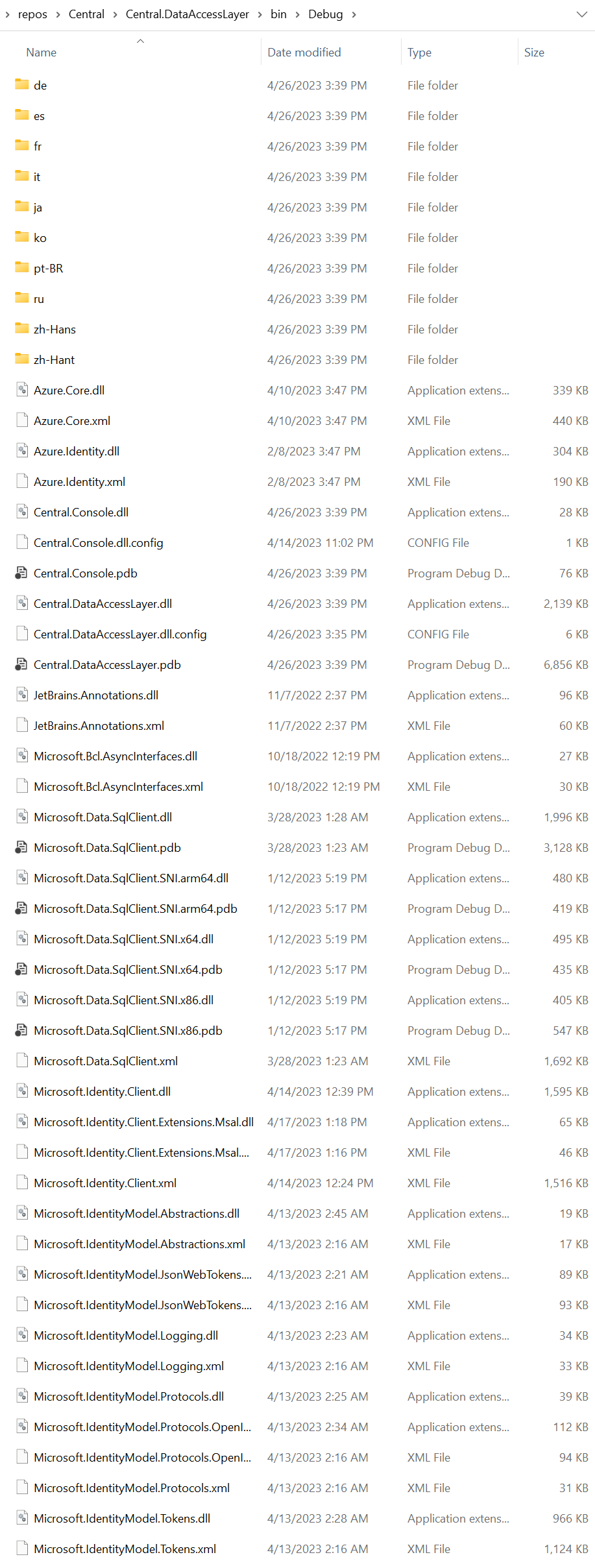
So the files are in the output for the DataAccessLayer project, which references the SqlClient, but not in the web app. Even though it should be because the web app references DataAccessLayer project.
ErikEJ commentedon Apr 27, 2023
Have you tried to reference the MDS package directly from your Web app then???
Aashishkebab commentedon Apr 27, 2023
Hello,
Yes that works. But I shouldn't need to do that because the SqlClient is a dependency of a referenced project, and should automatically be built and included.
So this is a bug of some kind somewhere.
ErikEJ commentedon Apr 27, 2023
Sure, but it is a workaround none the less
Aashishkebab commentedon Apr 27, 2023
Sure, and I'll do that for now. But this issue needs to be fixed.
Wraith2 commentedon Apr 27, 2023
Based on this old SO post https://stackoverflow.com/questions/19478775/add-native-files-from-nuget-package-to-project-output-directory it looks like the targets file in the
Microsoft.Data.SqlClient.SNI.targetsfile in theMicrosoft.Data.SqlClient.SNIpackage needs to be changed to stop using aContentelement to aNoneelement so that it'll be processed as a transient dependency. That package isn't open source and isn't in this repo.JRahnama commentedon Apr 27, 2023
@Wraith2 I will look at it. I spend the entire morning checking that target file. Thanks.
ErikEJ commentedon Apr 28, 2023
I am sure there are many issues that "need to be fixed" - regardless, the information you so kindly provided is a good help in root causing the issue.
JRahnama commentedon Apr 28, 2023
@Aashishkebab , Just to be quicker, can you provide a simple repro that I can test with the set of changes I have on hand? Or at least give me a step-by-step explanation on how to repro the issue in your case. I know there are several other issues, I am just testing to see if the issue is fixable for all existing scenarios.
Aashishkebab commentedon Apr 28, 2023
Create a standard C# project.
Install Microsoft.Data.SqlClient for only that project.
Create a function that opens a connection to SQL.
Create another project as ASP.NET web project with master file (don't know if that matters but I'm giving you how my exact setup is).
Reference only the first project in your ASP.NET project.
Call the function you created from the ASP.NET project.
Build and run. Wait for error.
Eragra3 commentedon May 12, 2023
Hello, I don't want to create even more mess here, but I didn't know which issue to put is in. I haven't seen this solution anywhere before and it may be useful for future readers.
Maybe we had unusual builds, but in our case everything worked locally, but failed on remote, because CI pipeline used MSBuild
Rebuildtask instead ofBuild.So in our case it helped to move from
Rebuilding the project to justBuilding it andtargetsfile worked properly.Aashishkebab commentedon May 12, 2023
We use Azure, and continuous integration doesn't even work because it uses an outdated version of MSBuild. As I said before, typical Microsoft.
Eragra3 commentedon May 12, 2023
Pretty sure you can pick MSBuild version https://learn.microsoft.com/en-us/azure/devops/pipelines/tasks/reference/vsbuild-v1?view=azure-pipelines#inputs.
Anyway sorry my fix doesn't work for you.
Aashishkebab commentedon May 12, 2023
Our issue occurs both locally and on cloud. We figured out that we need to add a reference to the project even though the dependency already has a reference. So clearly a bug.
Andreas-Dedalus commentedon Feb 1, 2024
I am not sure if this has been mentioned or if you found a resolution to your issues but this workaround works for me on our Azure Buildpipeline: #936 (comment)
jzabroski commentedon Nov 12, 2024
@ErikEJ Who is @kf-gonzalez and why did they have permission to close this issue? Nothing appears resolved here and they left no comments.
Aashishkebab commentedon Nov 12, 2024
ErikEJ commentedon Nov 12, 2024
@jzabroski Former team member, "Have you tried to reference the MDS package directly from your Web app then???" is a simple workaround. If you have issues with this, maybe create a new issue?
jzabroski commentedon Nov 12, 2024
That solution unfortunately doesn't work for me.
I created a new issue here #2998