Repository navigation
Cannot open a connection in .NET 6 FSI #1397

Description

Describe the bug
I cannot open a connection to a local SQL database instance using v4.0 of the Microsoft.Data.SqlClient package. Doing so gives the following error:
error FS0193: Could not load file or assembly 'System.Configuration.ConfigurationManager, Version=5.0.0.0, Culture=neutral, PublicKeyToken=cc7b13ffcd2ddd51'.

System.TypeInitializationException: The type initializer for 'Microsoft.Data.SqlClient.SqlAuthenticationProviderManager' threw an exception.
 ---> System.IO.FileNotFoundException: Could not load file or assembly 'System.Configuration.ConfigurationManager, Version=5.0.0.0, Culture=neutral, PublicKeyToken=cc7b13ffcd2ddd51'. The system cannot find the file specified.
File name: 'System.Configuration.ConfigurationManager, Version=5.0.0.0, Culture=neutral, PublicKeyToken=cc7b13ffcd2ddd51'
   at Microsoft.Data.SqlClient.SqlAuthenticationProviderManager..cctor()
   --- End of inner exception stack trace ---
   at Microsoft.Data.SqlClient.SqlInternalConnectionTds..ctor(DbConnectionPoolIdentity identity, SqlConnectionString connectionOptions, SqlCredential credential, Object providerInfo, String newPassword, SecureString newSecurePassword, Boolean redirectedUserInstance, SqlConnectionString userConnectionOptions, SessionData reconnectSessionData, Boolean applyTransientFaultHandling, String accessToken, DbConnectionPool pool) in D:\a\_work\1\s\src\Microsoft.Data.SqlClient\netcore\src\Microsoft\Data\SqlClient\SqlInternalConnectionTds.cs:line 480
   at Microsoft.Data.SqlClient.SqlConnectionFactory.CreateConnection(DbConnectionOptions options, DbConnectionPoolKey poolKey, Object poolGroupProviderInfo, DbConnectionPool pool, DbConnection owningConnection, DbConnectionOptions userOptions) in D:\a\_work\1\s\src\Microsoft.Data.SqlClient\netcore\src\Microsoft\Data\SqlClient\SqlConnectionFactory.cs:line 136
   at Microsoft.Data.ProviderBase.DbConnectionFactory.CreatePooledConnection(DbConnectionPool pool, DbConnection owningObject, DbConnectionOptions options, DbConnectionPoolKey poolKey, DbConnectionOptions userOptions) in D:\a\_work\1\s\src\Microsoft.Data.SqlClient\netcore\src\Common\src\Microsoft\Data\ProviderBase\DbConnectionFactory.cs:line 123
   at Microsoft.Data.ProviderBase.DbConnectionPool.CreateObject(DbConnection owningObject, DbConnectionOptions userOptions, DbConnectionInternal oldConnection) in D:\a\_work\1\s\src\Microsoft.Data.SqlClient\netcore\src\Microsoft\Data\ProviderBase\DbConnectionPool.cs:line 731
   at Microsoft.Data.ProviderBase.DbConnectionPool.UserCreateRequest(DbConnection owningObject, DbConnectionOptions userOptions, DbConnectionInternal oldConnection) in D:\a\_work\1\s\src\Microsoft.Data.SqlClient\netcore\src\Microsoft\Data\ProviderBase\DbConnectionPool.cs:line 1759
   at Microsoft.Data.ProviderBase.DbConnectionPool.TryGetConnection(DbConnection owningObject, UInt32 waitForMultipleObjectsTimeout, Boolean allowCreate, Boolean onlyOneCheckConnection, DbConnectionOptions userOptions, DbConnectionInternal& connection) in D:\a\_work\1\s\src\Microsoft.Data.SqlClient\netcore\src\Microsoft\Data\ProviderBase\DbConnectionPool.cs:line 1162
   at Microsoft.Data.ProviderBase.DbConnectionPool.TryGetConnection(DbConnection owningObject, TaskCompletionSource`1 retry, DbConnectionOptions userOptions, DbConnectionInternal& connection) in D:\a\_work\1\s\src\Microsoft.Data.SqlClient\netcore\src\Microsoft\Data\ProviderBase\DbConnectionPool.cs:line 1130
   at Microsoft.Data.ProviderBase.DbConnectionFactory.TryGetConnection(DbConnection owningConnection, TaskCompletionSource`1 retry, DbConnectionOptions userOptions, DbConnectionInternal oldConnection, DbConnectionInternal& connection) in D:\a\_work\1\s\src\Microsoft.Data.SqlClient\netcore\src\Microsoft\Data\ProviderBase\DbConnectionFactory.cs:line 122
   at Microsoft.Data.ProviderBase.DbConnectionInternal.TryOpenConnectionInternal(DbConnection outerConnection, DbConnectionFactory connectionFactory, TaskCompletionSource`1 retry, DbConnectionOptions userOptions) in D:\a\_work\1\s\src\Microsoft.Data.SqlClient\netcore\src\Common\src\Microsoft\Data\ProviderBase\DbConnectionInternal.cs:line 341
   at Microsoft.Data.ProviderBase.DbConnectionClosed.TryOpenConnection(DbConnection outerConnection, DbConnectionFactory connectionFactory, TaskCompletionSource`1 retry, DbConnectionOptions userOptions) in D:\a\_work\1\s\src\Microsoft.Data.SqlClient\netcore\src\Common\src\Microsoft\Data\ProviderBase\DbConnectionClosed.cs:line 39
   at Microsoft.Data.SqlClient.SqlConnection.TryOpen(TaskCompletionSource`1 retry, SqlConnectionOverrides overrides) in D:\a\_work\1\s\src\Microsoft.Data.SqlClient\netcore\src\Microsoft\Data\SqlClient\SqlConnection.cs:line 1838
   at Microsoft.Data.SqlClient.SqlConnection.Open(SqlConnectionOverrides overrides) in D:\a\_work\1\s\src\Microsoft.Data.SqlClient\netcore\src\Microsoft\Data\SqlClient\SqlConnection.cs:line 1327
   at Microsoft.Data.SqlClient.SqlConnection.Open() in D:\a\_work\1\s\src\Microsoft.Data.SqlClient\netcore\src\Microsoft\Data\SqlClient\SqlConnection.cs:line 1304
   at <StartupCode$FSI_0006>.$FSI_0006.main@()
Stopped due to error
To reproduce
#r "nuget:Microsoft.Data.SqlClient, 4.0"
open Microsoft.Data.SqlClient
let conn = new SqlConnection("my connection string goes here")
conn.Open()
Expected behavior
The connection is opened.
Further technical details
Microsoft.Data.SqlClient version: 4.0
.NET target: .NET 6
SQL Server version: SQL Server 2019
Operating system: Windows 11
Additional context
This works fine with the 3.0.1 NuGet package
Activity
Wraith2 commentedon Nov 20, 2021
Looks like the same problem that happens with powershell. You're not restoring the dependencies so it isn't working.
isaacabraham commentedon Nov 20, 2021
@Wraith2 The dependency should be getting pulled down by NuGet, unless it's not part of Microsoft.Data.SqlClient - which would seem to be wrong since it's evidently required to use the library.
JRahnama commentedon Nov 20, 2021
@isaacabraham have you looked at issue #645? Although the error message is different, but I think conversation flow could help to solve the issue.
isaacabraham commentedon Nov 20, 2021
@JRahnama That one is using manual DLL references and appears to be on .NET Core 3 and an older version of the SQL package. It was also closed nine months ago.
Read my issue again - it only doesn't work with v4 which was only just released a couple of days ago, and as I stated above, v3 works just fine, and I've also provided a simple repro for you to prove the issue.
Thanks
Tornhoof commentedon Nov 21, 2021
Did you try to add the nuget ref for the current version manually to your project?
https://www.nuget.org/packages/System.Configuration.ConfigurationManager/
isaacabraham commentedon Nov 23, 2021
@Tornhoof See #1397 (comment) - having to add this implies that the package dependency chain is broken. This could then affect all apps (console, class lib, web etc.) across .NET, not only for F#.
isaacabraham commentedon Nov 23, 2021
Either that or there's an issue with the way that FSI is using nuget refs, although I haven't seen this in any other package at all.
JRahnama commentedon Nov 23, 2021
@isaacabraham just to keep you and other interested people in the loop, I am testing to see if dropping support for
netcoreapp2.1has anything to do with this. Apparently the packageMicrosoft.Client.Identityis built for netcoreapp2.1 and in our previous version it was following the same path (From netcoreapp2.1 folder inside the nuget), but now it falls back onnetstandard 2.0and that might be the root cause of the issue( this is my idea not proven yet!) This is being tested now to see if I can gather more facts. If that is true, as you have mentioned, some other scenarios than F# should have the same problem, but so far no other issue has been received regarding this matter.eziante commentedon Dec 7, 2021
We are having the same issue with a C# application targeting .NET6.0
Originally we were using
System.Data.SqlClient, but after we upgraded our C# application from targeting .NET5.0 to target .NET6.0, we ran into an issue withSystem.Buffers4.0.2.0 not being found so we changed our code to useMicrosoft.Data.SqlClientinstead.Now when running the code we get the same error stating that
System.Configuration.ConfigurationManager5.0.0.0 could not be found.Manually installing the
System.Configuration.ConfigurationManagerin a version 5.0.0 from nuget solved this issue, however, we are now back at our original problem withSystem.Buffersversion 4.0.2.0 not being found that we also experienced withSystem.Data.SqlClient.Wraith2 commentedon Dec 7, 2021
So what happens when you use nuget to restore the System.Buffers dependency, as you should do with all the library dependencies that are listed?
eziante commentedon Dec 8, 2021
We use nuget to resolve all of our dependencies. For net5.0 it resolves to
System.Buffers5.0.0.0 and for net6.0 it resolves toSystem.Buffers6.0.0.0 which is what we exepect.We have solved the missing
System.Configuration.ConfigurationManagerby cleaning up some nuget packages that are not needed when targeting net6.0For the
System.Bufferswe have found out that the issue is related to<PublishSingleFile>true</PublishSingleFile>. If we do not publish as single file it works perfectly, but as soon as we turn it on again we get the missingSystem.Bufferserror. This also explains why it works in net5.0 and not net6.0 as thePublishSingleFilefeature changed quite a bit for net6.0.vforteli commentedon Dec 10, 2021
Ran into a similar issue with .netcore 3.1 and sql client 4. The transitive dependencies seem to work on windows at least, but when running in the appservices on ubuntu it would fail when trying to find System.Configuration.ConfigurationManager >= 5.
I guess adding an explicit dependency will fix it, but seems like an ugly workaround. So seems something is haywire with the dependencies of the package
Kaur-Parminder commentedon Dec 17, 2021
I have tested the issue with new released .net sdk 6.0.101, the same thing might work with previous version of .net 6.
I compared the path
C:\Program Files\dotnet\sdk\6.0.101\FSharp
with the already working sdk
C:\Program Files\dotnet\sdk\3.1.416\FSharp
I see a lot of new files in .net 6 and Also the dll which is causing the issue is there (missing in 3.1).

The version of this dll is old.
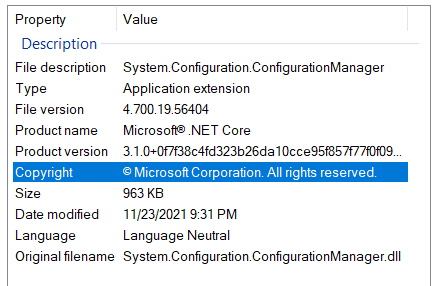
I deleted the file 'System.Configuration.ConfigurationManager' from C:\Program Files\dotnet\sdk\6.0.101\FSharp and the connection is made succesfully.
I am also attaching dotnet --info, in case anybody needs details of sdk/runtime versions
JRahnama commentedon Dec 17, 2021
I just checked net5 and netcoreapp 3.1 does not have that dependency.
JRahnama commentedon Dec 17, 2021
@dsyme, maybe you can direct us to the right owner of this issue please?
dsyme commentedon Dec 17, 2021
I suppose add a bug in dotnet/fsharp, and cc @KevinRansom and @vzarytovskii
Kaur-Parminder commentedon Dec 20, 2021
@isaacabraham Please log the issue with Repository https://github.com/dotnet/fsharp for any further work.
I am closing this as an external issue.
isaacabraham commentedon Feb 4, 2022
@Kaur-Parminder I don't understand - other people in PowerShell and C# applications are having an issue as well. This doesn't appear to be an F#-specific thing.
Kaur-Parminder commentedon Feb 4, 2022
@isaacabraham I tested with netcore 3.1 it works fine for me with the repro you have provided above. It was just .net6 that was causing the issue. Can you be specific with the C# application?
isaacabraham commentedon Feb 4, 2022
@Kaur-Parminder Have you read the comments above in this thread? For some reason I'm getting the feeling that your main priority here is simply to close this issue down as quickly as possible rather than actually get to the bottom of it.
Wraith2 commentedon Feb 4, 2022
If the priority were to close issues there would be a lot less old open issues.
I think the problem may be that it requires some in depth ecosystem knowledge to know that FSI is the f-sharp interpreter and understand that it's a REPL not a classic compiled environment. Even knowing that if someone isn't familiar with f-sharp they may not know how to investigate the problem. I don't, that's part of why I haven't.
It's also worth noting that (as far as I know) there is no explicit support for repl situations like fsi and powershell (as far as i know) and that the nuget behaviour of restoring the transitive closure of dependencies relies on the compilation target tfm to identify the list of things needed.
KevinRansom commentedon Feb 4, 2022
@isaacabraham ... it's probably simpler to just log an issue in our repo, we can always investigate and drive any fixes into sqlclient if they are necessary.
Kevin
dsyme commentedon Feb 4, 2022
Yes please reopen and transfer to dotnet/fsharp, it is likely a bug with transitive resolution of somehow we are fixing to an earlier System.Configuration.ConfigurationManager in the FSI implementation process.
KevinRansom commentedon Feb 4, 2022
I think we have an assembly probing issue because we actually deploy a copy of that dll, albeit a later version in the compiler directory on the sdk.
larjo commentedon Mar 22, 2022
For those in need of a quick workaround, this actually worked for me:
#r "nuget:System.Configuration.ConfigurationManager, 4.7.0"Everything else is .NET 6 and latest nuget versions and I can see no ill effects.
halcwb commentedon May 28, 2022
@larjo Thanks!! The magical "4.7.0" version did the trick. Quite a rabbit hole.
schonfinkel commentedon Jun 3, 2022
@larjo Thanks, that workaround managed to solve my FSI issues as well.