Repository navigation
Stack size is too small for arm64 platform #192
Description

Currently I try to run cassandra through official images, but the container cannot be started as "The stack size specified is too small, Specify at least 328k".
My docker environment is on 64bit ARMv8 Kunpeng920 CPU and I'v checked the architecture of image is "arm64".

After checking the option "-Xss" in jvm.options or cassandra-env.sh locating in the container, I find all of them are using "-Xss256k".

Activity
wglambert commentedon Oct 10, 2019
Same issue as #174, it wasn't able to be reproduced and when he used Ubuntu there wasn't an issue
You could try Docker's memory limit flag
-m 3.5Ghttps://docs.docker.com/config/containers/resource_constraints/#limit-a-containers-access-to-memory
yosifkit commentedon Oct 10, 2019
Yeah, I'd say this is a duplicate of #174 and the conclusion from the person reporting the issue was that it was host OS related (both on Centos 7, but Ubuntu worked fine). Can you give any more details that would prove otherwise?
maaaace commentedon Oct 11, 2019
@wglambert
Appreciate your suggestion. I've tried memory limit flag but it does not work.
maaaace commentedon Oct 11, 2019
@yosifkit I did further investigation about this issue. have to say this is OS related and also the architecutre causes it together.
Follow your suggestion, I upgrade Docker version on both CentOS and Ubuntu. Here is the result.

This table indicates that all the images fail to start a container with the error message "The stack size specified is too small, Specify at least 328k".
After adjusting -Xss on arm64 Ubuntu and x86 CentOS, I find the minimal stack size per thread of each OS/architecture are different.
arm64 CentOS7.6 328k
arm64 Ubuntu18.04 164k
x86 CentOS7.6 228k
Checking openjdk-1.8.0 source code, the error is from code snippet below.
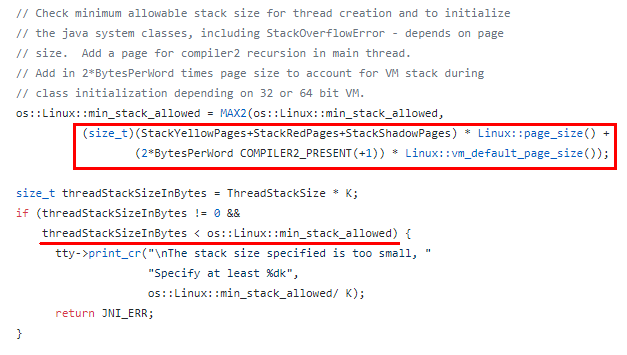

It shows
min_stack_allowedis related to StackYellowPage, StackRedPage, StackShadowPage, OS page size and VM default page size(8k). StackYellow/Red/ShadowPage could be checked with PrintFlagsFinal and page size is different corresponding to OS. Default page size of CentOS7.6 for arm64 is 64k, however, Ubuntu18.04 for arm64 and CentOS7.6 for x86 are both 4k.arm64 CentOS7.6 64bit
min_stack_allowed = 3 * 64 + ( 2 * 8 + 1) * 8 = 328k
arm64 Ubuntu18.04 64bit

min_stack_allowed = 7 * 4 + ( 2 * 8 + 1) * 8 = 164k
x86 CentOS7.6 64bit

min_stack_allowed = 228k
That's the reason why CentOS7.6 for arm64 cannot start canssandra docker images as jvm option "-Xss256k". In order to support it, could we have some change on this option?
waiting for your reply, thanks a lot.
binbinshi commentedon Nov 30, 2019
I run it on os
Linux version 4.14.0-115.el7a.0.1.aarch64 ([email protected]) (gcc version 4.8.5 20150623 (Red Hat 4.8.5-36) (GCC)) #1 SMP Sun Nov 25 20:54:21 UTC 2018
see the same error ;
The stack size specified is too small, Specify at least 328k Error: Could not create the Java Virtual Machine. Error: A fatal exception has occurred. Program will exit.use cassandra image arm64v8/cassandra:3.11.5 ,download url https://hub.docker.com/r/arm64v8/cassandra/ ;
can anyone fix it ?
update 2019/12/02
update the config of conf/jvm.options -Xss
Per-thread stack size. -Xss512kmy problem solved;
tianon commentedon Dec 20, 2023
Unfortunately, this is not something we plan to change -- CentOS 7 is very close to EOL, and we generally strive to stay as true as possible to upstream's defaults.
xtha commentedon Mar 8, 2024