[UPDATER] Updater text is not accurate, show 4.9.1 but update to latest (4.10.1 today) #12822

Description

- I have tried with the latest version of Docker Desktop
that cannot be done because it's the updater itself - I have tried disabling enabled experimental features
that is not related to experimental features but the updater - I have uploaded Diagnostics
- Diagnostics ID:
01A048BE-946F-4977-BF59-D435FEA6B778/20220706095837
- Diagnostics ID:
Actual behavior
Factory Reset: still the same
Clicking Update does download and install 4.10.1
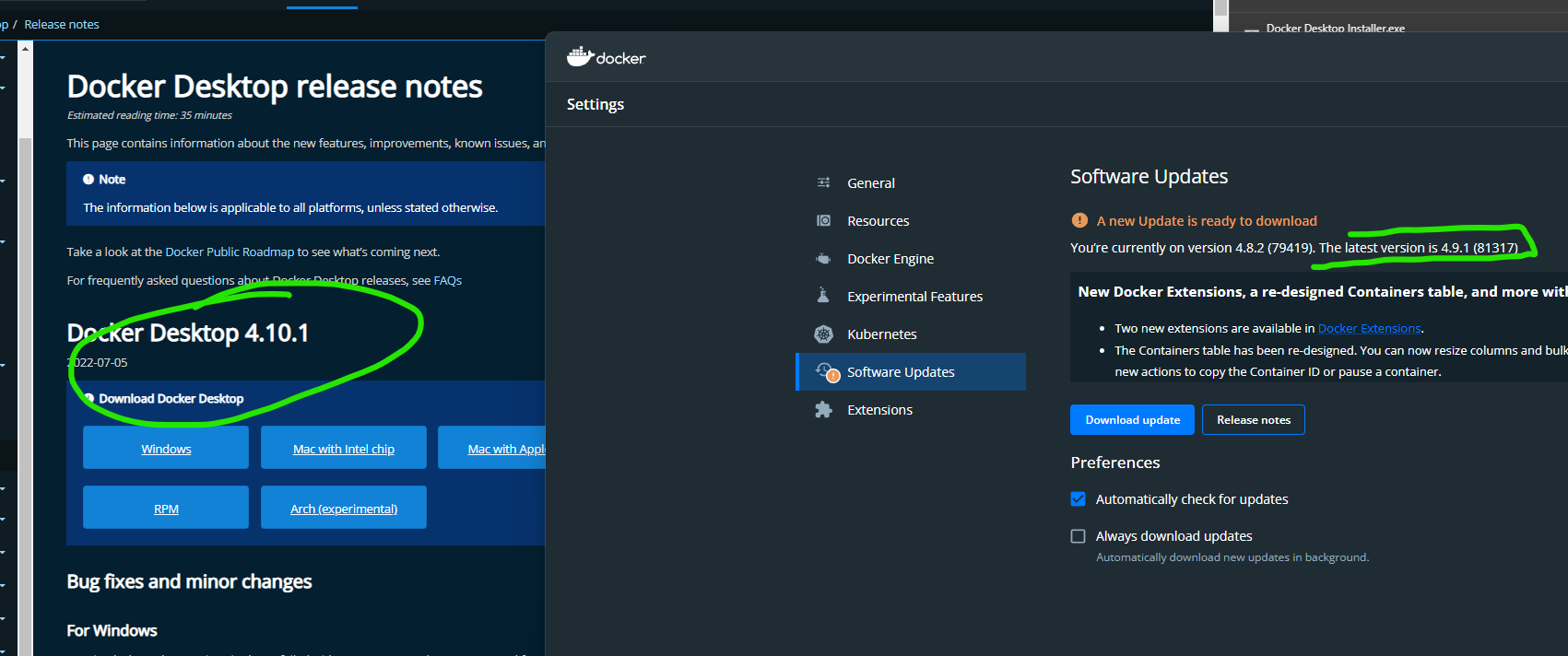

Expected behavior
The UI should re-check and invalidate it cache.
Information
I had 4.8.1 installed and did not update to 4.9.x due to known bugs
Just restarted today and it's still hinting at 4.9.x instead of 4.10.x
Information
- Is it reproducible?
- hard to tell (see at the end)
- Is the problem new?
- probably not / hard to tell
- Did the problem appear with an update?
- probably with all update
- A reproducible case if this is a bug, Dockerfiles with reproduction inside is best.
- it's about the installer itself
- Windows Version:
Microsoft Windows [Version 10.0.25151.1010] - Docker Desktop Version:
4.8.2 (79419) - WSL2 or Hyper-V backend?
wsl 2 - Are you running inside a virtualized Windows e.g. on a cloud server or a VM: no
Output of & "C:\Program Files\Docker\Docker\resources\com.docker.diagnose.exe" check
❯ & "C:\Program Files\Docker\Docker\resources\com.docker.diagnose.exe" check
Starting diagnostics

[PASS] DD0027: is there available disk space on the host?
[PASS] DD0028: is there available VM disk space?
[PASS] DD0031: does the Docker API work?
[PASS] DD0004: is the Docker engine running?
[PASS] DD0011: are the LinuxKit services running?
[PASS] DD0016: is the LinuxKit VM running?
[PASS] DD0001: is the application running?
[SKIP] DD0018: does the host support virtualization?
[PASS] DD0002: does the bootloader have virtualization enabled?
[PASS] DD0017: can a VM be started?
[PASS] DD0024: is WSL installed?
[PASS] DD0021: is the WSL 2 Windows Feature enabled?
[PASS] DD0022: is the Virtual Machine Platform Windows Feature enabled?
[PASS] DD0025: are WSL distros installed?
[PASS] DD0026: is the WSL LxssManager service running?
[PASS] DD0029: is the WSL 2 Linux filesystem corrupt?
[PASS] DD0015: are the binary symlinks installed?
[PASS] DD0003: is the Docker CLI working?
[PASS] DD0013: is the $PATH ok?
[PASS] DD0005: is the user in the docker-users group?
[PASS] DD0007: is the backend responding?
[PASS] DD0014: are the backend processes running?
[PASS] DD0008: is the native API responding?
[PASS] DD0009: is the vpnkit API responding?
[PASS] DD0010: is the Docker API proxy responding?
[PASS] DD0006: is the Docker Desktop Service responding?
[PASS] DD0012: is the VM networking working?
[PASS] DD0032: do Docker networks overlap with host IPs?
[SKIP] DD0030: is the image access management authorized?
[PASS] DD0033: does the host have Internet access?
No fatal errors detected.
Steps to reproduce the behavior
- install docker 4.8.1
- make it detect and maybe download 4.9.1 locally
- close it
- release 4.10.x later
- re-run docker desktop
- it still say it want to install 4.9.1
- if you click
Updateit will install 4.10.1