The orchestrator is a component of the Internet Computer that manages the replica. For that, it:
-
Repeatedly fetches and persists the registry changelog
-
Checks the registry for configuration updates and applies them (i.e. SSH keys & firewall)
-
Applies upgrades and subnet membership changes to the replica process using CUPs
These main tasks are executed asynchronously in three separate loops.
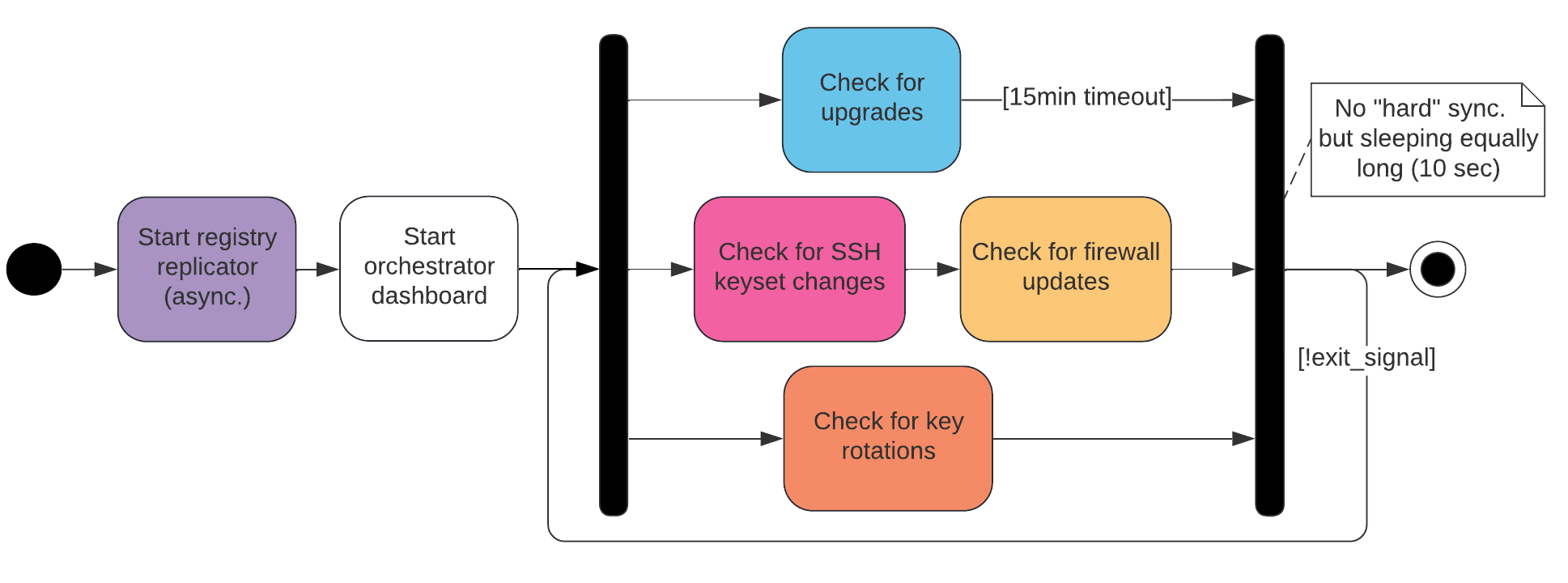
The Registry Replicator polls one of the NNS Nodes for registry updates on a regular basis, verifies the response using the public key configured in the registry and applies the received changelog to the Registry Local Store.

In case of a "switch-over" or starting a new independent NNS subnet, the Registry Replicator modifies the Registry Local Store before rebooting:
Consider the registry of the «parent» IC instance as the source registry. Let subnet_record be a subnet record (in the source registry) with subnet_record.start_as_nns set to true. Let v be the registry version at which subnet_record was added to the registry (i.e. the smallest v for which subnet_record exists). Create a fresh (target) registry state that contains all versions up to and including v-1. Add version v, but with the following changes:
-
subnet_record.start_as_nnsis unset on all subnet records -
nns_subnet_idset to the new NNS subnet id -
subnet_list: contains only thenns_subnet_id -
routing table: consists of a single entry that maps the range of canister ids that was mapped to the NNS in the source registry to the subnet id obtained from subnet record

Note that the Registry Local Store is usually accessed using the Registry Client, which itself is polling and caching the local store repeatedly. Due to the resulting asynchrony of the local registry state, client functions can be parameterized with a specific (last seen) registry version.
The Dashboard listens for connections on port 7070 and displays the node’s ID, datacenter ID, subnet ID, latest replica version, scheduled upgrades, current CUP height, registered readonly and backup keys, and more.
The orchestrator triggers upgrades of the replica process. For that, it periodically performs the following operations:
-
Ask the registry for the current peers in the subnetwork it is supposed to run in.
-
Select a random peer, and fetch the latest CUP via a separate endpoint.
-
Verify CUPs (by means of the subnet signature) and select the most recent one between local (lCUP), peer (pCUP) and registry (rCUP), based on the block height.
-
Use the registry version referenced in that CUP and check the replica version associated with that registry version.
-
If the version is different from what we are currently running, apply upgrade and restart replica with that CUP.
Additionally, using the highest CUP we determine the node’s subnet membership and delete its state once it becomes unassigned. Similarly, we handle the NNS recovery case by redownloading the Registry and restarting the node.
Our state is defined by a triple replica_version, subnet_id, local_CUP.


The Orchestrator manages and deploys two public key sets as configured in the registry:
-
Readonly keys (R): Owner has readonly access to replica
-
Backup keys (B): Owner has backup access to assigned replica Unassigned nodes do not hold state to be backed up and thus need no backup keys deployed.
Keys are deployed using an external shell script. Note that since the subnet_id is controlled by the upgrade module’s latest cup and thus independently of the registry, we need to keep track of both, the current registry version, and the subnet ID, when deciding if new key changes could apply.

The Orchestrator monitors the registry for new data centers. If a new data center is added, it will generate a new firewall configuration allowing access from the IP range specified in the DC record.

If the node is assigned to an ECDSA subnet with key rotations enabled, the Orchestrator periodically (every 10 seconds) checks for new key rotations by calling the corresponding function of the crypto component. If crypto indicates that it is time to rotate the key, the function to do the rotation is called and the new key is registered by sending an update call to a random NNS node. In case registration fails we will notice a key without registration during the next iteration, and will try to register it again.

The Orchestrator is the last resort for us in any critical situation. This component should always stay up and retry, and not panic up on the first unexpected condition. Instead, we exit the current loop (not shown in diagrams) and try again in the next iteration.
-
Lucid diagrams (internal): Changes in diagrams are reflected immediately.