The application will be an invoice generator which takes in time entry as input from the user, and outputs an invoice, printable in PDF form. The core functionality will allow them to edit the data, which will be JSON represented in a GUI format. The user will then be able to export as a PDF afterwards.
Contractors can use this application, giving them an easy way to keep track of their finances. As well as this, small businesses, accountants, and anyone looking for an easy way to generate their invoices will be able to use it as well.
As a tech contractor myself, I struggle a lot with keeping my invoices in check; my current workflow includes using an invoice generator online. Although it works, it is clunky, and I sometimes become disorganized, and end up wasting time. I hope that a desktop application will allow contractors to allow greater organization, both for myself, and others.
- As a user, I want to be able to add Invoice Line items to an Invoice.
- As a user, I want to be able to input the hours I've worked, and my hourly wage into my Invoice Line Items.
- As a user, I want to be able to view a list of my invoices.
- As a user, I want to be able to see what Invoice Line Items are added to a specific invoice.
- As a user, I want to be able to save my invoices
- As a user, I want to be able to load my invoices from a file
- You can generate the first required event by selecting the "Add Invoice" button and entering the name. You can do this multiple times.
- You can add invoice line items by selecting the "Add Invoice Line Item" button. Make sure to input a number for the hour and description; otherwise, it will produce an error message.
- To view the panel of invoices, you can click the "view invoices" button. This will allow you to view the invoices in the current save file.
- You can generate the second required event by clicking the "view invoice line items" button. This is differentiated from "View Invoices" since Invoice Line Items are a subchild of the invoice parent; by being able to view these invoice line items, which are a subset of a specific invoice, the program filters a user created class by another user created parent class.
- You can locate my visual component in the main screen of the invoice generator. It shows a save icon, in order to represent invoices that companies and contractors may load and save.
- You can save the state of my application by selecting the "Save Current Invoices" button.
- You can reload the state of my application by selecting the "Load from Previous Save" button.
This log will appear, printing out all Events that occur in the application. It will show up after program close.
EVENT DESC: Invoice test generated. | DATE: Wed Aug 10 21:13:01 PDT 2022
EVENT DESC: Getting invoice line items to be viewed. | DATE: Wed Aug 10 21:13:05 PDT 2022
EVENT DESC: Invoice test 2  generated. | DATE: Wed Aug 10 21:13:11 PDT 2022
EVENT DESC: Invoice test3 generated. | DATE: Wed Aug 10 21:13:22 PDT 2022
EVENT DESC: Getting invoice line items to be viewed. | DATE: Wed Aug 10 21:13:25 PDT 2022
If the log does not appear, it is because no invoice has been generated, or no invoice line item has been viewed. Note that the event log viewing occurs for invoice line items, not invoices.
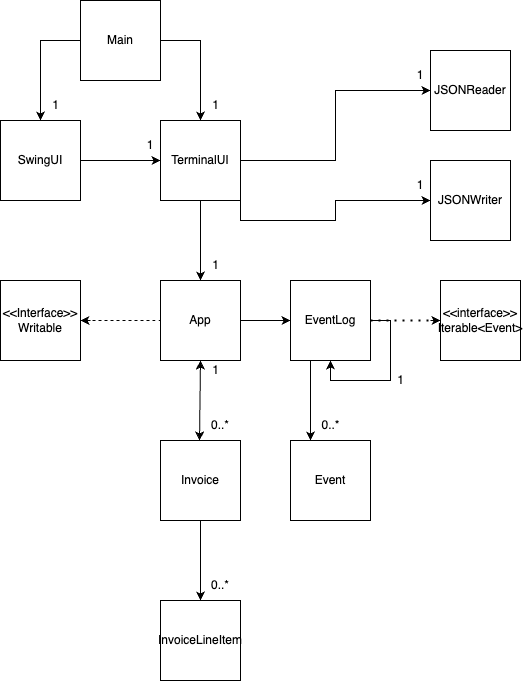
- Would have re-factored to have SwingUI connected directly to the App, so it is not so reliant on the terminal UI
- Removed the Writeable interface, since that was just a leftover from a template of an example
- Perhaps had InvoiceLineItems connect to App directly and have it connected to the Invoice object via Hashmap? This could have potentially reduced the amount of connections