Skip to content

feat: scope browser-only connections to a template - #30578

Merged
BobbyHo merged 18 commits into
coder:mainfrom
tarujg:taruj/template-browser-only
Nov 18, 2026
Merged

BobbyHo merged 18 commits into
coder:mainfrom
tarujg:taruj/template-browser-only

Conversation

@tarujg

@tarujg tarujg commented Oct 9, 2026 •

Copy link
Copy Markdown
Contributor

CODER_BROWSER_ONLY refuses SSH, port forwarding and desktop IDE connections for a whole deployment, so a deployment that hosts both regulated and general-purpose templates can only adopt it by taking those connections away from everyone. This adds a browser_only setting on the template, enforced in coderd, and leaves the deployment flag as a global override.

Refs #29157

Supersedes #29204, which the stale bot closed before it was reviewed. This is the same change rebased onto current main, with the migration renumbered to 000643.

TestMigration000617ConnectionLogsMethod seeded its template with dbgen.Template, which inserts every column the current InsertTemplate query names. At schema 616 that fails as soon as a later migration adds a column to templates, so the test now inserts the template with raw SQL, the same way the sibling ...InSingleTxn test already does.

What it does

templates.browser_only (new column, false by default) is surfaced as browser_only on codersdk.Template, CreateTemplateRequest and UpdateTemplateMeta, modeled on the allow_workspace_renames setting from #27558.

Enabling it requires the browser_only entitlement; disabling it does not, and enforcement never checks the entitlement. A lapsed license therefore neither silently reopens the connections nor strands a template with them refused. This mirrors how AGPLTemplateAccessControlStore keeps honoring an existing deprecated message that AGPL cannot set.

FeatureBrowserOnly.Enabled tracks the deployment flag rather than the license, so the write gate uses Entitlement.Entitled().

Enforcement

Every place the deployment flag already covers:

  • /api/v2/workspaceagents/{workspaceagent}/coordinate returns 409 with the same shape as the deployment-wide handler.
  • /api/v2/tailnet is user-scoped and spans templates, so it cannot be refused as a whole. It is refused per tunnel in rbacAuthorizer.AuthorizeTunnel. tailnet.TunnelPolicyError carries the reason past the generic "not found or you do not have permission" mask.
    • A policy refusal is non-fatal: the AGPL coordinator and pgcoord send the reason back as a CoordinateResponse.Error and keep the peer, so other tunnels on the same connection stay up. Coder Desktop shares one connection across every workspace, and closing the peer would have dropped all of them in a reconnect loop.
    • GetWorkspacesAndAgentsByOwnerID omits workspaces built from browser-only templates, so the workspace updates on this endpoint never tell Desktop to dial them. Flipping a template does not publish a workspace event, so until the next update the non-fatal refusal covers the stale list.
  • The MCP agent-connection tool, which already checked the deployment flag.

Things I would like direction on

  • Naming. I reused browser_only for parity with CODER_BROWSER_ONLY. On a template, require_browser_connections might read better.
  • An extra query under the coordinator mutex. AuthorizeTunnel runs while core.mutex is held, and this adds a second round trip (GetTemplateByID, which reads the template_with_names view). I have not measured it. If it matters, a narrow SELECT browser_only FROM templates WHERE id = $1 would replace the join.
  • Whether the feature should report as enabled when any template uses it. That would be a change in enterprise/coderd/coderd.go.

Not included

  • No dashboard UI. The setting is only reachable through the API today.
  • No coder templates edit flag.
  • The issue asks to express this in Terraform, which additionally needs a change in coder/terraform-provider-coderd.

Verification

Not verified: a real Coder Desktop client, a multi-node deployment, workspace proxies, and any UI. The enterprise pgcoord path is covered by TestPGCoordinator_TunnelPolicyRefusal, not by an end-to-end test.

Local runs after the rebase onto 8922988e34, on darwin/arm64 against Postgres in Docker, Go 1.26.10:

$ go test ./tailnet/... ./enterprise/tailnet/... ./coderd/database/migrations/ ./enterprise/audit/ -count=1
ok  	github.com/coder/coder/v2/tailnet	29.147s
ok  	github.com/coder/coder/v2/tailnet/derpmetrics	1.322s
ok  	github.com/coder/coder/v2/tailnet/proto	0.626s
ok  	github.com/coder/coder/v2/tailnet/tailnettest	5.989s
ok  	github.com/coder/coder/v2/enterprise/tailnet	16.949s
ok  	github.com/coder/coder/v2/coderd/database/migrations	22.934s
ok  	github.com/coder/coder/v2/enterprise/audit	8.124s

$ go test ./coderd/ -run 'TestWorkspaceUpdates|TestResolveTemplateMetaUpdate|TestPatchTemplateMeta|TestMCP|TestTailnetRPC|TestWorkspaceAgentClientCoordinate' -count=1
ok  	github.com/coder/coder/v2/coderd	17.955s

$ go test ./coderd/database/ -run 'TestGetAuthorizedWorkspacesAndAgentsByOwnerID' -count=1
ok  	github.com/coder/coder/v2/coderd/database	1.595s

$ go test ./enterprise/coderd/ -run 'TestBlockNonBrowser|TestWorkspaceProxy' -count=1
ok  	github.com/coder/coder/v2/enterprise/coderd	6.574s

$ golangci-lint run ./coderd/... ./codersdk/... ./enterprise/... ./tailnet/...
0 issues.

TestBlockNonBrowserTemplate/AgentCoordinate dials the agent as the owner before and after flipping the template, so the refusal cannot be an RBAC denial. From the coderd log of the original run in #29204, fields trimmed for width:

[debu]  coderd: GET  path=/api/v2/workspaceagents/a2ac4b4f-.../coordinate  workspace_name=purple-wilson3  agent_name=example  requestor_name=testuser  status_code=101
[debu]  coderd: PATCH  path=/api/v2/templates/d7306d85-...  requestor_name=testuser  status_code=200
[debu]  coderd: GET  path=/api/v2/workspaceagents/a2ac4b4f-.../coordinate  workspace_name=purple-wilson3  agent_name=example  requestor_name=testuser  status_code=409

TestBlockNonBrowserTemplate/UserTailnet opens one /api/v2/tailnet connection for a user with two workspaces, one browser-only. It asserts the browser-only workspace is missing from the workspace updates, its AddTunnel gets the policy message back, a tunnel to the other workspace still receives peer updates on the same connection, and the 403 tunnel entry lands in the connection log. TunnelPolicyRefusalTest in tailnet/test checks the same non-fatal refusal against both the AGPL coordinator and pgcoord. UserTailnet fails with the AGPL coordinator change reverted, and TestPGCoordinator_TunnelPolicyRefusal fails with the pgcoord change reverted.

make gen was run for the database, codersdk typescript, swagger and audit-log targets. The protobuf targets were skipped: nothing in this change touches .proto files and protoc-gen-go was not available locally. After the rebase onto 8922988e34, the database, API reference, audit-log and typescript targets were rerun.

AI disclosure

Most of this PR was written by Claude Code (Opus 5), so it falls under the AI contribution guidelines. The command output above is verbatim from those runs. The rebase onto current main and the follow-up to review were also done with Claude Code (Opus 5.5).

@tarujg
tarujg requested a review from nickvigilante as a code owner October 9, 2026 22:06
@github-actions github-actions Bot added the community Pull Requests and issues created by the community. label Oct 9, 2026
@tarujg
tarujg force-pushed the taruj/template-browser-only branch from a073c05 to c37b153 Compare October 15, 2026 07:20
@BobbyHo

BobbyHo commented Nov 12, 2026

Copy link
Copy Markdown
Collaborator

Hi @tarujg, thank you for creating this PR to add a per-template browser-only setting. The write-up is clear and the open questions you listed made it easy to review.

Based on the current implementation, I think it breaks Coder Desktop connections. Coder Desktop uses one /api/v2/tailnet connection for all of a user's workspaces and asks for a tunnel to every agent in the workspace list by itself. With this change, the tunnel to a browser-only workspace is refused in AuthorizeTunnel, and the coordinator closes the whole connection on that error. The app then reconnects, gets the same list, and is dropped again. So a user with one running browser-only workspace would lose Coder Desktop for their other workspaces too. I found this by reading the code and have not reproduced it with a real client, so please correct me if I missed something.

I think this needs to be addressed first. Two possible directions:

  • Leave browser-only workspaces out of the workspace updates sent on /api/v2/tailnet, so the app never asks for them.
  • Treat TunnelPolicyError as non-fatal: skip that tunnel and keep the connection.
    A test with two workspaces on one user connection (one browser-only, one not) would help confirm the normal one stays reachable.

Two smaller things:

  • The migration number needs to be updated. main already has 000624_workspace_secrets and is now at 000641, so this one needs a new number, a rebase, and make gen again.
  • It would be nice to include manual test steps in future PRs (how you set the flag and what you saw from coder ssh, Coder Desktop and the web terminal). It makes it much easier for us to verify.

Happy to continue reviewing once the Coder Desktop issue is addressed, and happy to share pointers if you have any questions.

@BobbyHo BobbyHo left a comment

Copy link
Copy Markdown
Collaborator

Choose a reason for hiding this comment

The reason will be displayed to describe this comment to others. Learn more.

Nice change! I think there's one blocking issue we should address first, though: #30578 (comment)

@nickvigilante nickvigilante left a comment

Copy link
Copy Markdown
Collaborator

Choose a reason for hiding this comment

The reason will be displayed to describe this comment to others. Learn more.

Two docs nits, but the docs LGTM otherwise!

Comment thread docs/admin/networking/index.md Outdated
Comment on lines +190 to +197
When only some workspaces handle data that requires it, enable browser-only on
those templates instead of the whole deployment. Set `browser_only` on the
template with `PATCH /api/v2/templates/{template}`. Coder then refuses SSH, port
forwarding and desktop IDE connections to workspaces built from that template,
and leaves the other templates in the deployment alone.

The deployment-wide setting still applies on top. While `CODER_BROWSER_ONLY` is
set, every template refuses those connections regardless of its own setting.

Copy link
Copy Markdown
Collaborator

Choose a reason for hiding this comment

The reason will be displayed to describe this comment to others. Learn more.

Suggested change
When only some workspaces handle data that requires it, enable browser-only on
those templates instead of the whole deployment. Set `browser_only` on the
template with `PATCH /api/v2/templates/{template}`. Coder then refuses SSH, port
forwarding and desktop IDE connections to workspaces built from that template,
and leaves the other templates in the deployment alone.
The deployment-wide setting still applies on top. While `CODER_BROWSER_ONLY` is
set, every template refuses those connections regardless of its own setting.
When only some workspaces handle data that requires it, enable browser-only on those templates instead of the whole deployment.
Set `browser_only` on the template with `PATCH /api/v2/templates/{template}`.
Coder then refuses SSH, port forwarding and desktop IDE connections to workspaces built from that template, and leaves the other templates in the deployment alone.
The deployment-wide setting still applies on top.
While `CODER_BROWSER_ONLY` is set, every template refuses those connections regardless of its own setting.

Comment thread docs/admin/networking/index.md Outdated

When only some workspaces handle data that requires it, enable browser-only on
those templates instead of the whole deployment. Set `browser_only` on the
template with `PATCH /api/v2/templates/{template}`. Coder then refuses SSH, port

Copy link
Copy Markdown
Collaborator

Choose a reason for hiding this comment

The reason will be displayed to describe this comment to others. Learn more.

Optional: link the API reference where PATCH /api/v2/templates/{template} first appears, so readers can find the request body.
The reference entry is Update template settings by ID.
This applies to the text as rewritten in the suggestion above.

CODER_BROWSER_ONLY refuses SSH, port forwarding and desktop IDE
connections for a whole deployment, so a deployment that hosts both
regulated and general-purpose templates cannot adopt it without taking
those connections away from everyone.

Add a browser_only setting on the template, enforced in coderd at the
agent-scoped coordinate endpoint, per tunnel on the user-scoped tailnet
endpoint, and on the MCP agent connection. The deployment-wide flag
stays a global override.

Enabling the setting requires the browser_only entitlement. Disabling it
does not, and enforcement does not check the entitlement, so a lapsed
license neither reopens the connections nor strands the template.

Refs coder#29157
…tunnel is refused

Coder Desktop shares one /api/v2/tailnet connection across all of a
user's workspaces, so refusing a browser-only tunnel by closing the peer
dropped every workspace and reconnected in a loop.

- The AGPL and pgcoord coordinators now return a TunnelPolicyError on
  that request and keep the peer.
- GetWorkspacesAndAgentsByOwnerID omits workspaces built from
  browser-only templates, so clients are not told to dial them.
- Renumber the template browser_only migration to 000643 after rebasing
  onto main.
- Apply docs review suggestions and regenerate the API reference.
@tarujg
tarujg force-pushed the taruj/template-browser-only branch from c37b153 to d6c17fb Compare November 17, 2026 01:19
@tarujg
tarujg temporarily deployed to main November 17, 2026 01:19 — with GitHub Actions Inactive
@tarujg
tarujg temporarily deployed to main November 17, 2026 01:42 — with GitHub Actions Inactive
@tarujg

tarujg commented Nov 17, 2026

Copy link
Copy Markdown
Contributor Author

Thanks for catching the Coder Desktop issue, @BobbyHo. I went with both directions:

  • GetWorkspacesAndAgentsByOwnerID now leaves out workspaces built from browser-only templates, so the workspace updates on /api/v2/tailnet never tell Desktop to dial them.
  • A TunnelPolicyError is now non-fatal in both the AGPL coordinator and pgcoord: the reason goes back as a CoordinateResponse.Error and the peer stays connected. This covers the window after a template is flipped, since that doesn't publish a workspace event and Desktop's list stays stale until the next one.

TestBlockNonBrowserTemplate/UserTailnet now uses two workspaces on one connection. It checks that the browser-only one is missing from the updates, that its tunnel is refused, and that the other one still gets peer updates on the same connection. A shared TunnelPolicyRefusalTest runs against both coordinators.

Rebased onto current main, the migration is now 000643, and make gen has been rerun.

I haven't tested with a real Coder Desktop client yet. I'll add manual steps for coder ssh, Desktop and the web terminal once I have.

@tarujg
tarujg requested a review from BobbyHo November 17, 2026 05:23
@tarujg
tarujg temporarily deployed to main November 17, 2026 05:23 — with GitHub Actions Inactive
@BobbyHo
BobbyHo temporarily deployed to main November 17, 2026 22:26 — with GitHub Actions Inactive
@BobbyHo

BobbyHo commented Nov 17, 2026

Copy link
Copy Markdown
Collaborator

Hi @tarujg, thank you for the quick update. The Coder Desktop issue looks fixed to me. I read both coordinator changes and the list filter, and the new go test cases pass locally.

A few more things to address before we could run a manual test:

  1. Migration number. Sorry, main moved again and now has 000643 and 000644. Could you merge main and rename the migration to 000645_template_browser_only? Nothing else should need to change.
  2. Connections that are already open. If I connect to an agent, turn browser_only on, and keep using the old connection, it still works. Only new connections get the 409. The deployment flag does not have this gap because it needs a restart. Could you add a line to the docs saying the setting applies to new connections only? Closing open connections could be a follow-up.
  3. Dashboard buttons. On a workspace from a browser-only template, the dashboard still shows the VS Code Desktop, SSH and dev container desktop buttons. They fail with the 409 after a click, and the dashboard does not say why. AgentRow.tsx and AgentDevcontainerCard.tsx only check the deployment-wide flag. Both already get the template prop, so would it be possible to also hide the buttons when template.browser_only is set?
  4. A test for the MCP check. Nothing tests the new check in coderd/mcp_http.go yet. It would be great to add a case to TestBlockNonBrowserTemplate that calls a workspace tool on a browser-only template and expects the error.
  5. Coder Desktop list after turning the setting off. The workspace does not come back in Desktop until the next workspace event for that user. A short note in the docs would be enough for now.

Two smaller things that could be follow-ups:

  • The Go client logs the refusal as coordination protocol error at error level. A warning, like the one for ReadyForHandshakeError, might be clearer.
  • A test that creates a template with browser_only: true would be nice to have.

On your open questions: I think the name browser_only is good, the extra query is fine for now, and reporting the feature as enabled could be its own PR.

Thanks again for working on this. Happy to help if you have any questions.

@BobbyHo

BobbyHo commented Nov 17, 2026

Copy link
Copy Markdown
Collaborator

Regarding manual tests, would you mind running the following when you have time? No rush at all. They cover the main paths and should be enough to show there is no regression.

Setup: one user with two running workspaces, ws-locked on a template with browser_only on, and ws-normal on a template with it off. The deployment flag CODER_BROWSER_ONLY stays off.

Turning the setting on needs a license with the browser-only feature. If you don't have one, just let me know and I'm happy to run the tests that need it on my end.

curl -X PATCH "$CODER_URL/api/v2/templates/<template-id>" \
  -H "Coder-Session-Token: $CODER_SESSION_TOKEN" \
  -H "Content-Type: application/json" \
  -d '{"browser_only": true}'
# Test Expected
1 coder ssh ws-locked and coder ssh ws-normal The first is refused with "Non-browser connections are disabled for this template." The second connects.
2 Open the web terminal and one web app on ws-locked in the dashboard Both still work.
3 Start Coder Desktop with the setting already on ws-normal is listed and reachable (for example ssh ws-normal.coder). ws-locked is not listed. Desktop stays connected.
4 With Coder Desktop connected and both templates off, turn the setting on for ws-locked's template ws-normal stays reachable and Desktop does not reconnect in a loop.
5 Turn the setting off again, then coder ssh ws-locked It connects again.

Whenever it is ready, it would be great if you could share the results here. A short note or a screenshot for each test is plenty.

Thanks again for your patience and for all the work on this!

@tarujg

tarujg commented Nov 18, 2026

Copy link
Copy Markdown
Contributor Author

Thanks for the detailed review, @BobbyHo. All five points and both follow-ups are addressed:

  1. Migration number. Merged main and renamed it to 000645_template_browser_only (fb4897e). make gen for the database produced no other changes.
  2. Connections that are already open. The docs now say the setting applies to new connections only, and that connections opened before it was turned on stay open until they close (2865465). Closing open connections can be a follow-up.
  3. Dashboard buttons. AgentRow and AgentDevcontainerCard now treat template.browser_only the same as the deployment flag, so VS Code Desktop, SSH and the dev container desktop buttons are hidden (ff1f642). There is a new TemplateBrowserOnly story with a play test, and it fails without the component change.
  4. MCP check. Added TestMCPHTTP_E2E_TemplateBrowserOnly (22bfc42). It calls workspace_read_file as the owner and the call succeeds. Then it sets browser_only on the template and calls again, which returns non-browser connections are disabled for this template. I put it in coderd/mcp next to TestMCPHTTP_E2E_WorkspaceSSHAuthz and not in TestBlockNonBrowserTemplate, because the MCP client helpers there are package-private and enforcement does not check the license.
  5. Coder Desktop list after turning the setting off. Covered by the same docs change: Desktop lists the workspace again on the next update to that user's workspaces.

Follow-ups:

  • Client log level. Policy refusals are now sent with a tunnel refused by policy: prefix, and the Go client logs that prefix as a warning, the same way it handles ReadyForHandshakeError (e3911cc).
  • Create test. An entitled create with browser_only: true round-trips, and an unlicensed create returns 400 on browser_only (84c8f5b).

Thanks also for answering the open questions. I kept the browser_only name and the current query, and left feature reporting for a separate PR.

Manual tests

Run on a local scripts/develop.sh deployment at 84c8f5bf75 with CODER_BROWSER_ONLY off and the docker starter template. One user owns ws-locked (copy of the template, set browser_only: true with your PATCH request) and ws-normal. The license was a local dev license signed with a key I added to Keys only for this run. It is not committed.

# Test Result
1 coder ssh ws-locked / coder ssh ws-normal ws-locked: error: Trace=[dial agent: start connector: ] Non-browser connections are disabled for this template. ws-normal: connected and ran the command.
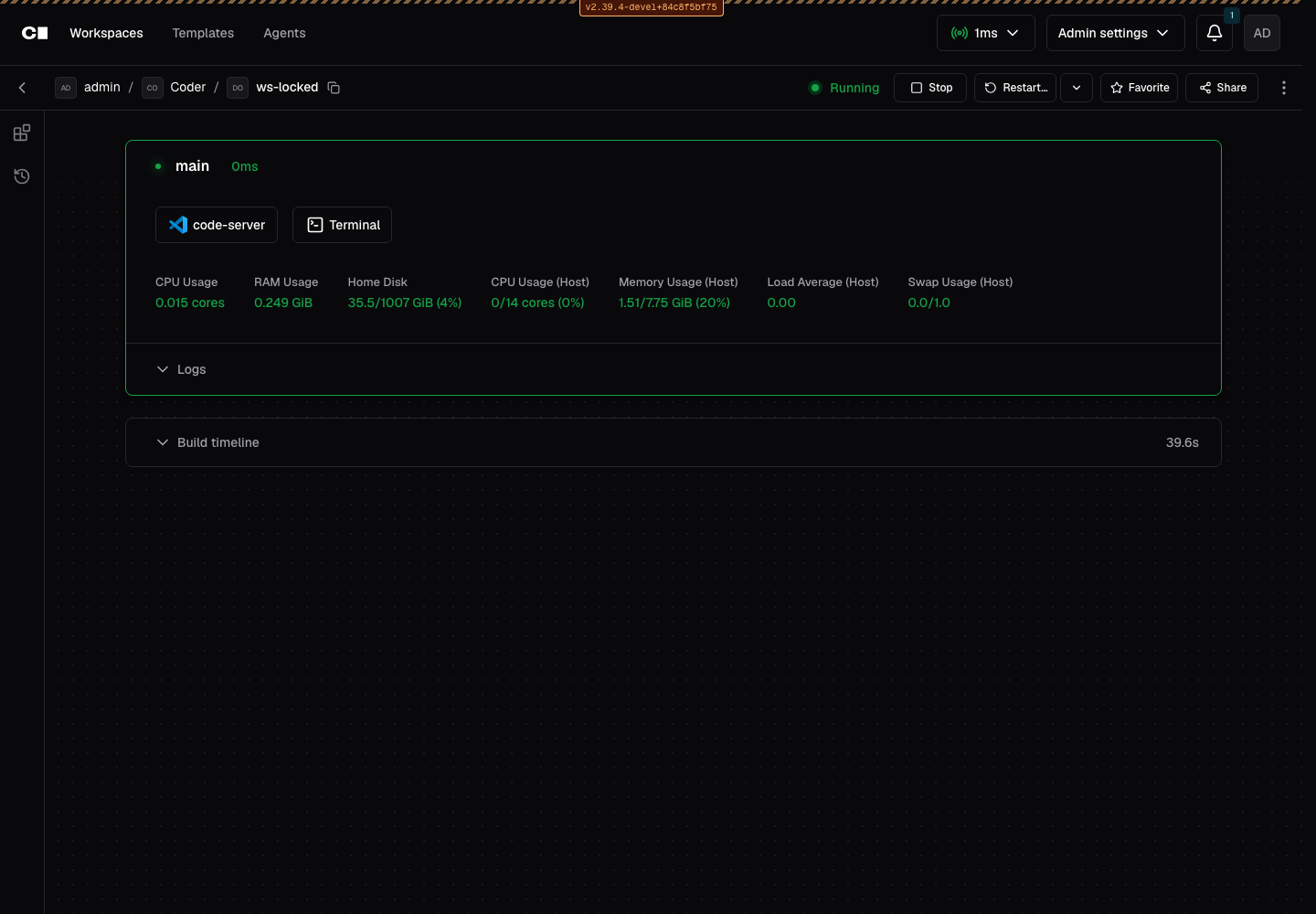
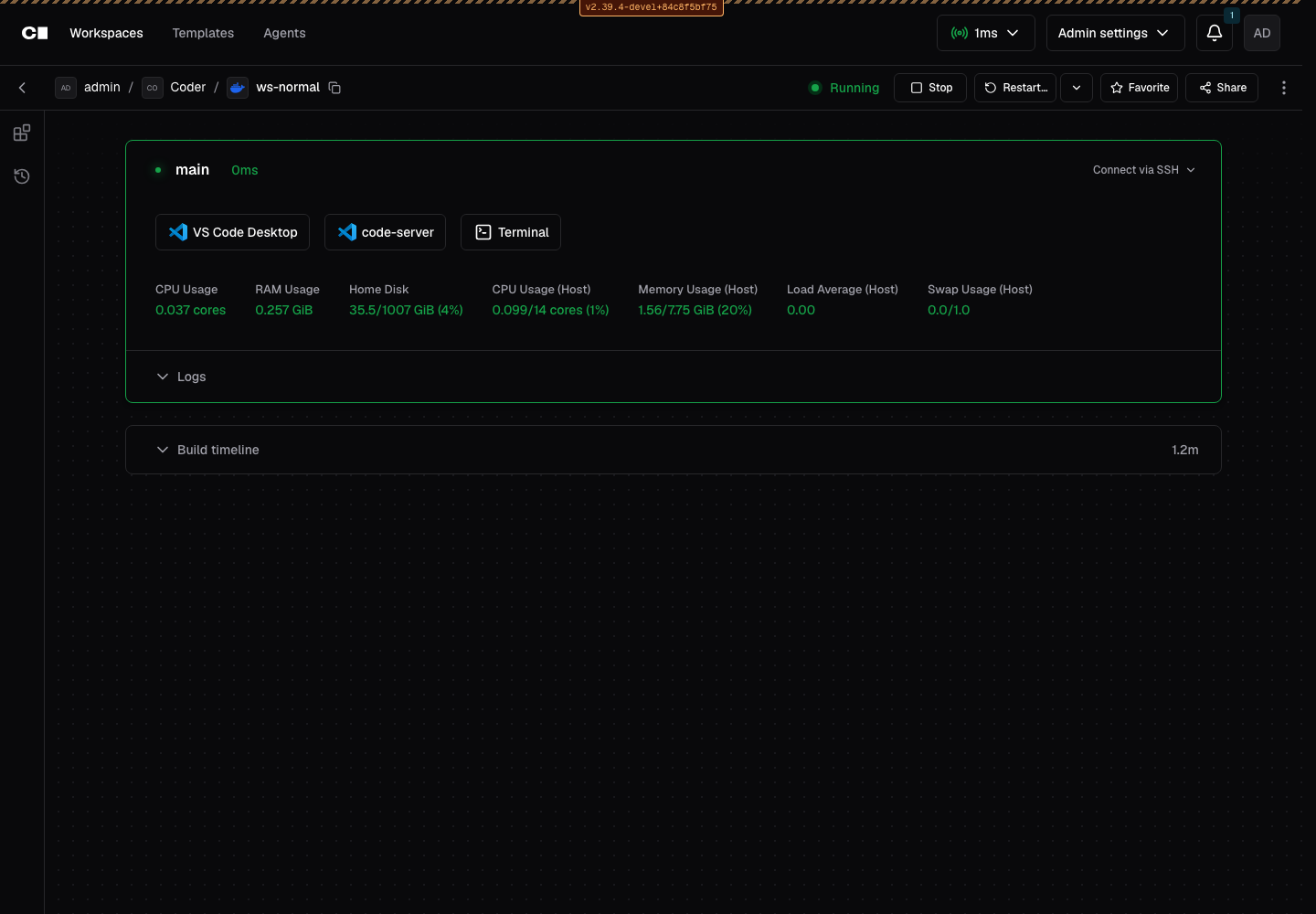
Dashboard Workspace page for each workspace ws-locked shows only code-server and Terminal. VS Code Desktop and Connect via SSH are hidden. ws-normal shows all four. Screenshots below.
2 Web terminal and a web app on ws-locked The web terminal websocket returned 101 Switching Protocols. code-server returned 200 with the VS Code page.
3 Start Coder Desktop with the setting already on Not run yet. I couldn't get Coder Desktop connected to the local deployment, so I'll follow up with 3 and 4.
4 Desktop connected, turn the setting on for ws-locked Not run yet, see 3.
5 Turn it off, coder ssh ws-locked Connected and ran the command.

Dashboard screenshots

ws-locked (template browser_only: true):

ws-locked dashboard

ws-normal:

ws-normal dashboard

@tarujg

tarujg commented Nov 18, 2026

Copy link
Copy Markdown
Contributor Author

@BobbyHo, about tests 3 and 4: I couldn't run them locally. Coder Desktop signed in to my scripts/develop.sh deployment, but Coder Connect never came up. The coder-darwin-arm64 binary a local build serves is ad-hoc signed, not signed by Coder, which I think is why Desktop won't start the tunnel.

The same behavior is covered at the protocol level by TestBlockNonBrowserTemplate/UserTailnet, which uses one /api/v2/tailnet connection with a browser-only and a normal workspace, and by TunnelPolicyRefusalTest against both the AGPL coordinator and pgcoord. Would you be able to run 3 and 4 with Desktop on a build Coder has signed? Thanks!

@BobbyHo

BobbyHo commented Nov 18, 2026

Copy link
Copy Markdown
Collaborator
Manual Test

Run on 2026-11-18 against this branch at 84c8f5bf75. The PR is not merged, so the server was a dev coderd built from this head with scripts/develop.sh inside a Coder workspace (v2.39.0-devel+84c8f5bf75, embedded Postgres, Premium license added during the run). One user, admin, had two running workspaces from the same Docker template source: ws-normal on template docker and ws-locked on template docker-locked. Only docker-locked had browser_only turned on. The deployment flag CODER_BROWSER_ONLY stayed off for the whole run, so every refusal below comes from the template setting.

Three clients were used: the Coder CLI built from this head, the dashboard in Chrome, and a real Coder Desktop 0.8.4 on macOS. Scenarios 9 to 13 are tests 3 and 4 from the author's manual test comment, the two that could not be run without a signed build. Coder Desktop refuses a tunnel binary that Coder did not sign. For this run its debug setting DangerousDisableCoderSignatureValidation was set to true, which skips only the signature check. Desktop still checked that the binary's version equals the server's, and it ran the Go tunnel code from this head unchanged. The setting was removed afterwards.

All 14 scenarios passed. Three things from the run are worth a look, listed under the table.

# Scenario Result
1 Environment: PR checkout, dev server on the PR head, two templates, two workspaces, both reachable with coder ssh Pass
2 Turning the setting on without a license is refused with a validation error on browser_only Pass
3 With a license the same request succeeds, and only that template changes Pass
4 coder ssh and coder port-forward to the browser-only workspace are refused with the template message; the other workspace connects Pass
5 The web terminal and code-server on the browser-only workspace work while the CLI is refused Pass
6 The workspace page hides "VS Code Desktop" and "Connect via SSH" for the browser-only workspace and shows them for the other Pass
7 The workspaces list still shows "Open VSCode" for the browser-only workspace Pass, see fact 2
8 Coder Desktop signs in to the dev server and runs the tunnel binary built from this head Pass
9 Coder Desktop, started with the setting already on, lists and reaches only the other workspace (author's test 3) Pass
10 Coder Desktop stays connected: no reconnect loop, no refused tunnel Pass
11 Turning the setting off: the CLI connects at once, Coder Desktop lists the workspace after the next workspace event Pass
12 Turning the setting on while Coder Desktop is connected (author's test 4): the other workspace is not disturbed, the CLI is refused Pass, see fact 1
13 Coder Desktop reconnects with a stale list: one refused tunnel, no loop, the connection stays up Pass
14 Cleanup: token removed, test workspaces deleted, server stopped Pass

Facts worth knowing from the run:

  1. With the setting turned on, a new SSH session through Coder Desktop still reached the workspace. Coder Desktop was connected and listed ws-locked. The setting was turned on at 20:47:20 UTC. A new ssh [email protected] hostname on the laptop printed ws-locked at 20:47:20 and again at 20:48:09. In that same second coder ssh ws-locked was refused with 409. Coderd checks the setting when a client asks for a tunnel. Desktop had asked for its tunnel before the change, and each new SSH session reuses it. The connection log had no 403 row and the server log had no refusal. The gap stayed open for 3 min 18 s, until a reconnect in scenario 13 gave Desktop a fresh list. With no workspace event and no reconnect it would stay open longer. The docs say the setting applies to new connections. That holds for the CLI. For Coder Desktop it holds only after its workspace list is rebuilt. At the least the docs could say so. One possible fix is to publish a workspace event for each workspace of the template when the setting changes. That fix was not tested here.
  2. The workspaces list still offers "Open VSCode" for a browser-only workspace. On /workspaces the row for ws-locked had the same three controls as the row for ws-normal: Open VSCode, Open code-server, Open Terminal. The workspace's own page hides the VS Code Desktop button (scenario 6). The list page does not read the template setting (site/src/pages/WorkspacesPage/WorkspacesTable.tsx). The server still refuses the connection, so this is a follow-up and not a blocker. The button was not clicked in this run.
  3. A refused CLI connection leaves no connection log row, and a refused Coder Desktop tunnel does. In scenario 4, four refused requests to ws-locked added no row to connection_logs, while an accepted ws-normal session in the same second did. The coordinate handler returns the 409 before any connection log write. In scenario 13 the one tunnel coderd refused from Coder Desktop was written with code 403. So an admin can see refused attempts from Coder Desktop and cannot see refused attempts from the CLI or the VS Code extension. This may be intended. It is a question, not a defect.
  4. No reconnect loop was seen. Coder Desktop kept one tunnel process for the whole run, 28 minutes. The connection log for the run has 27 rows and exactly one with code 403, the refusal in scenario 13.
  5. Limits of this run. The Coder Desktop menu was read in scenarios 11 and 13 and not in scenario 9, where the name lookups and the connection log are the record. The template had no JetBrains app, so the run does not show what the workspace page does with an external app. In scenario 13 the network loss was simulated by stopping the port forward that carried all traffic, so both open SSH sessions ended. The run cannot say whether a shorter network loss would end an open session to the other workspace.
1. Environment
# workspace that hosts the dev server
cd ~/coder && git fetch origin +pull/30578/head:pr-30578 && git checkout -q pr-30578
git log -1 --format='%h %s'
scripts/develop.sh --db-reset        # in the background, log to a file
curl -s http://localhost:3000/api/v2/buildinfo | jq -r .version
curl -s -H "Coder-Session-Token: $TOKEN" http://localhost:3000/api/v2/entitlements | jq -c '{has_license, browser_only: .features.browser_only}'
curl -sI http://localhost:3000/bin/coder-darwin-arm64 | grep -iE '^HTTP|content-length'
psql -Atc "select column_name||' '||data_type||' default '||column_default from information_schema.columns where table_name='templates' and column_name='browser_only'"
psql -Atc "select version, dirty from schema_migrations"

coder templates pull docker ./tpl --yes
coder templates push docker-locked -d ./tpl --yes --variable docker_arch=amd64 --variable docker_host=unix:///var/run/docker.sock
coder create ws-normal -t docker --yes --parameter 'jetbrains_ides=[]'
coder create ws-locked -t docker-locked --yes --parameter 'jetbrains_ides=[]'
coder list
for w in ws-normal ws-locked; do coder ssh $w -- hostname; done
84c8f5bf75 test: cover creating a template with browser_only
v2.39.0-devel+84c8f5bf75
{"has_license":false,"browser_only":{"entitlement":"not_entitled","enabled":false}}
HTTP/1.1 200 OK
Content-Length: 49864978
browser_only boolean default false
645|f
{"name":"docker","browser_only":false}
{"name":"docker-locked","browser_only":false}
WORKSPACE          TEMPLATE       STATUS   HEALTHY  LAST BUILT  CURRENT VERSION      OUTDATED
  admin/ws-locked  docker-locked  Started  true     <1m         jittery_lewis51      false
  admin/ws-normal  docker         Started  true     <1m         lively_richardson51  false
ws-normal
ws-locked

Both workspaces accept a CLI connection before the setting is turned on. This is the "before" for scenario 4. In the blocks below, coder on the workspace side is the CLI built from this head, pointed at the dev server. The laptop reached the dev server through an SSH port forward of port 3000.

2. Turning the setting on without a license is refused
curl -s -o patch.json -w 'HTTP %{http_code}\n' -X PATCH "http://localhost:3000/api/v2/templates/$DOCKER_LOCKED_ID" \
  -H "Coder-Session-Token: $TOKEN" -H 'Content-Type: application/json' -d '{"browser_only": true}'
cat patch.json
psql -Atc "select name, browser_only from templates order by name"
HTTP 400
{"message":"Invalid request to update template metadata!","validations":[{"field":"browser_only","detail":"Refusing non-browser connections is an Enterprise feature. Contact sales!"}]}
docker|f
docker-locked|f

Nothing was written.

3. With a license the same request succeeds
coder licenses add -f license.txt
curl -s -H "Coder-Session-Token: $TOKEN" http://localhost:3000/api/v2/entitlements | jq -c '{has_license, browser_only: .features.browser_only}'
# the same PATCH as in scenario 2
psql -Atc "select name, browser_only from templates order by name"
curl -s -H "Coder-Session-Token: $TOKEN" 'http://localhost:3000/api/v2/audit?limit=1&q=resource_type:template%20action:write' \
  | jq -c '.audit_logs[] | {action, status_code, resource_target, diff: .diff.browser_only}'
License with ID 1 added
{"has_license":true,"browser_only":{"entitlement":"entitled","enabled":false}}
HTTP 200
{"name":"docker-locked","browser_only":true, …}
docker|f
docker-locked|t
{"action":"write","status_code":200,"resource_target":"docker-locked","diff":{"old":false,"new":true,"secret":false}}

The same request got 400 in scenario 2 and 200 here, and the license is the only change between them. The response body is cut to two fields above. enabled stays false because the deployment flag is off. The change is in the audit log.

4. The CLI is refused for the browser-only workspace
# a plain GET of the coordinate endpoint, then the same with WebSocket upgrade headers
curl -s -w '\nHTTP %{http_code}\n' -H "Coder-Session-Token: $TOKEN" "http://localhost:3000/api/v2/workspaceagents/$WS_LOCKED_AGENT/coordinate"
curl -s -w '\nHTTP %{http_code}\n' -H "Coder-Session-Token: $TOKEN" "http://localhost:3000/api/v2/workspaceagents/$WS_NORMAL_AGENT/coordinate"
coder ssh ws-locked -- hostname; echo "exit $?"
coder ssh ws-normal -- hostname; echo "exit $?"
coder port-forward ws-locked --tcp 18080:8080; echo "exit $?"
{"message":"Non-browser connections are disabled for this template."}
HTTP 409
{"message":"Unknown or unsupported API version","validations":[{"field":"version","detail":"version 1.0 is no longer supported"}]}
HTTP 400
Encountered an error running "coder ssh", see "coder ssh --help" for more information
error: Trace=[dial agent: start connector: ]
Non-browser connections are disabled for this template.
exit 1
ws-normal
exit 0
Encountered an error running "coder port-forward", see "coder port-forward --help" for more information
error: Trace=[start connector: ]
Non-browser connections are disabled for this template.
exit 1

The 400 for ws-normal is the API version check, which is the next thing the handler does after the template check. So ws-normal passed the template check and ws-locked was stopped by it. The request with upgrade headers got the same 409 Conflict. The same coder ssh ws-locked connected in scenario 1.

The connection log six seconds later, newest first. The refused requests added no row (fact 3):

    at    | workspace_name | method | code | user_agent
 20:08:22 | ws-normal      | ssh    |    0 |
 20:02:28 | ws-normal      | ssh    |    0 |
 19:49:01 | ws-locked      | ssh    |    0 |
 19:49:01 | ws-locked      | tunnel |  101 | coder-cli/v2.39.0-devel+84c8f5bf75 (linu
5. The web terminal and code-server still work

In Chrome, signed in as admin, on the page of ws-locked. The terminal at /@admin/ws-locked.main/terminal:

coder@ws-locked:~$ hostname; date -u
ws-locked
Wed Nov 18 08:13:35 PM UTC 2026

code-server at /@admin/ws-locked.main/apps/code-server/ loaded with the title Welcome — coder — code-server and listed the home folder of ws-locked. With each of the two open, the coordinate endpoint for ws-locked still answered HTTP 409. The connection log has both browser sessions:

 20:14:44 | ws-locked      | workspace_app    |  200 | Mozilla/5.0 (Macintosh; Intel Mac OS X 1
 20:13:25 | ws-locked      | reconnecting_pty |    0 |
6. The workspace page hides the desktop buttons

Every link and button in the main area of each workspace page, read from the page 64 seconds apart in the same tab:

/@admin/ws-locked   template docker-locked, browser_only true
"Stop","Restart…","Favorite","Share","Workspace actions","Resources","History","code-server","Terminal","Logs","Build timeline"

/@admin/ws-normal   template docker, browser_only false
"Stop","Restart…","Favorite","Share","Workspace actions","Resources","History","Connect via SSH","VS Code Desktop","code-server","Terminal","Logs","Build timeline"

The two lists differ by exactly two entries, Connect via SSH and VS Code Desktop. The header entries that are the same on both pages are left out of the lists above.

7. The workspaces list

The controls of each row on /workspaces, read from the page:

["Select workspace ws-locked","ws-locked","Open VSCode","Open code-server","Open Terminal","Workspace actions"]
["Select workspace ws-normal","ws-normal","Open VSCode","Open code-server","Open Terminal","Workspace actions"]

Both rows are the same (fact 2). The Open VSCode button was not clicked.

8. Coder Desktop signs in to the dev server
# laptop, with Coder Desktop signed out and quit
defaults write com.coder.Coder-Desktop DangerousDisableCoderSignatureValidation -bool true
open -a "Coder Desktop"
# sign in to http://127.0.0.1:3000 with a token for admin, turn Coder Connect on
scutil --nc list | grep -i coder
ps -axo pid,lstart,command | grep 'coder-darwin-arm64 vpn-daemon'
* (Connected)      A78A5DBA-B6EA-4708-B011-1424AF051F46 VPN (com.coder.Coder-Desktop) "Coder"
 2122 Wed 18 Nov 13:28:07 2026     /var/root/Library/Application Support/com.coder.Coder-Desktop/coder-darwin-arm64 vpn-daemon run --rpc-read-fd 18 --rpc-write-fd 22

The server log has a GET of /bin/coder-darwin-arm64 with status 200 at 20:28:05 UTC, two seconds before the tunnel process started. The connection log then has Desktop's first tunnel:

 20:28:08 | ws-normal      | tunnel           |  101 | Go-http-client/1.1

No signature error appeared. The binary Desktop keeps is under /var/root and was not compared byte for byte with the served one.

9. Coder Desktop with the setting already on (author's test 3)
# laptop
dscacheutil -q host -a name ws-normal.coder
dscacheutil -q host -a name ws-locked.coder
ssh -F /dev/null -o BatchMode=yes -o StrictHostKeyChecking=no -o UserKnownHostsFile=/dev/null [email protected] hostname; echo "exit $?"
ping6 -c 3 ws-normal.coder | tail -2
name: ws-normal.coder
ipv6_address: fd60:627a:a42b:4edf:9106:5994:de01:4383

ws-normal
exit 0
ssh: Could not resolve hostname ws-locked.coder: nodename nor servname provided, or not known
exit 255
3 packets transmitted, 3 packets received, 0.0% packet loss
round-trip min/avg/max/std-dev = 74.371/81.495/87.354/5.375 ms

The second dscacheutil printed nothing. Coder Desktop makes a .coder name for each workspace in the list coderd sends, so ws-locked was not in the list. The server log had 0 lines with tunnel refused by policy, and the connection log had no tunnel row for ws-locked. Desktop did not ask for ws-locked and get refused. It never asked. Both workspaces were running for this user at the time.

10. Coder Desktop stays connected
# laptop: an SSH session through the Desktop tunnel that prints the time every second
ssh -F /dev/null -o BatchMode=yes -o ServerAliveInterval=5 [email protected] 'while true; do date -u +%H:%M:%S; sleep 1; done' > hold-ws-normal.log &
# after two minutes
grep -cE '^[0-9]{2}:' hold-ws-normal.log; head -1 hold-ws-normal.log; tail -1 hold-ws-normal.log

# server
psql -c "select workspace_name, connection_method, code, count(*) from connection_logs where connect_time > now() - interval '15 minutes' group by 1,2,3"
psql -Atc "select count(*) from connection_logs where code = 403"
grep -c 'tunnel refused by policy' develop.log
141
20:37:17
20:39:38
 workspace_name | method | code | count
 ws-normal      | ssh    |    0 |     1
 ws-normal      | ssh    |      |     1
 ws-normal      | tunnel |  101 |     1
0
0

141 lines in 141 seconds, and the session did not end. Desktop had one tunnel row in 11 minutes and the tunnel process was still pid 2122. A reconnect loop would have broken the session within a second and written a 403 row on each cycle.

11. Turning the setting off
# server, 20:41:34 UTC
# PATCH {"browser_only": false} on docker-locked
coder ssh ws-locked -- hostname; echo "exit $?"
# laptop, six reads over 64 s
dscacheutil -q host -a name ws-locked.coder
# server, 20:44:07 UTC
coder restart ws-locked --yes
# laptop, a loop reading the name once a second, then
ssh -F /dev/null -o BatchMode=yes [email protected] hostname; echo "exit $?"
HTTP 200
{"name":"docker-locked","browser_only":false, …}
ws-locked
exit 0
20:41:34 ws-locked.coder ->
20:41:49 ws-locked.coder ->
20:42:34 ws-locked.coder ->
The ws-locked workspace has been restarted at Nov 18 20:44:16!
20:44:15 ws-locked.coder ->
20:44:16 ws-locked.coder -> ipv6_address: fd60:627a:a42b:49db:909a:d10e:e495:8a6f
ws-locked
exit 0

The CLI connected 14 seconds after the change. Coder Desktop did not list the workspace for 2 min 42 s, and a CLI session to the workspace in between did not bring it back. The restart did, in the same second it finished. This is what the docs in this PR describe. The Desktop menu then listed both ws-locked.coder and ws-normal.coder, and the connection log has Desktop's first tunnel to ws-locked:

 20:44:16 | ws-locked      | tunnel |  101 | Go-http-client/1.1
12. Turning the setting on while Coder Desktop is connected (author's test 4)

Coder Desktop was connected and listed both workspaces. One SSH session was open to each workspace through the Desktop tunnel, printing the time every second.

# server, 20:47:20 UTC
# PATCH {"browser_only": true} on docker-locked
# laptop, right after, and again 49 s later
ssh -F /dev/null -o BatchMode=yes [email protected] hostname; echo "exit $?"
tail -1 hold-ws-normal.log; tail -1 hold-ws-locked.log
# server, 20:48:09 UTC
coder ssh ws-locked -- hostname; echo "exit $?"
psql -Atc "select count(*) from connection_logs where code = 403"; grep -c 'tunnel refused by policy' develop.log
HTTP 200
{"name":"docker-locked","browser_only":true, …}
20:47:20  ws-locked            exit 0     (new session through Coder Desktop)
20:48:09  ws-locked            exit 0     (new session through Coder Desktop)
20:48:09                                  (last line of the open ws-normal session)
20:48:09.290                              (last line of the open ws-locked session)
error: Trace=[dial agent: start connector: ]
Non-browser connections are disabled for this template.
exit 1
0
0

The other workspace was not disturbed, the open session to ws-locked kept running as the docs say, and the CLI was refused. A new SSH session through Coder Desktop still connected (fact 1). The times and the notes in brackets were added to the output above.

13. Coder Desktop reconnects with a stale list

The laptop's port forward to the dev server was stopped at 20:50:27 UTC and started again at 20:50:37. This cut Coder Desktop off from coderd while it still listed ws-locked.

# laptop, 30 s after the forward came back
scutil --nc list | grep -i coder
dscacheutil -q host -a name ws-locked.coder
ssh -F /dev/null -o BatchMode=yes [email protected] hostname; echo "exit $?"
log show --last 6m --predicate 'subsystem BEGINSWITH "com.coder.Coder-Desktop"' | grep 'refused by policy'

# server
grep 'tunnel refused by policy' develop.log
psql -c "select connect_time, workspace_name, connection_method, code, user_agent from connection_logs where code = 403"
* (Connected)      A78A5DBA-B6EA-4708-B011-1424AF051F46 VPN (com.coder.Coder-Desktop) "Coder"
ws-normal
exit 0
ssh: Could not resolve hostname ws-locked.coder: nodename nor servname provided, or not known
exit 255
2026-11-18 13:50:37.992700-0700 … com.coder.Coder-Desktop.Helper: [com.coder.Coder-Desktop.daemon:vpn] coordination warning: msg: "tunnel refused by policy: Non-browser connections are disabled for this template."

2026-11-18 20:50:38.042 [debu]  coderd.pgcoord: tunnel refused by policy  coordinator_id=a9a24f32-…  peer_id=d8845d98-…  name=client  request_id=92db3c4f-…  error="N…
 20:50:38.044 | ws-locked      | tunnel |  403 | Go-http-client/1.1

One refusal, one 403 row, one warning in Desktop's log, and no loop. The server log line is cut after the start of the error text. The tunnel process was still pid 2122 from scenario 8. A loop on the laptop that read the name once a second saw ws-locked.coder resolve at 20:50:37 and not at 20:50:38. The Desktop menu then showed Coder Connect on and listed ws-normal.coder only. Both open SSH sessions ended at 20:50:27, the second the forward was stopped, because all traffic went through that forward (fact 5).

14. Cleanup
coder tokens remove desktop-bo30578-2
coder delete ws-normal --yes; coder delete ws-locked --yes
docker ps --format '{{.Names}}' | grep coder-admin-ws- || echo "no test containers"
# stop develop.sh
# laptop
defaults delete com.coder.Coder-Desktop DangerousDisableCoderSignatureValidation
Token has been expired.
admin/ws-normal has been deleted at Nov 18 20:56:04!
admin/ws-locked has been deleted at Nov 18 20:56:10!
no test containers

Comment thread docs/admin/networking/index.md Resolved
@BobbyHo

BobbyHo commented Nov 18, 2026

Copy link
Copy Markdown
Collaborator

Thanks @tarujg for addressing all of my comments.

I ran the manual tests today in my local dev environment, including the two Coder Desktop cases you could not run. Everything passed. The details are in the Manual Test comment: #30578 (comment)

I also applied a small docs change to your branch: #30578 (comment). It says that Coder Desktop users keep access until the workspace is stopped or restarted. The reason is that Coder Desktop keeps its tunnel to every workspace it already lists, and its list is only rebuilt on a workspace event. Changing the template setting does not publish one, so new SSH and IDE sessions through Coder Desktop still reach the workspace until then. The change also tells admins how to end open connections right away.

The latest changes LGTM, so I am going to approve this PR. Publishing a workspace event when browser_only changes can be a follow-up.

Main added 000645_external_auth_links_oauth_extra_key_id in coder#32344, so
the number is taken again after the last merge of main.
@BobbyHo
BobbyHo enabled auto-merge (squash) November 18, 2026 21:52
@BobbyHo
BobbyHo merged commit 734a0ca into coder:main Nov 18, 2026
33 of 34 checks passed
@github-actions github-actions Bot locked and limited conversation to collaborators Nov 18, 2026

This branch was previously deployed

1 inactive deployment
main — 345696e8 Deployed Nov 18, 2026 by BobbyHo via cla #259922
Sign up for free to subscribe to this conversation on GitHub. Already have an account? Sign in.

Labels

community Pull Requests and issues created by the community.

Projects

None yet

Development

Successfully merging this pull request may close these issues.

3 participants