OS/Web Information
- Web Browser: Chrome
- Local OS: Chrome OS
- Remote OS: Debian GNU/Linux
- Remote Architecture: amd64
code-server --version: 3.9.1 + 3.9.2
Steps to Reproduce
- Load up a fresh setup of
code-server without specifying a folder or with --ignore-last-opened on Linux.
(You could also use the Help: Welcome command.)
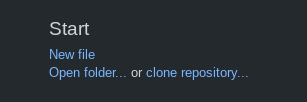
- Click
Open Folder under the Start Section.
Expected
It uses the open folder command specific to your remote OS and you can select a folder.
Actual
Witness nothing happens as after you click the link as the command it references may not even exist on your version of VSCode.
Screenshot
Notes
Has occurred on multiple Linux machines, this is my third remote machine I'm using to report it.
This issue can be reproduced in VS Code: Unknown
Seems to originate from this line. This might occur due to the 'mac-only' class version being used wrongly.


OS/Web Information
code-server --version: 3.9.1 + 3.9.2Steps to Reproduce
code-serverwithout specifying a folder or with--ignore-last-openedon Linux.(You could also use the
Help: Welcomecommand.)Open Folderunder theStartSection.Expected
It uses the open folder command specific to your remote OS and you can select a folder.
Actual
Witness nothing happens as after you click the link as the command it references may not even exist on your version of VSCode.
Screenshot
Notes
Has occurred on multiple Linux machines, this is my third remote machine I'm using to report it.
This issue can be reproduced in VS Code: Unknown
Seems to originate from this line. This might occur due to the 'mac-only' class version being used wrongly.