Qt: Add antialiasing to traffic graph widget #16153
Conversation


 promag
left a comment
promag
left a comment
promag
left a comment
There was a problem hiding this comment.
Concept ACK. Can you check if rounded join style looks better? See https://doc.qt.io/qt-5/qpen.html#join-style.
src/qt/trafficgraphwidget.cpp
Outdated
There was a problem hiding this comment.
Not sure if relevant but could be after fill?
There was a problem hiding this comment.
I believe configuration should come before usage.
There was a problem hiding this comment.
You can change render hints at any time.
Anyway, you can simplify this:
painter.setRenderHint(QPainter::Antialiasing);There was a problem hiding this comment.
You can, but should you?
Your suggestion is good, pushing.
There was a problem hiding this comment.
You can, but should you?
It depends if fillRect is faster without antialiasing - in this case it might make no difference as the rect is aligned and fills the entire surface.
More generally when you "paint/compose" an image you might want some parts/primitives antialiased and others not.

That is a different part of the code. I can't really see the difference, probably because the points are too close. It looks like this:
I can push the change anyway. If I have time I might play a bit with the whole graph to make it better though. That was initially my idea but this fix was simple and looks much better :) |


|
ACK |


Thanks for testing, I've also checked it. I think this is a nice improvement and it doesn't take more CPU to be that noticeable (measured in macos with instruments with and without this change). Other visual improvements are possible but this is fine as it is. ACK a89c808. |

|
Tested on OSX with HiDPI (retina) screen and I can't see any difference. I believe that using HiDPI on OSX sets antialiasing by default (unsure though). |

|
ACK 4211bdb. |

Could using of floating point versions for drawing primitives (e.g., QLineF) be considered? |

|
Gitian builds for commit 5d2ccf0 (master): Gitian builds for commit 28af91115fb83010bf2675796bfd635766ecf537 (master and this pull): |

|
@hebasto changed coordinates to float but result is apparently the same, so I don't think it's worth the change. @JosuGZ I still think you should enable antialiasing only on L106 (I've tested it), this way the grid is always crisp - you can see on your screenshots that the horizontal lines are blurred and a bit darker. |
Good catch, I think I agree, anti-aliasing improves diagonal lines but for axis-aligned lines (and the grid is that, by definition) it can make it look blurrier for no good reason. |
|
@JosuGZ at least please reply to the comments (even if you disagree) |
Hi, I haven't been on my Linux machine these days so I was waiting for that. About horizontal and vertical lines: I think it is pointless to disable it as I don't think performance should be an issue, and sometimes lines fall between 2 pixels (if using floats, which I recall it has been mentioned). I could do it though. Same for enabling antialiasing after filling the rect with black, this one at least does not add complexity. When I'm on it I will review a little more and I will comment. |
|
Do you think horizontal lines look better without antialiasing? |

|
@JosuGZ Can you please squash your commits. |

|
ACK db26e8e |

db26e8e Add antialiasing to traffic graph widget (Josu Goñi) Pull request description: Before:  After: 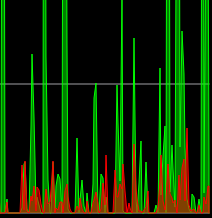 ACKs for top commit: laanwj: ACK db26e8e Tree-SHA512: d795809458522a1ec19e236de30c2c5070960544162323324f0d4e2f49c3590fe7756e924f1021056106b4c52dcb564e690c15f85a15ea35342badf72653d534
|
ACK db26e8e, could you update OP screenshots? |
Done! Not sure if it's useful now :P |
|
Thanks! it can be for forks |


Github-Pull: bitcoin#16153
Rebased-From: db26e8e


Summary: Backport of Core [[bitcoin/bitcoin#16153 | PR16153]]

Test Plan:
Visual improvement on network traffic plot:
`src/qt/bitcoin-qt -> Help -> Debug window -> Network Traffic`

Reviewers: O1 Bitcoin ABC, #bitcoin_abc, deadalnix

Reviewed By: O1 Bitcoin ABC, #bitcoin_abc, deadalnix

Differential Revision: https://reviews.bitcoinabc.org/D7819



8 participants


Before:
After: