Problem: BigchainDB and Tendermint tightly coupled and need some supervision#2410
Problem: BigchainDB and Tendermint tightly coupled and need some supervision#2410ldmberman merged 10 commits intobigchaindb:masterfrom
Conversation


- Fix config utils log info, previously misleading even if
  .bigchaindb file not present.


Codecov Report
@@            Coverage Diff             @@
##           master    #2410      +/-   ##
==========================================
- Coverage    86.9%   86.83%   -0.07%
==========================================
  Files          38       38
  Lines        2168     2173       +5
==========================================
+ Hits         1884     1887       +3
- Misses 284 286 +2 |


@kansi could you, please, suggest a section to update? I think, it would not be equally useful everywhere. Also, depending on the status quo it might be difficult to introduce a new section properly without a good idea of what else will go there. |


|
Some docs to update or add:
Note: There's an open PR (#2388) to delete the old page in the Appendices about installing OS-level dependencies. |
|
@ttmc I plan to update http://docs.bigchaindb.com/projects/server/en/master/simple-network-setup.html in the following PR when we ship a new release since the instructions depend on the binary that is to come with the new version. Thank you for other hints though! |
- Settling on default path of control file: $HOME/.monitrc
  - Handling overwriting of control file interactively
- Save BigchainDB logs in the current directory i.e. from which
  BigchainDB is launched.
- Print default values in help
- Cleanup TBD items
|
|
||
|
|
||
| DEFAULT_LOG_DIR = expanduser('~') | ||
| DEFAULT_LOG_DIR = os.getcwd() |
There was a problem hiding this comment.
What will be the value of DEFAULT_LOG_DIR incase BigchainDB is installed via pip and when using it via docker?

There was a problem hiding this comment.
It depends on where you run the command from, not on how and where you install it.
There was a problem hiding this comment.
It will be derived from the directory where you are running bigchaindb start from and in Docker we set the WORKDIR to /usr/src/app, the logs will be generated there.
There was a problem hiding this comment.
It would be good to make a note and mention such details in the doc, in this PR or a future PR whenever the related docs are added.
There was a problem hiding this comment.
I will note down where the logs are stored in the Monit setup section.
|
I will defer review until the docs explaining how to use this are written in a future pull request. |

|
@ttmc giving it a second thought, what if we add the docs now, although the script they depend on will come a little later? It's only about a single section in the end.. |

pkg/scripts/bigchaindb-monit-config
Outdated
|
|
||
| ENV[MONIT_EXEC_PATH] || --monit-exec-path PATH | ||
|
|
||
| Absolute path to the directory to run the script form. (default: ${monit_exec_path}) |
There was a problem hiding this comment.
This information is outdated. It is now "the path to the Monit control file". I would also use a different variable name for it, like monitrc_path.

Solution: Document how to manage processes using Monit.
|
@ttmc I checked http://docs.bigchaindb.com/projects/contributing/en/latest/dev-setup-coding-and-contribution-process/run-node-as-processes.html - the Monit setup does not really belong there because:
I will just create a Monit setup section in "Appendices". |
Actually, I would prefer to only keep it inside the network setup guide to avoid maintaining it in two different places. |
|
I will test the new docs soon, but I already have some basic questions about how this works. (I looked at the Monit setup code but I didn't find the answers there.) What does Monit monitor/check, and what triggers it to restart BigchainDB and/or Tendermint? Will it always restart both? |

|
|
||
| ``` | ||
| # Change 2.0.0b3 to the latest version as explained above: | ||
| ``` |

There was a problem hiding this comment.
When the line "# Change 2.0.0b3 to the latest version as explained above:" moved outside the code block, it changed from a comment into a top-level heading. Now it renders with big bold text and shows up in the overall top-level table of contents for the BigchainDB Server Docs:
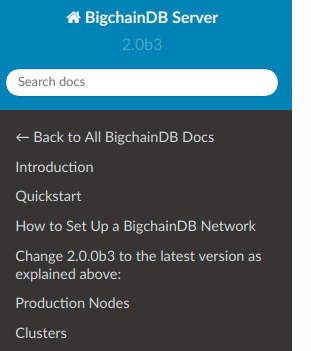
Suggestion: Move that line back inside the code block.
|
|
||
| This section describes how to manage the BigchainDB and Tendermint processes using [Monit][monit] - a small open-source utility for managing and monitoring Unix processes. | ||
|
|
||
| This section assumes that you followed the guide down to the [start MongoDB section](member-start-mongodb) inclusive. |
There was a problem hiding this comment.
The hyperlink on this line isn't working..
There was a problem hiding this comment.
Forgot to test it, thank you for spotting it!
|
|
||
| Check the status by running `monit status` or `monit summary`. | ||
|
|
||
| By default, it will collect program logs into the `~/.bigchaindb-monit/logs` folder. |
There was a problem hiding this comment.
I looked in some of those logs and was surprised to find that some of the "main" BigchainDB logs were not in bigchaindb.out.log but in bigchaind-benchmark.log, e.g.
~/.bigchaindb-monit/logs$ cat bigchaindb.out.log
======== Running on http://localhost:9985 ========
(Press CTRL+C to quit)

~/.bigchaindb-monit/logs$ cat bigchaindb-benchmark.log
2018-07-27 14:40:03, INFO, BigchainDB Version 2.0.0b3
2018-07-27 14:40:03, INFO, Initializing database
2018-07-27 14:40:03, INFO, Create database `bigchain`.
2018-07-27 14:40:03, INFO, Create `transactions` table.
2018-07-27 14:40:03, INFO, Create `utxos` table.
2018-07-27 14:40:03, INFO, Create `assets` table.
2018-07-27 14:40:03, INFO, Create `blocks` table.
2018-07-27 14:40:03, INFO, Create `metadata` table.
2018-07-27 14:40:03, INFO, Create `validators` table.
2018-07-27 14:40:03, INFO, Create `pre_commit` table.
2018-07-27 14:40:03, INFO, Create `transactions` secondary index.
2018-07-27 14:40:03, INFO, Create `assets` secondary index.
2018-07-27 14:40:03, INFO, Create `assets` secondary index.
2018-07-27 14:40:03, INFO, Create `utxos` secondary index.
2018-07-27 14:40:03, INFO, Create `pre_commit` secondary index.
2018-07-27 14:40:04, INFO, Create `validators` secondary index.
2018-07-27 14:40:04, INFO, Starting BigchainDB main process.
2018-07-27 14:40:04, INFO,
****************************************************************************
*                                                                          *
*   ┏┓ ╻┏━╸┏━╸╻ ╻┏━┓╻┏┓╻╺┳┓┏┓    ┏━┓ ┏━┓ ╺┳┓┏━╸╻ ╻                         *
*   ┣┻┓┃┃╺┓┃  ┣━┫┣━┫┃┃┗┫ ┃┃┣┻┓   ┏━┛ ┃┃┃  ┃┃┣╸ ┃┏┛                         *
*   ┗━┛╹┗━┛┗━╸╹ ╹╹ ╹╹╹ ╹╺┻┛┗━┛   ┗━╸╹┗━┛╹╺┻┛┗━╸┗┛                          *
*   codename "fluffy cat"                                                  *
*   Initialization complete. BigchainDB Server is ready and waiting.       *
*                                                                          *
*   You can send HTTP requests via the HTTP API documented in the          *
*   BigchainDB Server docs at:                                             *
*    https://bigchaindb.com/http-api                                       *
*                                                                          *
*   Listening to client connections on: 0.0.0.0:9984                       *
*                                                                          *
****************************************************************************

2018-07-27 14:40:04, INFO,  ABCIServer started on port: 26658
2018-07-27 14:40:04, WARNING, WebSocket connection failed with exception Cannot connect to host localhost:26657 ssl:False [Connect call failed ('127.0.0.1', 26657)]
2018-07-27 14:40:06, INFO,  ... connection from Tendermint: 127.0.0.1:60950 ...
2018-07-27 14:40:06, INFO,  ... connection from Tendermint: 127.0.0.1:60952 ...
2018-07-27 14:40:06, INFO,  ... connection from Tendermint: 127.0.0.1:60954 ...
2018-07-27 14:40:07, INFO, Connected to tendermint ws serverThere was a problem hiding this comment.
We did not change anything in this area. We do need to tidy the logging up a little in the future.
There was a problem hiding this comment.
I will I create a new issue that links to this review comment and then we can consider this comment taken-care-of for this PR.
A crash of the BigchainDB root process will trigger a restart of both. A crash of the Tendermint process will only trigger a restart of Tendermint, what should be fine. Also, it does not try to bring Tendermint up while BigchainDB is not running. |
5 participants


Problem
BigchainDB and Tendermint are very tightly coupled which implies that if the connection(ABCI) between BigchainDB and Tendermint breaks, the system halts i.e. Tendermint does not re-iniate the connection and both processes keep running without being productive.
Solution
Supervise both the services/processes with a process manager. For now using Monit. Monit will launch both BigchainDB and Tendermint and will monitor the lifecycle of both services.
Workflow
When BigchainDB is installed e.g.:
It will install a script
bigchaindb-monit-config, which is placed under/usr/local/binand can be intiated using:Once the above script is executed successfully with the message
BigchainDB process manager configured!. User can use monit to monitor both processes at the same time i.e. if one of them crashes or the connection breaks, monit will restart them.Issues Resolved
Resolves #2238
Dependencies
Monit
Remaining TODOs
.monitrcMonit control file is$HOME/.monitrc, we don't want to override it if someone is already using it with monit. So change the current script to become more interactive about.monitrcfile. Something similar tossh-keygen$HOME/.bigchaindb-monit/logs/<bigchaindb-logs>but at the same time the BigchainDB process, generates log files at$HOME/<bigchaindb-logs>(default path). There should only be one location for this.