Repository navigation
Add commands to move selections left and right by one column - #6631
Conversation


Not sure about Windows, but |

If you read the TODO list, you'll see this
🙈 |
|
@thomasjo I was just suggesting these keys. "seem to do nothing" -> can be taken for this PR's functionality. |
|
@YuriSolovyov Aaah, I misunderstood what you were saying; so you were suggesting those as possible keybinds. Sorry about the confusion! And yeah, those seems like sensible suggestions 👍 |

|
Things look good to me! 👍 |


1b98d60 to
de186c1
Compare

| translatedRanges = [] | ||
|
|
||
| @transact => | ||
| if noSelectionAtStartOfLine |
There was a problem hiding this comment.
Would it make more sense for this conditional to encompass the transaction too?

There was a problem hiding this comment.
Yeah, I think if the transaction is a no-op when the selection is at the start/end of line, then we shouldn't create the transaction.

|
This should be ready for review again! (I'm happy I managed to get back to this one just under the year mark... 😅) Right now I'm debating switching this over to screen ranges to keep behavior consistent if soft wrap's enabled, but I'm not sure right now which would be more intuitive. 💭s? Otherwise, @atom/feedback plz try this out and let me know if you catch anything weird! 🙇 |
|
In testing it out, I'm getting the same error beep behavior that we've seen when using Cmd+Ctrl+Down for each left/right movement on OS X. I don't think that's an issue with the PR, just something I noticed. Also, it appears that Cmd+Ctrl+Up/Down move the entire line, rather than just the selection. Again, not something specifically to block this, but to be aware of. |
Yup 😞 that one's blocked on electron/electron#2617 right now.
That's true – that was something I considered early on with this. Like, the literal counterpart of Move Line Up / Down would be to shift an entire column left or right (since the former is just shifting an entire row up or down), but that wouldn't be very useful. This is more the functional counterpart to Move Line Up / Down. 🚢? |
|
👍 I think this is good to go, yep 🚀 |


|
It seems to me that on Linux alt+shift+(left|right) conflict with these keybindings: See |

|
same for me. |

|
Thank you so much for this, love it! |

|
|

|
Ah well that's a bummer – that's what happens when you merge a PR 1 year later I guess 😞 (this definitely didn't conflict at the time!) I'll look into a new keybinding for this. Thanks everyone for bringing it to my attention! 😄 |

|
It was but 2 weeks ago when I thought to myself "I wish I could move selections left and right as well as up and down".. and today this! Good luck getting the binding sorted, and thanks! :) |

|
I was disappointed to find that the default key bindings for move-selection-left and move-selection-right don't work in Linuxmint 17.3 Cinnamon 64 bit on my MSI laptop. I was able to get them working with the windows-alt-left and windows-alt-right key combos by putting the following in my keymap file, keymap.cson: 'atom-text-editor':
'cmd-alt-left': 'editor:move-selection-left'
'cmd-alt-right': 'editor:move-selection-right'
So does anyone know if atom will always recognize the Linux super key when you define a key binding with 'cmd?' On Windows boxes super is the Windows key, but what about on PCs built to run Linux like those from System76, zareason, Entroware, etc? |

|
Rigth now on windows i'm using: maybe those are not the most intuitive, but they work and don't conflict with anthing. By the way, @Not-A-Hacker cmd-alt-* combinations don't work on windows. |

|
For shortcuts: What about Ctrl+< and Ctrl+> (i.e. ctrl+shift+, and ctrl+shift+.) |
|
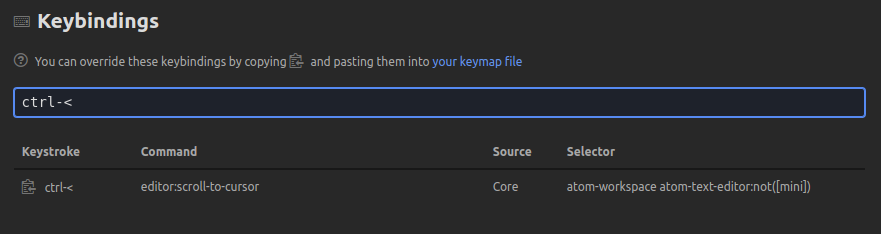
@ForeverWinter So we need to replace exist shortcut:
|
|
Ah yes, I missed that. Could make "scroll-to-cursor" ctrl-? (ctrl-shift-/). Alternatively, could make the shift left and right Alt-< and Alt-> (alt-shift-, and alt-shift-.) instead. |
|
|
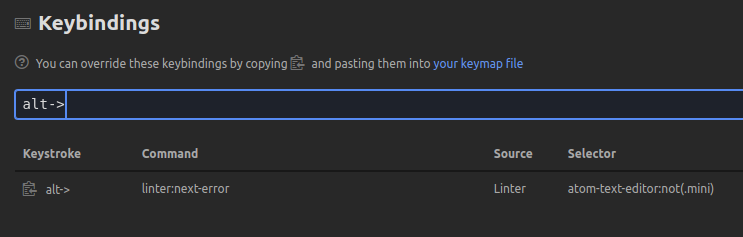
Yeah, but not by any core packages. Granted, Linter is one of the most common community packages; it should probably be taken under consideration given its popularity, but I didn't have it installed when checking for shortcut conflicts. |

|
Grouping Does not work well with python because python does not have brackets 😢 |


See https://discuss.atom.io/t/shift-selection-by-column/16545?u=mnquintana for more background
This adds the column-equivalent of
TextEditor::moveLineUp()andTextEditor::moveLineDown()- instead of moving a line up or down, these commands move any active selections left or right by one column. This is especially useful if you're refactoring / generally trying to clean up your code.TODO:
Shoutout to @lee-dohm for helping with the implementation 👋
/cc @atom/feedback