You signed in with another tab or window. Reload to refresh your session.You signed out in another tab or window. Reload to refresh your session.You switched accounts on another tab or window. Reload to refresh your session.Dismiss alert
This issue is to deal with all information in regards to the GUI redesign. It will assimilate all information about libraries and frameworks for the GUI.
Now, that a prototype GUI has been built, and is functional. It can be designed and developed in a more systematic manner, assuring its longevity, and maintenance.
I have explored both Angular and React in some more detail, and this is where we stand at the moment.
We will shortly commence on completely redesigning and building the GUI for TextDB from the ground up. This requires making a few pertinent decisions about what frameworks to use which will aid the development process. We need to ensure that the codebase of the GUI follows the same principles of the engine, and remains modular and extremely maintainable.
Currently, to make single page applications for the web there are two popular options of frameworks:
AngularJS - A very mature fronted application framework. There are two versions of the framework, we will consider Angular2 which is the newer of the two, and improves on the previous option. Applications in Angular2, however are written in TypeScript which is a superset of JavaScript and compiles to the latter, but is statically typed and handles Object Orientedness more gracefully.
React - A relatively new framework created by Facebook for building web UIs. This is a purely Javascript framework, which allows rapidly building applications with multiple views/components.
Both tend to be very good frameworks. In the following section I will list some of the pros and cons of either choice.
Angular2
Pros:
Cross platform portability
Better at change detection, and in being able to hook onto UI change events
Very structured, and has clear standards for best practices
TypeScript - tends to be a very clean and nice programming language to work with
Efficient
Cons:
TypeScript library support is not as widespread as Javascript
Harder to migrate existing applications to, but this is not a concern since the existing GUI was merely a proof of concept
Will have to check compatibility of jQuery flowchart with Angular2, this will be the first step now.
Angular2 template syntax can be a little complex
Have a look at the following sample application I built using Angular2, to get a sense of framework - Tour of Heroes
ReactJS
Pros:
Completely Javascript framework - extensive library support
Can make for a clean, modular codebase when used in tandem with an architecture like Flux
Virtual DOM is a huge boon
Template syntax JSX is relatively easier
Cons:
Can become a very messy codebase, if complex design decisions are not made early on (or) if a suitable architecture pattern is not followed
Having considered the above factors, an our general comfort level with building GUIs and the requirement for the codebase to be modular and maintainable, it seems like Angular2 will be a better option. Please have a look at this and do some exploring on your own too, and let me know what you guys think. This is an important decision for us.
These are the preliminary mockups as seen during the TextDB meeting on 02/01/2017. The mockup had some comments which have been listed after the screenshots.
Editor View
Query History View
Results View
Comments and Reviews of the Mockup
Drag and drop the operators.
Zooming in and out of the flowchart editor.
Properties, suggestions during the insertion of different operators.
These are the updated screenshots of the mockup after Feb 8 meeting: This screen represents the first screen (The icons should be draggable) The next 3 represents the different drop-down menus from different groups of operators This screen pops when the user click create operator This screen shows a history of previously finished operation (can select and edit it) This is pops when the user click run (go to the next screen when the data is ready) This is the final screen where it shows a statistic result of the search
Looks much better. For those icons, for now, can we just add small-font text (e.g., "Regex") to each icon? In the future we can make them more intuitive.
The new Angular GUI is fully merged into the master branch in PR #429#430#432#433#434#469 . The new GUI is beautiful and very successful.
The current GUI implemented the Editor view, (first picture in the design mockups).
This issue can be referred again as more view being implemented in the future.
Activity
kishore-narendran commentedon Jan 21, 2017
I have explored both Angular and React in some more detail, and this is where we stand at the moment.
We will shortly commence on completely redesigning and building the GUI for TextDB from the ground up. This requires making a few pertinent decisions about what frameworks to use which will aid the development process. We need to ensure that the codebase of the GUI follows the same principles of the engine, and remains modular and extremely maintainable.
Currently, to make single page applications for the web there are two popular options of frameworks:
Both tend to be very good frameworks. In the following section I will list some of the pros and cons of either choice.
Angular2
Pros:
Cons:
Have a look at the following sample application I built using Angular2, to get a sense of framework - Tour of Heroes
ReactJS
Pros:
Cons:
Have a look at the React tutorial for a better idea - Tutorial: Intro To React - React
Having considered the above factors, an our general comfort level with building GUIs and the requirement for the codebase to be modular and maintainable, it seems like Angular2 will be a better option. Please have a look at this and do some exploring on your own too, and let me know what you guys think. This is an important decision for us.
[-]Redesigned Modular GUI [/-][+]Redesigning Modular GUI [/+]kishore-narendran commentedon Feb 1, 2017
These are the preliminary mockups as seen during the TextDB meeting on 02/01/2017. The mockup had some comments which have been listed after the screenshots.
Editor View
Query History View
Results View
Comments and Reviews of the Mockup
kishore-narendran commentedon Feb 8, 2017
I have found from some exploration, that:
chenlica commentedon Feb 9, 2017
@henrychen0220 @kishore-narendran @Jimmy-VVang Please update the screenshots based on our discussion today on the mockup.
henrychen0220 commentedon Feb 10, 2017
These are the updated screenshots of the mockup after Feb 8 meeting:

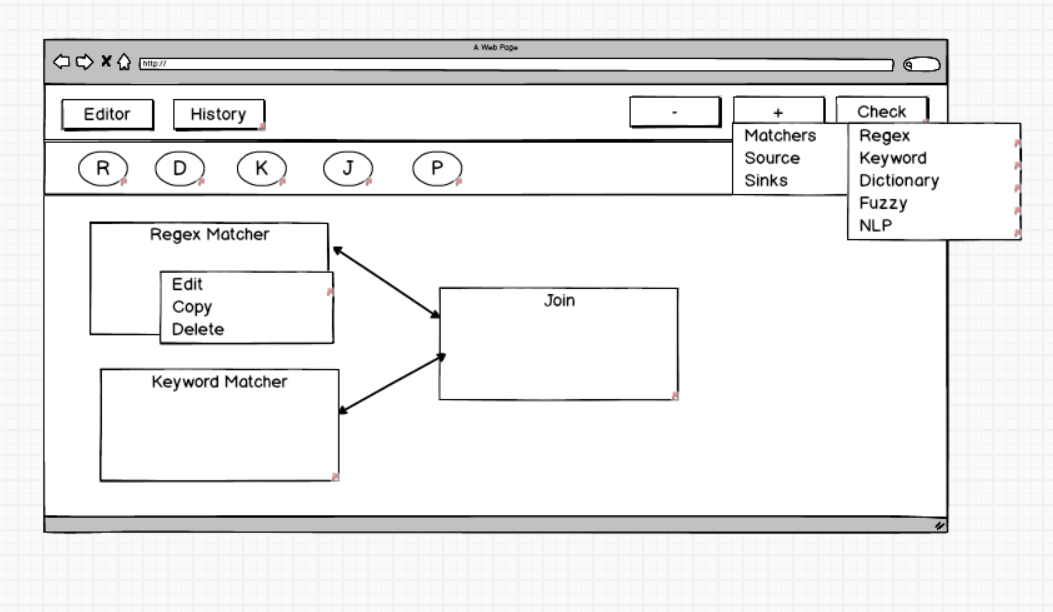
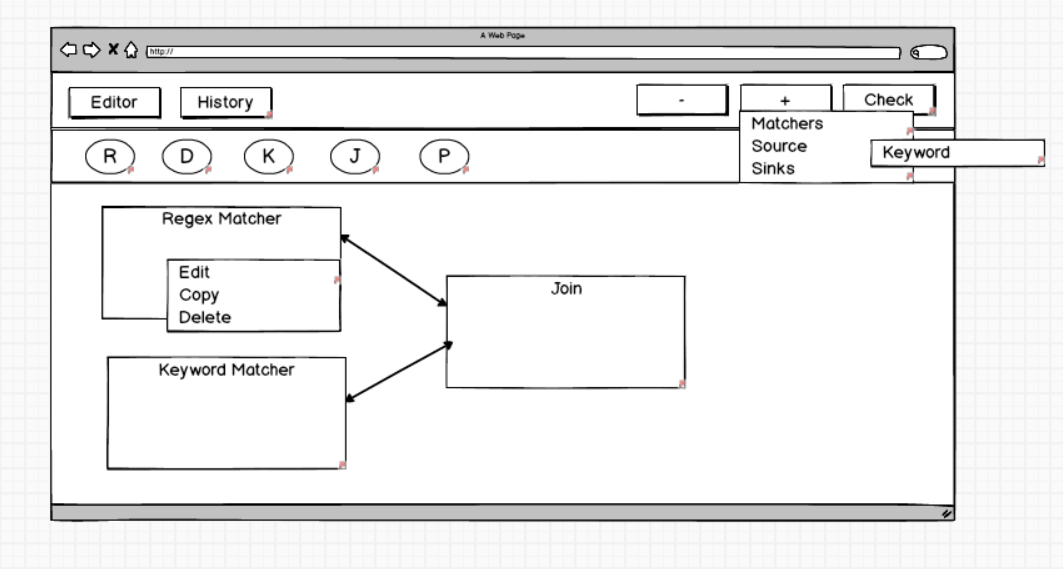


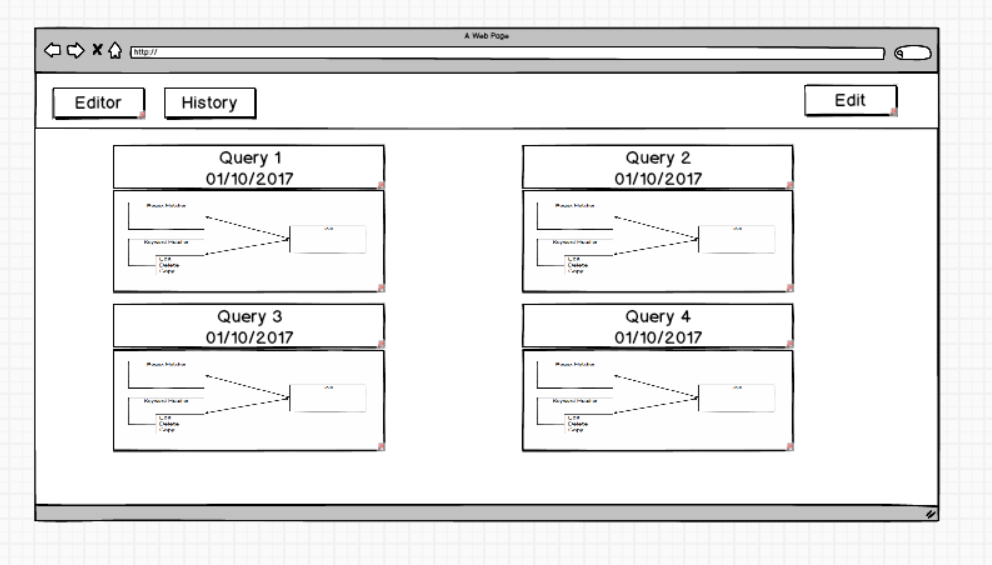
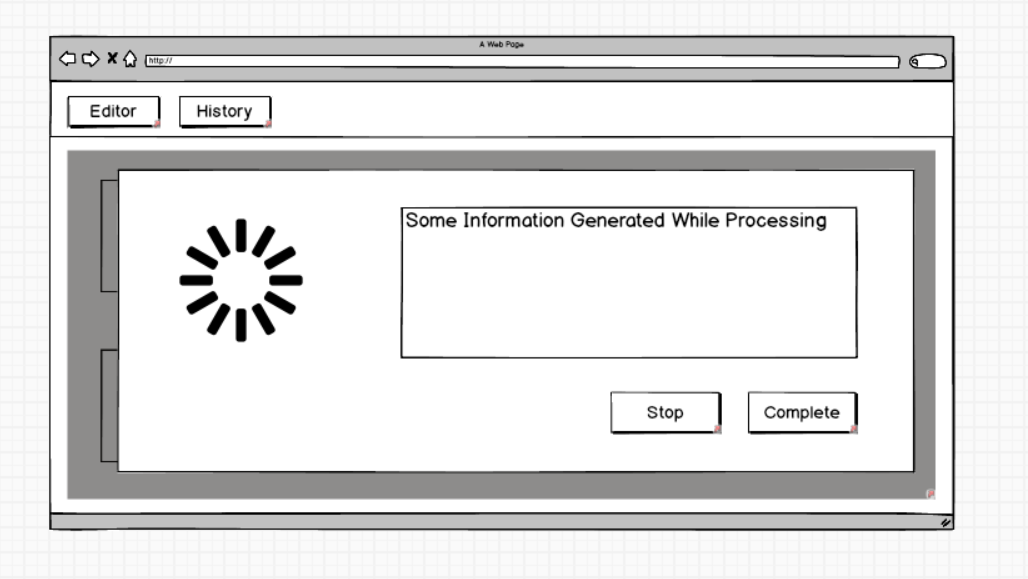
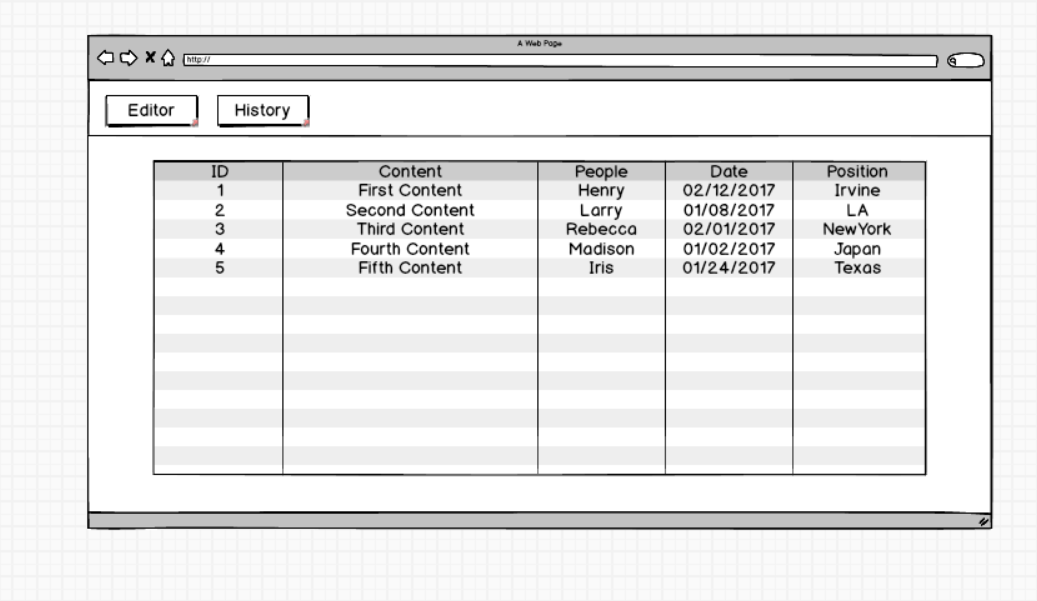
This screen represents the first screen (The icons should be draggable)
The next 3 represents the different drop-down menus from different groups of operators
This screen pops when the user click create operator
This screen shows a history of previously finished operation (can select and edit it)
This is pops when the user click run (go to the next screen when the data is ready)
This is the final screen where it shows a statistic result of the search
chenlica commentedon Feb 10, 2017
Looks much better. For those icons, for now, can we just add small-font text (e.g., "Regex") to each icon? In the future we can make them more intuitive.
[-]Redesigning Modular GUI [/-][+]Redesigning Modular GUI using AngularJS[/+][-]Redesigning Modular GUI using AngularJS[/-][+]Redesigning Modular GUI using Angular[/+]kishore-narendran commentedon Mar 6, 2017
@Jimmy-VVang Please update your progress with the Angular GUI under this issue. And use this issue as a reference in your PR.
zuozhiw commentedon Apr 27, 2017
The new Angular GUI is fully merged into the master branch in PR #429 #430 #432 #433 #434 #469 . The new GUI is beautiful and very successful.
The current GUI implemented the Editor view, (first picture in the design mockups).
This issue can be referred again as more view being implemented in the future.