all getSegmentStatus to handle segments missing in externalview #7803
Conversation
This file contains hidden or bidirectional Unicode text that may be interpreted or compiled differently than what appears below. To review, open the file in an editor that reveals hidden Unicode characters.
Learn more about bidirectional Unicode characters


Jackie-Jiang
approved these changes
Nov 20, 2021
Contributor
 Jackie-Jiang
left a comment
Jackie-Jiang
left a comment
Jackie-Jiang
left a comment
There was a problem hiding this comment.
LGTM. Thanks for the fix!

kriti-sc
pushed a commit
to kriti-sc/incubator-pinot
that referenced
this pull request
Dec 12, 2021

Sign up for free
to join this conversation on GitHub.
Already have an account?
Sign in to comment
2 participants


Add this suggestion to a batch that can be applied as a single commit.
This suggestion is invalid because no changes were made to the code.
Suggestions cannot be applied while the pull request is closed.
Suggestions cannot be applied while viewing a subset of changes.
Only one suggestion per line can be applied in a batch.
Add this suggestion to a batch that can be applied as a single commit.
Applying suggestions on deleted lines is not supported.
You must change the existing code in this line in order to create a valid suggestion.
Outdated suggestions cannot be applied.
This suggestion has been applied or marked resolved.
Suggestions cannot be applied from pending reviews.
Suggestions cannot be applied on multi-line comments.
Suggestions cannot be applied while the pull request is queued to merge.
Suggestion cannot be applied right now. Please check back later.
Description
This allows the controller to handle the case where the externalview is missing a segment that is in the ideal state. I'm not sure yet how this happens in our cluster, but it keeps the whole controller table UI from loading which makes it hard to even identify the missing segment. There's likely room to either
I want to say this is related to #7779, but we've seen it in clusters without tiered storage as well.
To test, locally I ran the realtime quickstart, deleted the segment from externalview, and opened the page in the UI. The segment now reports as BAD
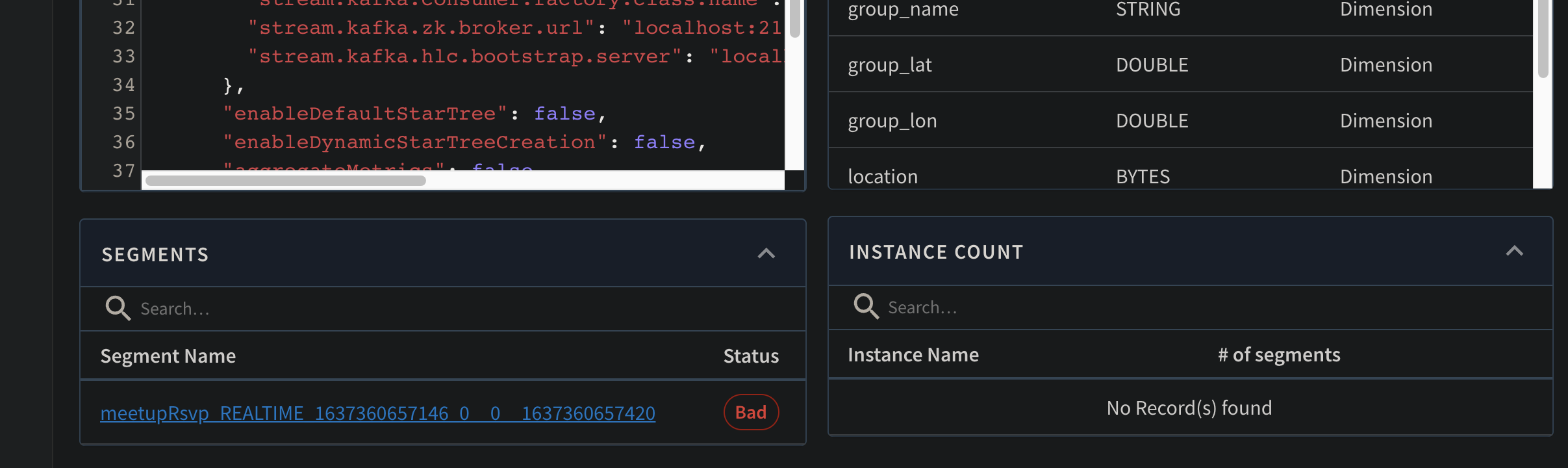

and has no server
Upgrade Notes
Does this PR prevent a zero down-time upgrade? (Assume upgrade order: Controller, Broker, Server, Minion)
backward-incompat, and complete the section below on Release Notes)Does this PR fix a zero-downtime upgrade introduced earlier?
backward-incompat, and complete the section below on Release Notes)Does this PR otherwise need attention when creating release notes? Things to consider:
release-notesand complete the section on Release Notes)Nothing of note that needs attention
Release Notes
Documentation