Describe the bug
Upon upgrading to the latest rc6 version, after I double clicked the image entering the detailed panel, there was only one row showing some of the tags I assigned to the image. Although I could scroll down to see the other rows, some of the tags were still blocked.
I have attached a few screenshots to illustrate this problem:
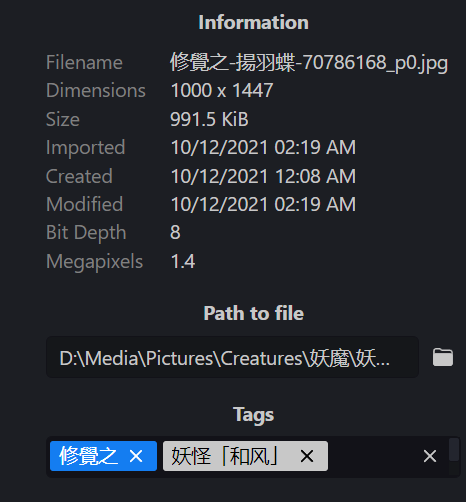

As shown above, I have 8 tags attached to this image, yet 3 of them were completely blocked, no matter how I played with the scroll bar.
Personally, I would prefer the big div block which showed most of the tags without scrolling in the previous version.
To Reproduce
Steps to reproduce the behavior:
- Assign multiple tags to an image.
- Double click the image to enter the detail panel.
- Check the tags on the right.
- Scroll down.
- See the problem.
Expected behavior
- A div block that shows all tags without scrolling.
- Scrolling without blocking tags.
Allusion version
Desktop OS
Additional context
I see in the other issue that I can adjust the style myself in dev-tools, but it is also mentioned that this change would be lost after restarting Allusion.
Describe the bug
Upon upgrading to the latest rc6 version, after I double clicked the image entering the detailed panel, there was only one row showing some of the tags I assigned to the image. Although I could scroll down to see the other rows, some of the tags were still blocked.
I have attached a few screenshots to illustrate this problem:


As shown above, I have 8 tags attached to this image, yet 3 of them were completely blocked, no matter how I played with the scroll bar.
Personally, I would prefer the big div block which showed most of the tags without scrolling in the previous version.
To Reproduce
Steps to reproduce the behavior:
Expected behavior
Allusion version
Desktop OS
Additional context
I see in the other issue that I can adjust the style myself in dev-tools, but it is also mentioned that this change would be lost after restarting Allusion.