Repository navigation
remote: Permission to git denied to github-actions[bot]. #96
Description

Hi,
I am trying to push changes but like you will see it fails due to some errors.
Test run is here:
https://github.com/NRCHKB/node-red-contrib-homekit-docker/runs/3194895671?check_suite_focus=true
Error
Run ad-m/github-push-action@master
  with:
    github_token: ***
    branch: refs/pull/42/merge
    directory: .
Push to branch refs/pull/42/merge
remote: Permission to NRCHKB/node-red-contrib-homekit-docker.git denied to github-actions[bot].
fatal: unable to access 'https://github.com/NRCHKB/node-red-contrib-homekit-docker.git/': The requested URL returned error: 403
Error: Invalid exit code: 128
    at ChildProcess.<anonymous> (/home/runner/work/_actions/ad-m/github-push-action/master/start.js:29:21)
    at ChildProcess.emit (events.js:210:5)
    at maybeClose (internal/child_process.js:1021:16)
    at Process.ChildProcess._handle.onexit (internal/child_process.js:283:5) {
  code: 128
}
Error: Invalid exit code: 128
    at ChildProcess.<anonymous> (/home/runner/work/_actions/ad-m/github-push-action/master/start.js:29:21)
    at ChildProcess.emit (events.js:210:5)
    at maybeClose (internal/child_process.js:1021:16)
    at Process.ChildProcess._handle.onexit (internal/child_process.js:283:5)
Part of the gh action:
  dependabot:
    #needs: [build]
    runs-on: ubuntu-latest
    if: ${{ github.actor == 'dependabot[bot]' }}
    steps:
      - uses: actions/setup-node@v2
        with:
          node-version: '14'
      - uses: actions/checkout@v2
        with:
          persist-credentials: false
          fetch-depth: 0
      - run: |
          git config user.name github-actions[bot]
          git config user.email github-actions[bot]@users.noreply.github.com
          npm version patch -m "[RELEASE] %s"
      - name: Push changes
        uses: ad-m/github-push-action@master
        with:
          github_token: ${{ secrets.GITHUB_TOKEN }}
          branch: ${{ github.ref }}
      - uses: fastify/[email protected]
        with:
github-token: ${{ secrets.GITHUB_TOKEN }}Reacted by Jared Burrows, typingrefbot, fregante, Marius Wörfel, Johannes Wiesner, Lasse Benninga, Rogério Cassares, Firas Regaieg, Eduard Sergeev, Sushant Raj and 6 more
Reacted by LetMeFly, Mike Mwanje, Deepak Sood, hoffa, rxsweet, Lopez Hugo, fishseven, 郭飞, sarifor, ilyazub and 5 more
Activity
ad-m commentedon Jul 30, 2021
Do you have organisation restriction? Is that branch protected?
Shaquu commentedon Jul 30, 2021
I am trying to push to dependapot pr branch. There should be no limits on that.
Maybe I am passing branch incorrectly.
I will check and get back.
ad-m commentedon Jul 30, 2021
Looks mention:
Default is:
See https://github.com/ad-m/cbosa/runs/3197304980?check_suite_focus=true .
Something is restricting permission.
What do you have at https://github.com/NRCHKB/node-red-contrib-homekit-docker/settings/actions in "Workflow permissions" section?
Shaquu commentedon Jul 30, 2021
@ad-m here it is, says read and write
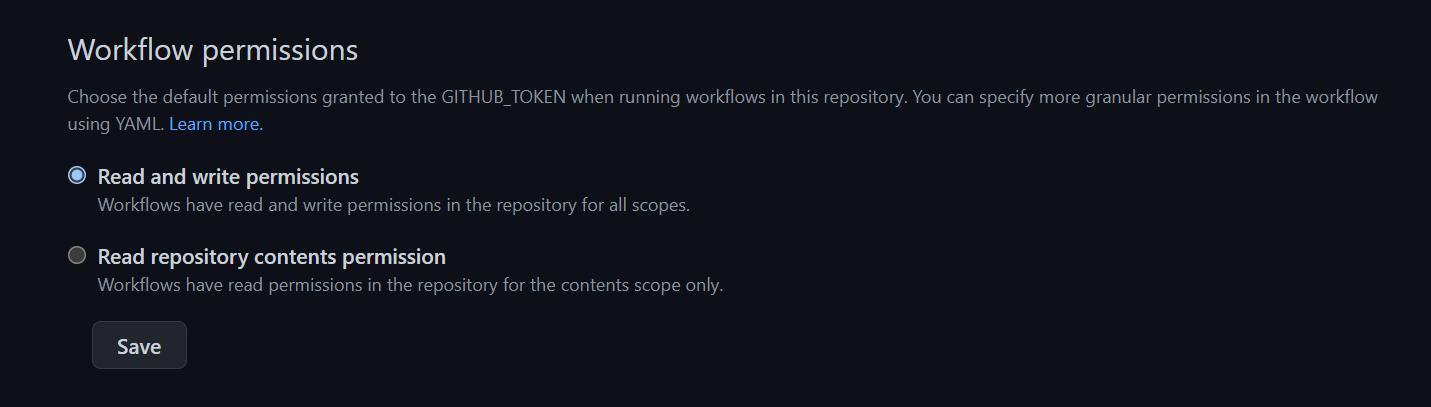
In your reference (cbosa run), you were pushing to master, I am trying to push to PR branch.
Shaquu commentedon Jul 30, 2021
Okay, I see the issue. Dependabot is pushing from fork. It is why permissions are limited.Dependabot is creating branch on my repo.
Shaquu commentedon Jul 30, 2021
@ad-m update.
I have used custom token:
It is defined on repo level

I receive new error from your action:
Missing input "github_token: ${{ secrets.GITHUB_TOKEN }}".UPDATE.
Another hint found:Secrets are not passed to workflows that are triggered by a pull request from a forkExcept it is branch on my repo.
ad-m commentedon Aug 1, 2021
See Using encrypted secrets in a workflow
See "Maximum access by forked repos" in Permissions for the GITHUB_TOKEN
I suggest - in your scenario – using the "push" event instead of "pull_request" and using GITHUB_TOKEN. Then the "push" event will be executed in the context of the source repository (repository that is fork), so it will be a local operation and will be a full write to the local repository.
Shaquu commentedon Aug 1, 2021
Just to clarify. I am merging between branches on the same repo.
Solution might be to extend permissions for GitHub token per job:
https://docs.github.com/en/actions/reference/workflow-syntax-for-github-actions#permissions
ad-m commentedon Aug 1, 2021
Thank for you clarification. It makes a big different.
I don't understand why extends of permission for GitHub token is required in your scenario. In my experience, the token should have the necessary "read / write" permissions currently. I already shared information permission of one of my job on personal repository.
Setting up permission in a workflow can potentially solve the problem, but it's worth understanding why it is required in this case.Setting up permission in a workflow can potentially solve the problem, but it's worth understanding why it is required in your case.
GitHub documentation mention:
Could you verify that in your organisation?
noxxious commentedon Sep 2, 2021
@Shaquu ran into the same issue here and it seems it is a limitation of the way dependabot works and there's a note in Github docs
Note: Workflow runs triggered by Dependabot pull requests run as if they are from a forked repository, and therefore use a read-only GITHUB_TOKEN. These workflow runs cannot access any secrets. See "Keeping your GitHub Actions and workflows secure: Preventing pwn requests" for strategies to keep these workflows secure.https://docs.github.com/en/actions/reference/authentication-in-a-workflow#permissions-for-the-github_token
noxxious commentedon Sep 2, 2021
It seems also you can manage this behavior in your organization action settings "Fork pull request workflows in private repositories" -> "Send secrets to workflows from fork pull requests."
albjeremias commentedon Oct 11, 2021
so im trying to create a branch.. called dist.. where dist folder is generated...
should I push it with dependabot? or is there a better strategy?
lixuguang commentedon Jun 2, 2022
I have the same problem
ZPascal commentedon Jun 2, 2022
Hi @lixuguang, do you have checked the access rights of the token?
siegfault commentedon Jun 6, 2022
I ran into this issue while trying to solve the same problem. In case it's helpful, I found some good examples that helped me resolve it. What @noxxious said, that dependabot by default has a readonly token, is true, but it looks like adding a top-level entry allows us to change that:
See:
33 remaining items
ZPascal commentedon Dec 8, 2023
@marknoble Could you please explain your use case? Maybe you need a PAT.
marknoble commentedon Dec 8, 2023
Fortunately/unfortunately I nuked my repo and did a fork on the project I was trying to emulate. For whatever reason, that solved the issue for me.
I had initially manually created the folder structure and files.
I wish I knew what I was doing wrong, but forking from the working project resolved the issue for me. 🤷♂️
ZPascal commentedon Dec 10, 2023
@marknoble That sounds great. Maybe you've specified the wrong reference or it's necessary to use the
forceoption for the initial commit.aangelinsf commentedon Dec 22, 2023
Came here to see why my workflow was failing. It took adding permissions so that Dependabot could modify the pull-request and push the changes back to the repo:
Tungobhadra commentedon Jan 5, 2024
This really worked, thanks :)
An attempt to solve workflow permissions
[Chore] permissions 추가
ZephyrCICD commentedon Mar 30, 2024
Thanks
XingXiaoWu commentedon May 22, 2024
To avoid anyone being unable to find it, here
sorenwacker commentedon May 16, 2025
Hm, I cannot change that option:
ZPascal commentedon May 16, 2025
Hi @sorenwacker, are you the owner of the repository? Is the repository public or archived?
huanfachen commentedon Nov 25, 2025
Have you checked the permission setting in publish.yml? I solved a similar problem by changing
contents: readtocontents: writeunderpermissionstab in publish.yml. The other settings underpermissionsare unrelevant and can be removed.