


Copy-paste .http examples for testing REST APIs: bearer tokens, Basic auth,
API keys, OAuth 2.0 token flows, and ASP.NET Core endpoints.
This is also the public home of Karve, the native
.http client for Windows — issue tracker, changelog, and recipes in one place.
Explore the recipes on karve.dev »
Karve for Windows
·
What is a .http file?
·
Report Bug
·
Request Feature
Table of Contents
Every recipe in this repository is a small, self-contained plain-text .http
file you can open in Karve, VS Code's REST Client,
Visual Studio 2022, or the JetBrains HTTP Client and run as-is after swapping
in your own values.
The collection covers the requests developers reach for every day:
- Authentication — bearer token, Basic auth, API keys, OAuth 2.0 client credentials, and refresh token flows
- ASP.NET Core — Minimal API CRUD, JWT login, validation errors, URL-encoded forms, health checks, and pagination
- Everyday requests — JSON POST bodies, create-then-fetch flows, and environment variables
Each recipe also has an explanation page — variables, expected response, and related recipes — at karve.dev/examples.
- Clone this repo or download a single
.httpfile fromhttp-recipes/. - Open it in an
.http-compatible client — Karve for Windows is a one-click install from the Microsoft Store. - Replace
api.example.com, localhost ports, andreplace-with-*placeholders with your real values. - Keep real credentials in a git-ignored
.envfile, not in the.httpfile — copyhttp-recipes/.env.exampleto get started.
| Recipe | What it shows | Guide |
|---|---|---|
| bearer-token.http | Send an Authorization: Bearer header from a variable |
Example page |
| basic-auth.http | HTTP Basic authentication with a base64 credential pair | Example page |
| api-key-header.http | API key sent in a custom request header | Example page |
| api-key-query.http | API key passed as a URL query parameter | Example page |
| oauth-client-credentials.http | OAuth 2.0 client credentials grant → access token | Example page |
| oauth-refresh-token.http | Exchange a refresh token for a new access token | Example page |
| Recipe | What it shows | Guide |
|---|---|---|
| aspnet-core-minimal-api-crud.http | Full GET/POST/PUT/DELETE cycle against a Minimal API | Example page |
| aspnet-core-jwt-login.http | Log in, copy the JWT, call a protected endpoint | Example page |
| aspnet-core-validation-errors.http | Trigger and read ValidationProblemDetails responses |
Example page |
| aspnet-core-form-urlencoded.http | POST an application/x-www-form-urlencoded form body |
Example page |
| aspnet-core-health-check.http | Probe /health liveness and readiness endpoints |
Example page |
| aspnet-core-pagination.http | Page through a collection with query parameters | Example page |
| Recipe | What it shows | Guide |
|---|---|---|
| json-post-request.http | POST a JSON body with the right Content-Type |
Example page |
| create-and-fetch-resource.http | Create a resource, then fetch it by its returned ID | Example page |
| environment-variables.http | @name variables and {{name}} references with .env files |
Example page |
A .http file is a plain-text format for describing HTTP requests — method,
URL, headers, and body — that lives in your repo next to your code. Unlike GUI
collections, .http files diff cleanly, review well in pull requests, and work
across editors. Learn more:
- What is a .http file? — syntax and format
- How to run .http files on Windows
- Environment variables in .http files
- Authentication in .http files — bearer, Basic, API keys
- Requests use only standard runnable methods:
GET,POST,PUT,PATCH,DELETE,HEAD, andOPTIONS, separated by###request blocks. - Variables are declared with
@name = valueand referenced as{{name}}, compatible with values supplied from a.envfile. - All hosts and credentials are safe placeholders — nothing here is a real secret.
.httpclients don't automatically chain values from one response into the next request, so recipes that obtain tokens or IDs call out the manual copy step.
This repository is the public issue tracker for the Karve app:
- Found a bug in Karve? Open a bug report with your Karve and Windows versions.
- Want a feature? Check the roadmap first, then open a feature request.
- Missing a recipe you reach for often?
Open a recipe request
with the workflow you want covered, or send a pull request that follows the
conventions above — one focused
.httpfile per workflow, safe placeholder values only.
Release history lives in CHANGELOG.md; what's coming next is on the roadmap.
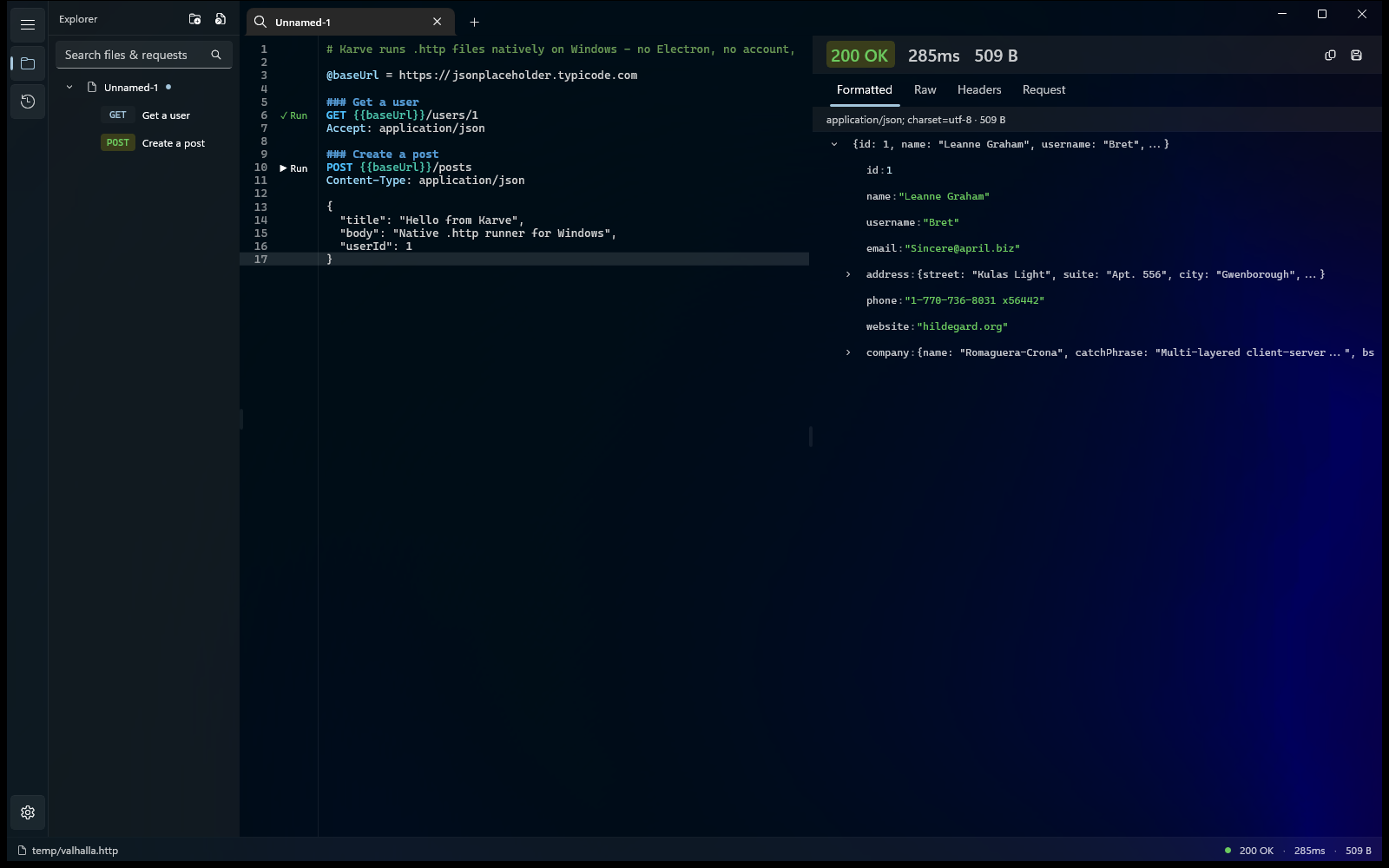
Karve is a fast, native .http client for Windows: open
a file, run requests beside your code, and inspect responses — fully offline,
no account, no cloud sync. It's built for developers who keep API requests in
Git instead of a proprietary collection format.

Free browser-based tools on karve.dev:
The contents of this repository — recipes, examples, and documentation — are
distributed under the MIT License. See LICENSE for details.
The Karve application itself is a commercial product distributed through the Microsoft Store and is not covered by this license.