[GUI]: add a small indicator for the last block time on lower veil status bar#865
Conversation


 CaveSpectre11
added
Component: GUI
CaveSpectre11
added
Component: GUI

|
@WetOne when submitting PRs, you're welcome to add a To include your address for payment in the original PR. Payment is made after code review, QA, and merging into the branch. |
CaveSpectre11
added
the
Tag: Waiting For Code Review
CaveSpectre11
changed the title
|
@WetOne how big of a deal would it be to flip the location; so "Height: " remains in the same place as it currently is, and the new stuff is in the space to the left.
Also, is the line something graphically intentional?
|


|
@CaveSpectre11 Moving the height should be easy - working it now. I don't quite understand the line. I did nothing that should have affected it. possibly my display? |
Definitely an artifact in the code; I see it on my screen too. |
|
OK, I think I see what is going on. Should have it ready tomorrow. |
|
Looks like I got both. How do I update into git?
|

Have the changes in your QtLastBlockTime branch; then commit the changes into that branch [so the branch will have 3 commits]. You would then "git rebase HEAD~2", which will bring up an editor with the two commits in it. Go to the second and change When you push it, push it with |
|
"git rebase HEAD~2" resulted in "Current branch QtLastBlockTime is up to date." Did the forced push. |
My bad; should have been |
 WetOne
force-pushed
the
QtLastBlockTime
branch
from
WetOne
force-pushed
the
QtLastBlockTime
branch
from
eff0573 to
2b69215
Compare
CaveSpectre11
force-pushed
the
QtLastBlockTime
branch
from
2b69215 to
2beb3bb
Compare
Bounty Payment Addresssv1qqphsvuwhk29xcn2q9gdth9x73qpm8kcktmuxyd8szl50sgt2nt47egpqwnxr83hfj7s6fnec2jr0cv5yc7r6s7nvxhd9969qrgy4cgnznwewqqqauut5m |


|
|


 codeofalltrades
added
Tag: Waiting For Developer
and removed
Tag: Waiting For Code Review
codeofalltrades
added
Tag: Waiting For Developer
and removed
Tag: Waiting For Code Review

|
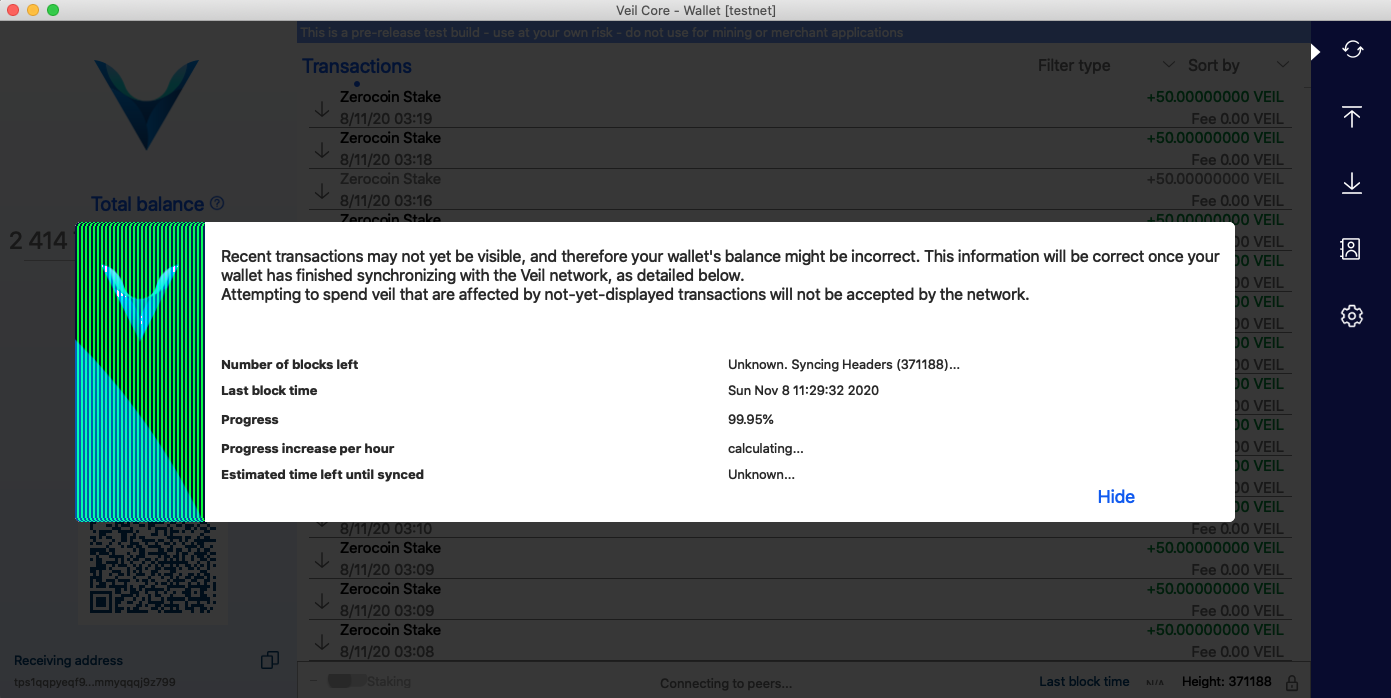
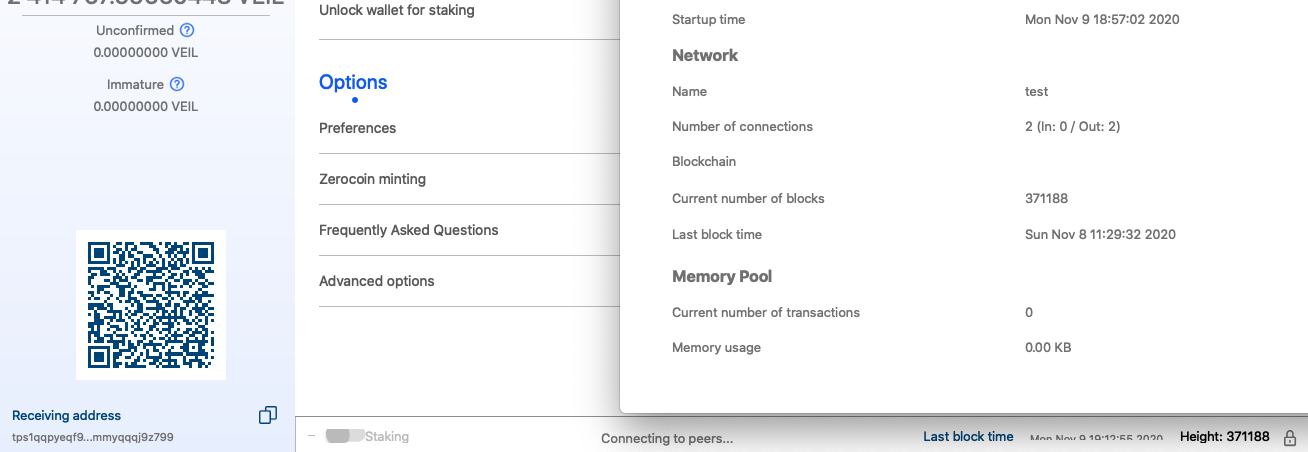
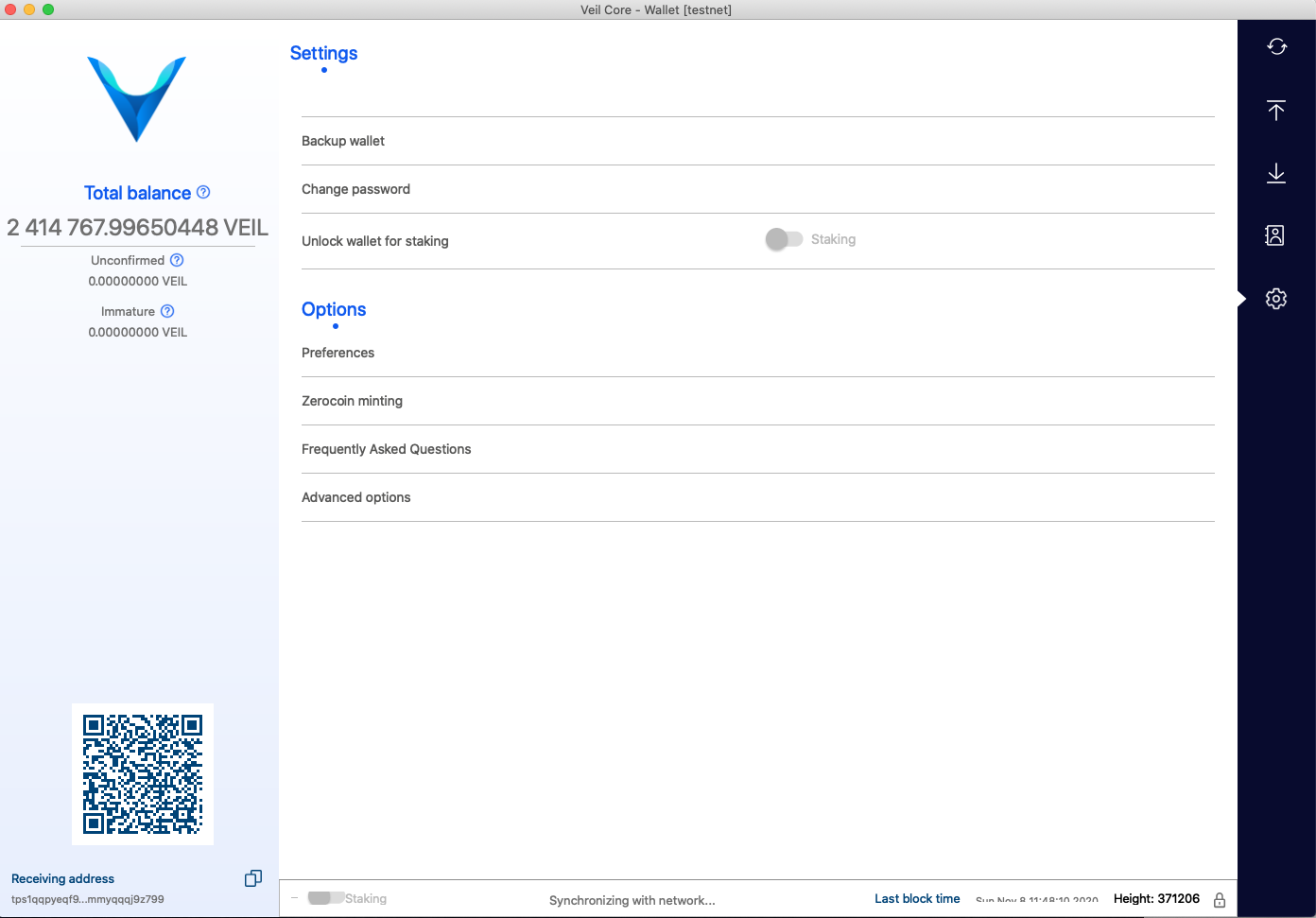
nAck I'm getting a problem with the display of that data as you will see in the screenshots. |


|
You can see also that it appears not to be using the same data source as the pop up syncing information, as that already has a displayable last block time while the one below only has "N/A". Also, the popup window that works comes up by default and can be brought back up again by simply clicking on "Synchronising with network ...", so maybe this whole thing can be solved by just adding the text "--> last block time" or something to that effect) after the ellipse. |
|
The above test is on MacOS Catalina 10.15.6 using the binaries downloaded from Github Actions. |
Note that when it's showing "N/A", the pop up is downloading headers still, not blocks. My guess is that it's only being populated by new blocks brought in, and no new blocks have come in yet since it's still doing headers? Definitely something for WetOne to confirm [note that part of the code was from Sinetek's PR; WetOne was asked to move it to where it's supposed to be.
Not sure we want to have it in different places when synchronizing vs. regular functional running of the code. Remember this is supposed to be there all the time [so you don't have to dig it out from the "Debug Window->Advanced Options->Information. But graphically I concur:
@WetOne is there a new box around the whole status bar that's causing the clipping? |
|
Looks like I fixed the clipping. When I updated the bar there was a new layout which resulted the clipping. This is what the update should look like. |

|
Now, regarding the update to the Last Block Time in the status bar vs in the Modal Display: I see we have 2 options
I prototyped the second. There still seems to be a small difference between the popup and the status bar using this method and the N/A is still there until new blocks come in (really until setNumBlocks is called). The small difference is probably due to some logic at the beginning of setNumBlocks. The second option probably makes more sense as most of the updates to the status bar and modal overlay are both are done from BitcoinGUI::setNumBlocks. Understand that I would probably remove most of Sinetek’s code as the SIGNAL-SLOT connection would not make sense with the second implementation. @CaveSpectre11, @codeofalltrades, @seanPhill : your call as to which way you want this. |
|
I would think the second implementation [as it makes more sense] would be desirable. I'll have to defer to @seanPhill though, as he had the original expectation of them mirroring one another. |
|
I'm fine with whatever works, functionally and aesthetically. |
 WetOne
force-pushed
the
QtLastBlockTime
branch
from
WetOne
force-pushed
the
QtLastBlockTime
branch
from
35725de to
cc13532
Compare
CaveSpectre11
added
Tag: Waiting For Code Review


|
ACK |
 CaveSpectre11
added
Code Review: Passed
QA: Passed
CaveSpectre11
added
Code Review: Passed
QA: Passed
|
10 hours @ 310 = 3100 Veil Thank you for your contribution to Veil! |
CaveSpectre11
added
Bounty: Paid
4 participants


Problem
A small improvement to the usability: the user often needs to see what the block time is on the current node, and it is very annoying having to open the debug console to extract this information.
Root Cause
The value is not visible.
Solution
Two labels have been added to the bottom status bar and connected the signal to update the block time.
Bounty Payment Address
sv1qqphsvuwhk29xcn2q9gdth9x73qpm8kcktmuxyd8szl50sgt2nt47egpqwnxr83hfj7s6fnec2jr0cv5yc7r6s7nvxhd9969qrgy4cgnznwewqqqauut5m