Getting Started
To get SBL working in your dev environment, you'll need to do the following:
- Add the library to your dependencies
Example usage:
repositories {
    exclusiveContent {
        forRepository {
            maven {
                name = 'SmartBrainLib'
                url = 'https://dl.cloudsmith.io/public/tslat/sbl/maven/'
            }
        }
        filter {
            includeGroup('net.tslat.smartbrainlib')
        }
    }
}dependencies {
implementation "net.tslat.smartbrainlib:SmartBrainLib-neoforge-${project.minecraft_version}:${project.sbl_version}"
// Example: implementation "net.tslat.smartbrainlib:SmartBrainLib-neoforge-1.21.1:1.16.5"
}dependencies {
implementation fg.deobf("net.tslat.smartbrainlib:SmartBrainLib-forge-${project.minecraft_version}:${project.sbl_version}")
// Example: implementation fg.deobf("net.tslat.smartbrainlib:SmartBrainLib-forge-1.21.1:1.16.5")
}dependencies {
modImplementation "net.tslat.smartbrainlib:SmartBrainLib-fabric-${project.minecraft_version}:${project.sbl_version}"
// Example: modImplementation "net.tslat.smartbrainlib:SmartBrainLib-fabric-1.21.1:1.16.5"
}- Refresh gradle in your IDE

- (If on Forge) Regen runs in your IDE
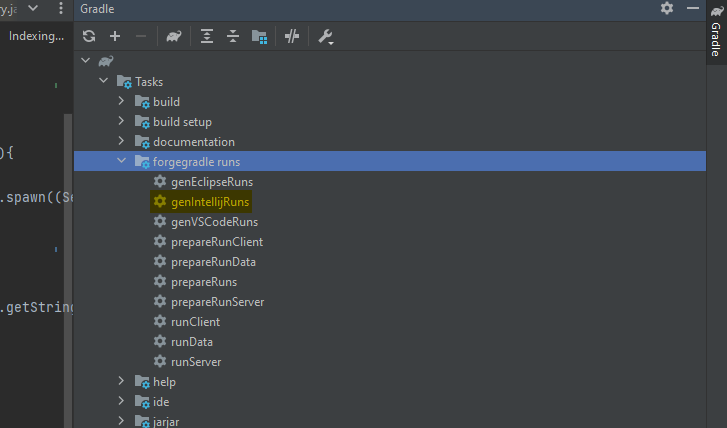
- Add the dependency to your mods.toml
[[dependencies.mymodid]]
    modId="smartbrainlib"
    mandatory=true
    versionRange="[1.16,)"
    ordering="NONE"
    side="SERVER"
You should now be able to use SBL in your dev and compile your mod with it as a dependency!