Hacktoberfest: Contribute a color style or palette #1315

Description

This issue describes how to submit a Style or Palette to ScottPlot and indicates expectations for pull request.
See the Hacktoberfest 2021 issue (#1274) for additional project ideas for new contributors.

Rules for Submitting Pull Requests (PRs)
⚠️ Include a screenshot of the demo application displaying the style or palette you are contributing⚠️ Run autoformat.bat to auto-format your code before submitting it⚠️ If colors were sourced from somewhere else, indicate the original source as a code comment
How to Contribute a Palette
A Palette is a set of default colors that gets applied to data as it is added to the plot.
- Add a palette by creating a class in
src/ScottPlot/Palettes/ - Mimic the namespace and class structure of existing palettes like Aurora.cs
- View your palette using the ScottPlot demo application and include a screenshot with your pull request
Palettes can be sourced from other similar libraries (but indicate source as a code comment):
- matplotlib colormaps (defined in _cm.py)
- https://www.color-hex.com/color-palettes
- https://color.adobe.com/explore
How to Contribute a Style
A Style is a set of colors that control the way the plot looks (background color, tick label colors, grid line colors, etc.)
- Add a new
IStyleclass to this folder:src/ScottPlot/Styles - Use an existing style for reference, for example:
src/ScottPlot/Styles/Blue1.cs - View your style using the ScottPlot demo application and include a screenshot with your pull request
How to Run the Demo Application
- Install Visual Studio (free)
- Open
src/ScottPlot.sln - In the
Solution Explorer, right-click theWinForms Demoapplication and selectSet as Startup Project - Press
F5to compile and launch the demo application - The style browser can be launched using the button at the bottom of the list
| Solution Explorer | Demo Application | Style Browser |
|---|---|---|
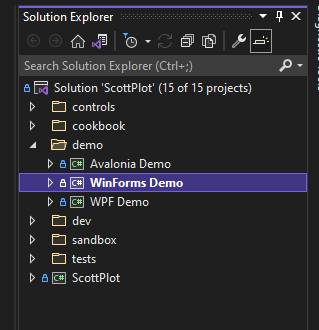 |
 |
|