
Counter
-
- Firefox 128 (ESR) + WaveFox v1.6.128
- Firefox 127 + WaveFox v1.6.127
- Firefox 115 ESR + WaveFox v1.6.115.0.3
- Windows
- MacOS
- Linux
-
Download the
chromefolder and put it in your user profile folderHow to access user profile folder?


-
Go to
about:configand activate the keys belowtoolkit.legacyUserProfileCustomizations.stylesheets
-
Specify the desired shape of the tabs
How to create keys?


userChrome.Tabs.Option1.Enabled

userChrome.Tabs.Option2.Enabled

userChrome.Tabs.Option3.Enabled

userChrome.Tabs.Option4.Enabled

userChrome.Tabs.Option5.Enabled

userChrome.Tabs.Option6.Enabled

userChrome.Tabs.Option7.Enabled

userChrome.Tabs.Option8.Enabled

userChrome.Tabs.Option9.Enabled

userChrome.Tabs.Option10.Enabled

userChrome.Tabs.Option11.Enabled

userChrome.Tabs.Option12.Enabled

userChrome.Tabs.Option13.Enabled
Go to the chrome folder and paste the desired styles inside the third_party_custom_styles.css file. Please note that this file has maximum execution priority. It will overwrite all styles, regardless of selector specificity. I make no guarantees of compatibility and will not resolve any style conflicts you may encounter.
userChrome.Style.ThirdParty.Enabled
Functionality that will not be part of the style will be published in the discussions section as requests from users.
Works only with the system theme.

browser.theme.windows.accent-color-in-tabs.enabled
Works only with the system theme.
browser.theme.macos.native-theme(MacOS 11+ / Tinting)widget.macos.titlebar-blend-mode.behind-window(Vibrancy / Restart required)
Requires Linux with transparency support. Tested on Manjaro KDE Plasma 5 / Plasma 6. Works only with the system theme. If you encounter a ghosting effect, increase the blur.

userChrome.Linux.Transparency.Low.EnableduserChrome.Linux.Transparency.Medium.EnableduserChrome.Linux.Transparency.High.EnableduserChrome.Linux.Transparency.VeryHigh.Enabledbrowser.tabs.inTitlebar>1(Required key)
Works only with the system theme.

userChrome.Toolbar.Transparency.Low.EnableduserChrome.Toolbar.Transparency.Medium.EnableduserChrome.Toolbar.Transparency.High.EnableduserChrome.Toolbar.Transparency.VeryHigh.Enabled
Incompatible with AMO themes.

userChrome.LightTheme.Tabs.Borders.Saturation.Low.EnableduserChrome.LightTheme.Tabs.Borders.Saturation.Medium.EnableduserChrome.LightTheme.Tabs.Borders.Saturation.High.EnableduserChrome.LightTheme.Tabs.Borders.Saturation.VeryHigh.Enabled
userChrome.DarkTheme.Tabs.Borders.Saturation.Low.EnableduserChrome.DarkTheme.Tabs.Borders.Saturation.Medium.EnableduserChrome.DarkTheme.Tabs.Borders.Saturation.High.EnableduserChrome.DarkTheme.Tabs.Borders.Saturation.VeryHigh.Enabled
userChrome.LightTheme.Tabs.Shadows.Saturation.Low.EnableduserChrome.LightTheme.Tabs.Shadows.Saturation.Medium.EnableduserChrome.LightTheme.Tabs.Shadows.Saturation.High.EnableduserChrome.LightTheme.Tabs.Shadows.Saturation.VeryHigh.Enabled
userChrome.DarkTheme.Tabs.Shadows.Saturation.Low.EnableduserChrome.DarkTheme.Tabs.Shadows.Saturation.Medium.EnableduserChrome.DarkTheme.Tabs.Shadows.Saturation.High.EnableduserChrome.DarkTheme.Tabs.Shadows.Saturation.VeryHigh.Enabled

userChrome.TabSeparators.Saturation.Low.EnableduserChrome.TabSeparators.Saturation.Medium.Enabled
By default context menus follow the selected interface density, but it is possible to set a fixed size.
| Compact | Normal | Touch |
|---|---|---|
 |
 |
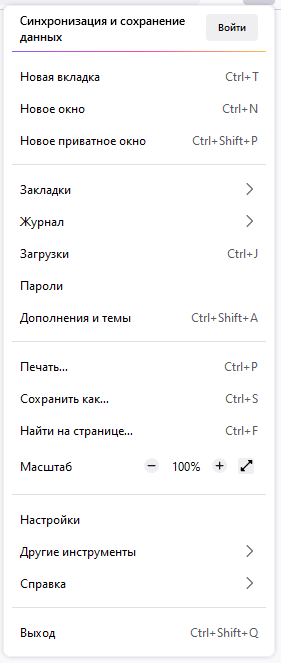 |
userChrome.Menu.Size.Compact.EnableduserChrome.Menu.Size.Normal.EnableduserChrome.Menu.Size.Touch.Enabled
| Regular | Filled |
|---|---|
 |
 |
userChrome.Menu.Icons.Regular.EnableduserChrome.Menu.Icons.Filled.Enabled
Icons from Lepton.css are now available. Please note that this is third-party code. I am not its author and do not support it. I will not solve any problems associated with these icons. They were added at the request of some users and work "As is". I will update this code according to the original source.
svg.context-properties.content.enableduserChrome.Menu.Icons.LeptonIcons.EnableduserChrome.icon.panel_fulloruserChrome.icon.panel_photonuserChrome.icon.libraryuserChrome.icon.paneluserChrome.icon.menuuserChrome.icon.context_menuuserChrome.icon.global_menuuserChrome.icon.global_menubaruserChrome.icon.1-25px_strokeuserChrome.icon.account_image_to_rightuserChrome.icon.account_label_to_rightuserChrome.icon.menu.fulluserChrome.icon.global_menu.mac

userChrome.DragSpace.Left.DisableduserChrome.DragSpace.Right.DisableduserChrome.DragSpace.Top.Windowed.EnableduserChrome.DragSpace.Top.Maximized.EnableduserChrome.DragSpace.Top.Fullscreen.Enabled

userChrome.Tabs.Pinned.Width.LowOffset.EnableduserChrome.Tabs.Pinned.Width.HighOffset.Enabled

userChrome.Tabs.SelectedTabIndicator.Enabled

userChrome.Tabs.TabsOnBottom.Enabledbrowser.tabs.inTitlebar(Required key. Set the value to 0)

userChrome.OneLine.TabBarFirst.EnableduserChrome.OneLine.NavBarFirst.Enabled