Repository navigation
add task runner for Pester - #97
Conversation


|
Hi Michael Greene (@mgreenegit), I'm your friendly neighborhood Microsoft Pull Request Bot (You can call me MSBOT). Thanks for your contribution!
TTYL, MSBOT; |


|
Cool. We just added support for debugging in either a 32-bit or 64-bit host process. Do you think it would be useful to have two tasks? One that is architecture neutral (run 64-bit PowerShell on a 64-bit OS and 32-bit PowerShell on a 32-bit OS) where I think you use sysnative and then also have a x86 runner that on a 64-bit OS invokes PowerShell from the SysWOW64 dir. Also, seems like it would be useful to set the current working directory in the PowerShell process. I'm not sure if you could pluck the "cwd" value from the launch.json file or maybe we just use |

|
Yep, I was also about to comment about the c:\Windows\sysnative bit. Probably good to have separate x64/x86 tasks. I would guess that the VS Code workspace variables apply but the task may need to have its own cwd variable if necessary. |
|
I'm still learning about tasks. I see this PR puts a tasks.json file in the |
|
I'm working on a problemMatcher for this but Pester's output is note conducive to working well with VSCode problemMatchers. I filed an issue with Pester. But this would be cool (if it worked consistently): Also Michael Greene (@mgreenegit), could you change the path to powershell slightly. Try using: // Start PowerShell
"command": "${env.windir}\\sysnative\\windowspowershell\\v1.0\\PowerShell.exe",As for the bit on 32-bit vs 64-bit, let's hold off on that until the VSCode team implements variations of OS support that include winx86. |

|
OK I'm going to merge this. This is a great examples of using a task in VSCode. I will tweak it a bit to add some problem matchers. |
add task runner for Pester

|
Sorry I didn't respond sooner, merging it seems to be the right thing to do for now. We can figure out how to enable this as a standard task later. |
|
I have a comment into an existing VSCode issue. Looks like this isn't supported yet. microsoft/vscode#2263 |
FYI, I'm going to get this change in for 0.5.0. I'm also working with Dave Wyatt (@dlwyatt) to try to get an updated output format for Pester that works better with VSCode's problem matchers. See pester/Pester#479. |
|
👍 💯 |

|
Keith Hill (@rkeithhill) Just want to be sure. If I were to fully demo this, I'd need the latest bits from vscode-powershell and pester and they'd need to all come from github? |
|
Dave says he'll release a Pester update tonight with the new changes to enable VS Code markers. That would just require the vscode-powershell changes from GitHub. You won't need to change Editor Services. |
|
Great. Will he publish it to the gallery? |
|
I believe so, yeah. |
|
And I need to update the example\tasks.json to use the new Pester option and new problemMatcher. I would like to test with the official Pester 3.4.0 before checking this in, but Doug Finke (@dfinke) if you need it sooner, I could email the file to you. |
|
No rush. Prepping a demo for 3/25 |

|
Trying to publish Pester 3.4.0 now, but that build step is suddenly failing (complaining about calling ShouldContinue in NonInteractiveMode. Publish-Module behavior has changed, I think.) Should have it sorted out soon. |
|
Done: http://www.powershellgallery.com/packages/Pester/3.4.0 . Publish-Module put up a good fight, but I beat it into submission eventually. ;) |
|
Way cool. Thanks! I look forward to continuing to improve the VSCode/PowerShell/Pester integration. VSCode still has a ways to go but we will keep chipping away at it. I'm looking forward to a VSCode release when they will have a better story for allowing extensions to contribute to the configuration of tasks.json files. :-) |
|
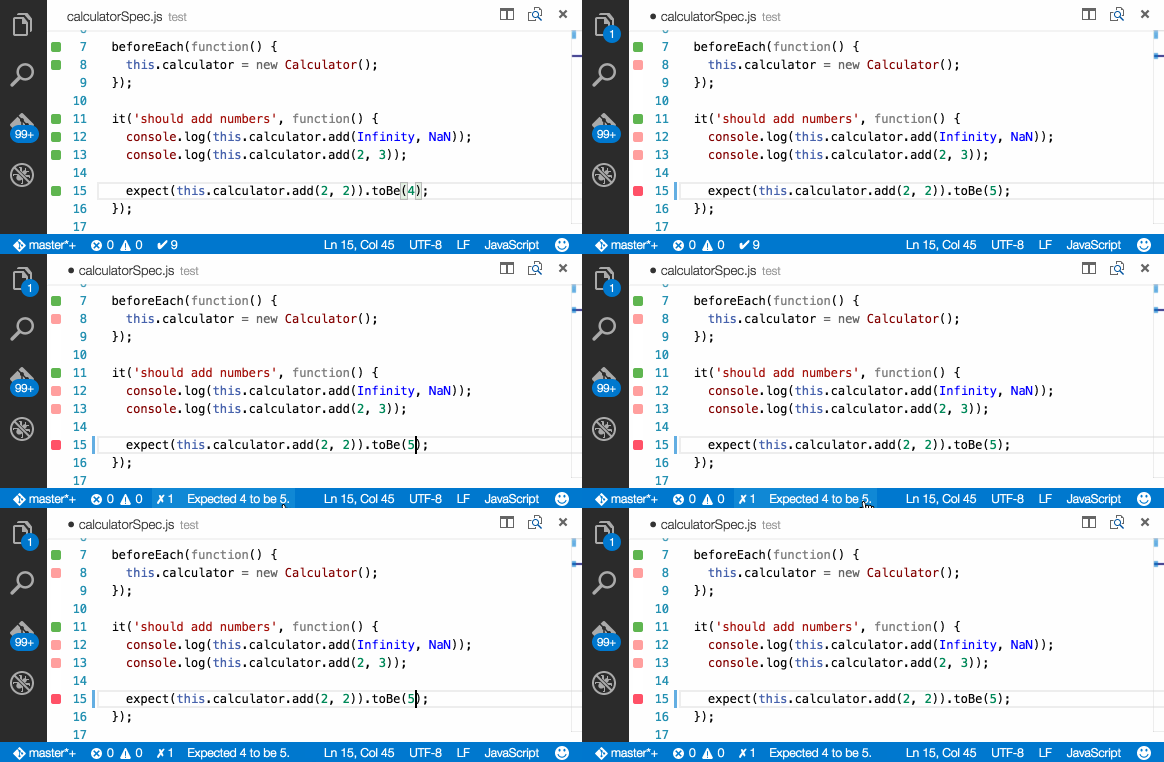
Thanks a lot for the integration help, Dave! I'd eventually love to wire up test coverage markers for Pester like Wallaby.js has: |


Adding to the example seems to be the best option?