Repository navigation
Add msbuild to NativeCommandProcessor (s_legacyCommands) in PWSH 7.3 #18660
Description

Prerequisites
- Write a descriptive title.
- Make sure you are able to repro it on the latest released version
- Search the existing issues.
- Refer to the FAQ.
- Refer to Differences between Windows PowerShell 5.1 and PowerShell.
Steps to reproduce
After the breaking change in native command execution in pwsh 7.3 our scripts stopped working with msbuild. This happens when setting a property-value of an msbuild script containing a semicolon or comma. For this the raw part of the property assignment must contain quotes: /pCategory="CI,Nightly"
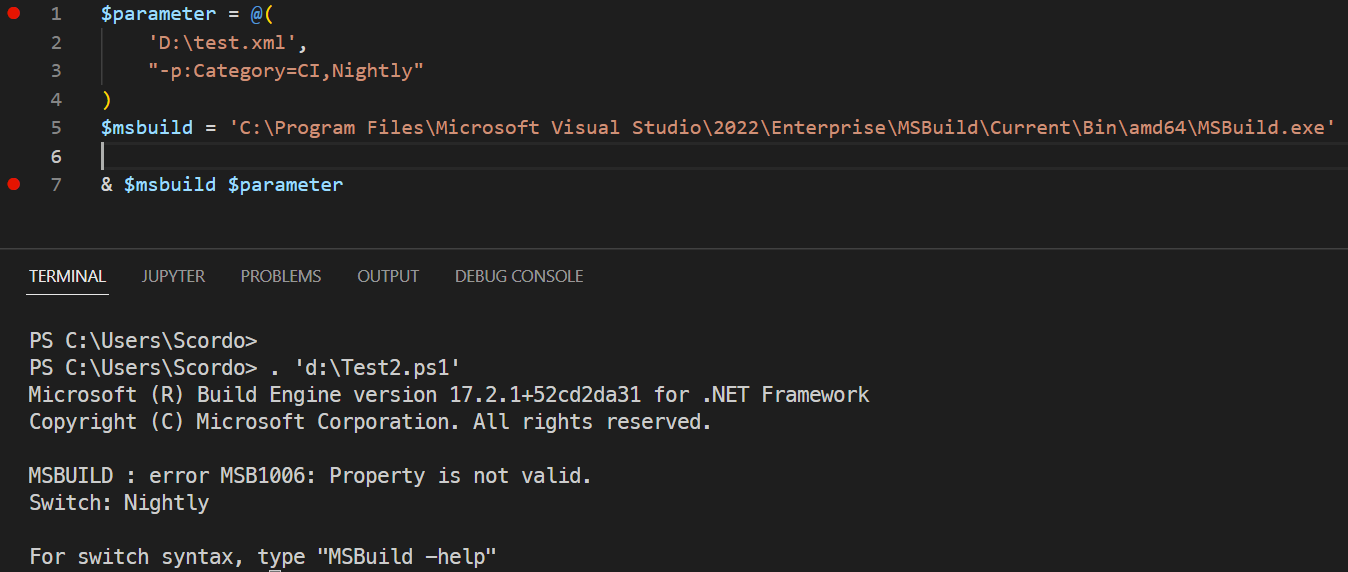
Without the quotes /pCategory=CI,Nightly the result is: MSBUILD : error MSB1006: Property is not valid. Switch: Nightly
Thats because you can set multiple properties like so: /p:Category=CI,OtherProperty=OtherValue
This command now produces different results (old pwsh without quotes in value of msbuild script, pwsh 7.3 with quotes):
& 'MSBuild.exe' @( 'D:\test.xml', "/p:Category="CI,Nightly"")
MSBuild-Script:
<Project DefaultTargets="Build" xmlns="http://schemas.microsoft.com/developer/msbuild/2003">
	<PropertyGroup>
		<Category>Default</Category>
	</PropertyGroup>

	<Target Name="Build">
		<Message Importance="High" Text="Category: $(Category)" />
		<Message Importance="High" Text="Finished" />
	</Target>
</Project>
With the new quoting rules it is impossible to satisfy the msbuild commandline without using Start-Process. Which has other problems which needs workarounds: dotnet/msbuild#2269
Please add msbuild to the list of legacy commands.
Expected behavior
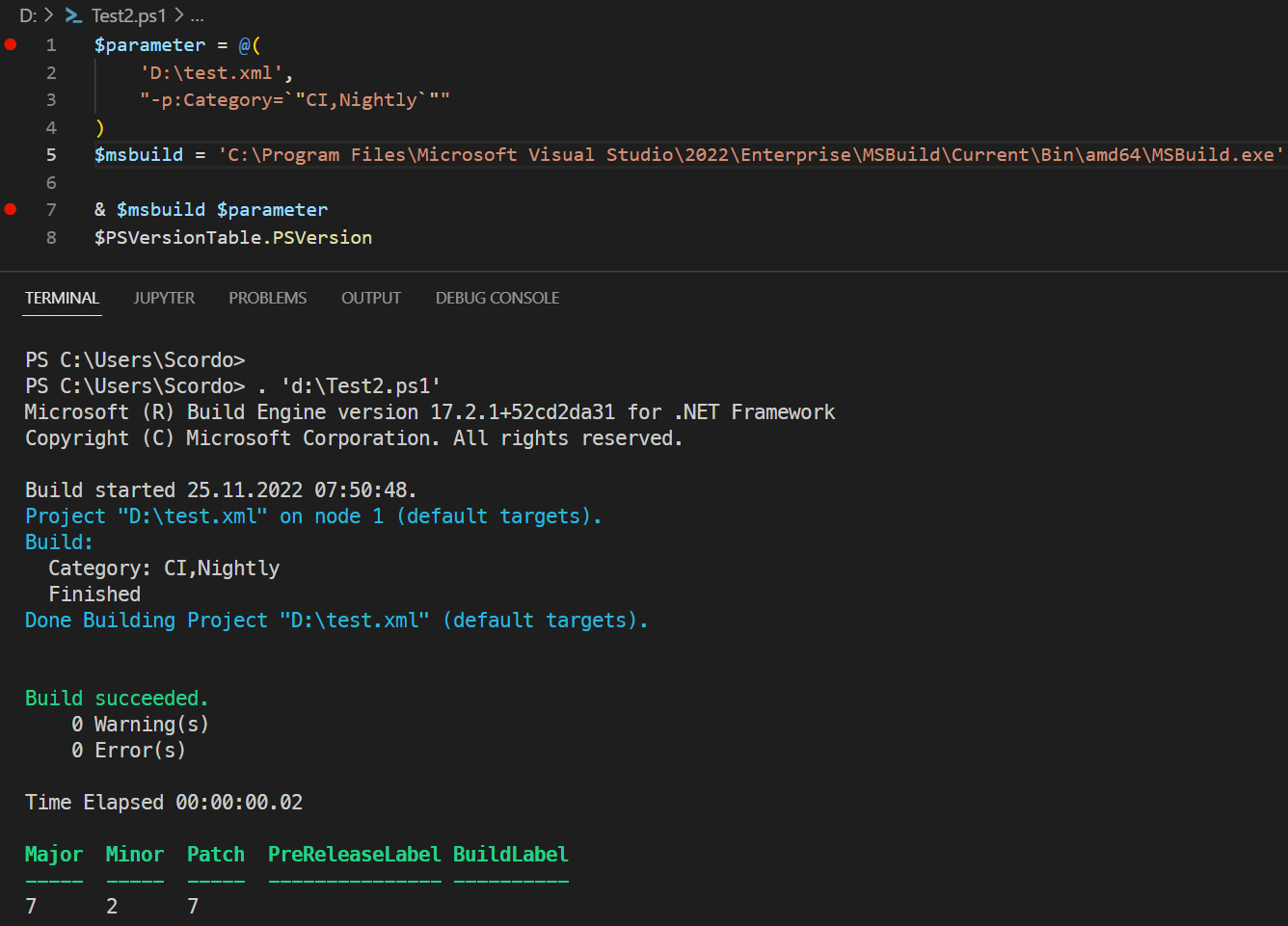
PS> & 'MSBuild.exe' @( 'D:\test.xml', "/p:Category=`"CI,Nightly`"")
Microsoft (R) Build Engine version 17.2.1+52cd2da31 for .NET Framework
Copyright (C) Microsoft Corporation. All rights reserved.

Build started 25.11.2022 07:37:43.
Project "D:\test.xml" on node 1 (default targets).
Build:
  Category: CI,Nightly <-- no quotes here
  Finished
Done Building Project "D:\test.xml" (default targets).

Build succeeded.
    0 Warning(s)
    0 Error(s)

Time Elapsed 00:00:00.02
Actual behavior
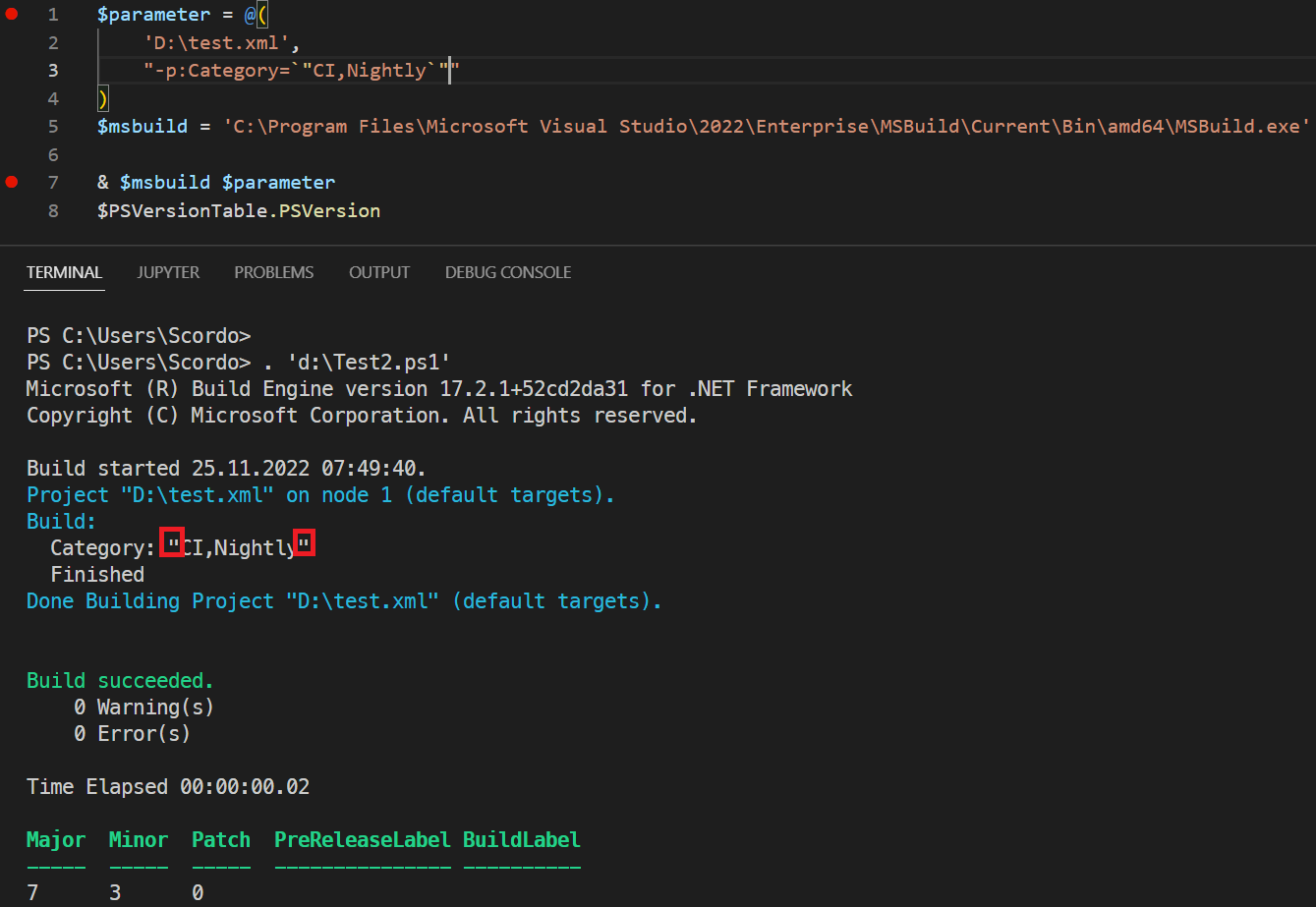
PS> & 'MSBuild.exe' @( 'D:\test.xml', "/p:Category=`"CI,Nightly`"")
Microsoft (R) Build Engine version 17.2.1+52cd2da31 for .NET Framework
Copyright (C) Microsoft Corporation. All rights reserved.

Build started 25.11.2022 07:39:19.
Project "D:\test.xml" on node 1 (default targets).
Build:
  Category: "CI,Nightly" <-- see the quotes here?
  Finished
Done Building Project "D:\test.xml" (default targets).

Build succeeded.
    0 Warning(s)
    0 Error(s)

Time Elapsed 00:00:00.02
Error details
No response
Environment data
PS> $PSVersionTable
Name                           Value
----                           -----
PSVersion                      7.3.0
PSEdition                      Core
GitCommitId                    7.3.0
OS                             Microsoft Windows 10.0.22621
Platform                       Win32NT
PSCompatibleVersions           {1.0, 2.0, 3.0, 4.0…}
PSRemotingProtocolVersion      2.3
SerializationVersion           1.1.0.1
WSManStackVersion              3.0
Visuals
Activity
mklement0 commentedon Nov 25, 2022
To add additional context and elaborate on your initial post:
Like
sqlcmd,msbuildhas (extra-)special quoting requirements that are at odds with the (effective)Standardmode of$PSNativeCommandArgumentPassing, which is designed to work with executables that use the Microsoft C/C++/.NET rules of command-line parsing (the most widely observed convention on Windows)./p:Category="CI,Nightly"must be placed exactly like that on the process command line, whichStandardmode cannot do, because it - properly - translates PowerShell's"/p:Category=`"CI,Nightly`""argument (which to PowerShell is verbatim/p:Category="CI,Nightly") to the convention-compliant"/p:Category=\"CI,Nightly\""on the process command line.Note that a convention-compliant executable does parse this as verbatim
/p:Category="CI,Nightly", butmsbuilddoes its own parsing of the raw argument.While an argument that contains no spaces normally needs no quoting at all - e.g., verbatim
/p:Category=CI,Nightly- in this case the partial double-quoting - aroundCI,Nightly- is required, because,is a metacharacter tomsbuild, separating multiple properties (e.g.,/p:Category=Foo,Other=Bar), so that a value containing,itself (CI,Nightly) requires enclosing in - unescaped! -"...".This anarchy - every executable on Windows being able to make up its own command-line parsing rules - is what makes a (capable) shell's life difficult; while mostly executable-agnostic general accommodations could be made that would make things work automatically in most cases, the case at hand is an example of a remaining edge case where explicit control over the process command line is required.
As noted before playing an eternal game of catch-up via piecemeal additions to an exception list is one way to solve the problem, but it is a terrible one:
Rogue executables will continue to be discovered and added over time, ensuring confusion over which PowerShell version has which executables on the exceptions list.
What's worse, the way to control the process command line for the executables on this exception list relies on workarounds for old, broken behavior. Future generations of PowerShell users should not be saddled with this obscurity.
There are existing,
$PSNativeCommandArgumentPassing-independent workarounds - spelled out in the next section for the case at hand - that do not require this exception list, and therefore should equally work across versions (before and after the breaking v7.3.0 change) as well as across editions (Windows PowerShell and PowerShell (Core).The
cmd /cworkaround relies on the fact thatcmd.exedoes allow explicit control over the process command line, because it is little more than a thin layer on top of the process command lines; while that is handy in scenarios like this, it generally limits this shell's abilities, and its use a workaround comes with pitfalls:cmd.exe's syntax; e.g.cmd /c 'echo value="3\" of snow & ver"'andcmd /c 'echo a&ver'do not work as expected and require^-escaping the&char.[Console]::OutputEncoding, which PowerShell uses to decode output from external executables.--%, the stop-parsing token, avoids involvement ofcmd.exeand copies what follows--%verbatim to the process command line, which comes with its own challenges, however:--%is broken as of 7.3.0 - see Stop-parsing token is broken #18664cmd.exe-style environment variables, e.g.%OS%).> out.txt,2> err.txt)--%with splatting, you can mostly avoid these limitations - see next section.A better, yet-to-be-implemented workaround is called for, namely one that allows you to use a new special token ,
--"", that allows you to copy argument(s) via a single single- or double-quoted string to the process command line verbatim:While only future PowerShell versions would benefit from it, it is a conceptually clear solution that is easy to communicate and doesn't rely on (ever-changing) exception lists and broken legacy syntax.
$PSNativeCommandArgumentPassingcould then default to'Standard', and we could (blissfuly) forget that'Windows'ever existed.$PSNativeCommandArgumentPassing = 'Legacy', as is already the case.$PSNativeCommandArgumentPassing = 'Legacy'with the broken legacy syntax, but managing preference-variable changes is easy to get wrong).In its all-arguments-as-a-single-string form, this workaround would be the equivalent of what
Start-Processalready supports when you pass a single string to-ArgumentList: the latter's verbatim value is copied as-is to the process command line, and therefore allows full control over it (to be clear:Start-Processis not a substitute for direct invocation of an executable - see Provide guidance as to when Start-Process is appropriate vs. direct / &-based invocation MicrosoftDocs/PowerShell-Docs#6239).This approach offers crucial advantages over the existing (
$PSNativeCommandArgumentPassing-independent) workarounds:cmd /cworkaround, there's no need for an extracmd.exeprocess and its attendant challenges.--%,>redirections and line-continuations, for instance.cmd.exe-style environment variable references such as%OS%(which also fixes the problem of not being able to escape%chars. with--%).The existing,
$PSNativeCommandArgumentPassing-independent workarounds spelled out for your case:cmd /cworkaround:--%workaround:Scordo commentedon Nov 30, 2022
If this is really fixed in 7.3.1 - Ths would be a very good solution to support backward compatibility scenarios:
Hopefully this gets fixed in #18664
SteveL-MSFT commentedon Dec 12, 2022
Michael Klement (@mklement0) would it be your opinion then that we should really just have
LegacyandStandardand abandonWindowsmode as it's potentially perpetually always playing catchup?mklement0 commentedon Dec 13, 2022
Steve Lee (@SteveL-MSFT), indeed - to me,
Windowsmode was a mistake to begin with, and if the old, broken behavior becomes the default again, there's no benefit to it whatsoever.Here's what I think is needed to get out of this mess (and it will remain a mess, just one that is predictable and manageable):
Provide a new operator that always exhibits the new, correct behavior (that is, it should exhibit
Standardbehavior irrespective of the value ofPSNativeCommandArgumentPassing)Christopher Yeleighton (@yecril71pl) proposes
&*(perhaps reminiscent of**argvin C, the vector (array) of arguments).To minimize the need to work around edge cases (see next point), this operator - and
Standardmode - should incorporate the accommodations proposed in Implement accommodations for Windows CLIs, notably batch files and misexec-style programs as part of experimental feature PSNativeCommandArgumentPassing #15143. Note that, unlike withWindowsmode, there would be no eternal play of catch-up to play; these accommodations are static and needn't change.As the recent
sqlcmdandmsbuildexamples have shown, even the proposed accommodations cannot cover all edge cases, so it's important to provide a way to control the process command line explicitly, but in a way that isn't burdened by the obscure, brokenLegacybehavior and doesn't have the limitations of--%(fighting PowerShell's syntax, inability to (directly use variables and expressions):--""would fit the bill.While eliminating
$PSNativeCommandArgumentPassingis presumably not an option anymore, the above enables the following:&*would therefore work (virtually) the same on all platforms.--""would be a conceptually clean workaround for edge cases in that it doesn't fight PowerShell's syntax the way that--%andLegacymode do.mklement0 commentedon Dec 13, 2022
Steve Lee (@SteveL-MSFT), with the above in place, the following clear guidance could be provided to end users:
For old code and new code that must work on older versions / also on Windows PowerShell (I'll call it cross-edition code below)
--%with splattingcmd /cFor new code that is free to target v7.3.x+ only:
Always use
&*to invoke native programs, on all platforms, to get the new, correct behavior.For edge cases on Windows, use
--""to control the process command line.Diagnosing edge cases / the resulting raw process command line needs proper documentation - and should be part of the upcoming docs you mention.
Additionally, consider shipping with
testecho.exe(on Windows only), to make it easier for users to see the raw command line, especially inStandardmode / with&*, whereTrace-Command -PSHost -Name ParameterBindingdoes not reveal the raw, single-string argument list (it only does so inLegacymode).yecril71pl commentedon Dec 13, 2022
&*is actually a homage to%*used inCOMMAND.COMbatch files.mklement0 commentedon Dec 13, 2022
I see, Christopher Yeleighton (@yecril71pl), though note that
%*incommand.com/cmd.exeis a single string (the raw part of the command line after the executable, i.e. the single-string representation that encodes all arguments), not an array of arguments.By contrast, in POSIX-compatible shells
$*is an array of arguments, albeit subject to word-splitting; the robust way to refer to the array of verbatim arguments is"$@".In light of the above,
&@is also worth considering, as it is reminiscent of both argument arrays in POSIX-compatible shells and PowerShell's (array) splatting.yecril71pl commentedon Dec 13, 2022
&@is syntactically confusing because@can begin an expression. And it is also visually heavy, detracting from the main function in fonts where@is heavier than&. UNIX folks will never need to use&*anyway—and&@will not resemble anything familiar to DOS folks (some@-pull-arguments-from-file tools have been ported to DOS, only adding to the potential confusion).SteveL-MSFT commentedon Dec 14, 2022
@PowerShell/powershell-committee discussed this and don't have a proposed solution yet, however, we considered the following:
msbuildto the legacy list forWindowsmode (which will be default for Previews)cmd /cworkaround for now cc Sean Wheeler (@sdwheeler)mklement0 commentedon Dec 14, 2022
Steve Lee (@SteveL-MSFT), these options only perpetuate the current confusion and lack of predictable behavior, indefinitely.
SteveL-MSFT commentedon Jan 4, 2023
@PowerShell/powershell-committee revisited this, we're proceeding with the plan above
mklement0 commentedon Jan 4, 2023
I am saddened to hear that, Steve Lee (@SteveL-MSFT).
Given that your previous comment already indicated this - regrettable - course of action, there was no need to repeat it, except if you wanted to shed light on why revisiting the decision caused you to stick with it.
SteveL-MSFT commentedon Jan 9, 2023
Michael Klement (@mklement0) we want to get more feedback and not make a rash decision here. Since we are making a change to 7.3.x to default to
Legacy, users should not be impacted and we can take time to decide later if we want to continue to pursueWindowsmode or not. I think a part of it is also looking forward to more broader cmdline tools coming or used on Windows (particularly ones that are cross-platform). Adding the telemetry will help us make a more data driven decision than anecdotal based on probably a loud minority.yecril71pl commentedon Jan 13, 2023
Good politicians make decisions based on reason and logic; successful politicians take decisions based on the opinion of the majority.
mklement0 commentedon Jan 20, 2023
See also:
Scordo commentedon Jun 23, 2023
Are there any outlooks on the whole problem? We are stuck on version 7.2.11 because of the quoting problems. Whats the plan for this. Which next powershell release will be compatible to old scripts?
daxian-dbw commentedon Jun 23, 2023
Take a look at #18706. It's supposed to resolve the issue on Windows. We will consider whether it should be backported to PS v7.3.
Scordo commentedon Oct 11, 2023
Michael Klement (@mklement0) Can you please provide a solution to this, wehn the path to msbuild contains a space?

For example like this: "C:\Program Files\Microsoft Visual Studio\2022\Enterprise\MSBuild\Current\Bin\amd64\MSBuild.exe"
I fail at it :-(
mklement0 commentedon Oct 11, 2023
Scordo, in this case you (unfortunately) have to pass a single
/cargument enclosed in"..."overall.That is, bizarrely,
cmd.exehappily accepts a"..."string with embedded"that aren't escaped (and that's where the broken worlds meet: PowerShell's lack of escaping of embedded"chars. meshes withcmd /cnot requiring such escaping).If you don't use overall
"..."enclosure,cmd.exefails to parse the command if (a) the first argument is double-quoted and its directory path contains spaces and (b) subsequent arguments contain double quotes. There are variations of this scenario that break too.Therefore, to be safe:
"..."tocmd /cinstead of using individual arguments - no extra escaping needed.Also note:
With the approach above
'D:\test.xml'would need embedded"..."quoting too, if it contained spaces (e.g.,'"D:\test 1.xml"')"/p:Category=`"CI,Nightly`""was changed to'/p:Category="CI,Nightly"'(single-quoting) to work around a bug in PowerShell's string interpolation (e.g,"$("Nat `"King`" Cole")"breaks, although it shouldn't - see Two double-quotes in inline expressions #3039 (comment) for background). If you need to embed variable values, use-fto construct the string.Scordo commentedon Oct 16, 2023
Hi Michael Klement (@mklement0) ,
and thanks for the info. I've created 2 functions to ease the dealing with msbuid. This now compatible with new and old powershell versions:
It is sad to have to deal with this problem at all, but at least we now have a clean solution.
Best regards,
Jens
mklement0 commentedon Oct 18, 2023
Glad to hear it, Scordo, but note that your functions will only work as intended if none of the
$Argselements contain spaces or other PowerShell metacharacters. (On a side note, it's best to avoid using the automatic$argsvariable for custom purposes).Scordo commentedon Oct 18, 2023
We know, that we have to escape args containing spaces with escaped quotes. But thanks for the info.
And yes, we already renamed the parameter "Args" :-)