Repository navigation
Multiple fixes - #94
Conversation


|
Just noticed, there's one edge case that breaks highlighting that I still need to figure out... [attribute(blah blah blah)
]breaks highlighting even with a EDIT: fixed in 350afda |


|
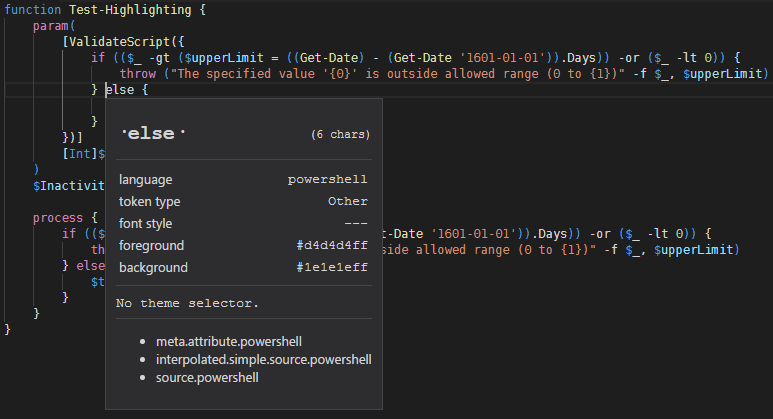
This's really nice job Nick James (@omniomi) ! I have found small edge case in ValidateScript attribute with complex scriptblock when the else keyword is not highlighted:
BTW could you have a look on enum highlighting since you are on a roll ;)
|


|
@tylerl0706 I have noticed that PowerShellSyntax.tmLanguage didn't change in couple of latest VSCode Insiders builds. Should we ping someone at VSCode to update it? |
|
Kris Borowinski (@kborowinski) can you post that snippet as plain text so I can copy/paste for testing please. |
|
Nick James (@omniomi) Yep, there you go: function Test-Highlighting {
param(
[ValidateScript({
if (($_ -gt ($upperLimit = ((Get-Date) - (Get-Date '1601-01-01')).Days)) -or ($_ -lt 0)) {
throw ("The specified value '{0}' is outside allowed range (0 to {1})" -f $_, $upperLimit)
} else {
$true
}
})]
[Int]$InactivityDays = 0
)
$InactivityDays
}
|
|
Kris Borowinski (@kborowinski) it's treating the closing brace of the if statement as the close of the scriptblock which puts "else" into meta.attribute.powershell which gives it no definition. The correct solution would be to properly define if/else/elseif statements not just their keywords... the quick and dirty solution is to include $self inside the attribute definition... I'm inclined to do it properly so it will take a bit.
|

|
Nick James (@omniomi) So enclosing the whole script in brackets should theoretically force parser to treat it as one block? Let me do quick check. Edit: Yes it does work BTW, sorry for naive question, but how you get these nice popups with token details? |

|
Kris Borowinski (@kborowinski) correct, but you should not need to do that. So I'll add it to the list of things to fix. CTRL/Cmd+P ⇨ |

|
Kris Borowinski (@kborowinski) I'll check to see what vscode's process is exactly. |

|
|
||
| build_script: | ||
| - ps: Set-Location (Join-Path $env:APPVEYOR_BUILD_FOLDER '\tools\') | ||
| - ps: BuildBanner |

There was a problem hiding this comment.
You don't have to address this now but I want to mention that I'm hoping to try and make the build.ps1 generic enough that we can use just build.ps1 commands in the appveyor.yml.
Then we can easily drop in an appveyor.yml into any repo that follows the build.ps1 concept and we'll have CI :)


|
🎉 |


General changes:
Scope changes:
Variable tokens (
$,@) now scopedkeyword.other.variable.definition.powershell. While they should bepunctuation.definition.variablenot many themes coverpunctuation.definition.*due to there not being as many token based languages.Variables are now scoped
variable.other.readwrite.powershell.Parentheses, brackets, and braces (
(,),[,],{,}) moved toPunctuation.section.*scope.Types now scoped
storage.type.powershell.Fixes:
Attributes (like
[cmdletbinding()]and[validatepattern()])Type declarations containing digits (like
[int32]) no longer break highlighting.